
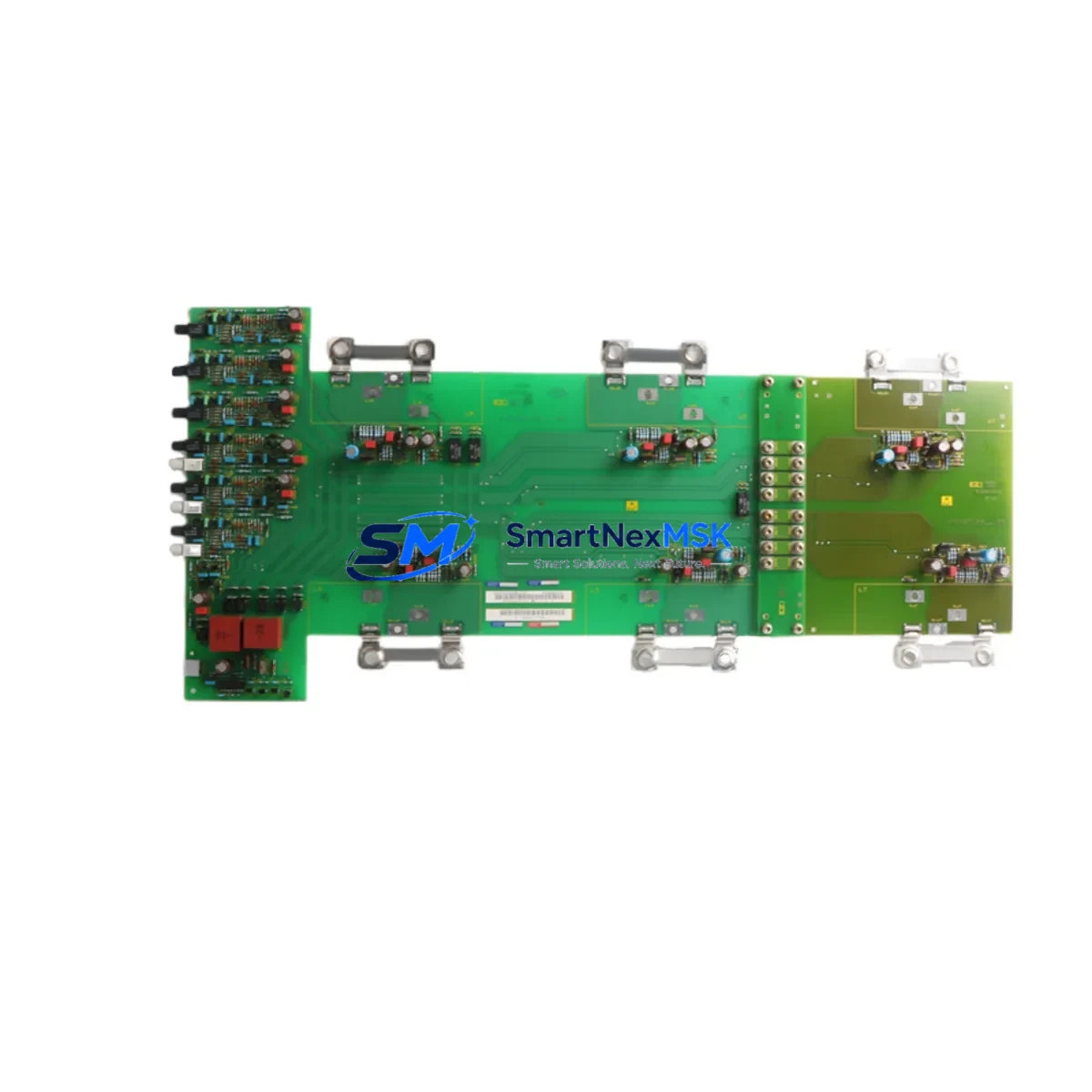
Siemens 6SE7033-5GJ84-1JC0 Maintenance-Ready Spare for MASTERDRIVES Automation
The Siemens 6SE7033-5GJ84-1JC0 is a high-performance inverter control module engineered for the SIMOVERT MASTERDRIVES series — one of Siemens’ most widely deployed variable-speed drive platforms in heavy industrial environments. Whether you are managing a planned shutdown, responding to an unscheduled fault, or building a proactive spare parts inventory for a critical production line, this module represents a direct, specification-matched replacement that restores drive functionality without requiring system reconfiguration or firmware migration.
Maintenance engineers working on MASTERDRIVES MC or VC topologies will recognize the 6SE7033-5GJ84-1JC0 as the control intelligence layer of the drive stack. It handles pulse-width modulation logic, closed-loop speed and torque regulation, fieldbus communication interfacing, and fault diagnostics. When this module fails — typically presenting as F-fault codes, loss of speed reference, or communication dropout — the fastest path to recovery is a verified, tested replacement unit sourced from a supplier with confirmed stock and pre-shipment inspection protocols.
This listing covers an original Siemens 6SE7033-5GJ84-1JC0 unit, supplied with a 12-month warranty and pre-shipment functional verification. Units are dispatched from bonded inventory and are traceable to original Siemens manufacturing documentation.
Spare Maintenance Table
| Parameter | Specification |
|---|---|
| Part Number | 6SE7033-5GJ84-1JC0 |
| Brand | Siemens |
| Series | SIMOVERT MASTERDRIVES |
| Product Type | Inverter Control Module (CU / Technology Board) |
| Compatible Drive Frame | MASTERDRIVES MC / VC, Frame Size F and above |
| Rated Output Current | ~353 A (series-dependent; verify against drive nameplate) |
| Supply Voltage | 3-phase AC 380–480 V ±10% |
| Control Voltage | 24 V DC (internal SMPS or external supply) |
| Communication Interface | PROFIBUS-DP / USS protocol (board-dependent) |
| Mounting | Direct plug-in to MASTERDRIVES power section backplane |
| Cooling | Forced air (drive enclosure fan); verify airflow path on installation |
| Operating Temperature | 0 °C to +40 °C (derate above 40 °C per Siemens derating curves) |
| Protection Class | IP20 (module); drive enclosure rating applies externally |
| Origin | Germany |
| Condition | Original, tested, pre-shipment inspected |
| Warranty | 12 Months |
| Delivery | DHL Express / FedEx Priority; typically 3–7 business days |
Maintenance Planning for Continuous Operation
Replacing the 6SE7033-5GJ84-1JC0 in a live MASTERDRIVES installation is rarely an isolated task. Experienced maintenance engineers treat a control module replacement as an opportunity to audit the entire drive cabinet and associated electrical circuit. The following components should be inspected or replaced concurrently to prevent repeat failures and maximize the value of the planned downtime window.
Begin with the 24 V DC auxiliary power supply feeding the control board. A degraded SITOP PSU8600 or equivalent 24 V SMPS is a common root cause of control module faults that are misdiagnosed as module failure. Measure output ripple and load regulation before reinstalling the new control board. Next, inspect the DC bus capacitor bank within the MASTERDRIVES power section — capacitor aging increases DC bus ripple, which stresses the control module’s internal power conditioning circuits.
Check all PROFIBUS-DP termination resistors and cable shielding on the fieldbus segment connected to this drive. A floating shield or missing terminator on a long PROFIBUS run can cause intermittent communication faults that trigger nuisance trips on the control module. If the installation uses a SIMATIC S7-300 or S7-400 PLC as the master controller, verify the DP master configuration in STEP 7 or TIA Portal matches the GSD file for the MASTERDRIVES unit after the module swap.
Inspect the I/O terminal strip and signal wiring on the control module connector. Corroded or loose terminals on the analog speed reference input (typically ±10 V or 4–20 mA) will cause erratic speed control after replacement. If the drive uses an encoder feedback board (such as the SBP or SBR option board) for closed-loop vector control, verify encoder cable integrity and connector seating — a faulty encoder signal will immediately generate speed deviation faults on the new module.
For drives operating in torque-controlled mode feeding downstream machinery, also inspect the output contactor (main contactor K1) and its auxiliary contacts. A worn contactor that fails to close cleanly will generate overcurrent transients that can damage the new control module within hours of commissioning. Similarly, check the motor thermistor (PTC/KTY) input wiring — an open-circuit thermistor input will trigger a motor overtemperature fault immediately on startup.
If the MASTERDRIVES cabinet includes a braking chopper module and braking resistor assembly, verify the chopper IGBT gate drive signals and resistor continuity. A failed braking chopper during regenerative deceleration will cause DC bus overvoltage faults that are often incorrectly attributed to the control module. Finally, review the fan and airflow system — blocked filter mats or a failed cabinet cooling fan will cause thermal shutdown within minutes of restarting a high-load drive, regardless of the condition of the new control module.
Site Replacement Workflow
Step 1 — Pre-replacement documentation: Record all drive parameters using the MASTERDRIVES parameter upload function (P053 = 3 or via DriveMonitor / Starter software). Save the parameter set to a PC and to the optional MMC memory card if fitted. This ensures parameter restoration takes less than five minutes after the new module is installed.
Step 2 — Safe isolation: Isolate the drive from the AC supply and engage the upstream circuit breaker lockout. Wait a minimum of five minutes for DC bus capacitors to discharge below 50 V (verify with a calibrated multimeter at the DC bus terminals). Do not rely on the drive’s internal discharge indicator alone.
Step 3 — Module extraction: Disconnect the PROFIBUS connector, the 24 V auxiliary supply connector, all I/O ribbon cables, and the encoder feedback board (if fitted). Release the module retention screws and slide the 6SE7033-5GJ84-1JC0 out of the power section chassis. Handle with ESD precautions throughout.
Step 4 — New module installation: Seat the replacement 6SE7033-5GJ84-1JC0 firmly into the backplane connector. Reconnect all cables in reverse order. Verify PROFIBUS address DIP switch settings match the original module configuration before powering up.
Step 5 — Parameter restore and commissioning: Power up the drive in a no-load condition. Restore parameters from the saved file or MMC card. Perform a motor identification run (P115 = 1) if the motor data has changed or if the original parameters are unavailable. Verify speed reference tracking, fault-free operation under light load, and PROFIBUS communication status before returning the drive to production.
This workflow minimizes total downtime to typically under two hours for a prepared maintenance team, compared to four to eight hours for an unprepared team encountering the fault for the first time.
Spare Parts Support FAQ
Q1: Is the 6SE7033-5GJ84-1JC0 a direct drop-in replacement for older MASTERDRIVES control modules?
Yes, within the SIMOVERT MASTERDRIVES product family, the 6SE7033-5GJ84-1JC0 is designed for direct mechanical and electrical compatibility with the corresponding drive frame size. However, always verify the firmware version and option board configuration (encoder, technology, or communication boards) against your existing installation before ordering. Contact our technical team with your drive nameplate data for confirmation.
Q2: What pre-shipment testing is performed on this module?
Each unit undergoes a functional power-on test, visual inspection for physical damage, and connector integrity verification before dispatch. Units are packed in anti-static ESD bags with foam cushioning and shipped in double-wall cartons. A test report is available on request.
Q3: How should I manage spare parts inventory for a fleet of MASTERDRIVES installations?
Industry best practice for critical drive applications is to maintain at least one control module spare per five installed drives, or one per production line if downtime cost exceeds USD 5,000 per hour. Store modules in a climate-controlled environment (15–25 °C, <70% RH) in their original ESD packaging. Rotate stock every three years to prevent electrolytic capacitor aging on stored boards.
Q4: What is covered under the 12-month warranty?
The 12-month warranty covers manufacturing defects and functional failure under normal operating conditions. It does not cover damage caused by incorrect installation, overvoltage events, water ingress, or operation outside the specified environmental ratings. Warranty claims are processed within 5 business days of receiving the returned unit, with replacement dispatch on the same day as claim approval.
© 2026 SMARTNEXMSK. All rights reserved.
Original Source: https://smartnexmsk.com
Contact: [email protected] | +86 18259474341



