
Industrial SFP Spares: Match the Optical Link
Check host support, paired optics and the installed fiber before treating an SFP module as an accepted industrial network spare.
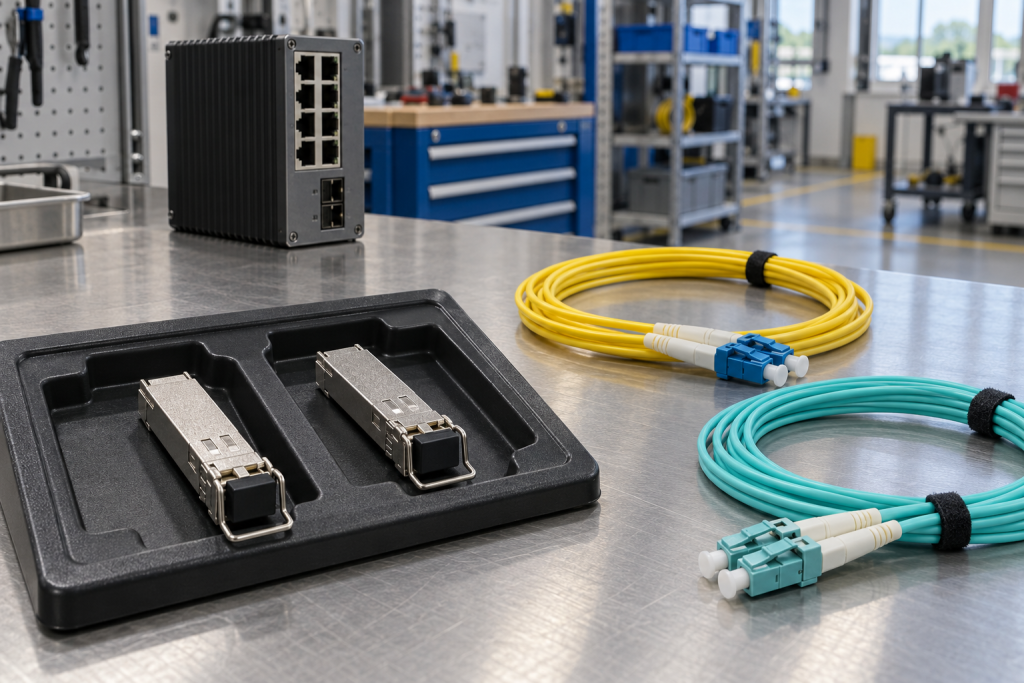
A failed fiber uplink can leave a healthy controller cabinet unreachable while a replacement SFP sits in stores. The spare fits the cage and carries a familiar distance rating, yet the link still does not recover. For industrial SFP spares, physical fit is only the first check. The purchasing specification must describe the host port, both optical endpoints and the installed fiber path.
Treat SFP optical compatibility as a link requirement rather than a single-item description. A useful release record explains where the module will operate, which remote optic it must communicate with and what evidence makes the replacement acceptable. A generic “1G fiber module” description leaves too much unresolved for an outage.
Confirm the host before comparing optics
Record the switch or media converter’s complete model, hardware revision, software version and exact port position. Check the manufacturer’s supported-transceiver information for that combination. Mechanical SFP compatibility does not settle supported speed, module recognition or software requirements. Do not assume a port accepts every module that can be inserted into it.
Cisco’s Gigabit Ethernet SFP datasheet, updated October 9, 2026, explicitly directs users to platform compatibility information. It also distinguishes module temperature categories. Capture the offered module’s exact suffix and applicable temperature specification; a rugged switch enclosure does not establish the suitability of every optic installed inside it.
Keep unsupported combinations pending review. A purchasing deadline is not a reason to bypass a host restriction, change firmware without approval or accept a seller’s broad compatibility statement as engineering evidence.
Match the fiber and optical interface
Identify the installed fiber type, connector arrangement and optical standard from records and verified component identities. Photograph both endpoint labels and retain the patch-panel route. Cable jacket color can help locate a run, but it should not replace the fiber record or an appropriate inspection.
The official Moxa SFP-1G specifications show why wavelength alone is insufficient: the family includes multimode choices at both 850 nm and 1310 nm, as well as single-mode choices at 1310 nm. Read the complete model’s media and optical parameters. Neither a shared wavelength nor an LC connector proves that two modules are a valid pair.
Keep speed, fiber type, connector details and required patch-cord arrangements in separate fields. If a proposed replacement changes any of them, classify it as an alternate needing engineering acceptance, not an exact spare ready for issue.
Record the remote endpoint too
A stores record should identify the optic at the other end of the link, not just the failed local module. Distinguish ordinary duplex connections from single-fiber bidirectional arrangements. For the latter, verify the required complementary transmit and receive wavelengths against the exact manufacturer pair. Two identical purchasing descriptions may not describe a working bidirectional pair.
Attach this endpoint relationship to the stock item. If one spare is intended to cover several links, list each approved host-and-peer combination. Do not silently extend one successful pairing to every fiber connection on the site.
Review loss and receiver limits, not distance alone
A kilometer rating is not a complete fiber link budget. Review the applicable transmitter range, receiver operating limits and permitted channel loss for the proposed combination. Consider the installed fiber, patch panels, connectors and splices, using current site evidence rather than an estimated route length alone.
Extreme Networks’ dual-speed SFP guide describes published distances as nominal guidance and calls for the actual installation’s optical characteristics to be considered. Its specific attenuation and margin instructions belong to those identified modules; they are not universal settings for other vendors’ optics.
Check excessive receive power as well as insufficient power. A longer-reach optic is not automatically a safer short-link spare. Any required attenuation must come from the applicable design and component documentation, not a guessed value chosen during an outage. Keep unresolved measurements open as a release condition.
Separate module checks from link acceptance
Agree the evidence required before counting the unit as usable coverage. Identity inspection, host recognition and supported diagnostic readings can form part of that record. They do not, individually, establish that the complete production link has been restored under its required conditions.
Where an approved test arrangement is available, record its host, peer optic, fiber path and acceptance scope. Preserve the readings and any limitations with the spare’s identity. Use qualified personnel and the site’s optical-safety, ESD and change-control procedures; this guide does not authorize a live network intervention.
The industrial Ethernet switch recovery guide covers the wider configuration and topology dependencies. Keep those network checks alongside this narrower optical-interface assessment rather than treating a lit link indicator as complete operational acceptance.
Give procurement a link-specific request
Include the installed and offered part numbers, both endpoint identities, host details, fiber record, quantity, condition requirement, documentation needs and recovery deadline. Ask the supplier to distinguish an exact match from a proposed alternate. Record which acceptance questions remain with the plant’s engineering team.
The communication modules and I/O category provides a sourcing route for related network hardware. Reconcile any listing with official specifications before making a recommendation. Conflicting wavelength, media or compatibility claims require clarification, not a convenient assumption.
FAQ
Is any SFP with the same speed a suitable spare?
No. Confirm host support, optical standard, fiber type, endpoint pairing, environmental requirements and the applicable optical limits.
Does 1310 nm always mean single-mode fiber?
No. Manufacturer ranges include 1310 nm multimode and single-mode options. Use the exact model’s specifications, not wavelength alone.
Is a longer-distance optic always an upgrade?
No. Receiver power limits and host compatibility still apply. A change in reach needs a documented assessment of the actual link.
What evidence should accompany an alternate SFP?
Provide its official specifications, host-support evidence, remote-end compatibility, optical assessment and agreed test scope. Keep it pending until the responsible engineer accepts it.
Prepare the replacement review
Send model numbers, nameplate photographs, discontinued replacement requirements and delivery deadlines to [email protected] or WhatsApp/Phone +86 18259474341. Include both endpoint identities so the enquiry addresses the link, not just the module.
Route this topic into a sourcing request
Connect the article topic to a model number, category, brand, quantity, and destination before opening the RFQ.
Related Insights
Continue with sourcing and model matching guides
 Nov 28, 2026
Series 90-30 Spares: Check the RX3i Rack Boundary
Separate exact Series 90-30 spares from the verified RX3i rack, processor and retained I/O needed for a planned migration.
Read guide Nov 27, 2026
HMI Screen Spares: Identify the Failed Layer
Separate surface damage, touch input and the supported display assembly before specifying an HMI hardware spare.
Read guide Nov 26, 2026
Motor Brake Rectifier Spares: Match the Coil
Check the fitted brake coil and approved control function before treating a motor brake rectifier as an exact spare.
Read guide