
HMI Screen Spares: Identify the Failed Layer
Separate surface damage, touch input and the supported display assembly before specifying an HMI hardware spare.
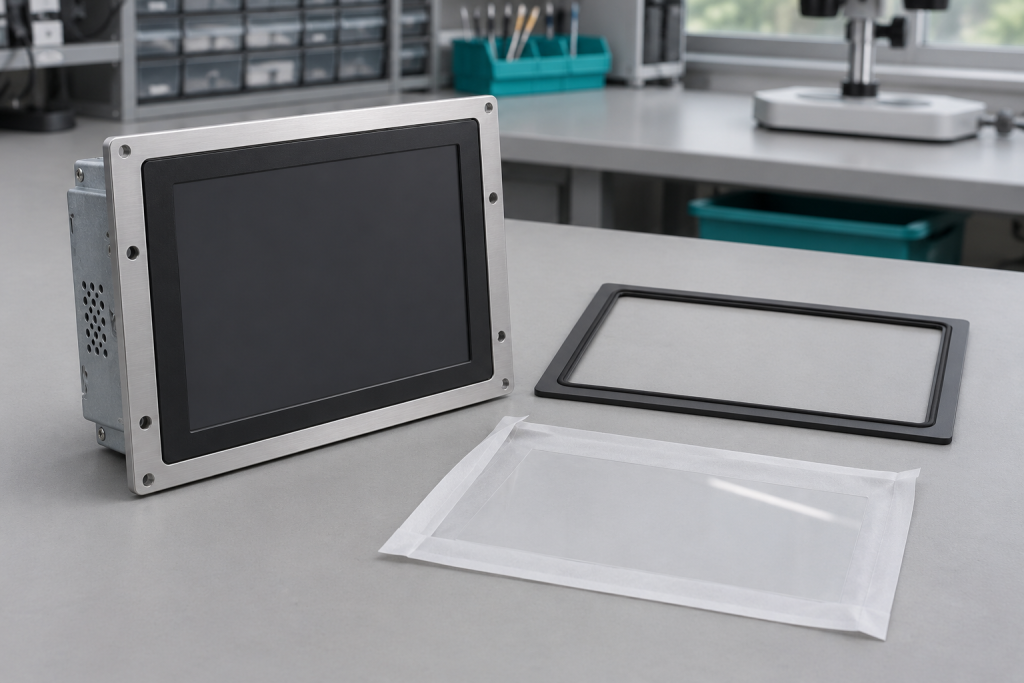
A work order says “replace the HMI screen.” The supplier quotes a clear protective sheet, while maintenance expects an assembly that restores touch input. Both can look like reasonable answers to the same short description, but they are different purchases. Before ordering HMI screen spares, separate the symptom from the part identity and record the smallest replacement unit the manufacturer actually supports.
Describe what is wrong without guessing which part failed
Start with a short description from the operator or maintenance record. Is the picture readable but touch input unreliable? Is the display blank while the terminal appears to be running? Is damage confined to a surface that the manual identifies as a removable protector? Record whether the symptom affects the whole face, one region, or the unit only in certain conditions. A photo can show a mark or crack, but it cannot establish whether a touch sensor, display or controller is responsible.
Preserve a readable photo of the installed nameplate, the front design and any separate module identification available through approved records. Use the full catalog number and hardware series or revision, not a screen-size description. Do not treat this purchasing review as a reason to open an energized unit, remove an unknown bonded layer, or prove the fault by operating equipment through unreliable controls.
Separate protective overlay, touch input and image
A replaceable protective overlay is a surface accessory. It is not the device that reads a touch or makes the image. The PanelView Plus 7 Performance manual shows an example of a protective overlay over the front bezel; it treats the overlay as a distinct item. A scratched protector may justify a protector purchase when the owner has verified which layer is affected. A damaged or misread touch region is not, on its own, evidence that an overlay purchase will restore it.
The touch input layer and image-producing display are different functions, but they are not necessarily separately orderable. A model may combine the front glass, touch sensing, display and sealing parts in one supported service assembly. The PanelView Plus terminals manual identifies distinct display-module and bezel options on selected units, and shows that connectors differ by model. Use the exact service documentation to identify the supported HMI display module replacement. Do not assume the same options exist for another generation.
Ask whether the quote includes electronics behind the screen
Compare the offered kit contents with the boundary of the machine’s existing configuration. A front assembly may leave a separate logic or box module in place. A complete terminal changes more than the front. The Pro-face SP5000 hardware manual is an example of a family with separate Display and Box Modules, and it identifies screen protection sheets as accessories for specified displays. That distinction matters when a quote says “complete display” but the parts list does not say which module is included.
Ask the supplier to identify the exact assembly, controller or box where applicable, gasket, protective overlay and any included adapter as separate line items. Where a different bezel or display is proposed, request evidence of the supported combination and ownership of the enclosure review. A similar diagonal size and matching appearance do not establish the correct connection, touch response or protection rating.
Make the order and acceptance records agree
Write down the part scope before releasing the order. “Front assembly only, existing controller retained” and “complete terminal, application recovery required” are not equivalent. A quote for a bare display cannot be accepted against a spare list that requires an overlay, gasket and front assembly. Define what the supplier is proving, what the site must still check, and who holds the authority to accept any substitution.
Use the HMI and touch panel collection to identify sourcing routes, not to infer fit from a catalog family. If the approved scope genuinely changes to a complete terminal, use the whole-terminal HMI replacement checklist to handle the separate questions of application, mounting and communications. Avoid asking a supplier to quote a complete HMI as the default answer to a front-surface repair request.
For receiving, record the work owner, intended reuse and the documented checks for the agreed scope. Image quality, touch response and enclosure integrity are different acceptance questions. Qualified site personnel should decide whether an approved check is possible without putting the machine into service, and whether the original fault has actually been resolved.
Frequently asked questions
Does a damaged protective sheet mean the touch sensor is defective?
No. Surface damage alone does not determine which layer is affected. Confirm that the exact model has a removable protective accessory and keep the observed symptom separate from any suspected cause.
Can I order a touch layer without buying the display?
Only when the manufacturer or approved repair provider supports that scope for the exact hardware. On some products the supported item is the front assembly or display module, not an individual layer.
Do two display modules with the same screen size interchange?
Not on size alone. The exact terminal and module catalog numbers, their supported pairing, mounting and environmental requirements still need to be checked.
Will a new front assembly require a software restore?
Not necessarily. Identify what remains in the machine and what the offered kit replaces. If the logic or complete terminal changes, treat application recovery as a separate task rather than assuming it follows the screen.
For help identifying an HMI front assembly or spare, send the model and module numbers, clear nameplate photos, any discontinued-part replacement requirement and your required delivery date to [email protected] or WhatsApp/Phone +86 18259474341.
Route this topic into a sourcing request
Connect the article topic to a model number, category, brand, quantity, and destination before opening the RFQ.
Related Insights
Continue with sourcing and model matching guides
 Nov 28, 2026
Series 90-30 Spares: Check the RX3i Rack Boundary
Separate exact Series 90-30 spares from the verified RX3i rack, processor and retained I/O needed for a planned migration.
Read guide Nov 26, 2026
Motor Brake Rectifier Spares: Match the Coil
Check the fitted brake coil and approved control function before treating a motor brake rectifier as an exact spare.
Read guide Nov 25, 2026
Magnetic Flowmeter Spares: Keep the Sensor Record
Separate transmitter identity, sensor calibration and plant signal configuration before ordering magnetic flowmeter spares.
Read guide