
NPort 5100 Spares: Match Serial Interface and Host
Separate NPort 5110, 5130 and 5150 serial interfaces, then verify how the host opens the connection before accepting a replacement.
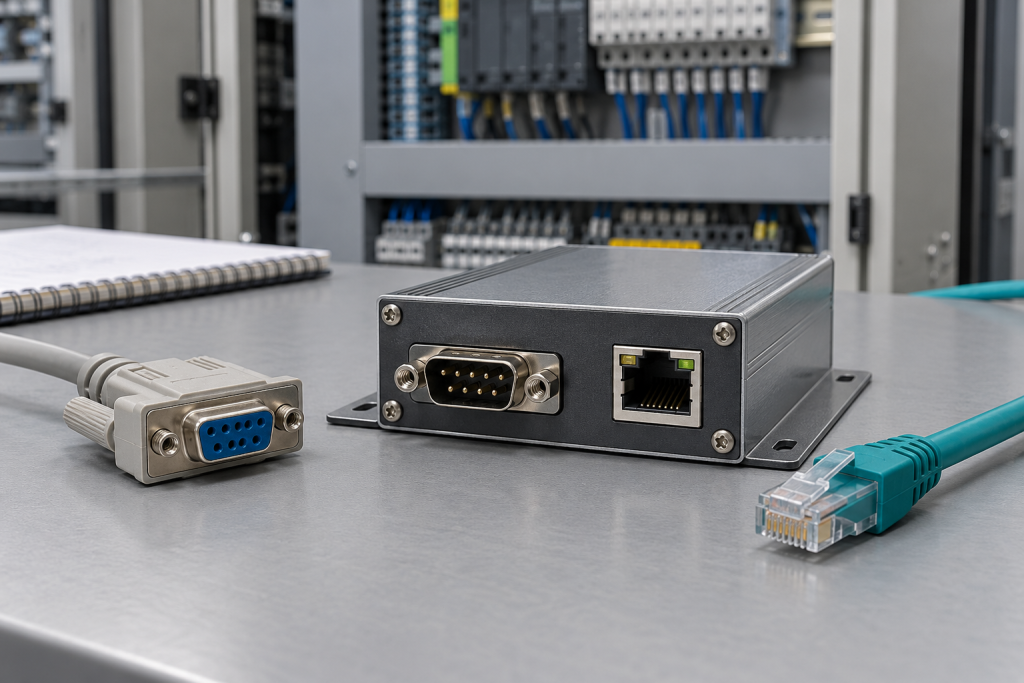
A failed serial device server can leave a healthy instrument invisible to its host. The replacement may have the same DB9 connector and an Ethernet socket, yet still be the wrong spare. For Moxa NPort 5100 spares, begin with the electrical interface and the software connection method, not the enclosure or a shortened purchase description.
The practical question is narrower than a network redesign: can this exact unit preserve the existing serial conversation? Separate that decision from any later migration. A substitute that requires new wiring, a different host driver or application changes is an engineering change, even when purchasing describes it as an equivalent.
Read the complete model before comparing connectors
Moxa’s NPort 5100 datasheet, version 2.1 distinguishes three interfaces:
- NPort 5110 / 5110-T: RS-232.
- NPort 5130: RS-422 and RS-485.
- NPort 5150: RS-232, RS-422 and RS-485.
A shared connector shape therefore does not establish electrical compatibility. Record the installed model, suffix, serial standard and cable termination separately. Do not infer a pin assignment from another manufacturer’s DB9 port, or treat a passive adapter as proof that the electrical interface has been converted.
Keep photographs of both cable ends with the spare record. Distinguish the device server from any intervening converter, isolator or terminal adapter. An unidentified accessory can hide the real interface requirement and make a correct-looking replacement fail at the first connection.
Identify what the host actually opens
The official NPort 5100 series page describes Real COM/TTY access and several network operating modes. Those are different connection arrangements, not interchangeable names for an Ethernet link.
Ask whether the application opens a COM or TTY device, connects to a TCP socket, waits for an incoming connection, or uses another documented mode. For a virtual serial port, record the host operating system, driver package, port mapping and application dependency. For a socket-based arrangement, record which side initiates the connection and which endpoint the application expects.
Preserve a readable settings record alongside the approved configuration export. A binary file without the relevant model, firmware and host context is weak recovery evidence. Keep passwords in the site’s controlled credential system, not in an unrestricted RFQ attachment.
Do not confuse transport with protocol conversion
Moxa distinguishes serial device servers from protocol gateways in its NPort and MGate connectivity overview. Moving serial traffic across Ethernet does not, by itself, demonstrate that the receiving application will understand a different industrial protocol.
Write down the application protocol at both ends. If a proposal changes the host from serial-aware software to a native network-protocol client, require an explicit conversion design. Do not approve a device merely because its description contains both “serial” and “Ethernet.” Treat unverified protocol translation as a hold point rather than an assumption buried in the purchase order.
Make the serial settings a controlled requirement
Capture baud rate, data bits, parity, stop bits and flow-control expectations from the working installation or approved records. For RS-485, also identify the wiring arrangement and where termination and biasing are provided. The datasheet lists adjustable resistor options; that does not prescribe one universally correct setting for every installation.
Have the responsible engineer reconcile those details with the applicable manual and site drawings. Avoid changing multiple variables together during fault finding. A replacement record should explain what was retained, what was changed and who accepted the change. This is especially important where a device has previously worked only with an undocumented cable or configuration workaround.
Qualify the supply and the complete spare package
The published NPort 5100 specifications identify a 12–48 VDC input and a power-input jack. Confirm the actual unit’s label, polarity, connector and suitable supply arrangement before release. A cabinet’s nominal DC voltage alone does not establish that the available cable or adapter is suitable.
Include the required mounting hardware and accessories in the receiving checklist. Keep original 5100 identities separate from similarly named families with additional letters. A wider feature list is not evidence of a drop-in replacement. If a different model is proposed, document the compatibility assessment instead of silently substituting it on the stock card.
Use the communication modules and I/O collection to organize the sourcing request. For the wider cabinet context, the industrial Ethernet switch recovery checklist covers network topology and configuration dependencies. Neither category membership nor an adjacent switch proves NPort compatibility.
Define evidence before the outage
Agree an isolated acceptance test with the application owner. It should demonstrate the intended host connection and representative serial exchanges, including the site’s approved reconnect or restart scenario. Record the exact hardware, firmware, host software and settings used. A ping response or a lit Ethernet indicator is not a completed application test.
The purchasing decision should distinguish an identified spare from an application-accepted spare. State unresolved dependencies explicitly, including missing host access or unavailable test equipment. Do not connect an unknown unit to the live control network just to discover its settings.
FAQ
Can a NPort 5110 replace a 5130 because both use DB9?
Not on that basis. The published serial standards differ. Verify the installed electrical interface and cable arrangement before considering any substitute.
Does NPort 5150 support more serial interfaces?
Yes, the datasheet lists RS-232, RS-422 and RS-485. That does not remove the need to select and validate the correct interface and operating mode.
Is successful ping enough to accept the spare?
No. It does not prove host-driver mapping, serial settings or application exchanges. Acceptance must cover the communication path the process actually depends on.
What should an NPort spare request include?
Send the complete model and suffix, label and connector photos, serial interface, host connection method, approved settings, accessories, quantity and required recovery date.
Prepare a precise sourcing request
For model review or a discontinued replacement requirement, send the full model, nameplate photographs, application details and delivery deadline to [email protected] or WhatsApp/Phone +86 18259474341. Keep credentials and sensitive network details out of the initial enquiry.
Route this topic into a sourcing request
Connect the article topic to a model number, category, brand, quantity, and destination before opening the RFQ.
Related Insights
Continue with sourcing and model matching guides
 Nov 28, 2026
Series 90-30 Spares: Check the RX3i Rack Boundary
Separate exact Series 90-30 spares from the verified RX3i rack, processor and retained I/O needed for a planned migration.
Read guide Nov 27, 2026
HMI Screen Spares: Identify the Failed Layer
Separate surface damage, touch input and the supported display assembly before specifying an HMI hardware spare.
Read guide Nov 26, 2026
Motor Brake Rectifier Spares: Match the Coil
Check the fitted brake coil and approved control function before treating a motor brake rectifier as an exact spare.
Read guide