
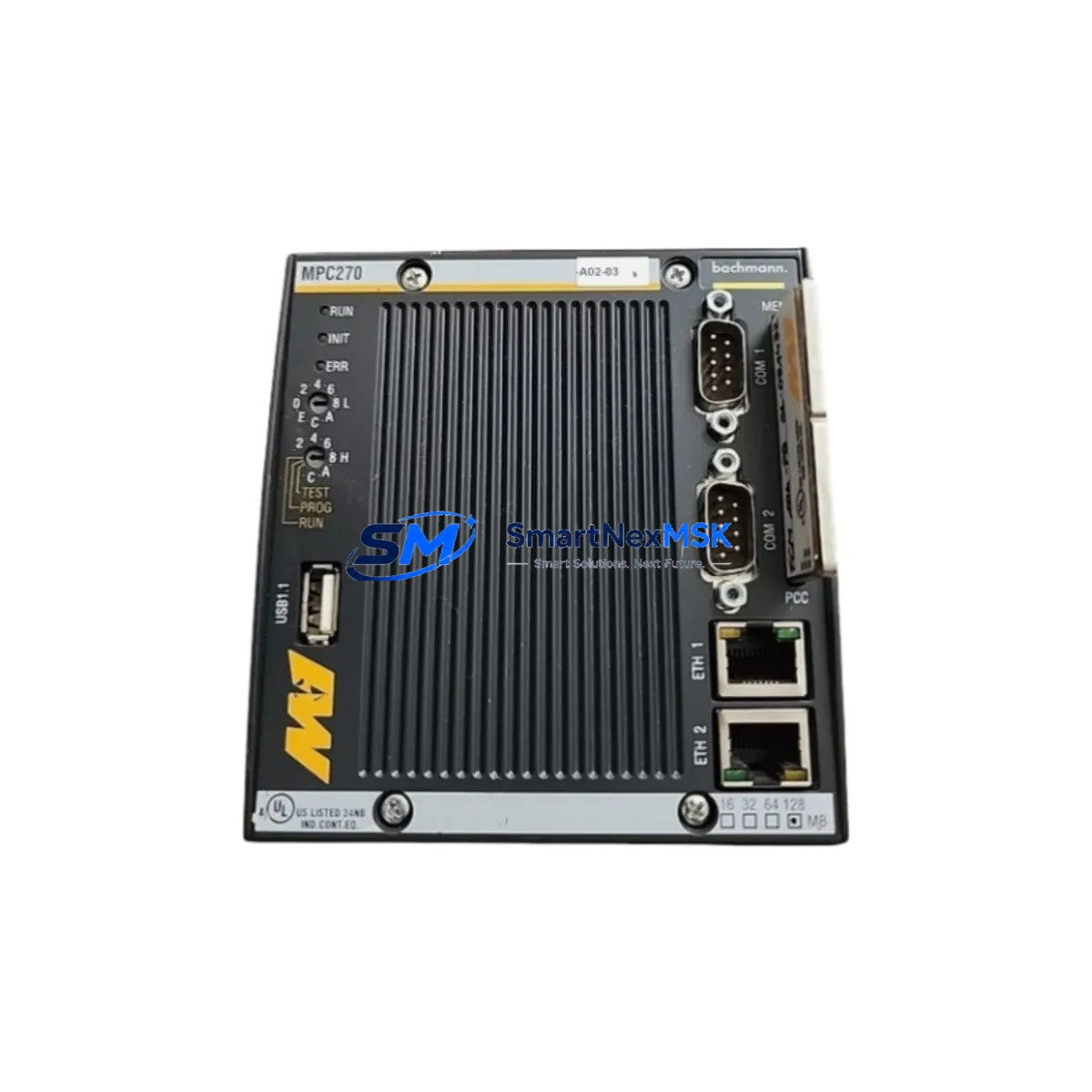
Bechmann MPC270 Maintenance-Ready Spare for MPC Automation
Unplanned downtime in industrial automation environments carries significant operational and financial risk. The Bechmann MPC270 is a CPU module designed for the MPC series programmable logic controller platform, widely deployed in process control, machine automation, and manufacturing execution systems. Maintaining a verified, tested spare of the MPC270 in your parts inventory is a proven strategy for minimizing mean time to repair (MTTR) and sustaining continuous production cycles.
This listing provides an original Bechmann MPC270 spare part, sourced through authorized industrial supply channels, pre-tested prior to shipment, and backed by a 12-month warranty. Whether you are managing a scheduled overhaul, responding to an unplanned fault, or building out a critical-spare inventory for aging MPC-series control systems, the MPC270 is a direct, compatible replacement that requires no firmware re-engineering or hardware modification in standard MPC rack configurations.
Maintenance engineers and procurement teams working with Bechmann MPC-series controllers will recognize the MPC270 as a central component in the CPU rack assembly. Its replacement typically occurs during corrective maintenance following CPU fault alarms, watchdog timeout events, or communication loss between the CPU and I/O subsystems. Proactive replacement during planned shutdowns — before failure occurs — is strongly recommended for systems operating beyond their original design lifecycle.
Spare Maintenance Table
| Parameter | Specification / Detail |
|---|---|
| Part Number | MPC270 |
| Brand | Bechmann |
| Series | MPC Series |
| Module Type | PLC CPU Module |
| Origin | Germany (DE) |
| Compatibility | Bechmann MPC Series PLC Racks; direct replacement for MPC270 CPU slot |
| Installation | Rack-mount; slot-compatible with standard MPC backplane |
| Application Environment | Industrial automation, process control, machine control panels |
| Condition | Original spare; pre-shipment functional test completed |
| Maintenance Recommendation | Replace during planned shutdown or immediately upon CPU fault alarm |
| Warranty | 12 Months |
Maintenance Planning for Continuous Operation
When replacing the MPC270 CPU module, a thorough inspection of the surrounding control cabinet components is essential to ensure the root cause of failure is addressed and to prevent repeat faults. Maintenance engineers should treat a CPU replacement as an opportunity for a broader system health check.
Begin by verifying the 24VDC power supply module feeding the MPC rack — voltage sag or ripple is a common cause of CPU resets and memory corruption. Inspect the MPC backplane bus connector for oxidation or mechanical damage, as poor backplane contact can cause intermittent CPU communication errors that mimic CPU failure. Check all digital input (DI) and digital output (DO) I/O modules seated in the same rack for blown output channels or input signal anomalies that may have triggered the original fault condition.
Review the communication module — whether PROFIBUS-DP, Modbus RTU, or Ethernet — for correct termination resistor settings and cable integrity, as communication faults are frequently misdiagnosed as CPU failures. Inspect relay output modules for contact wear, particularly on high-cycle outputs controlling solenoids or motor starters. Examine terminal blocks and field wiring for loose connections, which can introduce noise into analog signal circuits and cause erratic CPU behavior.
For systems with signal isolators on thermocouple or 4–20mA analog inputs, verify isolation integrity and check for ground loops that may have contributed to module stress. Inspect the HMI communication cable (RS-232 or RS-485) between the MPC270 and any operator panel for continuity and shielding. If the system includes a redundant CPU configuration, test the switchover logic and confirm the standby MPC270 spare is also current and functional. Finally, check fuse holders and circuit breakers in the control cabinet for signs of thermal stress or intermittent contact.
Building a structured spare parts kit around the MPC270 — including at least one spare I/O module per type, a backup power supply, and a tested communication module — is the most effective strategy for reducing emergency procurement lead times and keeping aging MPC-series systems operational through their extended service life.
Site Replacement Workflow
The MPC270 is designed for straightforward field replacement within the MPC rack architecture. Before beginning, ensure the replacement unit has been stored correctly (dry, ESD-protected environment) and that the firmware version matches or is compatible with your existing MPC system configuration. Document the current CPU parameter settings and program backup before powering down.
Power down the control cabinet following your site lockout/tagout (LOTO) procedure. Remove the faulty MPC270 by releasing the module locking mechanism and sliding it from the CPU slot. Insert the replacement MPC270, ensuring the backplane connector is fully seated. Restore power and verify the CPU status LED sequence — normal boot should complete without fault indicators. Reload the program from your backup media if the CPU does not retain the program automatically.
Confirm all I/O modules are recognized by the new CPU and that communication with field devices, HMI panels, and upstream SCADA or DCS systems has been restored. Perform a functional test of all critical outputs before returning the system to production. Log the replacement in your maintenance management system (CMMS) and update your spare parts inventory accordingly.
This workflow applies equally to corrective replacements following unplanned failure and to proactive replacements during scheduled maintenance windows. Proactive replacement — swapping a CPU that has accumulated significant operating hours before it fails — is the most cost-effective approach for systems where downtime costs exceed the cost of the spare part.
Spare Parts Support FAQ
Q1: Is the MPC270 compatible with all MPC series rack configurations?
The MPC270 is designed for the Bechmann MPC series PLC platform and is compatible with standard MPC backplane configurations. Compatibility should be verified against your specific rack model and firmware version before installation. Contact our technical team with your system details for confirmation prior to ordering.
Q2: What pre-shipment testing is performed on the MPC270 spare?
Each MPC270 unit undergoes functional verification prior to dispatch, including power-on self-test and basic communication checks. Units are shipped in ESD-protective packaging with documentation. The 12-month warranty covers manufacturing defects and functional failures under normal operating conditions.
Q3: How should the MPC270 be stored as a long-term spare?
Store in a dry, temperature-controlled environment (typically 0–55°C storage range) in the original ESD packaging. Avoid locations with high humidity, vibration, or exposure to corrosive atmospheres. Inspect stored spares annually and rotate stock to ensure the oldest unit is used first.
Q4: What is the lead time and warranty coverage for the MPC270?
In-stock units are dispatched within 1–3 business days. The MPC270 spare is covered by a 12-month warranty from the date of shipment, covering functional defects. Expedited shipping is available for emergency downtime situations — contact us directly for urgent requirements.
© 2026 SMARTNEXMSK. All rights reserved.
Original Source: https://smartnexmsk.com
Contact: [email protected] | +86 18259474341