NI AT-GPIB-TN Spare for AT-GPIB Series Automation: Spare Replacement & Industrial Downtime Risk Control
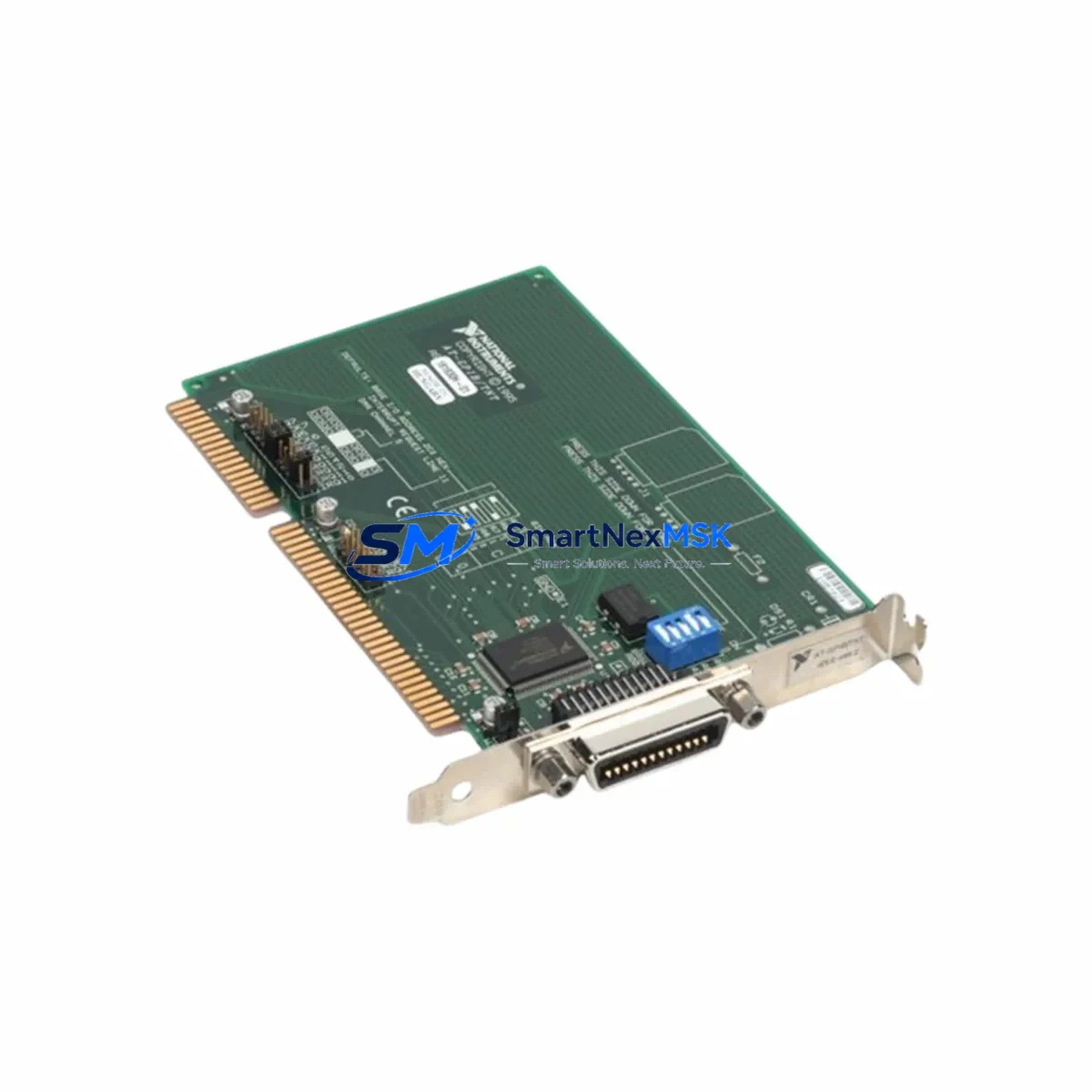
The NI AT-GPIB-TN is an original National Instruments ISA bus IEEE 488.2 GPIB interface card designed for AT-GPIB series automation and ATE (Automated Test Equipment) systems. As a maintenance-ready spare, the AT-GPIB-TN enables maintenance and procurement engineers to execute rapid board-level replacements, restore instrument communication buses, and minimize unplanned downtime in legacy ISA-based control and test environments. With a 12-month warranty and pre-shipment functional testing, this spare part is a reliable addition to any industrial spare parts inventory.
Spare Maintenance Table
| Parameter | Specification / Detail |
|---|---|
| Part Number / SKU | AT-GPIB-TN |
| Brand | National Instruments (NI) |
| Series | AT-GPIB |
| Bus Interface | ISA (AT) Bus |
| Communication Standard | IEEE 488.2 / GPIB |
| Max Transfer Rate | Up to 1.5 MB/s (HS488 capable) |
| GPIB Devices Supported | Up to 14 instruments per board |
| Compatibility | NI-488.2 driver, LabVIEW, LabWindows/CVI, ATE systems |
| Operating Environment | 0–55°C, 10–90% RH non-condensing |
| Installation | ISA slot, NI-488.2 driver installation required |
| Maintenance Recommendation | Inspect connector pins, verify IRQ/DMA settings, re-seat card annually |
| Origin | United States |
| Warranty | 12 Months |
| Pre-Shipment Testing | Functional test performed before dispatch |
Maintenance Planning for Continuous Operation
When replacing the AT-GPIB-TN in an ISA-based ATE or industrial control cabinet, a thorough maintenance review of the surrounding system is essential to prevent repeat failures and ensure full bus restoration. Maintenance engineers should treat this replacement as an opportunity for a broader cabinet inspection.
Begin by verifying the ISA backplane slot integrity — oxidized or damaged ISA edge connectors are a common root cause of GPIB communication faults that are misdiagnosed as card failures. Inspect the PC power supply unit supplying the ISA chassis; an aging PSU with degraded +5V or +12V rails can cause intermittent GPIB timeouts and data corruption that mimic a faulty interface card. If the system uses a NI GPIB-ENET/100 or GPIB-USB-HS as a parallel communication path, verify that the network or USB interface is not creating bus contention with the AT-GPIB-TN.
For systems running NI LabVIEW or LabWindows/CVI-based test sequences, confirm that the NI-488.2 driver version is compatible with the host OS after card replacement — driver mismatches are a frequent source of post-replacement communication errors. Check all GPIB cable assemblies (IEEE 488 24-pin cables) connecting instruments to the card; degraded shielding or bent connector pins can introduce bus errors even with a new interface card installed.
In multi-instrument ATE racks, inspect connected instruments such as NI PXI-4070 digital multimeters, Agilent/Keysight 34401A bench multimeters, or Tektronix oscilloscopes for GPIB address conflicts — each device must have a unique address (0–30) on the bus. If the control PC also hosts a NI DAQ card (such as the PCI-6221 or PCI-6251), verify that IRQ and DMA resource assignments do not conflict with the AT-GPIB-TN after reinstallation.
For legacy systems where the ISA platform is approaching end-of-life, procurement engineers should consider stocking a secondary AT-GPIB-TN spare alongside a GPIB-USB-HS adapter as a migration path — this allows the system to transition to a USB-based GPIB interface without immediate hardware redesign, extending the operational life of the test system by several years. Additionally, review the UPS (uninterruptible power supply) protecting the ISA chassis; power transients are a leading cause of ISA card degradation in industrial environments.
Site Replacement Workflow
Replacing the AT-GPIB-TN on-site is a straightforward procedure when the correct spare is available and the replacement workflow is followed systematically:
- Power down and isolate: Shut down the host PC and disconnect all GPIB cables from the AT-GPIB-TN. Label each cable with its instrument address before removal to avoid reconnection errors.
- Record IRQ/DMA settings: Before removing the faulty card, document the current IRQ, DMA, and base I/O address settings (typically configured via jumpers or software). The replacement card must be configured identically to avoid driver conflicts.
- Remove and inspect: Extract the AT-GPIB-TN from the ISA slot. Inspect the slot for debris, corrosion, or physical damage. Clean with compressed air if necessary.
- Install the replacement: Insert the new AT-GPIB-TN, ensuring full seating in the ISA slot. Apply the same IRQ/DMA configuration as the original card.
- Driver verification: Boot the system and verify that the NI-488.2 driver recognizes the card. Run the NI Measurement & Automation Explorer (MAX) self-test to confirm GPIB bus communication.
- Functional test: Execute a loopback test or communicate with a known-good instrument to verify end-to-end GPIB functionality before returning the system to production.
This workflow minimizes downtime and ensures system compatibility is maintained. The AT-GPIB-TN is a direct replacement for legacy AT-GPIB and AT-GPIB/TNT cards, preserving full software and driver compatibility with existing NI-488.2 installations.
Spare Parts Support FAQ
Q1: Is the AT-GPIB-TN compatible with modern operating systems?
The AT-GPIB-TN requires an ISA bus slot, which limits compatibility to legacy PC hardware. NI-488.2 driver support for this card is available for Windows XP and earlier. For systems running Windows 7 or later, NI recommends migrating to a PCI, PCIe, or USB-based GPIB interface such as the GPIB-USB-HS. We supply the AT-GPIB-TN specifically for legacy system maintenance where ISA hardware is still in service.
Q2: How do you verify compatibility before shipment?
Each AT-GPIB-TN unit undergoes a functional test prior to dispatch, including GPIB bus communication verification and physical inspection of the ISA edge connector and GPIB port. A test report is available upon request. The 12-month warranty covers functional defects identified after installation.
Q3: What is your spare parts inventory strategy for the AT-GPIB-TN?
Given the end-of-life status of ISA-based hardware, we recommend that facilities operating AT-GPIB-TN-dependent ATE systems maintain a minimum of one cold spare per test station. Long-term supply availability is not guaranteed for legacy ISA cards; securing spares now reduces the risk of extended downtime due to sourcing delays. We offer volume pricing for multi-unit spare stock orders.
Q4: What is covered under the 12-month warranty?
The 12-month warranty covers manufacturing defects and functional failures under normal operating conditions. It does not cover damage caused by incorrect installation, ESD mishandling, power surges, or physical impact. Warranty claims are processed with a replacement unit dispatched after fault verification. Contact our technical team for RMA procedures.
© 2026 SMARTNEXMSK. All rights reserved.
Original Source: https://smartnexmsk.com
Contact: [email protected] | +86 18259474341