
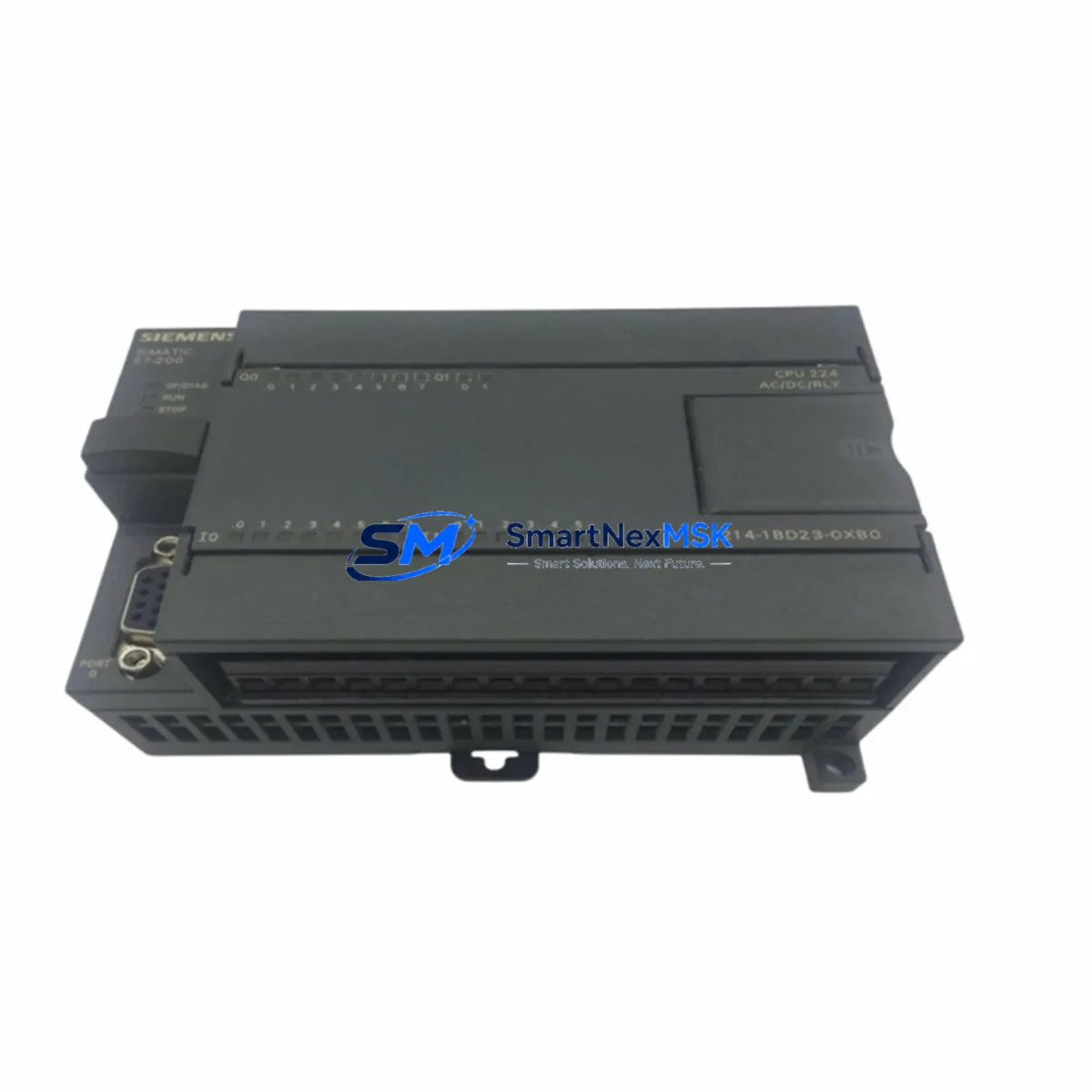
Siemens 6ES7214-1BD23-0XB0 Retrofit-Ready CPU 224 for S7-200 Control Systems
The Siemens 6ES7214-1BD23-0XB0 is a CPU 224 DC/DC/DC programmable logic controller module designed for the SIMATIC S7-200 series. As legacy S7-200 systems approach end-of-life and original spare parts become increasingly scarce, this unit serves as a verified retrofit-ready replacement for aging control cabinets across manufacturing, water treatment, building automation, and process control applications. Whether you are managing a planned system upgrade or responding to an unplanned failure, the 6ES7214-1BD23-0XB0 provides a direct hardware path to restore or extend operational continuity without requiring a full platform migration.
This CPU module features 14 digital inputs and 10 digital outputs, 8 KB program memory, and 5 KB data memory, with onboard support for up to two expansion modules. It communicates via the RS-485-based PPI/MPI port, making it fully compatible with existing STEP 7-Micro/WIN programming environments and legacy HMI panels such as the SIMATIC TD 200, TP 177micro, and OP 73micro. For sites running older PROFIBUS DP networks or point-to-point serial links, the native communication architecture of this CPU eliminates the need for protocol conversion hardware during the initial retrofit phase.
Upgrade Compatibility Table
| Parameter | Details |
|---|---|
| SKU / Part Number | 6ES7214-1BD23-0XB0 |
| Series | SIMATIC S7-200 |
| CPU Type | CPU 224 DC/DC/DC |
| Digital I/O | 14 DI / 10 DO (transistor output) |
| Program Memory | 8 KB |
| Data Memory | 5 KB |
| Communication Port | RS-485 PPI/MPI (Port 0) |
| Power Supply Input | 24 VDC |
| Expansion Modules Supported | Up to 2 (EM series) |
| Compatible Expansion Modules | EM 221, EM 222, EM 223, EM 231, EM 232, EM 235 |
| Programming Software | STEP 7-Micro/WIN V4.0 SP9 or later |
| HMI Compatibility | TD 200, TP 177micro, OP 73micro |
| Mounting | DIN rail or panel mount |
| Installation Requirement | Direct drop-in replacement; verify terminal wiring and module address |
| Communication Compatibility | PPI, MPI, Freeport (RS-485) |
| Replacement Recommendation | Direct replacement for CPU 224 (6ES7214-1BD21-0XB0, 6ES7214-1BD22-0XB0) |
| Commissioning Focus | Program upload/download, I/O address mapping, HMI tag verification |
| Warranty | 12 Months |
Retrofit Planning for Existing Automation Systems
Successful retrofit of the 6ES7214-1BD23-0XB0 into an existing S7-200 control cabinet begins with a thorough pre-replacement audit. Engineers should first verify the 24 VDC power supply capacity of the existing cabinet — the CPU 224 draws up to 700 mA from the 24 VDC bus, and any connected expansion modules such as the EM 223 digital I/O module or the EM 235 analog combination module will add to this load. Undersized power supplies are a common cause of intermittent faults after module replacement and must be addressed before commissioning.
Terminal wiring should be documented in full before removing the original CPU. The 6ES7214-1BD23-0XB0 uses a removable terminal block design, but wire labeling and photographic documentation of the original wiring layout are strongly recommended. Pay particular attention to the 24 VDC sensor supply connections on the input side and the load wiring on the transistor output side, especially if the original installation used relay output variants that may have been wired differently.
If the existing system includes expansion modules connected via the I/O bus on the right side of the CPU, confirm that the backplane connector and bus cable are undamaged before reinstalling. Modules such as the EM 231 analog input module or the EM 222 digital output module must be re-addressed correctly in the STEP 7-Micro/WIN configuration to match the original program’s symbolic address table. Any mismatch between the physical module order and the software configuration will result in I/O faults at startup.
For sites that use a PC/PPI cable or USB-PPI adapter for programming, confirm that the communication port settings in STEP 7-Micro/WIN match the baud rate and station address configured on the replacement CPU. If the original program was not backed up prior to the failure, a data recovery attempt via the memory cartridge slot — using a compatible SIMATIC Micro Memory Card — should be made before proceeding with a fresh program load. Where an HMI panel such as the TP 177micro is connected, verify that the HMI project’s PLC connection settings reference the correct PPI station address after replacement.
Sites migrating from older CPU 222 or CPU 221 units to the CPU 224 should note the expanded I/O count and additional expansion capacity, which may allow consolidation of previously separate control panels. This is particularly relevant in retrofit projects where a 6ES7212-1BB23-0XB0 (CPU 222) is being replaced with the 6ES7214-1BD23-0XB0 to gain additional I/O headroom without changing the control platform.
Downtime Control During System Migration
Minimizing production downtime during a CPU replacement requires a structured migration sequence. Before any hardware is removed, the existing program should be uploaded from the running CPU using STEP 7-Micro/WIN and saved to a secure backup location. If the CPU is non-functional and program recovery is not possible, the backup program from the site’s documentation archive or the original commissioning engineer’s project files must be used. Never proceed with a replacement CPU installation without a verified program file.
The physical swap of the 6ES7214-1BD23-0XB0 can typically be completed within 30 to 60 minutes for a well-documented installation. The critical path items are terminal reconnection, expansion module reseating, and communication cable reconnection. Once the replacement CPU is powered on, the program should be downloaded and the CPU placed in RUN mode with all outputs initially forced off to allow a safe I/O verification sequence before returning the system to automatic operation.
For systems where continuous control is required, consider staging the replacement during a scheduled maintenance window and pre-configuring the replacement CPU offline using STEP 7-Micro/WIN before the maintenance window begins. This approach reduces the live intervention time to the physical swap and program download only, typically under 20 minutes for experienced engineers. Where a SIMATIC TD 200 text display or other HMI is in use, verify that all operator screens display correctly and that alarm setpoints are intact before releasing the system to production.
Post-replacement, a full functional test of all I/O points, communication links, and control sequences should be completed and documented. Any deviations from the original system behavior should be investigated before the system is returned to unattended automatic operation. All replacement units supplied by SMARTNEXMSK are pre-tested prior to shipment and covered by a 12-month warranty, reducing the risk of secondary failures during the commissioning phase.
Retrofit Support FAQ
Q: Is the 6ES7214-1BD23-0XB0 a direct replacement for earlier CPU 224 variants such as the 6ES7214-1BD21-0XB0 or 6ES7214-1BD22-0XB0?
A: Yes. The 6ES7214-1BD23-0XB0 is hardware-compatible with earlier CPU 224 DC/DC/DC variants. The program, I/O configuration, and expansion module connections are directly transferable. Verify that your STEP 7-Micro/WIN version supports the firmware revision of the replacement unit before downloading the program.
Q: What wiring checks are required before powering on the replacement CPU?
A: Confirm that the 24 VDC supply polarity is correct on the CPU power terminals, that all digital input commons are connected, and that the transistor output load wiring does not exceed the per-output current rating of 0.75 A. If expansion modules such as the EM 223 or EM 235 are connected, verify that the I/O bus connector is fully seated before applying power.
Q: How do I verify communication compatibility with my existing HMI or SCADA system?
A: The 6ES7214-1BD23-0XB0 supports PPI and MPI protocols on its RS-485 port. Confirm that the HMI or SCADA system’s communication driver is configured for the correct PPI baud rate (typically 9.6 kbps or 19.2 kbps) and that the CPU station address matches the address expected by the HMI project. For systems using a CP 243-1 Ethernet module for remote access, verify that the module’s configuration in STEP 7-Micro/WIN references the correct CPU type.
Q: What does the 12-month warranty cover, and how are units tested before shipment?
A: All units supplied by SMARTNEXMSK undergo functional testing prior to shipment, including power-on verification, I/O point testing, and communication port validation. The 12-month warranty covers hardware defects and functional failures under normal operating conditions. Units that fail during the warranty period will be replaced or repaired at no charge. Contact [email protected] for warranty claims and technical support.
© 2026 SMARTNEXMSK. All rights reserved.
Original Source: https://smartnexmsk.com
Contact: [email protected] | +86 18259474341



