
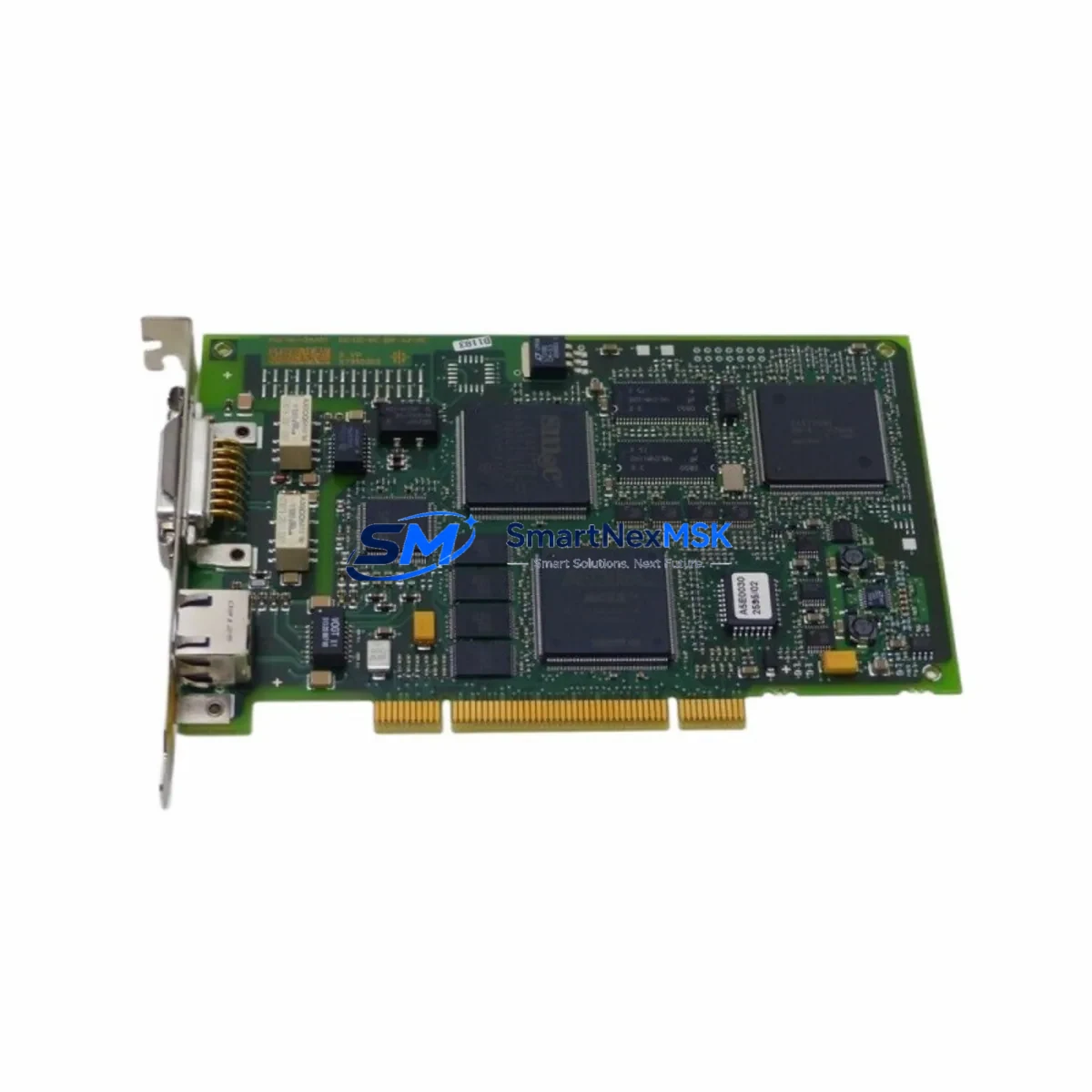
Siemens 6GK1161-3AA01 Spare for CP1613 Automation: Spare Replacement & Industrial Downtime Risk Control
The Siemens 6GK1161-3AA01 is an original SIMATIC NET CP1613 Industrial Ethernet PCI communication card designed for seamless integration into SIMATIC S7-300 and S7-400 automation systems. As a maintenance-ready spare, this module enables maintenance engineers and procurement teams to execute rapid control cabinet replacements, restore network communication links, and minimize unplanned downtime in production environments. Whether you are managing a scheduled overhaul, responding to an emergency fault, or building a strategic spare parts inventory, the 6GK1161-3AA01 delivers the compatibility, reliability, and long-term supply assurance that industrial operations demand.
Sourced directly from verified supply channels, every unit undergoes functional testing prior to shipment. With a 12-month warranty and documented traceability, this spare is suitable for both immediate field replacement and long-term stockroom storage in climate-controlled cabinets.
Spare Maintenance Table
| Parameter | Specification |
|---|---|
| Part Number / SKU | 6GK1161-3AA01 |
| Product Family | SIMATIC NET CP1613 |
| Interface Type | Industrial Ethernet (ISO / TCP/IP) |
| Bus Interface | PCI (32-bit, 33 MHz) |
| Communication Protocols | ISO, TCP/IP, UDP, S7 Communication, SEND/RECEIVE |
| Compatible Systems | SIMATIC S7-300, S7-400, WinCC, STEP 7, PC-based SCADA |
| Operating Voltage | 3.3 V / 5 V via PCI slot |
| Operating Temperature | 0 °C to +55 °C |
| Country of Origin | Germany |
| Installation | Standard PCI slot in industrial PC or SIMATIC PC station |
| Driver Support | Windows Server 2003/2008, Windows XP/7 (32/64-bit) |
| Maintenance Recommendation | Inspect PCI slot contacts, verify network cable integrity, confirm firmware version compatibility before installation |
| Warranty | 12 Months — Tested Before Shipment |
Maintenance Planning for Continuous Operation
When replacing the 6GK1161-3AA01 CP1613 communication card in a SIMATIC PC station or industrial control cabinet, a thorough inspection of the surrounding electrical and communication infrastructure is essential to prevent repeat failures and ensure stable network restoration. Maintenance engineers should treat this replacement as an opportunity to audit the full communication chain.
Begin by verifying the integrity of the Industrial Ethernet patch cables and RJ45 connectors connecting the CP1613 to the plant network switch. Degraded cable shielding or loose connectors are a common root cause of intermittent communication faults that are often misdiagnosed as card failures. Inspect the 24 VDC power supply module feeding the SIMATIC PC station — voltage fluctuations or ripple outside tolerance can cause PCI card instability and premature failure. If the station uses a SITOP PSU300S or equivalent regulated power supply, verify output voltage under load before commissioning the replacement card.
Check the PROFIBUS DP interface modules or CP5611/CP5613 communication processors in the same cabinet if the system architecture includes parallel fieldbus and Ethernet communication paths. A fault in the PROFIBUS segment can cascade into Ethernet communication errors, masking the true source of the alarm. Similarly, inspect any ET 200S or ET 200M distributed I/O racks connected via PROFINET or PROFIBUS — degraded I/O modules can generate excessive network traffic that overloads the CP1613 card.
For systems running WinCC SCADA or STEP 7 on the host PC, confirm that the SIMATIC NET software stack and CP1613 driver version are compatible with the installed operating system patch level. Mismatched driver versions are a frequent cause of post-replacement communication failures. If the control system includes S7-300 CPU modules such as the CPU 315-2 PN/DP or CPU 317-2 PN/DP, verify that the MPI/DP interface settings and network addresses are correctly configured in STEP 7 Hardware Configuration before going live.
Inspect terminal blocks and wiring in the control cabinet for signs of oxidation, loose ferrules, or thermal damage — particularly on 24 VDC signal circuits and analog I/O wiring connected to SM321/SM322 digital I/O modules or SM331/SM332 analog modules. A complete spare parts audit should also include reviewing the status of the SIMATIC S7 memory cards (MMC), battery backup modules, and any installed CP343-1 or CP443-1 Ethernet modules in the S7 rack, as these components share the same communication infrastructure and are subject to similar aging mechanisms.
Site Replacement Workflow
Step 1 — Pre-Replacement Verification: Before removing the faulty 6GK1161-3AA01, document the existing network configuration using SIMATIC NET Configuration Console. Export the current station configuration from STEP 7 or TIA Portal as a backup. Confirm the replacement card’s firmware version matches or is compatible with the host system’s SIMATIC NET software version.
Step 2 — Safe Removal: Power down the SIMATIC PC station following the plant’s lockout/tagout (LOTO) procedure. Ground yourself with an ESD wrist strap before handling the PCI card. Remove the card carefully, inspect the PCI slot for debris or bent contacts, and clean with compressed air if necessary.
Step 3 — Installation: Seat the 6GK1161-3AA01 firmly into the PCI slot. Secure the bracket screw. Reconnect the Industrial Ethernet cable. Power on the station and allow the operating system to detect the new hardware. Install or update the CP1613 driver from the SIMATIC NET CD or Siemens support portal.
Step 4 — Configuration Restore: Open SIMATIC NET Configuration Console and assign the MAC address and network parameters to the new card. Restore the station configuration in STEP 7 or TIA Portal. Perform a communication test using the PING function and S7 connection test to verify end-to-end connectivity with the S7 CPU.
Step 5 — System Validation: Monitor the system for 30 minutes under normal operating load. Check the Windows Event Log and SIMATIC NET diagnostic buffer for any error entries. Confirm that all WinCC tags and S7 data blocks are updating correctly before returning the system to production.
This structured workflow reduces mean time to repair (MTTR), eliminates guesswork during emergency replacements, and ensures the restored system meets the original design specification — extending the operational life of legacy SIMATIC installations without requiring costly hardware upgrades.
Spare Parts Support FAQ
Q1: Is the 6GK1161-3AA01 a direct replacement for older CP1613 variants?
Yes. The 6GK1161-3AA01 is the standard production revision of the CP1613 PCI Ethernet card and is compatible with SIMATIC PC stations and industrial PCs that previously used earlier CP1613 variants. Verify the PCI slot type (32-bit, 33 MHz) and confirm SIMATIC NET software version compatibility before installation. No hardware modification is required for direct substitution in most S7-300/400 and WinCC environments.
Q2: What pre-shipment testing is performed on this spare?
Every 6GK1161-3AA01 unit is functionally tested prior to dispatch. Testing includes PCI interface continuity verification, Ethernet port link-up confirmation, and basic communication protocol validation. Units are packed in anti-static ESD bags with protective foam inserts to prevent transit damage. A 12-month warranty is provided from the date of shipment, covering manufacturing defects and functional failures under normal operating conditions.
Q3: How should this spare be stored in a maintenance stockroom?
Store the 6GK1161-3AA01 in its original ESD packaging in a dry, temperature-controlled environment (recommended: 10 °C to 35 °C, relative humidity below 75% non-condensing). Avoid storing near strong magnetic fields or high-voltage equipment. Label the spare with the purchase date and warranty expiry. For long-term storage beyond 12 months, re-inspect the card and verify functionality before deployment. Maintaining one unit on-hand per critical SIMATIC PC station is recommended as a minimum spare parts strategy.
Q4: Can this card be used in systems running TIA Portal instead of STEP 7 Classic?
The 6GK1161-3AA01 CP1613 is primarily associated with STEP 7 Classic (V5.x) environments and SIMATIC NET V6.x–V8.x software stacks. For TIA Portal-based systems, compatibility depends on the installed SIMATIC NET version and the PC station configuration. It is recommended to verify the SIMATIC NET PC Software compatibility matrix on the Siemens support portal before deploying this card in a TIA Portal environment. Our technical team can assist with compatibility confirmation prior to order.
© 2026 SMARTNEXMSK. All rights reserved.
Original Source: https://smartnexmsk.com
Contact: [email protected] | +86 18259474341



