
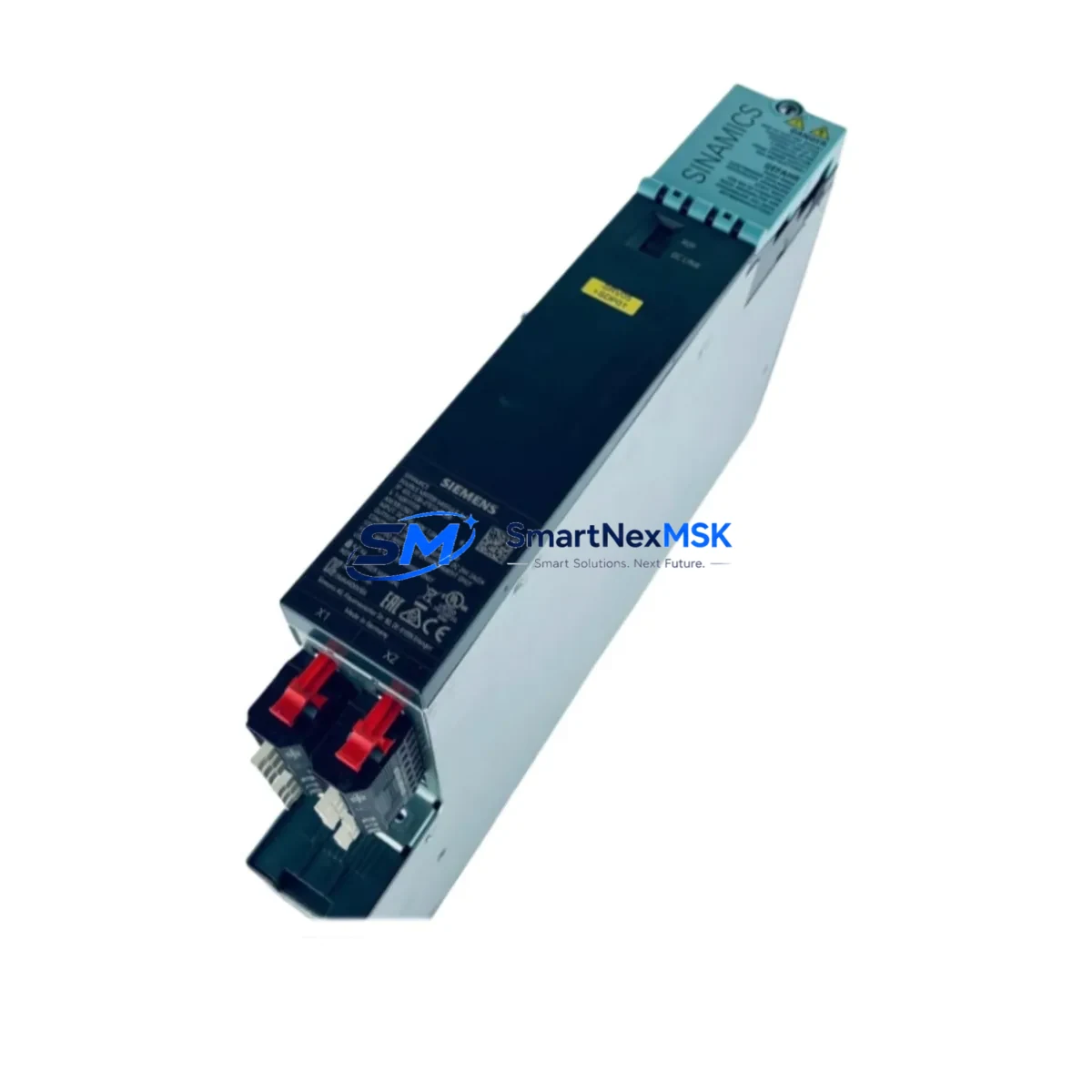
Siemens 6SL3120-2TE13-0AD0 Retrofit-Ready Double Motor Module for S120 Control Systems
The Siemens 6SL3120-2TE13-0AD0 is a SINAMICS S120 Booksize Double Motor Module rated at 3A continuous output current per axis. Designed for dual-axis servo control within the S120 Booksize format, this module is a direct retrofit replacement for aging or discontinued drive components in legacy automation lines. Whether you are upgrading a multi-axis CNC cell, modernizing a packaging machine, or restoring a failed drive in a production-critical environment, the 6SL3120-2TE13-0AD0 delivers the electrical and mechanical compatibility required for a smooth, low-risk transition.
Each unit shipped by SMARTNEXMSK undergoes pre-delivery functional verification, including DC bus charging, DRIVE-CLiQ enumeration, and axis enable response testing. All units carry a 12-month warranty covering manufacturing defects and functional failure under normal operating conditions.
Upgrade Compatibility Table
| Parameter | Specification / Retrofit Note |
|---|---|
| SKU / Order Number | 6SL3120-2TE13-0AD0 |
| Series | SINAMICS S120 Booksize |
| Module Type | Double Motor Module (Dual-Axis) |
| Rated Output Current | 3A per axis |
| DC Bus Interface | Shared DC bus via Booksize busbar — compatible with S120 Line Modules (e.g. 6SL3130 series) |
| Communication Interface | DRIVE-CLiQ (x2 ports) — compatible with CU320-2 DP, CU320-2 PN Control Units |
| Installation Format | Booksize — mounts on standard S120 Booksize mounting rail |
| Encoder Feedback | SMC10 / SMC20 / SMC30 Sensor Module Cabinet-Mounted compatible |
| Replacement Compatibility | Direct replacement for 6SL3120-2TE13-0AA0 (earlier hardware revision) |
| Commissioning Tool | STARTER / SINAMICS Startdrive (TIA Portal V14+) |
| Firmware Compatibility | SINAMICS S120 firmware V4.5 and above |
| Warranty | 12 Months — covers functional failure and manufacturing defects |
Retrofit Planning for Existing Automation Systems
Integrating the 6SL3120-2TE13-0AD0 into an existing S120 Booksize drive cabinet requires a structured pre-installation review. Begin by auditing the DC bus capacity of the existing Line Module — typically a 6SL3130-series Active Line Module or Basic Line Module — to confirm it can support the combined load of all Motor Modules on the shared bus. If the existing Line Module is undersized or approaching end-of-life, a parallel replacement with a correctly rated 6SL3130 unit should be planned as part of the same retrofit window.
Terminal wiring on the 6SL3120-2TE13-0AD0 follows the standard S120 Booksize pinout. Motor power connections (U2, V2, W2 per axis) and brake control outputs are located on the lower connector block. Verify that existing motor cables — particularly those routed to legacy 1FK7 or 1FT7 servo motors — meet the current-carrying requirements for 3A continuous service. If the original cable cross-section was sized for a higher-current module, no re-cabling is required; if undersized, replace before energizing.
The DRIVE-CLiQ topology must be re-mapped after module replacement. Using STARTER or SINAMICS Startdrive, perform an automatic topology scan to allow the CU320-2 DP or CU320-2 PN Control Unit to detect the new module. If the replacement module carries a different hardware revision than the original, the control unit will prompt a firmware download — accept and complete this step before proceeding to axis parameterization. Encoder feedback paths routed through SMC20 Sensor Module Cabinet-Mounted units remain unaffected provided the SMC20 firmware is at a compatible revision level.
For systems using PROFIBUS DP or PROFINET IO for higher-level communication with a SIMATIC S7-300 or S7-400 PLC, verify that the drive object address assignments in the CU320-2 match the GSD/GSDML device description used by the PLC project. Address mismatches after module swap are a common source of commissioning delays. If the site uses a CP343-1 or CP443-1 communications processor on the PLC side, no changes to the network configuration are typically required — only the drive-side parameter set needs validation.
HMI screens built on SIMATIC WinCC or WinCC flexible that display axis status, speed feedback, or fault codes reference drive object numbers rather than physical slot positions. After the DRIVE-CLiQ rescan, confirm that drive object numbering has not shifted; if it has, update the HMI tag assignments accordingly before returning the machine to operator control. This step is frequently overlooked and can result in operators seeing stale or misrouted axis data on the production floor.
Where the retrofit involves I/O expansion — for example, adding a TM31 Terminal Module or TM41 Terminal Module to support additional digital inputs for safety interlocks or jog functions — plan the DRIVE-CLiQ chain extension during the same outage window. Adding a TM31 after initial commissioning requires a second topology scan and parameter save, which adds time if not pre-planned. Similarly, if a Voltage Sensing Module (VSM10) is present for Active Line Module control, verify its DRIVE-CLiQ connection is upstream of the new Motor Module in the daisy-chain sequence.
Downtime Control During System Migration
Minimizing production downtime during a drive module replacement on an S120 Booksize system depends on preparation quality more than execution speed. The single most effective measure is to perform a full parameter backup — using STARTER’s “Upload to PG” function or Startdrive’s project upload — before any hardware is disturbed. Store the backup on both the engineering workstation and a removable medium kept at the machine. This ensures that if the replacement module requires a clean parameter set rather than a restored one, the original axis tuning data, speed limits, torque limits, and safety function configurations are available for manual re-entry.
Where the machine control architecture allows, consider placing the affected axes in a safe torque-off (STO) state and isolating only the DC bus segment feeding the failed module, rather than shutting down the entire drive line. On multi-cabinet S120 installations, this approach can keep unaffected axes operational during the swap, reducing the impact on overall line throughput. Confirm with the site safety officer that partial isolation is permitted under the local lockout/tagout procedure before proceeding.
After physical installation of the 6SL3120-2TE13-0AD0, restore the parameter backup and perform a controlled test cycle at reduced speed before releasing the machine to full production. Check current feedback symmetry between the two axes, verify brake release timing, and confirm that all fault and warning thresholds are correctly restored. Document the hardware revision of the replacement module in the machine maintenance log for future reference. SMARTNEXMSK provides pre-shipment test records on request to support site acceptance documentation.
Retrofit Support FAQ
Q1: Is the 6SL3120-2TE13-0AD0 a direct drop-in replacement for the 6SL3120-2TE13-0AA0?
Yes. The -0AD0 hardware revision is backward compatible with the -0AA0 in terms of mechanical mounting, DC bus connection, DRIVE-CLiQ interface, and motor power terminals. A firmware update on the CU320-2 Control Unit may be prompted during the first DRIVE-CLiQ scan; this is normal and should be completed before axis commissioning.
Q2: What commissioning steps are required after installing this module?
After physical installation, connect DRIVE-CLiQ and power the drive line. In STARTER or Startdrive, perform an automatic topology recognition. Restore the parameter backup to the new drive object. Run a motor identification routine if the axis tuning data is unavailable. Verify encoder feedback via the SMC20 or direct DRIVE-CLiQ encoder interface. Perform a low-speed test run and check current, speed, and position feedback before returning to full production speed.
Q3: Can this module be used with PROFIBUS DP systems, or only PROFINET?
The 6SL3120-2TE13-0AD0 Motor Module communicates exclusively via DRIVE-CLiQ to the Control Unit (e.g. CU320-2 DP or CU320-2 PN). The fieldbus protocol — PROFIBUS DP or PROFINET IO — is determined by the Control Unit variant, not the Motor Module. This module is compatible with both CU320-2 DP (PROFIBUS) and CU320-2 PN (PROFINET) control units without modification.
Q4: What does the 12-month warranty cover, and how is a claim initiated?
The 12-month warranty covers functional failure and manufacturing defects under normal operating conditions, including DC bus faults attributable to the module, DRIVE-CLiQ communication failure, and output stage failure. It does not cover damage resulting from incorrect wiring, overvoltage events, or installation errors. To initiate a warranty claim, contact SMARTNEXMSK with the unit serial number, fault code history, and a brief description of the failure mode. Replacement or repair is typically dispatched within 5 business days of claim verification.
© 2026 SMARTNEXMSK. All rights reserved.
Original Source: https://smartnexmsk.com
Contact: [email protected] | +86 18259474341



