
ProSoft MVI46-MCM Spare and Migration Guide
Legacy communication modules usually fail at the worst possible time: when the plant needs a small serial link to keep an older controller, drive, meter, or SCADA path alive. The ProSoft MVI46-MCM is a good example. It sits in the Rockwell Automation SLC ecosystem and is used as a Modbus Master/Slave communication module. ProSoft now […]
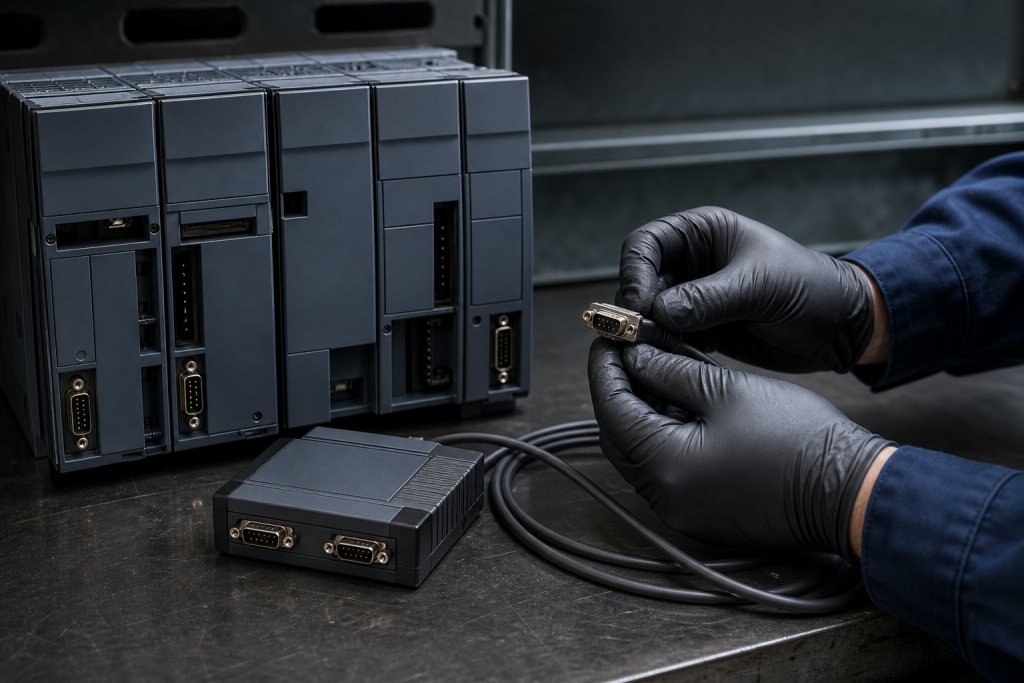
Legacy communication modules usually fail at the worst possible time: when the plant needs a small serial link to keep an older controller, drive, meter, or SCADA path alive. The ProSoft MVI46-MCM is a good example. It sits in the Rockwell Automation SLC ecosystem and is used as a Modbus Master/Slave communication module. ProSoft now places the MVI46-MCM in its Legacy Products area, and its legacy replacement table maps MVI46-MCM to the PLX31-EIP-MBS4. That is useful information, but it is not a permission to treat the newer module as a blind, drop-in substitute.
The maintenance question is simple: hold an exact MVI46-MCM spare, prepare a migration, or do both? The answer depends on the installed SLC rack, serial interface, ladder logic, Modbus register map, and the recovery time the process can tolerate.
What the MVI46-MCM actually represents in a plant
The MVI46-MCM is not just a serial converter. ProSoft documentation describes it as an in-rack module that allows an SLC processor to exchange data with Modbus-compatible devices. It provides two application ports and can be configured for Modbus Master or Slave operation. Depending on the installation, it may poll field devices, respond to another master, or exchange data with the SLC processor through ladder logic.
A spare review has to cover the complete communication path. The module, SLC backplane, port wiring, RS-232/422/485 selection, serial parameters, Modbus addresses, register offsets, and processor data files belong to the same maintenance record. Replacing the card without this context can produce a module that powers up correctly but does not restore process data.
First decision: exact spare or migration project?
An exact MVI46-MCM spare is usually the fastest bridge for a stable legacy installation when the plant has a short outage window and a proven application. It can reduce the immediate scope of work, but only if the part is correctly identified, its condition is credible, and the site has the configuration and ladder files needed to restore it.
A migration to PLX31-EIP-MBS4 is a different engineering activity. The new hardware may change the host platform, network path, configuration software, data exchange method, or diagnostics. Even where the functional objective is similar, the existing SLC data tables and ladder routines may need to be translated, tested, and documented. Treat the migration as a controlled change with a test plan, not as a purchasing substitution.
For plants with high consequence downtime, a sensible strategy can be two-track: keep one verified exact spare as a recovery bridge while preparing the migration package during a planned maintenance window. This avoids forcing an untested architecture change into an emergency failure response.
Five checks before buying an MVI46-MCM spare
1. Verify the complete identity
Record the full MVI46-MCM catalog reference, label photographs, serial number, revision information, and any visible configuration markings. Do not accept “MVI46” as sufficient identification because the MVI46 family includes more than one communication function.
2. Match the host platform
Confirm the exact SLC platform, rack position, local or extended I/O arrangement, and the processor model. Check the installed card against the hardware configuration and the site drawing. A module that looks correct on a shelf can still be wrong for the installed rack or application.
3. Capture the serial layer
Document whether each application port uses RS-232, RS-422, or RS-485; the baud rate; parity; data bits; stop bits; station address; termination; and cable pinout. Also record whether the port is operating as a Modbus Master or Slave. This evidence is essential when the original spare has no reliable configuration file.
4. Preserve the SLC data exchange
Back up the ladder program and record the M0/M1 or processor data file assignments used by the application. Identify the register blocks that feed the process and the fault-handling logic that reacts to communication errors. A replacement test that checks only module LEDs is not enough.
5. Define acceptance testing
For an exact spare, plan visual inspection, power-up checks, port diagnostics, communication tests, and point-by-point comparison with the existing register map. For a migration, add a staged test with representative Modbus devices, timeout and error tests, scaling checks, alarm verification, and a rollback plan. Put these requirements into the RFQ before purchase.
How to inspect a surplus or refurbished module
Legacy communication modules require evidence beyond a clean front panel. Ask for photographs of the nameplate, connectors, port condition, and storage damage. Check for corrosion, bent pins, cracked housings, contamination, and rework. Request the seller’s test scope: was the unit only powered on, or were both serial ports exercised with a known Modbus device?
For a critical application, the receiving inspection should compare the delivered identity with the purchase record, verify the connector and housing condition, and quarantine the module until it passes a controlled bench test. Store the tested configuration with the asset record. This is especially important when an exact spare is being used as a bridge to a future migration.
Where the replacement decision becomes technical
ProSoft’s own legacy replacement listing is valuable because it names PLX31-EIP-MBS4 as the successor path for MVI46-MCM. It does not prove that every installation can migrate without redesign. Before approving the change, compare the required network protocol, the host controller, the number and type of serial devices, the polling schedule, the register map, the required diagnostics, and the available engineering tools.
For a direct spare request, SmartNexMSK’s ProSoft MVI46-MCM module spare page provides the exact product context. If the application sits inside a broader communications architecture, review the industrial communication modules and I/O category. For a multi-item RFQ or a mixed legacy cabinet, use the SmartNexMSK parts catalog and include the full label and application evidence.
FAQ
Is the MVI46-MCM still a normal active product?
ProSoft presents it in the Legacy Products section, so buyers should treat availability and support as lifecycle risks. Confirm current condition, documentation, and test evidence instead of assuming normal new-stock support.
Is PLX31-EIP-MBS4 a plug-in replacement?
No. ProSoft identifies it as a replacement path, but the migration still requires verification of the host platform, communications architecture, application logic, data mapping, and commissioning tests.
What is the most important evidence when buying an exact spare?
Send the complete catalog number, nameplate photographs, host SLC model, rack position, port settings, cable details, ladder backup, register map, and the required recovery deadline. These details prevent a family-level match from being mistaken for a functional match.
Should the plant buy a spare if migration is already planned?
For a high-consequence process, an exact tested spare can be a sensible bridge while the migration is engineered and tested. The bridge spare and the migration should be tracked as separate lifecycle actions.
How should a refurbished MVI46-MCM be accepted?
Require identity verification, visual inspection, port diagnostics, and a controlled Modbus communication test. A power-on report alone does not prove that the module will handle the site’s serial traffic or ladder data exchange.
For an MVI46-MCM spare review or a discontinued replacement request, send the full model, nameplate and connector photographs, application details, quantity, and delivery deadline to [email protected] or contact SmartNexMSK by WhatsApp/Phone at +86 18259474341.
Route this topic into a sourcing request
Connect the article topic to a model number, category, brand, quantity, and destination before opening the RFQ.
Related Insights
Continue with sourcing and model matching guides
 Sep 8, 2026
SANYO DENKI QS1E Spares: Save Parameters First
When a SANMOTION Q axis stops, the purchasing request often becomes a model number: “Please quote QS1E01AA0H4A3P1T.” That is a useful starting point, but…
Read guide Sep 6, 2026
Yaskawa SGDH-05DE-OY Spares: Check the Servo Chain
A servo drive fault often produces a deceptively simple purchasing request: “Replace the SGDH-05DE-OY.” In a running machine, however, the amplifier is only one…
Read guide Sep 5, 2026
GE IS220PCLAH1A Spares: Check Mark VIe Fit
When a Mark VIe cabinet develops an intermittent control fault, the urgent request often becomes a single line: “Please quote IS220PCLAH1A.” That is understandable…
Read guide