
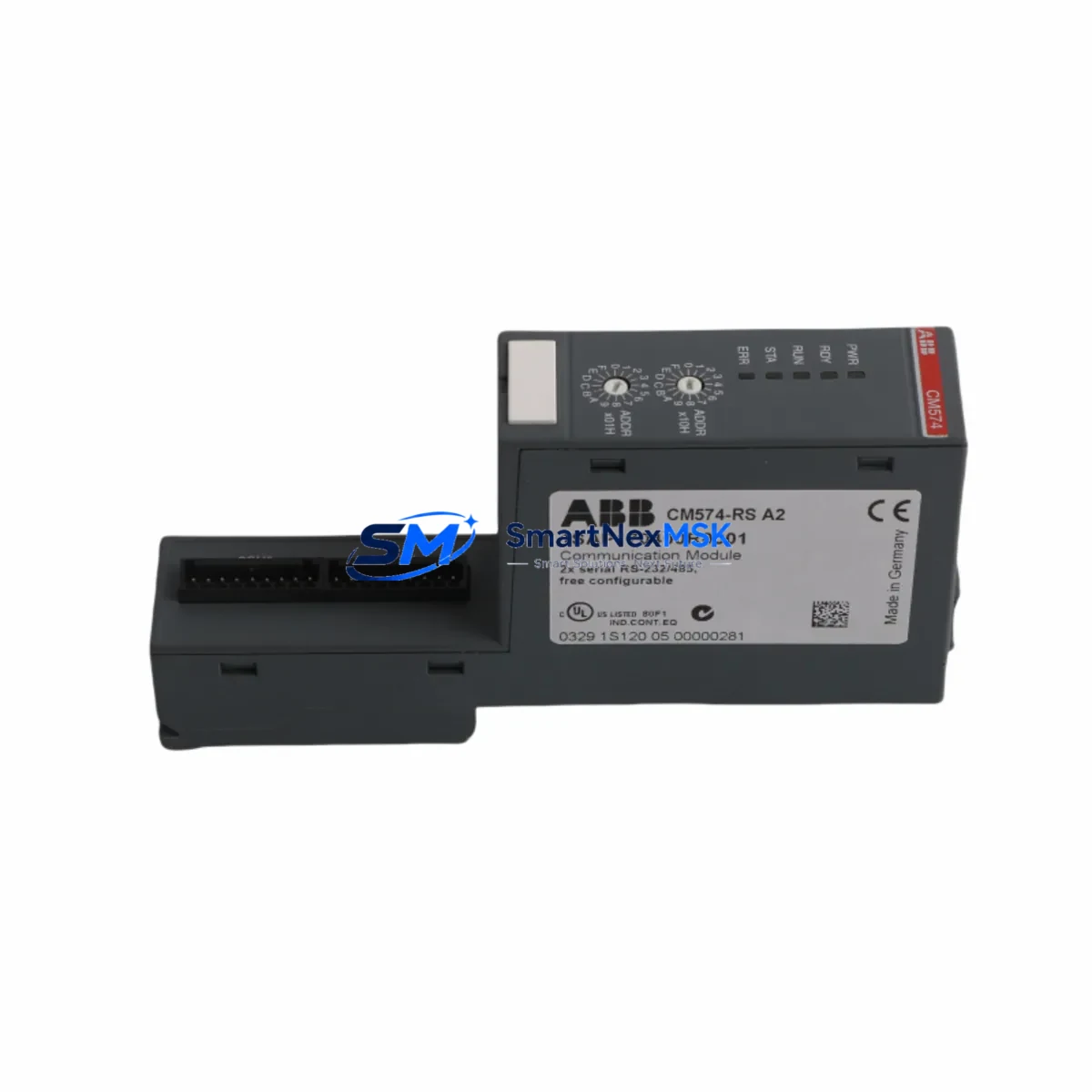
ABB CM574-RS 1SAP170400R0001 Spare for AC500 Automation
The ABB CM574-RS (order reference 1SAP170400R0001) is an original RS-485 serial communication module designed for the ABB AC500 PLC platform. In industrial maintenance environments where unplanned downtime translates directly into production loss, having a verified, tested spare of this communication module on the shelf is a fundamental risk-control measure. This module enables RS-485 serial communication between the AC500 CPU and field devices such as drives, meters, sensors, and third-party controllers using protocols including Modbus RTU and custom serial implementations. When this module fails or degrades, the entire communication segment it serves goes silent — isolating field instruments, disabling remote I/O polling, and triggering fault states across the control loop.
At SMARTNEXMSK, every CM574-RS unit is sourced as an original ABB component, individually inspected, and function-tested prior to dispatch. Each unit ships with a 12-month warranty and full traceability documentation, supporting both planned maintenance cycles and emergency replacement scenarios. Whether you are managing a single AC500 cabinet or maintaining a fleet of distributed automation systems, this spare is stocked for fast global fulfillment.
Spare Maintenance Table
| Parameter | Specification |
|---|---|
| Part Number | CM574-RS |
| Order Reference | 1SAP170400R0001 |
| Brand | ABB |
| Series | AC500 |
| Module Type | RS-485 Serial Communication Module |
| Supported Protocols | Modbus RTU, ASCII Serial, Custom RS-485 |
| Interface | RS-485 (2-wire / 4-wire configurable) |
| Baud Rate | Up to 115.2 kbps |
| Mounting | AC500 CPU left-side expansion slot |
| Compatible CPUs | PM571, PM572, PM573, PM581, PM582, PM583, PM585, PM591, PM592, PM595 |
| Operating Temperature | -25°C to +60°C |
| Protection Class | IP20 |
| Power Supply | Supplied via CPU backplane (no external supply required) |
| Origin | Germany |
| Weight | Approx. 200 g |
| Warranty | 12 Months |
| Condition | Original New / Tested Surplus |
| Application Environment | Industrial automation, process control, building management, utilities |
| Maintenance Recommendation | Inspect connector pins and RS-485 termination resistors during scheduled cabinet maintenance. Replace if communication error counters are rising or CRC fault rates exceed threshold. |
Maintenance Planning for Continuous Operation
When a CM574-RS communication fault is identified during routine cabinet inspection or fault-log review, experienced maintenance engineers know that the communication module itself is rarely the only component requiring attention. A disciplined replacement workflow should extend to the broader communication circuit and power environment to prevent repeat failures and ensure the system returns to full operational status.
Begin by verifying the 24 VDC supply rail feeding the AC500 CPU — the AC500 PM582 or PM583 CPU module draws its logic power from this rail, and a marginal supply voltage can cause intermittent communication faults that mimic module failure. Check the PS501 or PS502 power supply module output under load and confirm ripple is within specification. If the cabinet uses a TB521 or TB541 terminal base, inspect the backplane connector for oxidation or mechanical damage before inserting the replacement CM574-RS.
On the RS-485 bus side, inspect the field wiring for correct termination. A missing or incorrectly valued termination resistor (typically 120 Ω at each end of the bus) is a common root cause of communication degradation that accelerates module wear. If the system uses a CM572-DP PROFIBUS DP communication module in the same cabinet for parallel fieldbus segments, verify that both modules are correctly seated and that the CPU’s communication slot assignments have not been altered during the fault investigation.
For systems that include DI524 or DO524 digital I/O modules on the same AC500 rack, confirm that the I/O module status LEDs show normal operation after the communication module is replaced — a communication fault can mask downstream I/O errors that only become visible once the serial link is restored. Similarly, if the installation includes an AI523 analog input module for process variable monitoring, verify signal integrity on the analog channels after the RS-485 segment is re-established.
Where the AC500 system communicates upstream to a SCADA or DCS via an CM589-PNIO PROFINET I/O module or an CM578-CN CANopen module, confirm that the higher-level communication layer has not entered a fault-hold state during the RS-485 outage. Some DCS configurations latch communication faults and require an explicit reset from the operator station or HMI — typically an ABB CP635 or CP651 Panel — before normal polling resumes.
Finally, document the replacement in the cabinet maintenance log, update the spare parts inventory record, and note the serial number of the removed module for warranty or failure-analysis purposes. Maintaining a minimum stock of one CM574-RS per AC500 system cluster is a widely adopted practice in facilities where RS-485-based field instrument networks are critical to process continuity.
Site Replacement Workflow
Step 1 — Fault Confirmation: Review the AC500 CPU diagnostic log for communication error codes specific to the RS-485 port (e.g., timeout errors, CRC fault counters, bus-off events). Confirm the fault is persistent and not caused by a field device or wiring issue before condemning the CM574-RS module.
Step 2 — Safe Isolation: Place the AC500 CPU in STOP mode via the programming tool (Automation Builder or PS501 Control Builder) or the local keyswitch. De-energize the cabinet following site LOTO procedures. The CM574-RS does not require external power disconnection beyond the CPU backplane, but confirm the 24 VDC rail is isolated before handling.
Step 3 — Module Removal: Release the CM574-RS from the CPU left-side expansion slot by pressing the release tab and sliding the module clear. Note the slot position — the replacement must be installed in the same physical slot to preserve the CPU’s internal address mapping.
Step 4 — Replacement Installation: Insert the new CM574-RS into the same slot, ensuring the backplane connector is fully engaged. The module should click into place without excessive force. Verify the RS-485 field wiring terminals are reconnected with correct polarity (A+/B−) and that bus termination is in place.
Step 5 — System Restart and Verification: Restore power and place the CPU in RUN mode. Monitor the CM574-RS status LED — a steady green indicates normal operation. Verify communication with all field devices on the RS-485 segment by checking the CPU diagnostic buffer and confirming that all previously faulted I/O points have returned to valid states.
Step 6 — Documentation: Record the replacement date, new module serial number, and post-replacement test results in the site maintenance management system. Update the spare parts stock level and initiate a reorder if the on-hand quantity falls below the minimum buffer.
This workflow is applicable to all AC500 CPU variants that support the CM574-RS left-side expansion slot, including legacy PM571/PM572 installations and current-generation PM591/PM595 deployments. The CM574-RS is a direct replacement for earlier RS-485 communication options in the AC500 family, making it suitable for old-system life-extension projects without requiring CPU or software changes.
Spare Parts Support FAQ
Q1: Is the CM574-RS (1SAP170400R0001) compatible with all AC500 CPU variants?
The CM574-RS is compatible with the full range of AC500 CPUs that feature a left-side communication expansion slot, including PM571, PM572, PM573, PM581, PM582, PM583, PM585, PM591, PM592, and PM595. It is not compatible with the AC500-S safety CPU variants or the AC500-eCo compact series, which use a different module form factor. If you are unsure of your CPU variant, provide the CPU order reference and we will confirm compatibility before shipment.
Q2: What pre-shipment testing is performed on each unit?
Every CM574-RS unit undergoes visual inspection for connector integrity and physical condition, followed by a functional power-on test to verify the module initializes correctly and the status LED operates as expected. Units sourced as tested surplus are additionally verified for communication port continuity. A test report is available on request. All units ship with a 12-month warranty covering manufacturing defects and functional failure under normal operating conditions.
Q3: Can the CM574-RS be used to replace an older ABB RS-485 communication option in a legacy AC500 system?
Yes. The CM574-RS is the current-generation RS-485 communication module for the AC500 platform and is backward compatible with earlier AC500 installations. No CPU firmware upgrade is required in most cases, though it is recommended to verify the installed Automation Builder or Control Builder version supports the CM574-RS module type. For systems running legacy PS501 software, contact our technical team for compatibility confirmation prior to ordering.
Q4: What is the recommended spare parts stocking strategy for AC500 RS-485 communication modules?
For facilities operating three or more AC500 systems with active RS-485 communication segments, a minimum buffer of one CM574-RS per system cluster is recommended. For critical process applications where RS-485 communication loss would trigger a plant shutdown, a two-unit buffer per cluster is advisable. Given the module’s role in connecting field instruments, drives, and meters to the control system, the cost of holding a spare is negligible compared to the downtime cost of a single unplanned communication failure. SMARTNEXMSK maintains standing stock of CM574-RS units to support both planned procurement and emergency same-day dispatch requirements.
© 2026 SMARTNEXMSK. All rights reserved.
Original Source: https://smartnexmsk.com
Contact: [email protected] | +86 18259474341



