
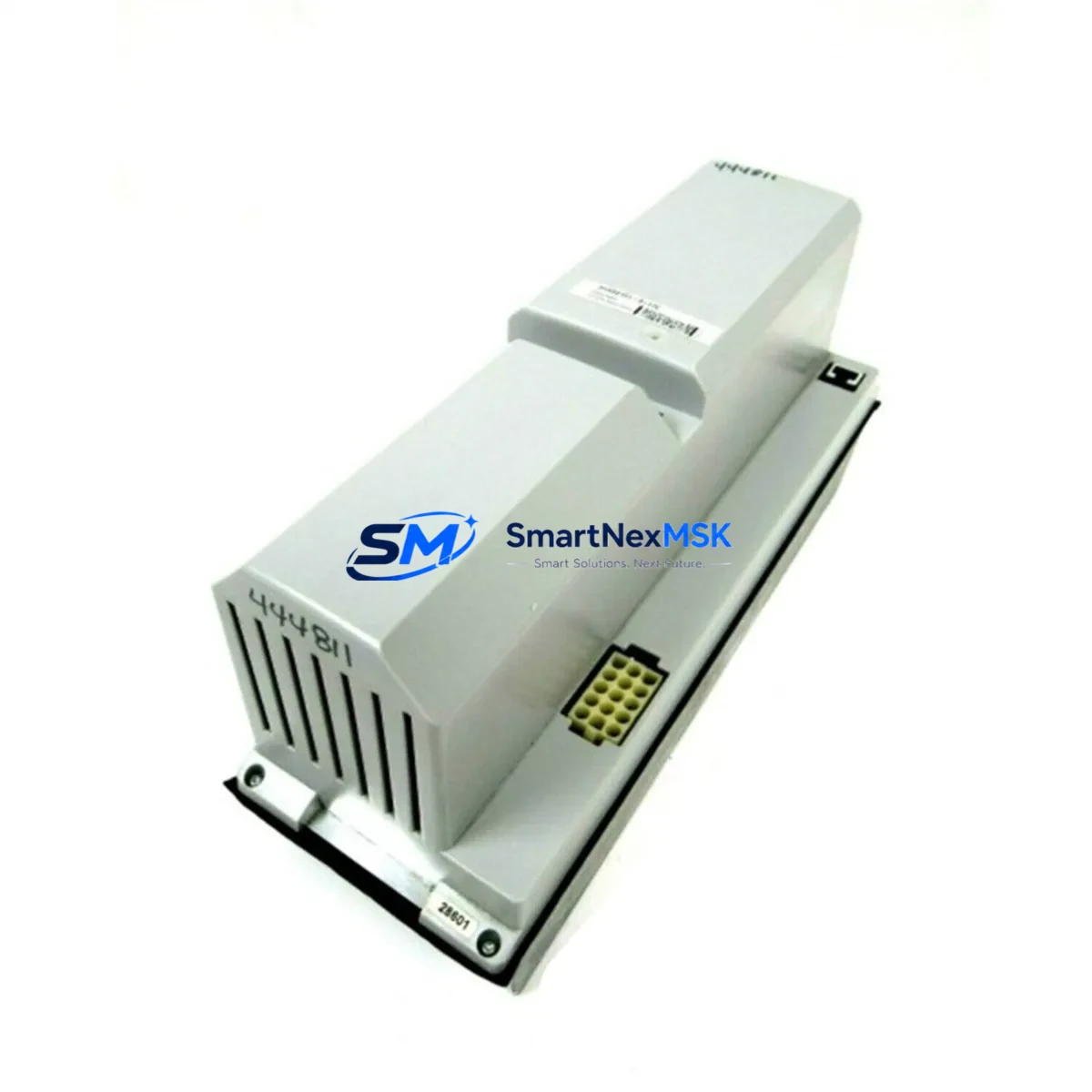
ABB DSQC346G Retrofit-Ready AC Servo Drive for IRC5 Control Systems
The ABB DSQC346G is a proven AC Servo Drive Unit engineered for seamless integration into ABB IRC5 and S4C+ robot controller platforms. As legacy automation lines face increasing pressure from discontinued spare parts and aging drive hardware, the DSQC346G has become a critical retrofit component for maintenance engineers and system integrators managing long-lifecycle robotic cells. Whether you are replacing a failed drive in an active production line or upgrading a decommissioned S4C+ cabinet to extend its operational life, the DSQC346G delivers the electrical compatibility, backplane interface alignment, and firmware handshake required for a controlled, low-risk migration.
Each unit supplied by SMARTNEXMSK is sourced from verified industrial channels, subjected to pre-shipment functional testing under load conditions, and backed by a 12-month warranty covering manufacturing defects and operational failures. Units are dispatched from our Xiamen warehouse with full traceability documentation, enabling your procurement and quality teams to maintain audit-ready records.
Upgrade Compatibility Table
| Parameter | DSQC346G Specification | Retrofit Notes |
|---|---|---|
| Compatible Controller | ABB IRC5, S4C+ | Verify cabinet generation before ordering |
| Backplane Interface | ABB Drive Bus (proprietary) | Direct slot replacement; no adapter required for IRC5 |
| Power Supply Requirement | 3-phase AC input; DC bus from DSQC374 or equivalent PSU | Confirm DSQC374 power module capacity before swap |
| Communication Protocol | ABB internal drive bus; DeviceNet optional via DSQC378 | DeviceNet node address must be re-configured post-installation |
| Terminal Wiring | Motor power: U/V/W; Resolver feedback connector | Match resolver cable pinout to axis assignment in RobotWare |
| Module Address | Set via DIP switch on unit face | Match original axis address; document before removal |
| Firmware Compatibility | RobotWare 5.x / 6.x | No firmware flash required for direct replacement |
| HMI / FlexPendant | Compatible with TP02, TP03 FlexPendant | Drive fault codes visible on FlexPendant event log |
| Mounting | DIN rail / cabinet rack mount | Fits standard IRC5 single and dual cabinet configurations |
| Warranty | 12 months from date of shipment — covers functional failure under normal operating conditions | |
Retrofit Planning for Existing Automation Systems
A successful DSQC346G retrofit begins well before the unit arrives on-site. Engineers should start by auditing the existing IRC5 or S4C+ cabinet to confirm the power module — typically a DSQC374 or DSQC609 — can sustain the additional drive load after replacement. In multi-axis cells, the cumulative draw across all installed drive units must remain within the cabinet’s rated capacity. If the existing DSQC374 shows signs of capacitor aging or voltage ripple, it is advisable to replace it concurrently to avoid a secondary failure shortly after the drive swap.
Terminal wiring is the next critical checkpoint. The DSQC346G uses a standard U/V/W motor power output with a dedicated resolver feedback connector. Before disconnecting the old drive, photograph and document all terminal assignments, particularly the resolver cable pinout, which varies by axis and robot model. Mislabeled or transposed resolver connections are the most common cause of post-retrofit axis faults. Cross-reference the wiring against the robot’s electrical schematic, which is typically stored in the DSQC652 main computer or retrievable via RobotStudio.
The DSQC652 main computer and its associated DSQC643 axis computer board govern the communication handshake between the controller and each drive unit. When replacing the DSQC346G, ensure the axis computer firmware version is compatible with the replacement drive’s hardware revision. In most IRC5 installations running RobotWare 5.14 or later, this is handled automatically during the boot sequence, but older S4C+ systems may require a manual parameter reset via the system parameters editor on the FlexPendant.
For systems that include a DSQC378 DeviceNet board or a DSQC688 fieldbus adapter, the communication node address assigned to the replaced drive must be verified and re-entered after installation. DeviceNet node conflicts are a frequent source of post-commissioning faults that can be mistaken for drive hardware failures. Similarly, if the cell uses a DSQC679 operator panel or a legacy TP02 teach pendant, confirm that the drive fault display codes are correctly mapped in the HMI configuration before returning the cell to production.
I/O expansion modules such as the DSQC328A or DSQC332 connected to the same backplane should be powered down in sequence before the drive is removed. Backplane hot-swap is not supported on S4C+ platforms, and improper removal sequence can corrupt the system parameter file stored on the DSQC652. Always perform a full system parameter backup to a USB drive or network share before beginning any drive replacement procedure.
Finally, verify that the robot program logic — particularly any axis-specific motion limits, zone definitions, and payload declarations — remains intact after the replacement. A cold-start calibration run at reduced speed is recommended before resuming full production velocity. SMARTNEXMSK can provide pre-shipment test reports and configuration guidance to support your commissioning team.
Downtime Control During System Migration
Minimizing unplanned downtime during a drive replacement is a primary concern for any production environment. The DSQC346G’s direct form-fit-function compatibility with the IRC5 platform means that a prepared maintenance team can complete a swap in under two hours, provided all pre-work — parameter backup, wiring documentation, and spare parts staging — is completed in advance.
To protect original program logic, always back up the system parameters and RAPID program files from the DSQC652 main computer before powering down the cabinet. Store the backup on both a local USB drive and a network location. If the system uses a DSQC679 operator panel with custom HMI screens, export the panel configuration separately, as it is stored independently from the main system backup.
During the physical swap, maintain control continuity on adjacent axes by keeping the remaining drive units powered where the cabinet architecture permits. In IRC5 dual-cabinet configurations, the second cabinet can often remain operational while work is performed on the primary drive rack, reducing the impact on multi-robot cells. After installation, perform a controlled power-up sequence: energize the DSQC374 power module first, allow the DSQC652 to complete its boot cycle, then enable the drive bus. Monitor the FlexPendant event log for any axis initialization faults before releasing the cell to automatic mode.
SMARTNEXMSK maintains ready stock of the DSQC346G to support emergency replacement scenarios. Orders placed before 14:00 CST are typically dispatched same-day, with DHL Express and FedEx International Priority options available for time-critical shipments. All units are tested and packed with ESD-protective materials to ensure safe transit.
Retrofit Support FAQ
Q1: Is the DSQC346G a direct drop-in replacement for the original unit in my IRC5 cabinet?
Yes. The DSQC346G is designed as a direct replacement for the same part number in ABB IRC5 and S4C+ cabinets. No mechanical modifications or adapter brackets are required. The backplane connector, DIN rail mounting, and terminal block layout are identical to the original specification. Confirm the hardware revision suffix on your existing unit matches the replacement before installation if your system is running a very early IRC5 firmware version.
Q2: What pre-installation checks should I perform before fitting the replacement drive?
Verify the DSQC374 or DSQC609 power module output voltage is within specification. Document all terminal wiring and DIP switch settings on the outgoing unit. Back up system parameters from the DSQC652. Confirm the axis computer firmware version on the DSQC643 is compatible. Check that no DeviceNet node address conflicts exist if a DSQC378 fieldbus board is installed.
Q3: Does the replacement unit come with a warranty, and what does it cover?
Yes. Every DSQC346G supplied by SMARTNEXMSK is covered by a 12-month warranty from the date of shipment. The warranty covers functional failure under normal operating conditions, including drive bus communication faults, output stage failures, and resolver interface defects. Physical damage caused by incorrect installation, overvoltage, or environmental contamination is excluded. A pre-shipment test report is available upon request.
Q4: Can SMARTNEXMSK support urgent replacement orders for production-down situations?
Yes. We maintain dedicated safety stock of the DSQC346G for emergency dispatch. Contact our sales team directly at [email protected] or +86 18259474341 with your order details and required delivery timeline. Same-day dispatch is available for orders confirmed before 14:00 CST, with express courier options to most industrial regions globally.
© 2026 SMARTNEXMSK. All rights reserved.
Original Source: https://smartnexmsk.com
Contact: [email protected] | +86 18259474341



