
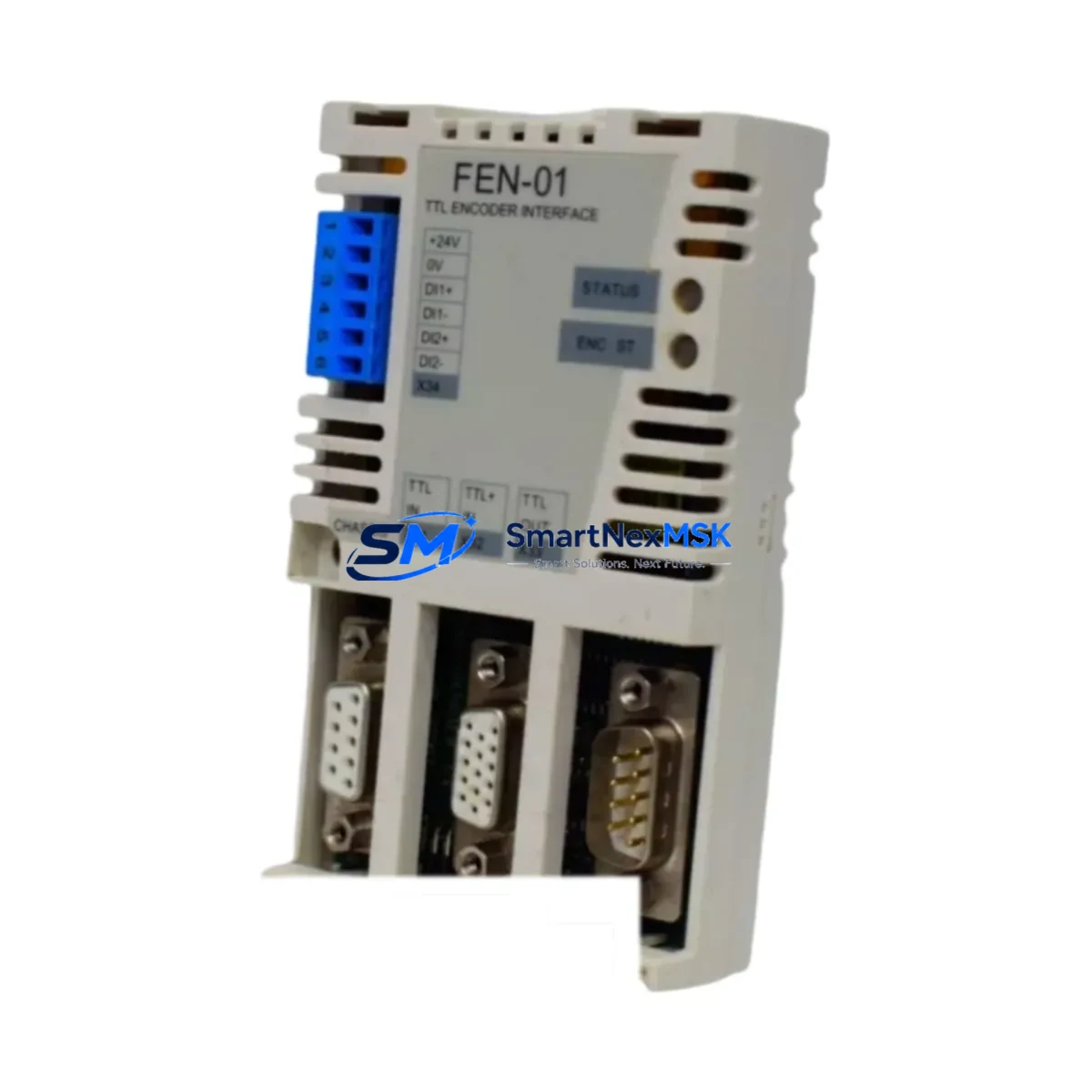
ABB FEN-01 Retrofit-Ready Encoder Interface for ACS Control Systems
The ABB FEN-01 is a dedicated encoder interface module engineered for closed-loop speed and position feedback in ABB ACS series variable frequency drives. As legacy automation systems age and original encoder feedback cards become increasingly difficult to source, the FEN-01 stands as the authoritative retrofit solution for engineers tasked with modernizing existing drive cabinets without replacing the entire drive platform. Whether you are upgrading an ACS800, ACS550, or ACS880 installation, or migrating from an older open-loop configuration to a closed-loop vector control architecture, the FEN-01 provides the hardware foundation for a reliable, low-risk transition.
Designed and manufactured in Finland to ABB’s industrial-grade standards, the FEN-01 mounts directly onto the drive’s option slot, eliminating the need for external signal conditioning hardware. It supports incremental TTL encoders with A, B, and Z pulse channels, making it compatible with the vast majority of motor-mounted encoders already installed in the field. For retrofit projects where the existing encoder is a legacy 5V TTL type, the FEN-01 accepts these signals natively, preserving the original motor and encoder investment while delivering the precision feedback required for demanding process applications such as winding, hoisting, and high-inertia conveyor systems.
Upgrade Compatibility Table
| Parameter | Details |
|---|---|
| Compatible Drive Series | ACS800, ACS880, ACS550, ACS580, ACS355 (option slot required) |
| Encoder Signal Type | Incremental TTL (5V), A/B/Z channels |
| Installation Interface | Drive option slot (Slot 1 or Slot 2 depending on drive model) |
| Communication Compatibility | DDCS fiber optic link, RDCO-0x communication modules |
| Replaces / Supersedes | OTAC-01, RTAC-01 (legacy encoder feedback cards) |
| Retrofit Recommendation | Direct slot-in replacement; verify drive firmware version ≥ required baseline |
| Commissioning Key Points | Set encoder pulses/rev in drive parameters; verify feedback polarity; run autotune |
| Warranty | 12 Months — covers manufacturing defects, tested before shipment |
Retrofit Planning for Existing Automation Systems
A successful FEN-01 retrofit begins well before the module arrives on site. The first step is a thorough audit of the existing drive cabinet. Engineers should confirm the target ACS drive has an available option slot — on ACS800 multi-drive systems, the RDCU control unit typically hosts the option slots, and the RDCO-02 or RDCO-03 fiber optic communication module may already occupy Slot 1, requiring the FEN-01 to be installed in Slot 2. On standalone ACS880 drives, the option slot layout differs, and the BCON-11 or BCON-12 Bluetooth connectivity module, if present, must be accounted for in the slot assignment plan.
Terminal wiring is the next critical checkpoint. The FEN-01 connects to the encoder via a dedicated terminal block on the module itself. Technicians must verify the encoder cable shielding is intact and that the cable run does not exceed the manufacturer’s recommended length for the encoder’s output voltage level. In older installations where the encoder cable was originally routed to an OTAC-01 or RTAC-01 card, the existing cable can often be re-terminated directly to the FEN-01 terminal block, significantly reducing rewiring labor. Always confirm encoder supply voltage compatibility — the FEN-01 provides a 5V encoder supply, and any encoder previously powered by an external 12V or 24V supply will require either a replacement encoder or a signal level converter.
On the drive parameter side, the key settings to configure after FEN-01 installation include the encoder pulse count per revolution, feedback channel selection, and speed feedback filter time. For ACS800 drives running DTC (Direct Torque Control), enabling encoder feedback typically requires switching the motor control mode from open-loop DTC to closed-loop DTC in the drive’s parameter group 98. On ACS880 drives using the Primary Control Program, the equivalent parameters are found in the Feedback configuration menu. In both cases, an ID run or motor autotune sequence should be performed after the FEN-01 is commissioned to ensure the drive’s internal motor model is aligned with the actual feedback signal.
For systems that include an ACS800 master-follower configuration using DDCS fiber optic links, the FEN-01 on the follower drive must be configured to accept speed reference from the master drive rather than from its own encoder independently. This is a common oversight during retrofit projects and can result in speed synchronization errors if not addressed during commissioning. Similarly, in applications where a Panel Bus or Modbus RTU link connects the drive to a SCADA or DCS system, the communication parameters must be re-verified after the option module change, as some drive firmware versions reset communication settings when a new option module is detected in the slot.
HMI screens connected to the drive via an ACS-CP-C or ACS-CP-D control panel should be checked for any encoder-related fault displays or speed feedback status indicators. If the plant uses a third-party HMI connected via Profibus DP through an RPBA-01 adapter module, the GSD file and I/O mapping should be reviewed to confirm that encoder feedback status words are correctly mapped to the HMI data blocks. In multi-axis systems where several ACS drives share a common DC bus and a JCU-01 or BCU-12 control unit manages the system, the FEN-01 configuration on each axis must be individually verified.
Downtime Control During System Migration
Minimizing production downtime during a FEN-01 retrofit requires a structured pre-commissioning strategy. Before the scheduled maintenance window, the existing drive parameters should be backed up using DriveStudio or Drive Composer software, saving the full parameter set to a PC or USB memory. This backup preserves the original open-loop tuning values, ramp times, torque limits, and process-specific settings, providing a recovery baseline if the closed-loop commissioning encounters unexpected behavior.
During the physical installation, the drive should be powered down and locked out following site LOTO procedures. The FEN-01 module slides into the option slot and is secured with the retaining screw — the entire mechanical installation typically takes under ten minutes. The encoder cable is then connected to the FEN-01 terminal block, and the drive is powered up for parameter configuration. With the parameter backup already prepared, the technician can restore all non-encoder parameters immediately, then configure only the FEN-01-specific settings from scratch. This approach reduces the active commissioning window to the encoder parameter setup and the autotune sequence, typically achievable within one to two hours for a single drive.
For critical processes where even a brief interruption is unacceptable, a parallel commissioning approach is recommended: install and configure the FEN-01 on a spare drive of the same model in the workshop, verify closed-loop operation on a test bench, then swap the pre-configured drive into the production cabinet during a planned short outage. This strategy is particularly effective in ACS800 multi-drive systems where individual drive modules can be exchanged without disturbing the common DC bus or the RDCO fiber optic network topology. Throughout the migration, the original program logic in the connected PLC — whether a Siemens S7-300, Allen-Bradley ControlLogix, or Schneider Modicon M340 — remains untouched, as the FEN-01 retrofit affects only the drive’s internal feedback configuration and does not alter the PLC-to-drive communication interface.
Retrofit Support FAQ
Q: Can the FEN-01 directly replace an OTAC-01 or RTAC-01 encoder feedback card?
A: Yes. The FEN-01 is the current-generation replacement for the legacy OTAC-01 and RTAC-01 encoder interface cards used in older ACS800 installations. The physical option slot interface is compatible, and the encoder terminal wiring can be re-used in most cases. After installation, the encoder-related drive parameters must be reconfigured to match the FEN-01’s parameter structure, which differs slightly from the legacy cards.
Q: What encoder types are compatible with the FEN-01?
A: The FEN-01 supports incremental TTL encoders with A, B, and Z (zero pulse) channels operating at 5V. It is not compatible with absolute encoders, sin/cos encoders, or HTL (High Threshold Logic) encoders without additional signal conditioning. If your existing encoder is an HTL type, consider the FEN-11 (HTL encoder interface) as an alternative.
Q: Is pre-shipment testing included, and what does the 12-month warranty cover?
A: Every FEN-01 unit is functionally tested before shipment to verify encoder signal reception, option slot communication, and power supply output. The 12-month warranty covers all manufacturing defects and functional failures under normal operating conditions. It does not cover damage resulting from incorrect installation, overvoltage, or environmental exposure beyond the module’s rated specifications.
Q: How do I verify the FEN-01 is correctly recognized by the ACS drive after installation?
A: After powering up the drive with the FEN-01 installed, navigate to the drive’s parameter group 98 (ACS800) or the Options menu (ACS880) and confirm that the option module is listed as detected. The drive will display the module type and slot assignment. If the module is not recognized, check that the option slot connector is fully seated and that the drive firmware version supports the FEN-01. A firmware update may be required on older ACS800 drives.
© 2026 SMARTNEXMSK. All rights reserved.
Original Source: https://smartnexmsk.com
Contact: [email protected] | +86 18259474341



