
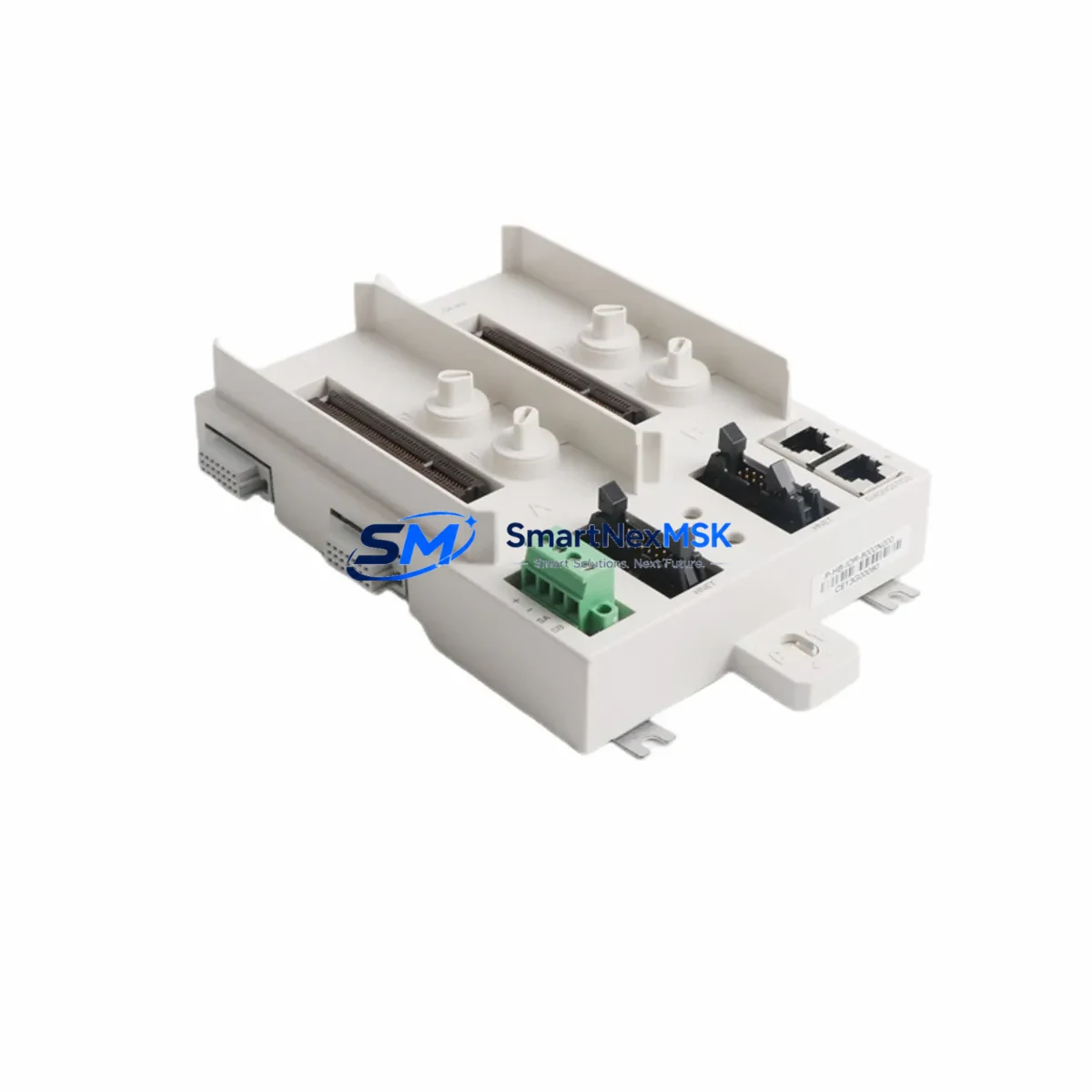
ABB P-HB-IOR-8000N200 Retrofit-Ready I/O Mounting Base for IOR 8000 Control Systems
The ABB P-HB-IOR-8000N200 is a high-density remote I/O mounting base engineered for the Harmony IOR 8000 Series distributed control architecture. As legacy DCS installations age and OEM support windows close, the P-HB-IOR-8000N200 has become a critical retrofit component for engineers tasked with extending the operational life of existing control systems without a full platform migration. Whether you are replacing a failed base unit, expanding an existing I/O rack, or modernizing a control cabinet that still runs proven ABB Harmony logic, this mounting base delivers the mechanical and electrical compatibility required for a smooth, low-risk upgrade.
Designed to accept standard IOR 8000 Series I/O modules, the P-HB-IOR-8000N200 maintains full backplane signal integrity across analog input, analog output, digital input, and digital output channel types. Its 200-position terminal configuration supports direct field wiring re-use, eliminating the need to re-terminate existing cable runs during a retrofit — a significant advantage when minimizing downtime is a project constraint. The base mounts on standard DIN rail or panel-mount configurations consistent with existing IOR 8000 enclosure layouts, preserving cabinet footprint and reducing mechanical rework.
In modernization projects where the host controller — such as an ABB AC 800M or a legacy ABB Advant OCS — remains in service, the P-HB-IOR-8000N200 allows engineers to replace degraded or end-of-life mounting bases without altering the I/O module addressing scheme or forcing a re-download of the control application. This is particularly valuable in continuous process environments where an unplanned program reload carries significant operational risk.
Upgrade Compatibility Table
| Parameter | Detail |
|---|---|
| Part Number | P-HB-IOR-8000N200 |
| Brand | ABB |
| Series | Harmony IOR 8000 |
| Product Type | Remote I/O Mounting Base |
| Terminal Count | 200-position field wiring terminals |
| Backplane Interface | Compatible with IOR 8000 Series I/O modules |
| Mounting | DIN rail / panel mount (consistent with IOR 8000 enclosure standard) |
| Communication Compatibility | PROFIBUS DP, Modbus RTU (via IOR 8000 communication modules) |
| Replacement Scope | Direct drop-in for degraded or end-of-life IOR 8000 mounting bases |
| Module Address Retention | Yes — no re-addressing required when replacing base only |
| Installation Requirement | Power isolation required during base swap; verify 24 VDC bus capacity |
| Commissioning Note | Confirm I/O module seating and terminal torque after installation |
| Warranty | 12 Months — covers manufacturing defects and functional failure |
| Origin | China (CN) |
| Weight | 440 g |
Retrofit Planning for Existing Automation Systems
A successful P-HB-IOR-8000N200 retrofit begins well before the physical swap. Engineers should audit the existing IOR 8000 rack assembly to confirm the power supply module — typically an ABB IOR 8000 PSU or equivalent 24 VDC rail-mount unit — can sustain the full load of all populated I/O slots after the base replacement. Undersized power capacity is one of the most common causes of intermittent faults following a base change, particularly in racks where additional I/O modules such as ABB DI810 digital input modules or ABB AO810 analog output modules have been added over time.
Before removing the existing base, document the physical wiring layout at each terminal block. In many IOR 8000 installations, field cables are labeled by terminal number rather than signal tag, making accurate re-termination dependent on the original wiring schedule. If the project involves migrating from an older Advant OCS rack to a current IOR 8000 architecture, the terminal numbering convention may differ, requiring a cross-reference between the legacy wiring diagram and the new base layout.
Communication continuity is another key planning item. IOR 8000 racks typically communicate to the host DCS via a PROFIBUS DP segment or, in older installations, via Modbus RTU over RS-485. The communication module — such as an ABB CI854 PROFIBUS DP interface or an ABB CI801 Fieldbus Communication Interface — remains in the rack during a base swap and does not require reconfiguration, provided the base replacement does not alter the rack’s physical slot assignments. Verify that the communication cable shield grounding point on the new base matches the original to avoid introducing ground loop noise on the fieldbus segment.
For projects that also involve upgrading the HMI layer — for example, migrating from an ABB Panel 800 operator terminal to a current-generation ABB CP600 HMI — confirm that all I/O signal tags referenced in the HMI graphic pages remain consistent with the tag database in the control application. A base swap alone does not affect tag mapping, but concurrent I/O module changes or slot reassignments will require HMI screen updates and a full functional test of all alarm and interlock displays.
Where the retrofit scope includes adding I/O capacity, the P-HB-IOR-8000N200’s 200-position terminal layout accommodates expansion without requiring a second enclosure in most standard cabinet configurations. Additional ABB AI810 analog input modules or ABB DO810 digital output modules can be populated into vacant slots on the new base, with module addresses assigned sequentially from the existing highest address to avoid conflicts with the running control program.
Finally, ensure that the programming cable — such as an ABB TK212A USB-to-serial adapter or equivalent — is available on-site for any post-installation verification using ABB Control Builder or the legacy Advant Builder environment. Even when no program changes are planned, the ability to go online and verify I/O status in real time is essential for confirming a successful retrofit before returning the system to automatic control.
Downtime Control During System Migration
Minimizing unplanned downtime during a P-HB-IOR-8000N200 base replacement requires a structured pre-outage preparation protocol. Begin by placing the affected IOR 8000 rack in manual override at the DCS workstation, ensuring all field devices connected to the rack’s I/O modules are held at their last safe output state. For critical loops — such as flow control valves or motor starters — coordinate with the operations team to confirm manual hold positions before isolating the rack’s 24 VDC power feed.
The physical base swap on an IOR 8000 rack is typically achievable within a two-to-four hour maintenance window when all replacement components, tools, and wiring documentation are staged in advance. Remove I/O modules in slot order, label each module with its slot position, and transfer them to the new P-HB-IOR-8000N200 base in the same sequence. Re-terminate field wiring terminal by terminal, verifying each connection against the wiring schedule before applying power.
After power restoration, bring the rack online at the DCS and perform a channel-by-channel I/O verification scan. Confirm that all analog input signals read within expected engineering unit ranges and that all digital input states match field device positions. For analog output channels, issue a manual test output from the DCS and verify the field device response before returning loops to automatic. This structured commissioning sequence protects the original program logic and ensures control continuity is fully restored before the maintenance window closes.
Where the project timeline permits, consider staging the new P-HB-IOR-8000N200 base with I/O modules pre-installed and pre-tested on the bench before the outage window. Bench testing with a 24 VDC bench supply and a laptop running ABB Control Builder allows engineers to verify module communication and channel functionality in advance, reducing the risk of discovering a faulty module during the live outage.
Retrofit Support FAQ
Q1: Is the P-HB-IOR-8000N200 a direct replacement for all IOR 8000 Series mounting bases?
The P-HB-IOR-8000N200 is designed for the 200-terminal IOR 8000 base configuration. Before ordering, confirm your existing base part number and terminal count. Installations using a different terminal density variant may require a different base model. Contact our technical team with your existing part number for a confirmed cross-reference.
Q2: Will replacing the mounting base require re-downloading the control program?
In most cases, no. A base-only replacement that preserves the existing I/O module slot assignments and module types does not require a program re-download. The host controller — whether an ABB AC 800M or a legacy Advant OCS — will re-establish communication with the rack automatically after power restoration. However, if any I/O modules are changed or slot assignments are modified during the retrofit, a partial or full program update may be required.
Q3: What pre-shipment testing is performed on the P-HB-IOR-8000N200?
Each unit undergoes functional verification prior to shipment, including backplane continuity testing, terminal block integrity checks, and visual inspection for mechanical damage. Units are shipped with protective packaging to prevent transit damage. A 12-month warranty covers manufacturing defects and functional failure from the date of shipment.
Q4: How do I verify wiring compatibility before installation?
Compare the terminal numbering layout of the P-HB-IOR-8000N200 against your existing wiring schedule. The 200-position terminal configuration follows the standard IOR 8000 Series terminal assignment convention. If your installation uses custom terminal labeling or non-standard wiring practices, prepare a terminal cross-reference map before the outage window to ensure accurate re-termination. Our technical support team can assist with wiring compatibility review upon request.
© 2026 SMARTNEXMSK. All rights reserved.
Original Source: https://smartnexmsk.com
Contact: [email protected] | +86 18259474341



