
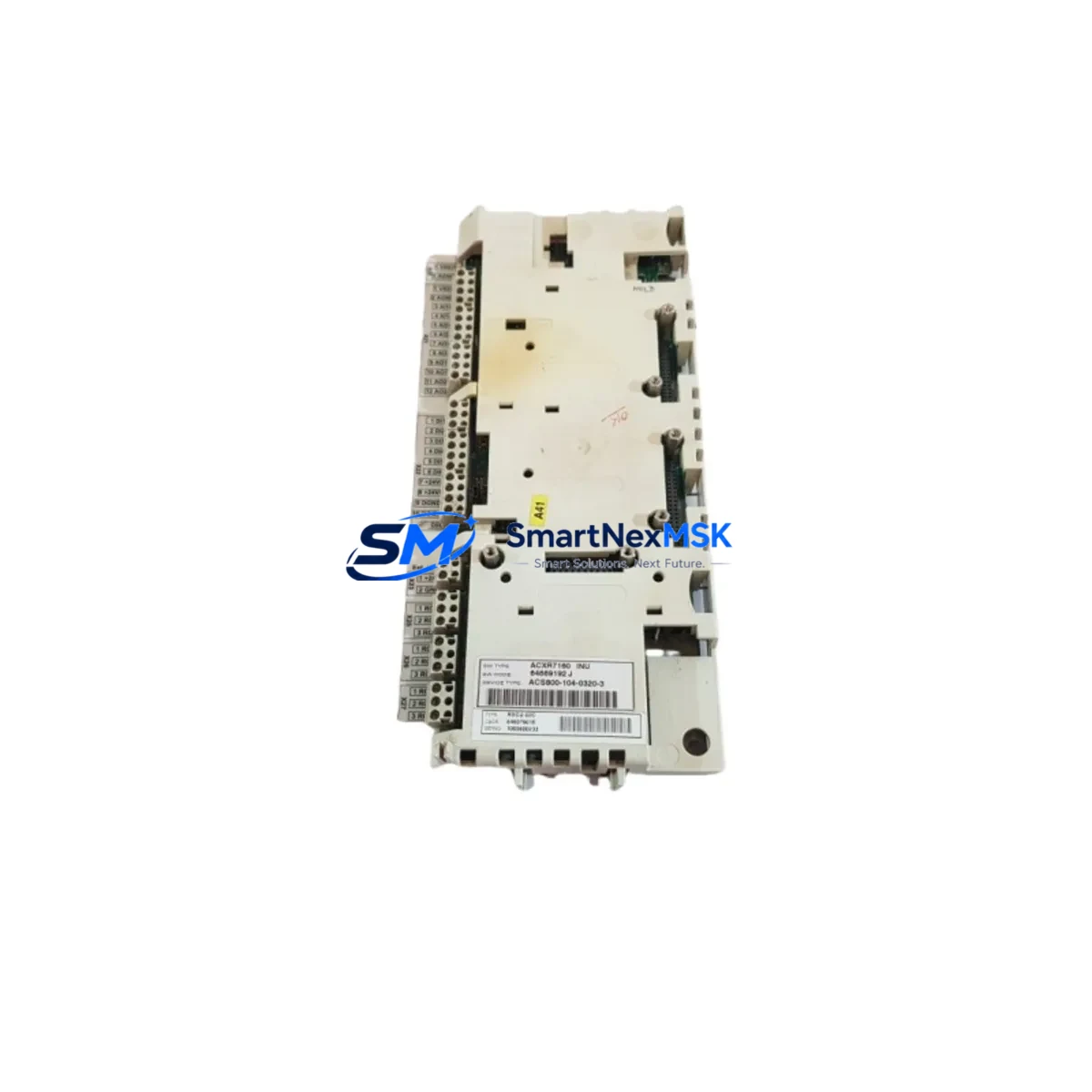
ABB RDCU-02C Retrofit-Ready Drive Control Unit for ACS800 Control Systems
The ABB RDCU-02C (Part No. 64607901E) is a retrofit-ready drive control unit engineered for seamless integration into existing ACS800 series variable frequency drive platforms. Whether you are replacing a failed control board, upgrading an aging drive cabinet, or migrating a legacy automation line to a more maintainable architecture, the RDCU-02C delivers the compatibility, reliability, and technical precision that industrial retrofit projects demand.
This unit serves as a direct functional replacement for the original RDCU-02C control board installed across a wide range of ACS800 single-drive and cabinet-mounted configurations. It supports the DDCS (Distributed Drives Communication System) fiber-optic communication protocol and is fully compatible with the RDCO-02C and RDCO-03C communication option modules, enabling engineers to preserve existing fieldbus topologies — including PROFIBUS-DP, DeviceNet, and Modbus — without rewiring or reconfiguring the communication layer.
Sourced from verified supply channels and tested prior to shipment, each unit is backed by a 12-month warranty covering manufacturing defects and functional failures under normal operating conditions.
Upgrade Compatibility Table
| Parameter | Details |
|---|---|
| SKU / Part Number | RDCU-02C / 64607901E |
| Compatible Drive Series | ABB ACS800 (single drive, cabinet, multi-drive) |
| Communication Interface | DDCS fiber-optic; compatible with RDCO-02C, RDCO-03C |
| Fieldbus Protocols Supported | PROFIBUS-DP, DeviceNet, Modbus RTU (via option module) |
| Mounting / Installation | Direct board swap; standard ACS800 control section slot |
| Power Supply Requirement | 24 VDC internal (supplied by drive power section) |
| Terminal Compatibility | Matches original RDCU-02C terminal layout; no rewiring required |
| Firmware / Parameter Compatibility | Compatible with ACS800 standard application programs; parameters retained via DriveWindow or CDP panel |
| Replacement Recommendation | Drop-in replacement; verify firmware version before commissioning |
| Commissioning Notes | Restore parameters from backup; verify I/O mapping and fault history reset |
| Warranty | 12 months from date of shipment |
Retrofit Planning for Existing Automation Systems
Retrofitting an ACS800 drive control section requires careful pre-planning to avoid extended downtime and ensure continuity of the production process. Before removing the failed or aging RDCU-02C board, engineers should use DriveWindow Light or a CDP control panel to perform a full parameter backup. This backup preserves motor data, application-specific tuning values, I/O configurations, and fault history — all of which are critical for restoring the drive to its pre-failure operating state.
When the replacement RDCU-02C is installed, confirm that the RMIO-11C or RMIO-12C I/O extension module (if present) is correctly seated and that its terminal wiring matches the original configuration. In systems where the ACS800 is integrated with a NPBA-12 PROFIBUS adapter or an NEBA-01 EtherNet/IP adapter, the communication node address and baud rate settings must be verified against the PLC program before the drive is brought online.
For cabinet-mounted multi-drive systems, the RDCU-02C interfaces with the drive’s inverter section via the internal DDCS fiber-optic link. Inspect the fiber connectors on both the control unit and the AINT-02C or AINT-11C inverter interface board for contamination or physical damage before reconnecting. A clean fiber link is essential for stable torque and speed control performance.
In applications where the ACS800 controls a motor connected to a legacy ACS600 or ACS550 era control cabinet, the RDCU-02C retrofit may also involve updating the HMI panel — typically a CDP312R or ACS-CP-C control panel — to ensure that the operator interface correctly reflects the new drive’s parameter set and alarm structure. Verify that all HMI display pages, setpoint references, and fault acknowledgment sequences function correctly during commissioning.
Where the system includes an external IOEC-04 or IOEC-07 I/O extension board connected via the DDCS ring, confirm that the board addresses are correctly set and that the PLC program’s I/O mapping table matches the physical wiring. Mismatched addresses are a common source of commissioning delays in multi-node DDCS topologies.
Downtime Control During System Migration
Minimizing production downtime during an RDCU-02C replacement is achievable with disciplined pre-staging and a structured commissioning sequence. The recommended approach is to pre-configure the replacement board offline — loading the parameter backup, setting the correct application macro, and verifying the firmware version — before the scheduled maintenance window begins.
During the physical swap, isolate the drive from the main power supply and allow the DC bus to fully discharge before opening the control section. Label all fiber-optic connections and terminal wiring before disconnection to eliminate reconnection errors. The RDCU-02C board swap itself typically takes under 30 minutes for a trained technician familiar with the ACS800 control section layout.
After reconnection, perform a controlled no-load test run before returning the drive to production. Verify speed reference tracking, I/O response, fieldbus communication status, and fault relay outputs. If the drive is part of a coordinated multi-drive system — for example, a winder or crane application using a MASTERBUS or DDCS master-follower configuration — confirm that the master-follower synchronization is re-established before enabling the production sequence.
With proper pre-staging, most ACS800 RDCU-02C retrofit projects can be completed within a single planned maintenance shift, keeping unplanned production losses to a minimum.
Retrofit Support FAQ
Q1: Is the RDCU-02C 64607901E a direct drop-in replacement for all ACS800 variants?
The RDCU-02C is compatible with the majority of ACS800 single-drive and cabinet-mounted configurations. However, some early ACS800 hardware revisions may use a different control board variant. Always verify the part number on the existing board and cross-reference with the ACS800 hardware manual before ordering.
Q2: Do I need to reconfigure parameters after installing the replacement board?
Yes. The replacement RDCU-02C ships without pre-loaded parameters. You must restore the parameter backup from your previous board using DriveWindow or a CDP panel. If no backup exists, parameters must be re-entered manually based on the motor nameplate data and application requirements.
Q3: Is the unit tested before shipment?
Yes. Each RDCU-02C unit undergoes functional verification testing prior to shipment. Units are inspected for board-level integrity, communication interface functionality, and power supply rail stability. A test report is available upon request.
Q4: What does the 12-month warranty cover?
The 12-month warranty covers manufacturing defects and functional failures under normal operating conditions from the date of shipment. It does not cover damage resulting from incorrect installation, overvoltage events, environmental contamination, or unauthorized modification. Warranty claims are processed via our sales team with a fault description and return authorization.
© 2026 SMARTNEXMSK. All rights reserved.
Original Source: https://smartnexmsk.com
Contact: [email protected] | +86 18259474341



