
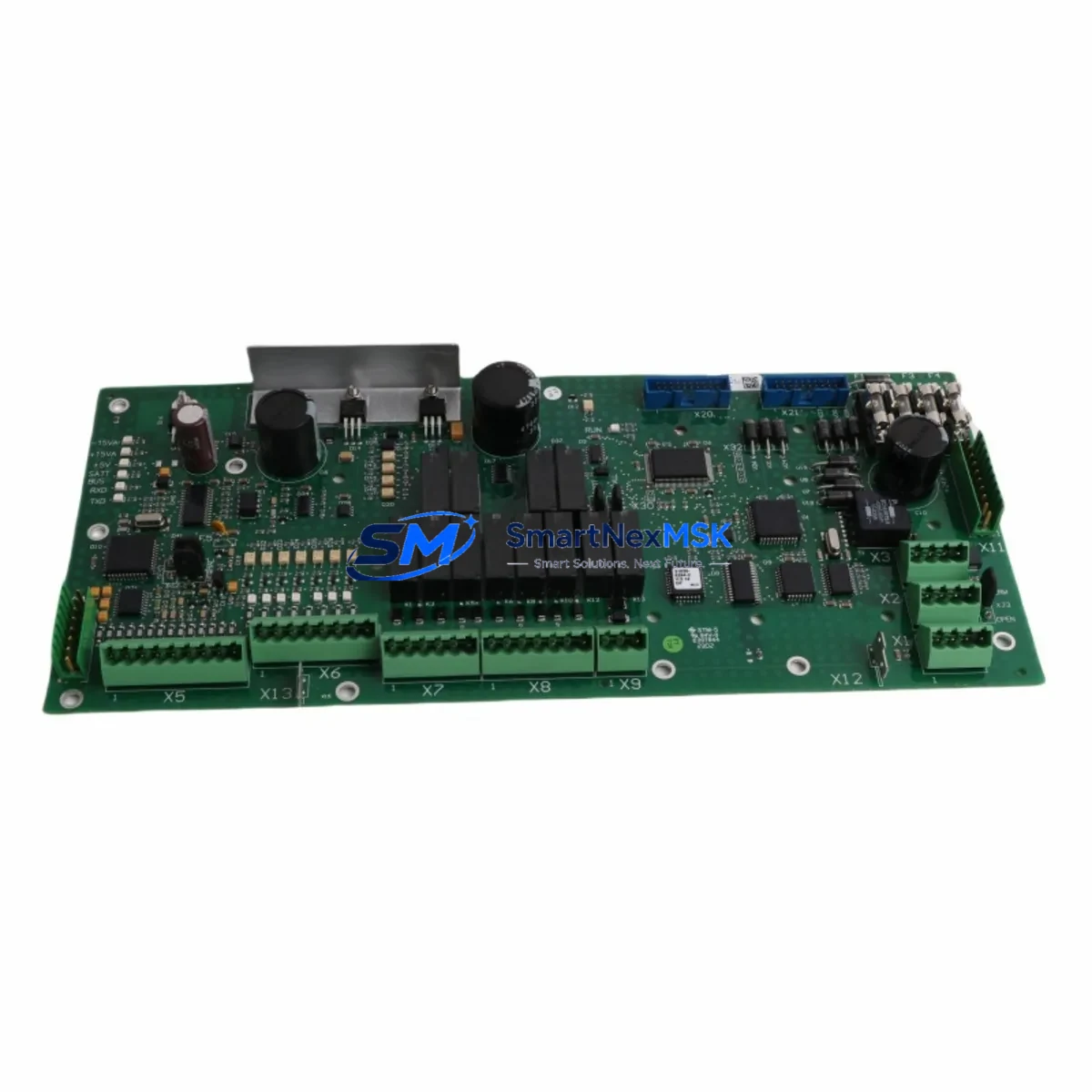
DFI EL620-C Retrofit-Ready SBC for EL620 Series Control Systems
The DFI EL620-C is a 3.5-inch industrial single board computer engineered for seamless compatibility with legacy EL620 Series embedded control platforms. Powered by the Intel Celeron N3350 dual-core processor and built to DFI’s industrial-grade specifications, the EL620-C is the preferred drop-in replacement for aging or discontinued EL620 Series boards deployed across manufacturing lines, machine vision stations, motion control cabinets, and distributed automation nodes. Whether you are managing a planned system upgrade or responding to an unplanned board failure, the EL620-C delivers the processing headroom, I/O compatibility, and long-term supply assurance that industrial retrofit projects demand.
Sourced directly from authorized distribution channels, every EL620-C unit shipped by SMARTNEXMSK undergoes pre-shipment functional verification covering POST completion, memory detection, storage interface recognition, and thermal performance under load. Each unit is backed by a 12-month warranty and ships with full documentation support to accelerate your integration timeline.
Upgrade Compatibility Table
| Parameter | Legacy EL620 Series Board | DFI EL620-C (Replacement) | Retrofit Notes |
|---|---|---|---|
| Form Factor | 3.5-inch SBC | 3.5-inch SBC | Direct mechanical fit; no chassis modification required |
| Processor | Intel Atom / Bay Trail variants | Intel Celeron N3350 (Apollo Lake) | Performance uplift; OS and driver re-validation recommended |
| Memory Interface | DDR3L SO-DIMM | DDR3L SO-DIMM (up to 8 GB) | Existing SO-DIMM modules may be reused if DDR3L-compatible |
| Storage Interface | mSATA / SATA II | mSATA + SATA III | Existing mSATA SSDs are compatible; SATA III offers higher throughput |
| Display Output | VGA / LVDS | VGA + LVDS (dual display) | Verify LVDS panel timing parameters in BIOS before HMI reconnection |
| Serial Ports (COM) | 2–4 × RS-232/RS-485 | 4 × COM (RS-232/RS-485 configurable) | Re-map COM port addresses in PLC or SCADA configuration after swap |
| USB | USB 2.0 | USB 3.0 + USB 2.0 | USB 3.0 backward compatible; verify dongle-based license keys |
| LAN | 1 × GbE | 2 × GbE (Intel i211) | Dual NIC supports network isolation between OT and IT segments |
| Operating Temperature | 0°C to 60°C | -20°C to 70°C (extended) | Suitable for harsh-environment cabinet installations |
| Power Input | 12V DC (AT/ATX) | 12V DC (AT/ATX selectable) | Confirm AT vs. ATX power mode matches existing PSU configuration |
| Watchdog Timer | Hardware WDT | Hardware WDT (programmable) | Re-configure WDT timeout values in application software |
| Warranty | End-of-life / no support | 12-Month Warranty | Covered from date of shipment; includes DOA replacement |
Retrofit Planning for Existing Automation Systems
A successful EL620-C retrofit begins well before the physical board swap. In most EL620 Series deployments, the SBC operates as the embedded computing core within a compact industrial PC chassis or DIN-rail mounted control cabinet, interfacing with field devices through a combination of serial communication modules, digital I/O expansion cards, and industrial Ethernet switches. Before initiating the replacement, engineers should audit the full bill of materials in the existing control cabinet.
Start by documenting the power supply unit (PSU) specifications — confirm whether the existing 12V DC PSU operates in AT or ATX mode, as the EL620-C supports both but requires explicit BIOS configuration. If the cabinet uses a shared rail supplying both the SBC and peripheral modules such as a DFI EC700-BT or similar embedded controller, verify that the combined current draw remains within the PSU’s rated capacity after the board swap.
Next, map all active serial communication links. In legacy EL620 deployments, COM ports are frequently assigned to Modbus RTU or RS-485 multi-drop networks connecting field instruments, variable frequency drives, and remote I/O terminals. The EL620-C provides four configurable COM ports, but OS-level COM port enumeration may differ from the legacy board — particularly if the original system used a MOXA CP-132EL or similar multi-port serial expansion card to extend the COM count. Update all PLC communication configurations, SCADA tag bindings, and HMI screen COM assignments accordingly.
For systems running WinPAC, XPAC, or embedded Windows-based SCADA platforms, the OS image from the legacy board is typically not directly transferable to the EL620-C due to chipset driver differences. Plan for a clean OS installation using the EL620-C’s supported image, followed by re-installation of the SCADA runtime, OPC server, and any dongle-based software licenses. If the system uses a Beckhoff CX series or Siemens SIMATIC IPC as the primary controller with the EL620-C serving as a visualization or data-logging node, coordinate the OS migration with the controller vendor’s support team to avoid protocol stack incompatibilities.
I/O expansion is another critical planning area. Many EL620 Series installations rely on PCIe Mini Card or PCI/104 expansion modules for additional digital inputs, analog outputs, or motion control axes. Verify that the EL620-C’s expansion slots match the form factor and bus interface of the existing expansion cards. Where PCI/104-Plus cards are in use, confirm stack-through connector compatibility before finalizing the replacement BOM. Similarly, if the system includes a Moxa EDS-308 or equivalent managed industrial Ethernet switch for PROFINET or EtherNet/IP traffic, validate that the EL620-C’s dual GbE ports can be configured to maintain the required network topology without disrupting upstream PLC communications.
LVDS-connected HMI panels require particular attention. If the existing EL620 board drives a 10.4-inch or 12.1-inch LVDS panel — common in operator interface stations on packaging lines or CNC machining centers — the LVDS timing parameters (pixel clock, H/V sync polarity, data mapping) must be re-entered in the EL620-C BIOS. Failure to match these parameters will result in a blank or distorted display at first boot. Retain the original BIOS configuration printout or photograph the legacy board’s BIOS screens before decommissioning it.
Downtime Control During System Migration
Minimizing unplanned downtime is the primary operational constraint in any industrial SBC retrofit. For EL620-C replacements, a structured migration approach can reduce total system downtime to under four hours in most standard cabinet configurations.
Begin with a full system image backup of the legacy board’s storage media — mSATA SSD or CompactFlash — using a bootable imaging tool such as Clonezilla or Acronis. Store the image on an external USB drive and retain it as a rollback option. Even if the image cannot be directly restored to the EL620-C due to driver differences, it serves as an authoritative reference for application configuration, IP address assignments, COM port mappings, and scheduled task definitions.
Where the production process permits, perform a parallel bench test before the live cutover. Mount the EL620-C in a spare chassis, replicate the OS and application stack, and simulate field device communication using a loop-back test harness or a bench-top PLC such as a Mitsubishi FX5U or Omron CP1H. Validate all COM port assignments, Ethernet connectivity, HMI display output, and watchdog timer behavior before scheduling the production cutover window.
During the live swap, follow a documented step-by-step procedure: power down the cabinet in the correct sequence, label and photograph all cable connections before disconnection, swap the board, reconnect all cables, restore power, and verify system startup within the watchdog timeout window. Keep a spare EL620-C unit on-site during the first 72 hours of post-retrofit operation to enable rapid board-level replacement if an early-life failure occurs. SMARTNEXMSK maintains in-stock inventory of the EL620-C to support same-day or next-day dispatch for emergency replacement scenarios, with a 12-month warranty covering all shipped units.
Retrofit Support FAQ
Q1: Is the DFI EL620-C a direct drop-in replacement for all EL620 Series boards?
The EL620-C shares the 3.5-inch form factor and mounting hole pattern with the EL620 Series, making it mechanically compatible with existing chassis. However, the processor architecture upgrade from Bay Trail to Apollo Lake requires OS and driver re-validation. Application software, COM port assignments, and LVDS display parameters must be reconfigured. SMARTNEXMSK provides pre-shipment functional testing and technical documentation to support this process.
Q2: What pre-shipment testing does each EL620-C unit undergo?
Every unit is tested for POST completion, DRAM detection and stability, storage interface recognition (mSATA and SATA), USB enumeration, dual GbE link-up, and thermal performance under sustained CPU load. A test report is available upon request. All units are covered by a 12-month warranty from the date of shipment, including DOA replacement within 30 days.
Q3: How do I verify COM port and serial communication compatibility before the live cutover?
Document all existing COM port assignments, baud rates, parity settings, and protocol types (Modbus RTU, RS-485 multi-drop, etc.) from the legacy system. After installing the OS on the EL620-C, verify that the Device Manager enumerates the correct number of COM ports and that the port numbers match your application’s configuration. If your system uses an external serial expansion card such as a MOXA CP-132EL, confirm driver availability for the EL620-C’s OS version before committing to the migration.
Q4: What is the warranty coverage and return process?
All EL620-C units sold by SMARTNEXMSK carry a 12-month warranty covering manufacturing defects and early-life failures. DOA claims are accepted within 30 days of receipt with photographic evidence of the defect. Warranty replacements are dispatched within 3 business days of claim approval. For units outside the warranty period, SMARTNEXMSK offers board-level repair assessment and access to refurbished exchange stock. Contact [email protected] to initiate a warranty claim or request a replacement quotation.
© 2026 SMARTNEXMSK. All rights reserved.
Original Source: https://smartnexmsk.com
Contact: [email protected] | +86 18259474341