NOVELLUS TT2301R2-1-NES-NOVELLUS2 Spare Novellus2: Spare Parts Replacement & Industrial Downtime Risk Control
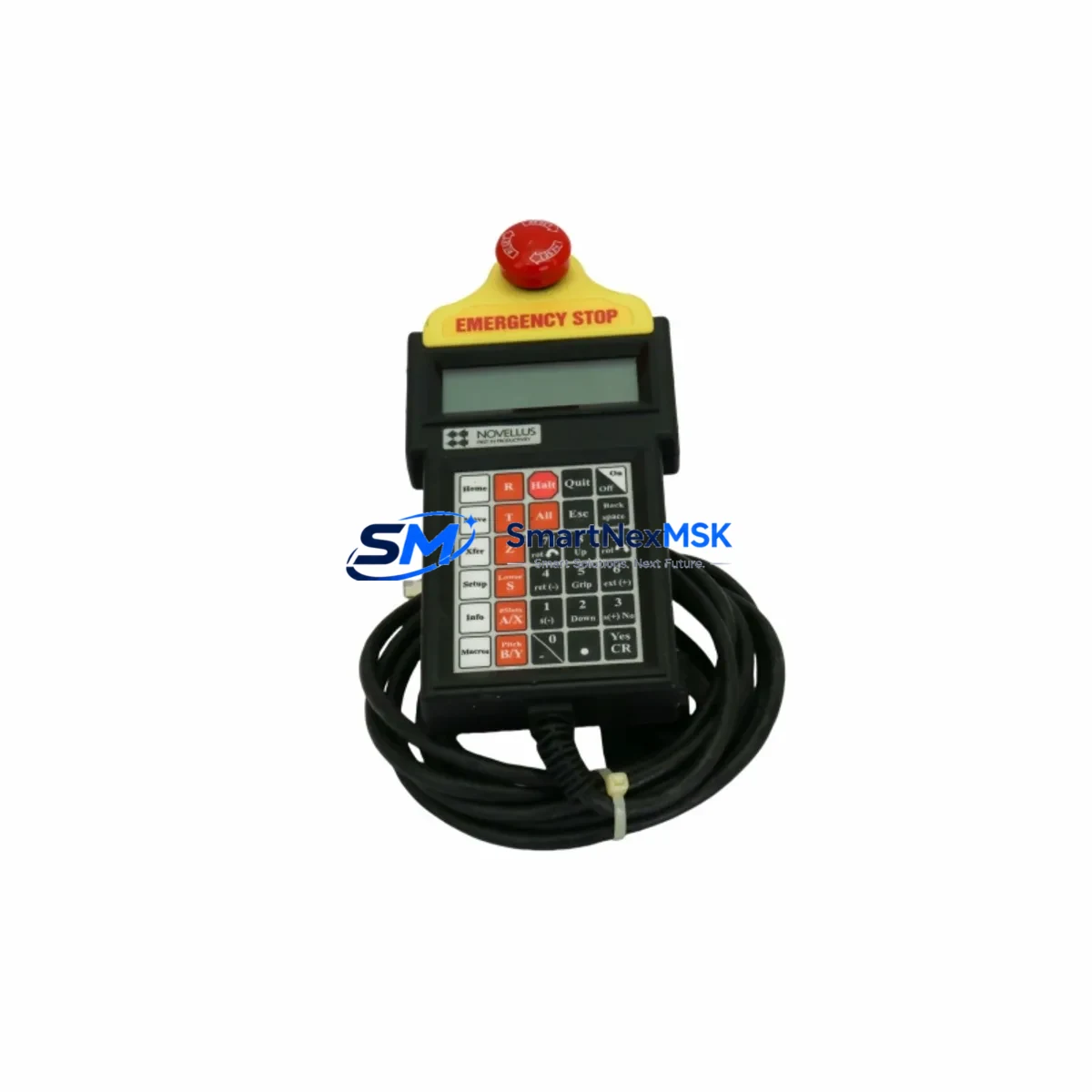
The NOVELLUS TT2301R2-1-NES-NOVELLUS2 is an original teach pendant designed for Novellus2-series CVD and PVD wafer handler automation systems. As a critical human-machine interface component within semiconductor process equipment, this teach pendant enables operators to program, jog, and verify robot arm positions during routine maintenance, recipe changeover, and post-repair recommissioning. Sourced as a genuine original spare, this unit is tested prior to shipment and backed by a 12-month warranty, ensuring your facility can restore full wafer-handling capability with minimal unplanned downtime.
For maintenance engineers managing aging Novellus2 CVD chambers or PVD cluster tools, the teach pendant is often the first component to show wear — connector fatigue, display degradation, and keypad failure are common failure modes after years of continuous use. Stocking a verified replacement unit of the TT2301R2-1-NES-NOVELLUS2 eliminates the risk of extended downtime caused by sourcing delays on this long-lead-time item. Procurement engineers should note that original NOVELLUS teach pendants for the Novellus2 platform are increasingly difficult to source through standard distribution channels, making pre-positioned spare inventory a sound operational strategy.
Spare Maintenance Table
| Parameter | Specification / Detail |
|---|---|
| Part Number / SKU | TT2301R2-1-NES-NOVELLUS2 |
| Brand | NOVELLUS |
| Component Type | Teach Pendant (HMI / Robot Programming Interface) |
| Compatible Platform | Novellus2 CVD / PVD Wafer Handler Automation Systems |
| Application | Semiconductor process equipment; robot arm jogging, position teaching, recipe commissioning |
| Origin | United States (OEM Original) |
| Interface | Pendant cable interface; compatible with Novellus2 robot controller backplane |
| Operating Environment | Cleanroom-compatible; semiconductor fab environment |
| Weight | Approx. 800 g |
| Condition | Original spare; pre-shipment functional test |
| Warranty | 12 Months |
| Shipping | ESD-safe packaging; global express delivery available |
| Barcode | 27-326390-00 |
Maintenance Planning for Continuous Operation
When replacing the TT2301R2-1-NES-NOVELLUS2 teach pendant in a Novellus2 system, a thorough inspection of the surrounding control architecture is essential to prevent repeat failures and ensure stable recommissioning. Maintenance engineers should treat pendant replacement as an opportunity to audit the full robot controller subsystem.
Begin by inspecting the pendant cable assembly — the coiled cable and strain-relief connector are high-wear items that frequently fail alongside the pendant body itself. If the cable shows cracking, intermittent continuity, or connector pin damage, it must be replaced concurrently. Next, verify the robot controller backplane and its associated I/O interface board; a faulty pendant connection can mask underlying backplane communication errors that will resurface after pendant replacement.
Check the 24 VDC control power supply feeding the pendant circuit — undervoltage conditions accelerate display and keypad failures. Inspect the fuse block and circuit protection on the pendant power rail; blown or degraded fuses are a common root cause of apparent pendant failure. For systems with a robot motion controller card (such as the Novellus2 SCARA or linear transfer module controller), confirm firmware compatibility between the replacement pendant and the installed controller revision before powering up.
During planned maintenance windows, also inspect the E-stop relay module wired into the pendant’s emergency stop circuit — degraded relay contacts can cause nuisance faults or, more critically, fail to trip during an actual emergency. The signal isolation module between the pendant and the process controller should be checked for drift, particularly in high-EMI fab environments. If the system uses a fieldbus communication module (DeviceNet or Profibus, depending on Novellus2 configuration), verify that the pendant’s communication handshake is clean after replacement.
For facilities running extended Novellus2 system life beyond original design intent, consider stocking the robot controller CPU board and teach pendant interface PCB as companion spares alongside the TT2301R2-1-NES-NOVELLUS2. This spare parts strategy ensures that a single component failure does not cascade into a multi-week sourcing delay across interdependent subsystems.
Site Replacement Workflow
Step 1 — Isolation & Lockout: Follow your facility’s LOTO procedure. De-energize the robot controller cabinet and confirm zero-energy state before disconnecting the teach pendant cable.
Step 2 — Cable Disconnect & Inspection: Disconnect the pendant cable at the controller interface panel. Inspect the connector pins and cable jacket. If wear is evident, replace the cable assembly before installing the new pendant.
Step 3 — Pendant Installation: Connect the TT2301R2-1-NES-NOVELLUS2 replacement unit. Ensure the locking collar is fully engaged. Restore control power and verify pendant display initialization.
Step 4 — Functional Verification: Perform a jog test across all robot axes at reduced speed. Confirm E-stop circuit response. Verify position readback matches the robot controller’s internal encoder values.
Step 5 — Recommissioning: Restore the system to automatic mode. Run a dry-cycle verification before resuming wafer processing. Document the replacement in your maintenance management system (CMMS) with the new unit’s serial number and installation date.
This workflow minimizes recommissioning time and ensures system compatibility is confirmed before production resumes, reducing the risk of a secondary fault event.
Spare Parts Support FAQ
Q1: Is the TT2301R2-1-NES-NOVELLUS2 an original OEM part or a third-party replacement?
This is an original NOVELLUS spare part, not an aftermarket or third-party substitute. Each unit is sourced from verified OEM supply channels and undergoes pre-shipment functional testing to confirm it meets original performance specifications for Novellus2 CVD/PVD wafer handler systems.
Q2: What does the 12-month warranty cover, and how is it handled?
The 12-month warranty covers manufacturing defects and functional failures under normal operating conditions. If a unit fails within the warranty period, we provide a replacement or full refund after fault verification. Warranty claims are processed directly through our support team at [email protected] — no third-party RMA routing required.
Q3: How do I confirm compatibility before ordering if my Novellus2 system has been modified or upgraded?
Provide your robot controller model number, firmware revision, and the existing pendant part number (visible on the label of the unit being replaced). Our technical team will cross-reference compatibility and confirm fit before shipment. We recommend this verification step for any system that has undergone controller upgrades or third-party modifications.
Q4: What is your typical lead time, and can you support emergency same-day dispatch?
In-stock units are dispatched within 1 business day. For critical downtime situations, contact us directly at +86 18259474341 to arrange priority processing and express courier booking. We maintain buffer stock of high-demand Novellus2 spare components specifically to support unplanned outage recovery scenarios.
© 2026 SMARTNEXMSK. All rights reserved.
Original Source: https://smartnexmsk.com
Contact: [email protected] | +86 18259474341