
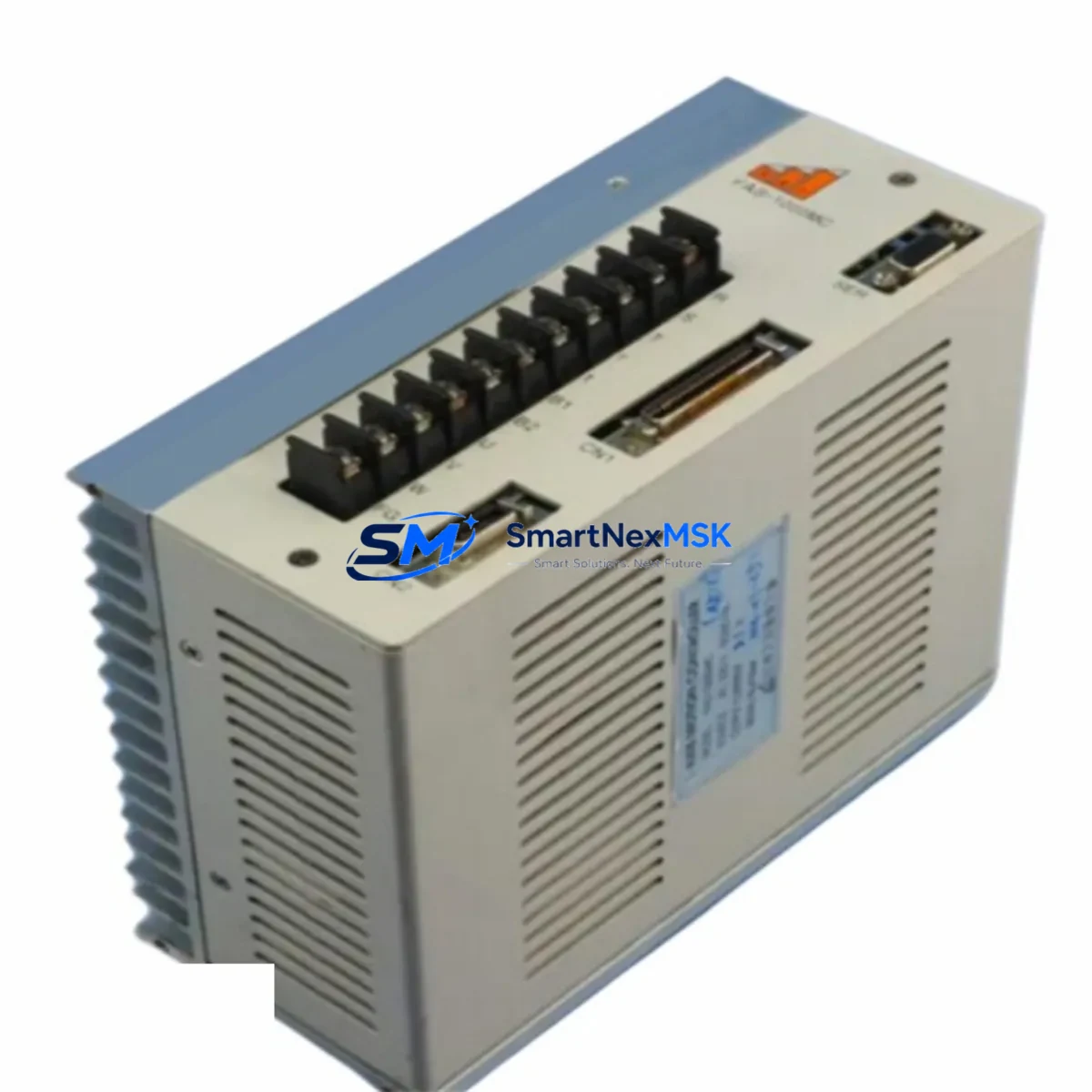
SAT FAS-1000MC Maintenance-Ready Spare for FAS-1000 Automation
The SAT FAS-1000MC is a multi-axis motion controller designed for high-precision industrial automation systems built on the FAS-1000 Series platform. For maintenance engineers managing servo-driven production lines, CNC machining centers, or coordinated motion applications, keeping a verified FAS-1000MC spare on the shelf is a fundamental risk-control measure. Unplanned downtime caused by a failed motion controller can cascade across an entire production cell — halting servo drives, disrupting encoder feedback loops, and triggering safety interlocks that require full system re-initialization before restart. A pre-tested, ready-to-install FAS-1000MC eliminates the most critical delay in that recovery sequence.
This unit ships as an original SAT spare, sourced through verified industrial supply channels. Each FAS-1000MC undergoes functional verification prior to dispatch, covering axis command output, communication interface integrity, and power-on self-test routines. The 12-month warranty covers manufacturing defects and confirmed functional failures under normal operating conditions, giving procurement engineers a defensible basis for spare parts budgeting and lifecycle planning.
For facilities running legacy FAS-1000 Series installations — particularly systems commissioned five or more years ago — the FAS-1000MC represents one of the highest-priority line items in any planned maintenance spare kit. As OEM support windows narrow and lead times for new-build controllers extend, maintaining at least one verified spare per production line is the most cost-effective strategy for sustaining uptime commitments.
Spare Maintenance Table
| Parameter | Specification / Detail |
|---|---|
| Part Number / SKU | FAS-1000MC |
| Brand | SAT (Shenzhen Automation Technology) |
| Series | FAS-1000 |
| Product Type | Multi-Axis Motion Controller |
| Origin | China (CN) |
| Compatibility | FAS-1000 Series servo systems; drop-in replacement for original FAS-1000MC installations |
| Typical Axis Count | Multi-axis (application-dependent; confirm with system documentation) |
| Communication Interface | EtherCAT / RS-485 / proprietary SAT bus (verify against installed system revision) |
| Power Supply Requirement | 24 VDC control power (confirm with panel wiring diagram) |
| Mounting | DIN rail / panel mount (per FAS-1000 Series cabinet standard) |
| Operating Temperature | 0°C to 55°C (storage: -20°C to 70°C) |
| Application Environment | Industrial control cabinets, servo motion cells, CNC integration panels |
| Maintenance Recommendation | Replace on first confirmed axis command fault or communication timeout; do not attempt field repair of controller PCB |
| Pre-Shipment Testing | Power-on self-test, axis output verification, communication interface check |
| Warranty | 12 Months — covers manufacturing defects and confirmed functional failures |
| Lead Time | In-stock units ship within 1–3 business days |
Maintenance Planning for Continuous Operation
When a FAS-1000MC failure is confirmed or suspected, experienced maintenance engineers know that the controller itself is rarely the only component that requires attention. A thorough site inspection should accompany every motion controller replacement to prevent repeat failures and ensure the restored system meets its original performance specification.
Begin with the 24 VDC control power supply feeding the FAS-1000MC. Voltage sag, ripple, or intermittent dropout is a leading cause of premature controller failure and is frequently overlooked during fault isolation. Measure output voltage under load and replace the power supply module if readings fall outside the ±5% tolerance band. In the same cabinet sweep, inspect the SAT FAS-1000 servo drive units connected to the controller — check for fault codes, verify encoder cable seating, and confirm that drive firmware versions are compatible with the replacement controller revision.
Examine all I/O terminal blocks and wiring harnesses connected to the FAS-1000MC’s digital input and output ports. Loose terminations, corroded contacts, or undersized conductors can introduce signal noise that mimics controller faults. If the system uses SAT communication modules for EtherCAT or fieldbus connectivity, verify module status LEDs and re-seat any modules showing intermittent link errors. For systems integrating signal isolators on analog command channels, confirm isolator output levels match the controller’s input range before commissioning the replacement unit.
Check the condition of 24 VDC relay modules used for enable signals and safety interlocks — worn relay contacts are a common source of erratic enable behavior that can be misdiagnosed as a controller fault. Inspect fuse holders and circuit protection devices in the controller power circuit; replace any fuses showing signs of thermal stress even if they have not yet opened. If the installation includes a SAT HMI panel communicating with the FAS-1000MC over a serial or Ethernet link, verify communication parameters and update the HMI project file if the replacement controller requires a firmware-matched configuration.
For older FAS-1000 Series installations, this is also an appropriate time to assess the condition of the backplane or mounting rack — inspect connector pins for oxidation and verify that all module retention clips are secure. Document the replacement event, including the failed unit’s serial number, fault symptoms, and the date of installation of the replacement FAS-1000MC, to support future maintenance planning and warranty claims.
Site Replacement Workflow
Step 1 — Isolate and de-energize. Follow your site’s lockout/tagout procedure. Isolate the FAS-1000 Series control cabinet from all power sources, including the 24 VDC control rail and any UPS-backed circuits. Confirm zero energy state with a calibrated voltage tester before opening the cabinet.
Step 2 — Document the existing installation. Photograph all wiring connections, cable routing, and module positions before removal. Record the firmware version and axis configuration parameters from the HMI or engineering software if the existing controller is still partially functional. This documentation is essential for restoring the system to its pre-fault configuration and avoids the need to re-commission axis parameters from scratch.
Step 3 — Remove the failed FAS-1000MC. Disconnect all cables in the order specified by the SAT FAS-1000 Series maintenance manual — typically communication cables first, then I/O connectors, then power. Release the DIN rail or panel mounting hardware and extract the unit. Inspect the vacated mounting position for signs of heat damage, moisture ingress, or mechanical stress.
Step 4 — Install the replacement FAS-1000MC. Mount the new unit, reconnect all cables in reverse removal order, and verify connector seating. Do not power on until all connections are confirmed. If the system uses a battery-backed real-time clock or parameter memory module, transfer or re-initialize as required.
Step 5 — Power-on and verify. Restore control power and observe the FAS-1000MC startup sequence. Confirm that all configured axes initialize without fault codes, that communication links to servo drives and HMI are established, and that I/O status matches expected states. Run a low-speed jog cycle on each axis before returning the system to automatic mode.
Step 6 — Update maintenance records. Log the replacement in your CMMS or maintenance register. Initiate a replacement spare order to restore your on-hand inventory to the minimum stocking level defined in your spare parts plan.
Spare Parts Support FAQ
Q: Is this FAS-1000MC unit an original SAT component or an aftermarket substitute?
A: This is an original SAT FAS-1000MC sourced through verified industrial supply channels. It is not an aftermarket, refurbished, or third-party compatible unit. Each unit is functionally tested prior to shipment and carries a 12-month warranty against manufacturing defects and confirmed functional failures.
Q: How do I confirm compatibility with my installed FAS-1000 Series system before ordering?
A: Locate the part number label on your existing controller — it should read FAS-1000MC. Cross-reference the hardware revision number if visible. If your system was commissioned with a specific firmware version, contact us with the revision details before ordering; we can confirm compatibility and advise on any firmware update requirements prior to installation.
Q: What is the recommended minimum stocking level for the FAS-1000MC in a multi-line facility?
A: For facilities operating three or more FAS-1000 Series motion axes, a minimum of one FAS-1000MC spare per production zone is recommended. For critical single-line operations where downtime cost exceeds the spare part value within hours, a two-unit buffer is advisable. Consult your maintenance planning team to align stocking levels with your MTTR targets and acceptable downtime thresholds.
Q: What does the 12-month warranty cover, and how is a warranty claim initiated?
A: The 12-month warranty covers confirmed manufacturing defects and functional failures under normal operating conditions. It does not cover damage resulting from incorrect installation, overvoltage events, physical impact, or unauthorized modification. To initiate a claim, contact our support team with the unit serial number, purchase date, and a description of the fault symptoms. We will advise on return authorization and replacement or repair options.
© 2026 SMARTNEXMSK. All rights reserved.
Original Source: https://smartnexmsk.com
Contact: [email protected] | +86 18259474341