
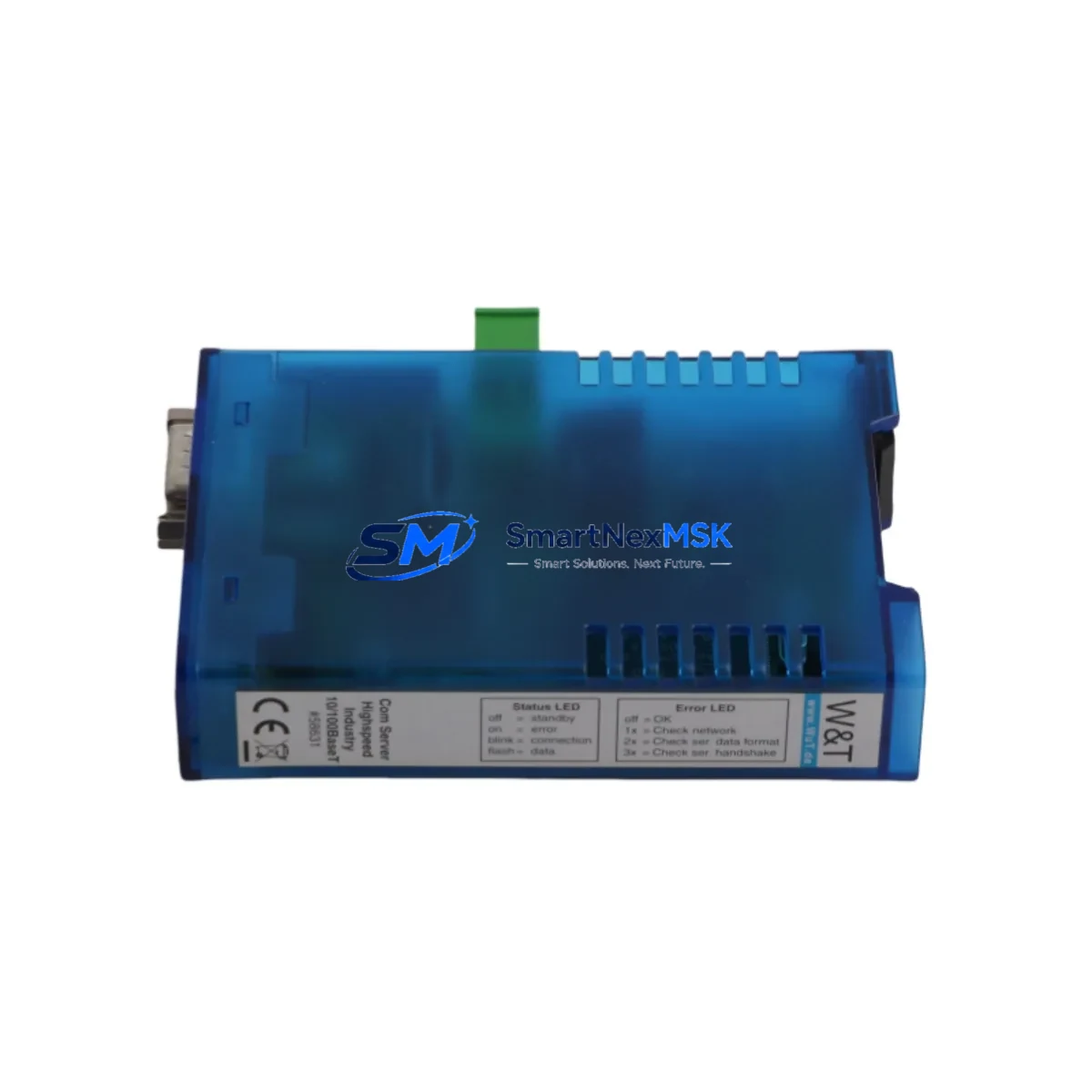
W&T 58631 Retrofit-Ready RS-232/485 Gateway for Com-Server Control Systems
The W&T 58631 Com-Server is a proven industrial serial-to-Ethernet gateway engineered for seamless integration into legacy automation environments. As a retrofit-ready replacement for discontinued or aging serial communication modules, the 58631 bridges RS-232 and RS-485 serial devices to modern TCP/IP Ethernet networks — enabling plant operators to extend the service life of existing control architectures without full system replacement.
In industrial retrofit projects, the 58631 is frequently deployed to replace end-of-life serial interface cards embedded in older SCADA workstations, DCS communication racks, and PLC remote I/O panels. Its compact DIN-rail form factor and wide operating temperature range make it suitable for installation directly inside existing control cabinets, minimizing the need for panel redesign. Engineers migrating from older Modbus RTU serial loops to Modbus TCP/IP Ethernet backbones consistently select the 58631 as the protocol bridge of choice, preserving existing field wiring while modernizing the communication layer.
When planning a retrofit using the W&T 58631, engineers must verify several critical compatibility parameters before commissioning. Power supply requirements should be confirmed against the existing 24 VDC rail capacity in the control cabinet — the 58631 draws modest current, but shared rails powering other modules such as the W&T 57736 Pocket Line Server or W&T 57727 Com-Server Highspeed must be assessed for total load. Terminal wiring must be mapped carefully: RS-232 DB9 pinout assignments (TxD, RxD, RTS, CTS, GND) and RS-485 two-wire or four-wire configurations differ between legacy devices, and incorrect wiring will prevent communication establishment. Technicians should document the original serial cable pinout before disconnecting the legacy module.
Backplane and rack interface considerations are straightforward for the 58631 since it is a standalone DIN-rail device rather than a backplane-mounted card — this simplifies installation in mixed-vendor cabinets where rack slots may already be occupied by modules such as Siemens CP 343-1 communication processors or Schneider Electric NOE 771 10 Ethernet modules. Module addressing must be configured via the W&T WuTility network configuration tool: IP address, subnet mask, gateway, and serial port parameters (baud rate, data bits, parity, stop bits) must match the legacy device’s original serial settings exactly to avoid communication faults after cutover.
Program compatibility is a key concern in retrofit projects. SCADA software such as Wonderware InTouch, Ignition, or WinCC communicating via virtual COM port drivers (using software such as W&T’s own WCOM or third-party tools) must be reconfigured to point to the 58631’s TCP/IP socket address. PLC programs on platforms such as Siemens S7-300 or Allen-Bradley ControlLogix that previously used serial MSG instructions may require ladder logic or function block modifications to switch to Ethernet-based communication. HMI screen tag bindings referencing legacy COM port addresses must be updated to reflect the new TCP/IP connection parameters.
Communication link verification should be performed using the 58631’s built-in web interface, which provides real-time port status, connection diagnostics, and data throughput monitoring. Before final handover, technicians should conduct a full field commissioning test covering: ping response from the control network, successful TCP socket connection from the SCADA host, bidirectional data exchange with the connected serial device, and alarm/event logging continuity. All test results should be documented as part of the retrofit acceptance record.
Upgrade Compatibility Table
| Parameter | W&T 58631 Com-Server | Retrofit Notes |
|---|---|---|
| Serial Interfaces | RS-232 (DB9) + RS-485 (terminal) | Verify legacy device pinout before wiring |
| Network Interface | 10/100 Mbit Ethernet (RJ45) | Compatible with standard industrial switches |
| Protocols Supported | TCP/IP, UDP, Modbus TCP, virtual COM | Replaces Modbus RTU serial loops via TCP bridge |
| Power Supply | 24 VDC (10–30 VDC range) | Confirm shared rail capacity with other modules |
| Mounting | DIN rail (35 mm) | No backplane slot required; fits existing cabinets |
| Configuration Tool | W&T WuTility / Web browser | Set IP, baud rate, parity to match legacy device |
| Replacement Compatibility | Replaces W&T 58011, 58012, 58013 legacy Com-Servers | Functional drop-in with parameter reconfiguration |
| Commissioning Test | Built-in web diagnostics + TCP socket test | Verify ping, socket, data exchange before handover |
| Warranty | 12-Month Warranty | Covered from date of shipment; includes DOA exchange |
Retrofit Planning for Existing Automation Systems
A successful retrofit using the W&T 58631 begins with a thorough audit of the existing serial communication topology. In a typical legacy control cabinet, the serial communication chain may include a Siemens S7-300 PLC with a CP 341 serial communication module, a Moxa NPort 5150 serial device server, or an older W&T 58011 Com-Server — all of which the 58631 is designed to replace or supplement. Engineers should map every serial device on the RS-485 bus, noting device addresses, baud rates, and polling intervals, before introducing the 58631 as the new network gateway.
In control cabinets where space is constrained, the 58631’s compact DIN-rail housing allows it to be installed adjacent to existing 24 VDC power supply modules, terminal blocks, and I/O marshalling strips without requiring panel expansion. When the retrofit also involves upgrading remote I/O — for example, replacing legacy Profibus DP remote I/O racks with Profinet-capable modules — the 58631 can serve as a parallel communication path for serial devices that are not yet migrated to the new fieldbus. This staged approach allows plant operators to maintain production continuity while progressively modernizing the communication infrastructure.
For systems where the legacy serial device is a barcode scanner, weighing terminal, or third-party instrument communicating via RS-232, the 58631’s virtual COM port driver enables the host PC application to communicate with the device over Ethernet as if it were still connected via a physical COM port — eliminating the need to modify the host application. In multi-drop RS-485 networks, the 58631 supports Modbus RTU master/slave topologies, making it compatible with field instruments, variable frequency drives, and smart sensors that use Modbus RTU as their native protocol. Technicians should also verify that the existing RS-485 cable termination resistors and bias resistors are correctly installed, as improper termination is a common source of communication errors after gateway replacement.
Downtime Control During System Migration
Minimizing unplanned downtime is the primary operational concern in any serial-to-Ethernet migration. The recommended approach when deploying the W&T 58631 is to pre-configure the unit on the bench before the scheduled maintenance window: assign the IP address, configure the serial port parameters, and verify connectivity using a laptop connected to the same network segment. This pre-commissioning step ensures that the installation window is limited to physical wiring and final connection testing rather than on-site configuration troubleshooting.
To protect the original PLC program logic during cutover, engineers should create a full program backup from the controller — whether a Siemens S7-300, Schneider Electric Modicon M340, or Allen-Bradley CompactLogix — before making any communication parameter changes. If the SCADA system uses a redundant communication path, the secondary path should remain active during the migration to maintain supervisory visibility. After the 58631 is installed and the TCP/IP connection is established, the SCADA host’s virtual COM port or socket connection should be tested with live data before the legacy serial module is physically removed from the cabinet. This hot-swap validation approach ensures that the control system remains in a known-good state throughout the migration, with the ability to revert to the legacy configuration if unexpected issues arise during commissioning.
Retrofit Support FAQ
Q1: Can the W&T 58631 directly replace an older W&T 58011 or 58012 Com-Server without hardware modification?
Yes. The 58631 is functionally compatible with earlier W&T Com-Server models and uses the same WuTility configuration tool. The primary change required is reconfiguring the IP address and serial port parameters to match the legacy unit’s settings. No hardware modification to the control cabinet is required beyond connecting the DIN-rail mount and terminal wiring.
Q2: What commissioning steps are required after installing the 58631 in a Modbus RTU network?
After physical installation and IP configuration, verify the serial port settings (baud rate, data bits, parity, stop bits) match the Modbus RTU slave devices on the RS-485 bus. Use the 58631’s built-in web interface to confirm port status, then test Modbus TCP polling from the SCADA host or PLC. Confirm that all slave device addresses respond correctly before declaring the migration complete.
Q3: Is the 58631 compatible with virtual COM port software used by legacy SCADA applications?
Yes. The W&T 58631 supports RFC 2217 (Telnet COM port control) and is compatible with standard virtual COM port drivers, including W&T’s own WCOM driver and third-party alternatives. This allows legacy SCADA applications that communicate via COM port to continue operating without software modification after the migration to TCP/IP.
Q4: What does the 12-month warranty cover, and what is the process for a warranty claim?
The 12-month warranty covers manufacturing defects and functional failures under normal operating conditions from the date of shipment. Dead-on-arrival (DOA) units are eligible for priority exchange. To initiate a warranty claim, contact [email protected] with the order number, unit serial number, and a description of the fault. Replacement units are dispatched after fault verification, with outgoing shipment tracking provided.
© 2026 SMARTNEXMSK. All rights reserved.
Original Source: https://smartnexmsk.com
Contact: [email protected] | +86 18259474341