
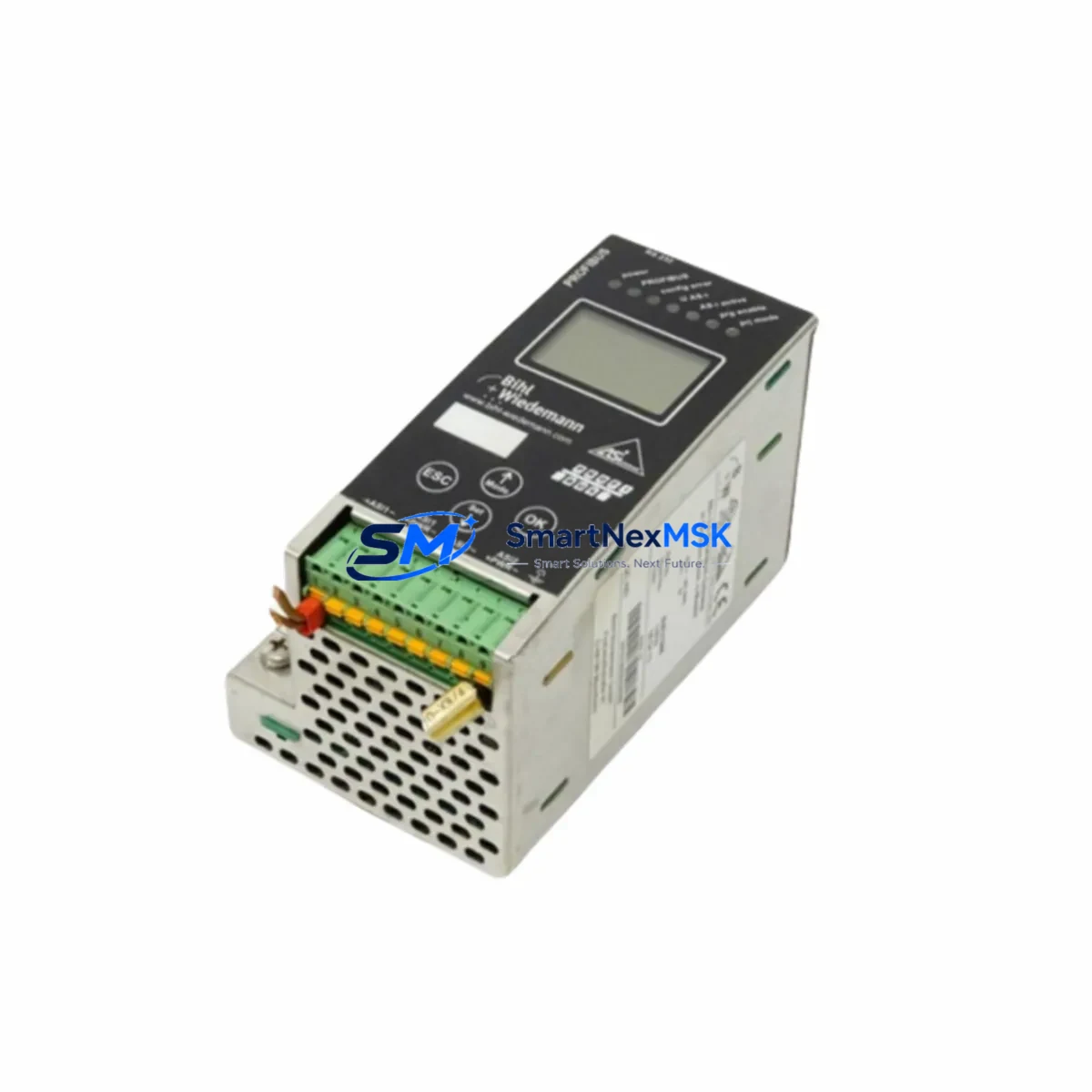
WIEDERMANN BWU1568 Retrofit-Ready Gateway for AS-I 3.0 Control Systems
The WIEDERMANN BWU1568 AS-I 3.0 BIH1 is a high-performance AS-Interface gateway engineered for seamless integration into existing automation architectures. As legacy AS-Interface 2.1 infrastructure reaches end-of-life, plant engineers and system integrators increasingly rely on the BWU1568 as a drop-in retrofit solution that preserves existing field wiring while unlocking the full feature set of the AS-Interface 3.0 specification. Whether you are modernizing a packaging line, upgrading a conveyor control cabinet, or migrating a distributed I/O network from an older Siemens S7-300 or S7-400 platform to a current S7-1500 or SIMATIC ET 200SP environment, the BWU1568 delivers the compatibility and reliability your project demands.
Sourced directly from authorized distribution channels and subject to full incoming inspection, every BWU1568 unit shipped by SMARTNEXMSK is verified against factory test parameters before dispatch. Stock is maintained on-hand to support urgent MRO requirements, planned shutdowns, and long-lead retrofit projects alike. All units carry a 12-month warranty covering manufacturing defects and functional failures under normal operating conditions.
Upgrade Compatibility Table
| Parameter | Legacy / Predecessor | BWU1568 AS-I 3.0 BIH1 | Retrofit Notes |
|---|---|---|---|
| AS-Interface Specification | AS-I 2.1 (31 slaves max) | AS-I 3.0 (62 slaves max) | Backward compatible; existing AS-I 2.1 slaves remain operational |
| Fieldbus / Upper Interface | PROFIBUS DP, DeviceNet | PROFIBUS DP / PROFINET (model-dependent) | Verify upper-level protocol before ordering; confirm PLC rack slot availability |
| Power Supply Requirement | AS-I power supply 29.5–31.6 V DC | AS-I power supply 29.5–31.6 V DC | Existing WIEDERMANN or Siemens AS-I power supplies are compatible; verify current capacity ≥ 8 A for full slave count |
| Terminal / Wiring Interface | Screw terminals, flat cable tap | Screw terminals, flat cable tap | No rewiring required for flat AS-I cable; confirm terminal torque spec (0.5–0.6 Nm) |
| Backplane / Rack Mounting | DIN rail 35 mm | DIN rail 35 mm | Direct mechanical replacement; check cabinet depth clearance |
| Module Address Assignment | Manual rotary switch or software | Software-configurable via STEP 7 / TIA Portal | Re-address slaves if migrating from rotary-switch legacy units; document existing address map before removal |
| Program / Logic Compatibility | S7-300 / S7-400 function blocks | Compatible with S7-1200 / S7-1500 / ET 200SP via updated GSD/GSDML | Import updated GSDML file into TIA Portal; remap I/O addresses in OB1 if address offsets differ |
| HMI Screen Adaptation | WinCC Classic / TP277 panels | Compatible with WinCC Unified / Comfort Panels | Update tag addresses in HMI project if I/O base address changes; test all alarm triggers |
| Communication Link Verification | PROFIBUS segment, baud rate 1.5 Mbit/s | PROFIBUS DP up to 12 Mbit/s | Retain existing baud rate during initial commissioning; optimize after stability confirmed |
| Commissioning / Diagnostics | LED indicators, handheld programmer | LED diagnostics + STEP 7 / TIA Portal online diagnostics | Use AS-I Control Monitor or TIA Portal device diagnostics to verify slave detection before going live |
| Warranty | — | 12 Months | Covers manufacturing defects and functional failures under normal operating conditions |
Retrofit Planning for Existing Automation Systems
A successful retrofit begins well before the maintenance window opens. When replacing a legacy AS-Interface gateway with the BWU1568, the first step is a thorough audit of the existing control cabinet. Engineers should document the current AS-I power supply model — commonly a WIEDERMANN BWU2786 or equivalent 8 A unit — and confirm that its output current budget can support the expanded slave count enabled by AS-I 3.0. If the existing supply is marginal, a parallel redundant supply or an upgraded unit should be staged before the cutover date.
Next, record the complete slave address map. In many legacy installations, slave addresses were assigned using rotary switches on devices such as WIEDERMANN BWU3573 or BWU3574 I/O modules. The BWU1568 supports software-based address assignment through TIA Portal, which simplifies future changes but requires that the existing address scheme be fully documented before the old gateway is removed. A printout or export of the AS-I Control Monitor slave list is strongly recommended.
Terminal wiring on the AS-I flat cable side is typically unchanged, as the BWU1568 uses the same flat cable tap and screw terminal interface as its predecessors. However, the upper-level fieldbus connection — whether PROFIBUS DP via a 9-pin Sub-D connector or PROFINET via RJ45 — must be verified against the PLC rack configuration. If the host controller is a Siemens S7-1500 with a CM 1542-5 PROFIBUS master module, the existing PROFIBUS segment can be retained. If the project involves migrating to PROFINET, a new CP 1543-1 or integrated PROFINET interface on the CPU must be configured, and the GSDML file for the BWU1568 must be imported into the TIA Portal hardware catalog.
I/O expansion during the retrofit is a common requirement. The AS-I 3.0 specification supports up to 62 slaves on a single segment, compared to 31 under AS-I 2.1. This headroom allows engineers to add new WIEDERMANN BWU3580 digital input modules or BWU3582 digital output modules to the existing flat cable without adding a second gateway or power supply, provided the current budget allows. Analog I/O expansion using WIEDERMANN BWU3590 or compatible analog slave modules can also be accommodated within the same segment.
For installations that include safety-rated devices — such as AS-Interface Safety at Work (ASIsafe) slaves — the BWU1568 BIH1 variant supports the ASIsafe protocol, allowing existing safety door monitors, light curtain interfaces, and emergency stop modules to remain on the same AS-I segment. The safety monitor function must be reconfigured and validated after any gateway replacement, in accordance with the applicable machinery safety standard (ISO 13849 or IEC 62061).
Programming cable and laptop access to the gateway during commissioning is essential. A standard USB-to-PROFIBUS adapter or the Siemens PC Adapter USB A2 is sufficient for STEP 7 or TIA Portal connectivity. Before going live, use the online diagnostics view to confirm that all expected slaves are detected, that no address conflicts exist, and that the cycle time is within the application’s tolerance. A pre-shipment functional test report is available upon request for all BWU1568 units supplied by SMARTNEXMSK.
Downtime Control During System Migration
Minimizing unplanned downtime is the primary concern for any retrofit project on a running production line. The recommended approach is a staged cutover: prepare the new BWU1568 gateway on a bench, configure it fully in TIA Portal with the correct GSDML, slave addresses, and I/O mapping, and perform a loop-back test before the maintenance window begins. This eliminates configuration errors as a source of delay during the actual cutover.
During the maintenance window, follow a structured sequence: isolate the AS-I segment by de-energizing the AS-I power supply, remove the legacy gateway, install the BWU1568 in the same DIN rail position, reconnect the flat cable tap and fieldbus connector, and restore power. The entire mechanical swap typically takes under 30 minutes for an experienced technician. The remaining time in the window should be allocated to online diagnostics, slave detection verification, HMI alarm acknowledgment, and a supervised production trial run.
To protect the original program logic, always create a full backup of the PLC project — including hardware configuration, OB1, and all function blocks — before beginning any hardware change. If the I/O base address of the BWU1568 differs from the legacy gateway due to rack slot reassignment, update the symbolic address table in TIA Portal and recompile before downloading. Do not overwrite the PLC program until the new hardware configuration has been confirmed online. This two-step approach — hardware first, software second — preserves the ability to revert to the original configuration if an unexpected issue arises during commissioning.
For critical processes where even a brief interruption is unacceptable, a hot-standby strategy using a second PLC CPU with a pre-loaded program and a pre-configured BWU1568 can be staged adjacent to the control cabinet, ready for a rapid swap if the primary system encounters an issue during the cutover window.
Retrofit Support FAQ
Q1: Is the BWU1568 AS-I 3.0 BIH1 a direct replacement for older WIEDERMANN AS-Interface gateways?
A: Yes. The BWU1568 is mechanically and electrically compatible with the same DIN rail mounting and flat cable tap interface used by previous WIEDERMANN AS-I gateway generations. AS-I 3.0 is fully backward compatible with AS-I 2.1 slaves, so existing field devices remain operational after the gateway swap. The primary change is the upper-level fieldbus configuration, which must be updated in the PLC hardware project.
Q2: What commissioning steps are required after installing the BWU1568?
A: After mechanical installation and wiring, import the BWU1568 GSDML file into TIA Portal, configure the device in the hardware catalog, download the updated hardware configuration to the PLC, and use the online diagnostics view to verify that all AS-I slaves are detected at their correct addresses. Confirm I/O data exchange by monitoring process image inputs and outputs in a watch table. For ASIsafe variants, re-validate the safety monitor configuration and document the validation result.
Q3: How do I verify wiring compatibility before removing the legacy gateway?
A: Photograph and document all terminal connections on the existing gateway before removal, including the AS-I flat cable tap, the fieldbus connector, and any auxiliary 24 V DC supply terminals. Compare the terminal layout of the BWU1568 against the legacy unit using the respective installation manuals. In most cases, the flat cable tap connection is identical; the fieldbus connector pinout should be verified against the PROFIBUS or PROFINET port specification of the BWU1568.
Q4: What does the 12-month warranty cover, and how is a claim processed?
A: The 12-month warranty covers manufacturing defects and functional failures under normal operating conditions, commencing from the date of shipment. It does not cover damage resulting from incorrect installation, overvoltage, or unauthorized modification. To initiate a warranty claim, contact SMARTNEXMSK at [email protected] with the order reference, unit serial number, and a description of the fault. A replacement unit or repair will be arranged within the agreed lead time. Pre-shipment test reports are available for all units upon request.
© 2026 SMARTNEXMSK. All rights reserved.
Original Source: https://smartnexmsk.com
Contact: [email protected] | +86 18259474341