
Siemens S7-1200 G1 Phase-Out: Spare Planning
Siemens has published S7-1200 G1 phase-out dates. This guide turns them into practical spare coverage and G2 migration decisions.
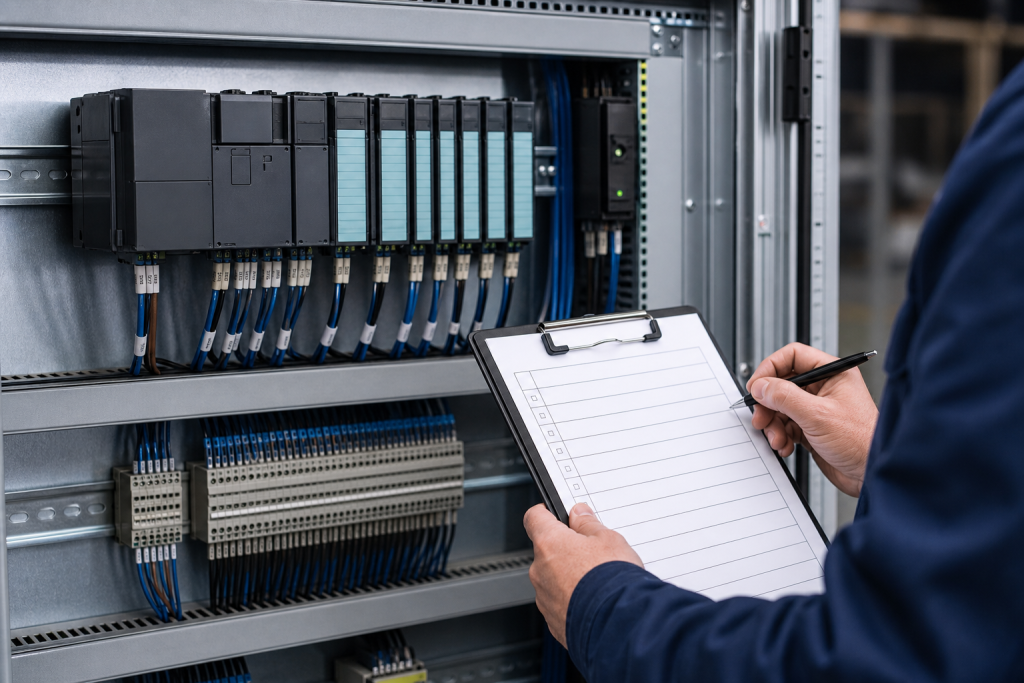
Siemens has put a concrete date on a lifecycle decision that many machine builders and plant maintenance teams can no longer leave in a spreadsheet. On its automation migration page, Siemens says the first generation of SIMATIC S7-1200 controllers will begin a gradual phase-out on November 1, 2026. The same page says G1 devices can still be ordered as new equipment until October 31, 2027, while modules are planned to remain available as spare parts until approximately 2036.
That timetable does not mean every S7-1200 installation needs an immediate migration. It does mean that the maintenance record should now separate three decisions: what must be kept running, what should be bought before the procurement window changes, and what should be designed around the S7-1200 G2 successor. The safest response is evidence-led planning, not a rushed replacement of every controller on site.
What the G1 dates mean for maintenance teams
The most important date for a maintenance engineer is not always the final new-device order date. It is the date when an installed controller becomes difficult to identify, source, test, or replace under outage pressure. A plant may have several S7-1200 G1 models, different firmware states, mixed I/O configurations, and different levels of redundancy or manual fallback. A single portfolio-level date therefore needs to be translated into a location-by-location risk map.
Start by listing every S7-1200 controller and associated module in service. Record the exact MLFB or part number, firmware version where available, cabinet or machine reference, connected I/O, communication modules, expansion modules, installed quantity, and the consequence of failure. Add the last known replacement date and the person responsible for the current TIA Portal project. This turns a general lifecycle notice into a usable maintenance register.
Do not assume that two controllers are interchangeable because both are described as S7-1200. CPU memory, communication interfaces, firmware compatibility, power requirements, expansion limits, and the connected application can all change the replacement method. The part number is the starting point; the installed project and cabinet evidence complete the check.
Build a spare position before you build a migration project
For critical machines, define the minimum spare position that protects recovery. That may be one controller, but it may also include a specific communication module, signal board, memory element, power component, terminal arrangement, or a validated set of expansion modules. The right question is not “How many S7-1200 CPUs do we own?” It is “Which failure combinations can stop the machine, and which exact component is required to restore it?”
A precise model-specific sourcing record is more useful than a generic family label. For example, the live Siemens 6ES7214-1HG40-0XB0 S7-1200 spare and the Siemens 6ES7214-1AG40-0XB0 S7-1200 spare should be treated as separate procurement records. Each record still needs to be matched against the installed project, revision, cabinet photographs, and machine function.
Keep a distinction between a spare that is physically available and a spare that is outage-ready. An outage-ready unit has an identity record, a compatibility basis, condition evidence, storage or packaging information, and a documented installation and recovery sequence. If the team must discover the correct firmware, connector arrangement, or project backup during the shutdown, the inventory is not yet ready.
Capture the evidence that disappears first
Before removing or relocating any G1 hardware, capture the evidence that is easiest to lose. Photograph the complete controller, nameplate, connectors, expansion arrangement, cabinet position, and nearby power or communication components. Save the photographs with the plant asset identifier, not only the model number. Record the current diagnostics and any active but tolerated faults according to the site’s approved procedures.
Preserve the relevant TIA Portal project and document who owns the current source of truth. Confirm the project version, hardware configuration, communication addressing, safety or technology options, and the approved backup location. A spare controller without the right project evidence may be a box on a shelf rather than a recovery asset.
Also record what was not verified. If a unit has not been powered or bench-tested, say so. If the plant cannot reproduce the installed network or machine cycle outside production, do not imply that a site-level functional test has been completed. Clear limits are more valuable than an overstated condition label.
Decide where G2 belongs in the plan
Siemens positions SIMATIC S7-1200 G2 as the successor for future requirements and highlights higher performance, modern safety, expanded motion-control capability, and digitalization readiness. Siemens also provides a G2 product overview and a G2 migration resource. Those resources are useful starting points, but a successor platform is not automatically a drop-in replacement for an installed G1 machine.
Separate the G2 decision into three classes. First, machines that need continued G1 support and should receive a documented spare position. Second, machines already scheduled for electrical or controls modernization, where G2 can be evaluated as part of a planned project. Third, machines where a failure would cause disproportionate downtime and where a migration study should begin before the next outage.
For each candidate, compare the installed I/O, communication topology, motion or safety functions, HMI dependencies, panel space, wiring, engineering tools, validation work, and operator training. The result may be a G1 spare, a partial retrofit, or a full migration. Treating all three as the same decision creates unnecessary cost and can introduce avoidable outage risk.
Use the 2027 window intelligently
The announced ability to order G1 as new equipment until October 31, 2027 should not be interpreted as a reason to postpone every decision. It is a planning window. Use it to close documentation gaps, identify high-consequence assets, obtain model-specific evidence, and decide which installations genuinely need a last-time-buy quantity.
Frequently asked questions
Does the November 1, 2026 date mean S7-1200 G1 stops working?
No. It is the start of the gradual phase-out stated by Siemens. Existing equipment can continue operating, but procurement, documentation, and migration planning should become more deliberate.
Should every G1 controller be replaced by G2 now?
No. First classify the asset. Some installations need a verified G1 spare, some are good candidates for a planned G2 project, and some need a migration study because their failure consequence is high.
Can one S7-1200 CPU spare cover several machines?
Only after model, firmware, I/O, communication, project, and physical installation requirements are compared. A family name alone is not a compatibility approval.
What should be included in a G1 spare record?
Include the exact part number, installed location, photographs, firmware and project evidence, connected modules, condition and packaging notes, storage owner, acceptance criteria, and the approved recovery sequence.
When should a G2 migration study begin?
Begin when a machine has high downtime consequence, weak G1 spare coverage, unusual configuration, a planned controls change, or a replacement that would require substantial engineering work anyway.
Practical next step
For an S7-1200 G1 review, send the exact CPU or module number, nameplate and cabinet photographs, installed I/O and communication details, project or firmware information where available, and the target delivery or migration requirement. SmartNexMSK can help separate a model match from a system-compatible spare and identify which assets need a G2 migration study. Contact [email protected] or WhatsApp/Phone +86 18259474341.
Route this topic into a sourcing request
Connect the article topic to a model number, category, brand, quantity, and destination before opening the RFQ.
Related Insights
Continue with sourcing and model matching guides
 Sep 8, 2026
SANYO DENKI QS1E Spares: Save Parameters First
When a SANMOTION Q axis stops, the purchasing request often becomes a model number: “Please quote QS1E01AA0H4A3P1T.” That is a useful starting point, but…
Read guide Sep 6, 2026
Yaskawa SGDH-05DE-OY Spares: Check the Servo Chain
A servo drive fault often produces a deceptively simple purchasing request: “Replace the SGDH-05DE-OY.” In a running machine, however, the amplifier is only one…
Read guide Sep 5, 2026
GE IS220PCLAH1A Spares: Check Mark VIe Fit
When a Mark VIe cabinet develops an intermittent control fault, the urgent request often becomes a single line: “Please quote IS220PCLAH1A.” That is understandable…
Read guide