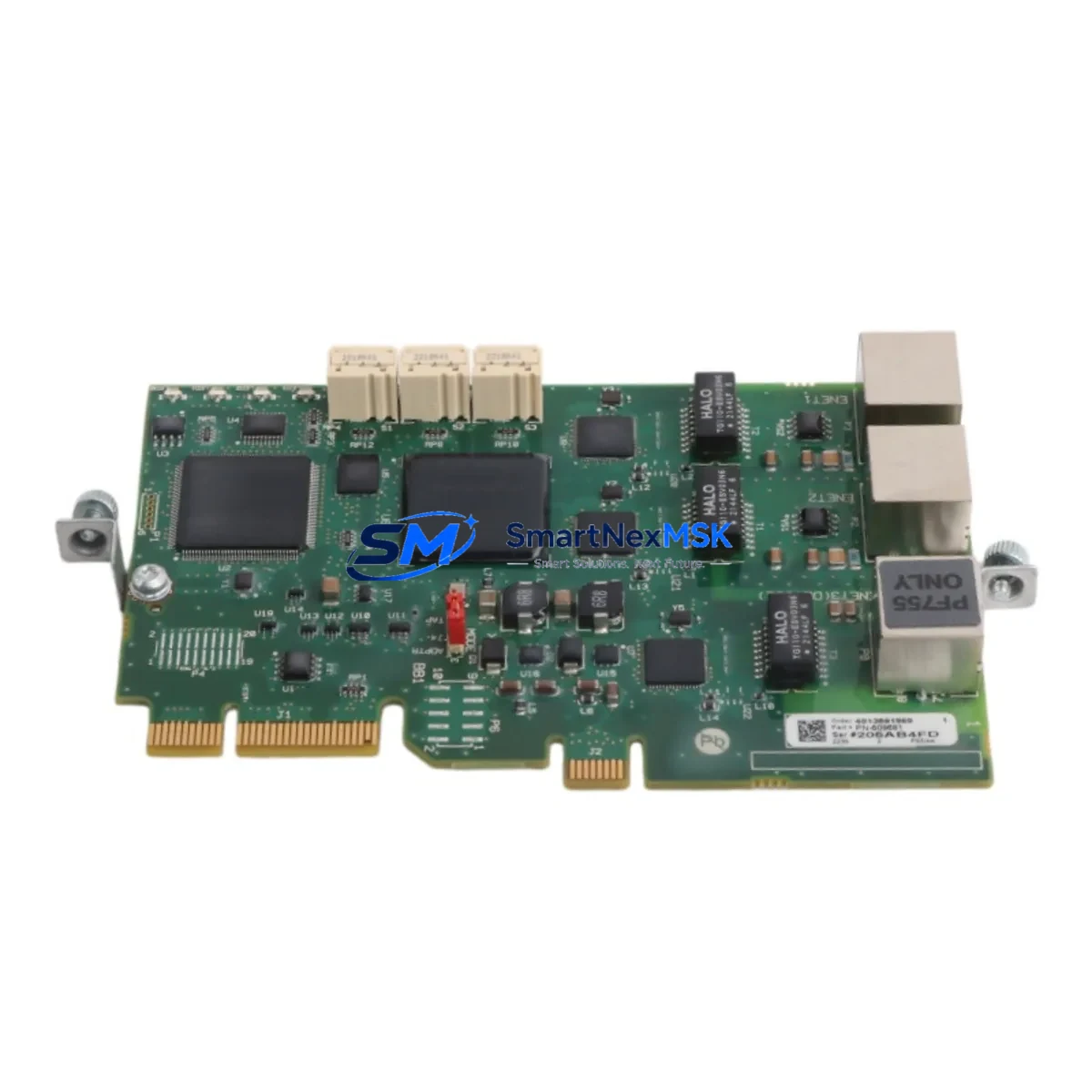
Allen-Bradley 20-750-ENETR Retrofit-Ready Dual-Port EtherNet/IP Module for PowerFlex 750 Control Systems
The Allen-Bradley 20-750-ENETR is a Dual-Port EtherNet/IP Option Module designed for the PowerFlex 750 Series of AC drives. As legacy drive communication infrastructure ages and original modules reach end-of-life or become difficult to source, the 20-750-ENETR has become one of the most sought-after retrofit components in industrial automation modernization projects. Whether you are replacing a failed communication card in a running production line, upgrading an older single-port EtherNet/IP module, or migrating a legacy DeviceNet or ControlNet architecture to a unified EtherNet/IP backbone, the 20-750-ENETR provides a direct, low-disruption path forward.
This module installs into the option card slot of PowerFlex 755, PowerFlex 753, and PowerFlex 750 Series drives, occupying Port 4, 5, or 6 depending on the drive frame size and existing option card configuration. Before installation, engineers should verify available option slots against the existing configuration — common co-installed modules include the 20-750-S1 Safe Speed Monitor Option, the 20-750-DNET1 DeviceNet adapter (if being retired), and the 20-750-PNET1 PROFIBUS adapter in mixed-protocol environments. Slot conflicts must be resolved before the retrofit proceeds.
Upgrade Compatibility Table
| Parameter | Details |
|---|---|
| Compatible Drive Series | PowerFlex 750 Series (PowerFlex 753, PowerFlex 755) |
| Module Type | Dual-Port EtherNet/IP Option Module |
| Network Protocol | EtherNet/IP (CIP), Device Level Ring (DLR) supported |
| Port Configuration | 2 × RJ-45 Ethernet ports (linear/ring topology) |
| Installation Slot | Option Port 4, 5, or 6 (frame-size dependent) |
| Replaces / Upgrades From | 20-750-ENET (single-port), legacy DeviceNet/ControlNet adapters |
| Controller Compatibility | ControlLogix (1756 series), CompactLogix (1769 series), Studio 5000 |
| Firmware Requirement | Drive firmware v4.001 or later recommended; verify via DriveExplorer or Studio 5000 |
| IP Address Assignment | DHCP, BOOTP, or static via module DIP switches or RSLinx Classic |
| Commissioning Tool | Studio 5000 Logix Designer, RSNetWorx for EtherNet/IP, DriveExplorer |
| Warranty | 12 Months from date of shipment — covers manufacturing defects and functional failure |
Retrofit Planning for Existing Automation Systems
A successful 20-750-ENETR retrofit begins well before the module arrives on-site. The first step is a full audit of the existing drive cabinet: confirm the PowerFlex 755 or PowerFlex 753 drive firmware version, document all currently installed option modules, and photograph the existing terminal wiring and backplane layout. In many legacy installations, the drive may be running an older single-port 20-750-ENET module or communicating via a 20-750-DNET1 DeviceNet adapter tied to a 1747-SDN Scanner in an SLC 500 rack — a configuration that is increasingly difficult to maintain as SLC 500 hardware reaches obsolescence.
When migrating from DeviceNet to EtherNet/IP, the control program in the upstream ControlLogix 1756-L7x or CompactLogix 1769-L3x controller must be updated to replace explicit DeviceNet messaging with EtherNet/IP I/O connections. The drive’s Add-On Profile (AOP) in Studio 5000 must be re-imported to reflect the new communication module. Engineers should also verify that the 1756-EN2T or 1756-EN2TR EtherNet/IP scanner module in the ControlLogix chassis has sufficient connection capacity for the additional drive node.
Power supply capacity in the drive option card bus is another critical checkpoint. The 20-750-ENETR draws power from the drive’s internal option card supply; when combined with other installed option modules such as the 20-750-UFB-1 Universal Feedback Module or the 20-750-S1 Safe Speed Monitor, total option card power consumption must remain within the drive’s rated option supply budget. Exceeding this budget can cause intermittent faults or module resets under load.
Terminal wiring for the Ethernet ports uses standard Cat5e or Cat6 patch cables. In ring topology deployments using Device Level Ring (DLR), both RJ-45 ports are used — Port 1 connects upstream and Port 2 connects downstream to the next node. In linear topology, only Port 1 is used. Label all cables clearly before disconnection to simplify re-commissioning. If the existing cabinet uses managed switches such as the Stratix 5700 or Stratix 2000, confirm VLAN and QoS settings are compatible with the drive’s EtherNet/IP traffic profile.
Downtime Control During System Migration
Minimizing production downtime during a drive communication module swap requires a structured pre-outage preparation process. Before the scheduled maintenance window, export and back up the full drive parameter set using DriveExplorer or the 20-HIM-A6 Human Interface Module. Save the Studio 5000 project file with a version-stamped backup. If the drive is connected to an HMI — such as a PanelView Plus 7 running FactoryTalk View ME — document all drive parameter tags mapped to HMI faceplates, as tag addresses may need to be re-verified after the module swap if the EtherNet/IP node address changes.
During the swap window, power down the drive following the correct lockout/tagout procedure. Remove the existing option module by releasing the retention latch and sliding the card out of the option slot. Install the 20-750-ENETR, ensuring the module is fully seated and the latch is engaged. Power up the drive and confirm the module status LED sequence — a solid green RUN LED and flashing green NET LED indicate normal EtherNet/IP operation. Use RSLinx Classic or Studio 5000 to verify the drive appears on the network at the expected IP address before re-enabling the control program.
If the upstream controller loses the EtherNet/IP connection during commissioning, the drive will fault on a F111 – Comm Loss fault code. Configure the drive’s communication loss action parameter (Parameter 935) to an appropriate response — typically “Fault and Stop” for safety-critical applications or “Hold Last” for processes where a brief communication interruption is acceptable. Restore the Studio 5000 I/O connection, go online, and verify all drive status and command tags are updating correctly before returning the line to production. Total swap and commissioning time for a prepared team is typically 2–4 hours per drive.
Retrofit Support FAQ
Q1: Is the 20-750-ENETR a direct drop-in replacement for the 20-750-ENET single-port module?
Yes. The 20-750-ENETR is backward compatible with the single-port 20-750-ENET and installs in the same option slot. The primary difference is the addition of a second RJ-45 port for DLR ring topology support. No drive parameter changes are required for basic linear EtherNet/IP operation; however, if upgrading to a ring topology, the DLR supervisor settings must be configured in Studio 5000.
Q2: What commissioning steps are required after installing the 20-750-ENETR?
After physical installation, set the IP address via the module’s DIP switches (for static addressing) or configure DHCP/BOOTP through RSLinx Classic. Import or update the drive’s Add-On Profile (AOP) in Studio 5000 if the existing AOP version does not recognize the ENETR module. Verify the EtherNet/IP I/O connection in the controller project, go online, and confirm all drive parameter tags are communicating correctly. Run a full functional test including start, stop, speed reference, and fault reset commands before returning to production.
Q3: Can the 20-750-ENETR be used with older PowerFlex 70 or PowerFlex 700 drives?
No. The 20-750-ENETR is designed exclusively for the PowerFlex 750 Series platform (PowerFlex 753 and PowerFlex 755). It is not compatible with the PowerFlex 70 or PowerFlex 700 option card architecture. For those drives, the appropriate EtherNet/IP adapter is the 20-COMM-E or 20-COMM-ER peripheral communication module.
Q4: What does the 12-month warranty cover, and what is the return process?
The 12-month warranty covers manufacturing defects and functional failure under normal operating conditions from the date of shipment. It does not cover damage caused by incorrect installation, overvoltage, or environmental contamination. To initiate a warranty claim, contact our sales team with the order number, module serial number, and a description of the fault symptom. We will arrange inspection and, where confirmed defective, provide a replacement unit. Pre-shipment functional testing is performed on all modules before dispatch to minimize field failures.
© 2026 SMARTNEXMSK. All rights reserved.
Original Source: https://smartnexmsk.com
Contact: [email protected] | +86 18259474341