
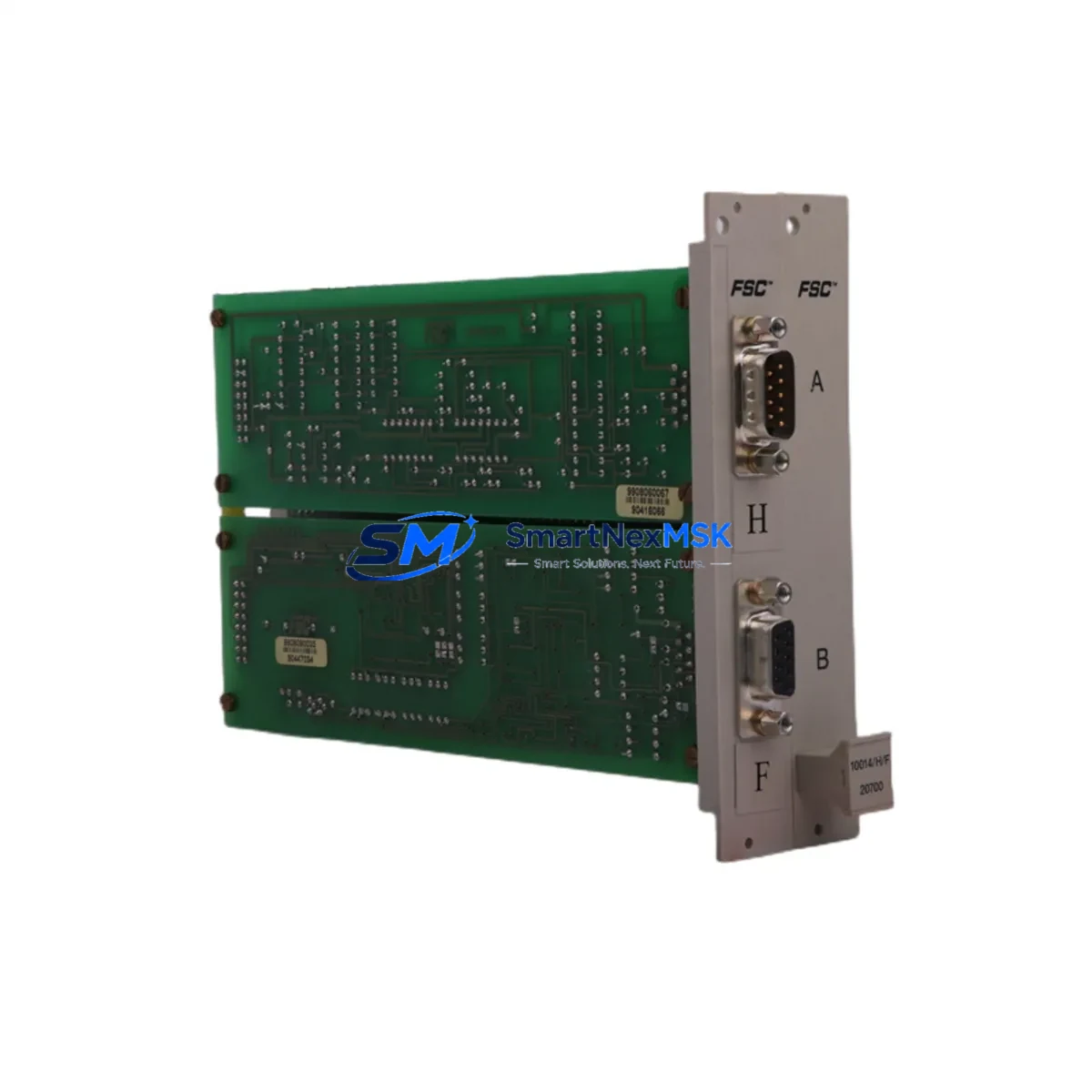
HONEYWELL 10018/E/1 Retrofit-Ready Ethernet Communication Module for Experion PKS Control Systems
The HONEYWELL 10018/E/1 is a proven Ethernet Communication Module designed for seamless integration into Honeywell Experion PKS distributed control system architectures. As legacy DCS installations approach end-of-life or face discontinued spare parts availability, the 10018/E/1 serves as a critical retrofit and replacement component — enabling plant engineers to restore network communication capability, extend system service life, and defer costly full-platform migrations. Whether you are recovering from an unplanned module failure, executing a planned control cabinet upgrade, or migrating from an older TDC 3000 or PlantScape platform to a modern Experion PKS environment, the 10018/E/1 provides a reliable, specification-matched solution backed by 12-month warranty coverage and verified pre-shipment testing.
In retrofit scenarios, the 10018/E/1 is typically installed within a C300 Controller chassis or compatible Experion PKS I/O Link cabinet, interfacing directly with the FTE (Fault Tolerant Ethernet) network backbone. Engineers replacing a failed or obsolete communication module must verify backplane slot compatibility, confirm FTE switch port assignments, and validate module addressing within the Experion Configuration Studio before bringing the replacement online. The module’s firmware version should be cross-checked against the active Experion PKS server release to ensure protocol handshake compatibility — particularly in environments running R400 through R510 software revisions.
Upgrade Compatibility Table
| Parameter | Details |
|---|---|
| SKU / Part Number | 10018/E/1 |
| Brand / Manufacturer | HONEYWELL |
| Compatible Platform | Experion PKS (R400–R510+) |
| Communication Interface | Fault Tolerant Ethernet (FTE) |
| Installation Type | Backplane-mounted, C300 / IOLINK chassis |
| Replaces / Upgrades | Legacy TDC 3000, PlantScape, older Experion Ethernet modules |
| Retrofit Compatibility | Drop-in replacement for same-series chassis slots |
| Commissioning Requirement | Address configuration via Experion Configuration Studio |
| Warranty | 12 Months — includes pre-shipment functional test |
| Stock Status | Available — global shipping from verified inventory |
Retrofit Planning for Existing Automation Systems
Successful integration of the 10018/E/1 into an existing Experion PKS control system requires careful pre-installation planning across several interdependent subsystems. Before removing the failed or obsolete module, engineers should document the current FTE network topology, including switch port assignments and IP address allocations, to avoid communication conflicts after reinsertion. The C300 Controller paired with this module must have sufficient backplane power budget — the HPPM (High Performance Process Manager) power supply module should be audited to confirm it can support the additional Ethernet module load without triggering under-voltage faults.
Terminal wiring on adjacent I/O modules — such as the HLAI (High Level Analog Input) or LLAI (Low Level Analog Input) series — should remain undisturbed during the swap to prevent inadvertent signal interruptions on live process loops. If the control cabinet houses a SCMXCF1 or similar serial communication module for legacy field device integration, its communication link to the Experion server must be verified independently after the Ethernet module replacement, as FTE topology changes can occasionally affect routing tables.
For plants running redundant controller pairs, the standby C300 Controller should be taken offline before the primary module swap to prevent automatic failover during the maintenance window. After physical installation, the replacement 10018/E/1 must be assigned the correct module address within Experion Configuration Studio, and a full download of the controller strategy should be performed to synchronize the new hardware with the active control logic. HMI display assignments linked to the communication module’s network node should also be validated in the Experion Operator Station to confirm that process graphics and alarm displays reflect the updated hardware configuration. Programming cables such as the MC-TPPR02 or equivalent Honeywell configuration tools may be required for initial firmware verification prior to network commissioning.
Downtime Control During System Migration
Minimizing unplanned downtime during a 10018/E/1 module replacement requires a structured hot-swap or controlled-outage procedure depending on the redundancy configuration of the target Experion PKS node. In fully redundant FTE architectures, the replacement can often be executed with zero process interruption by isolating the failed module’s network path while the redundant Ethernet link maintains controller-to-server communication. Engineers should confirm that the FTE switch — typically a Cisco IE series or Honeywell-qualified industrial Ethernet switch — has correctly rerouted traffic before physically removing the defective module.
For non-redundant installations, a planned maintenance window should be scheduled during low-production periods. Prior to shutdown, a full backup of the C300 Controller strategy should be exported from Experion Configuration Studio and stored offline. This preserves all PID loop tuning parameters, interlock logic, and I/O channel configurations, ensuring rapid restoration if the replacement module requires a full controller reload. After reinsertion and address assignment, a staged power-up sequence — energizing the backplane before enabling FTE network communication — reduces the risk of address conflicts with other modules on the same chassis, such as the IOTA (I/O Termination Assembly) or co-located analog output modules.
Retrofit Support FAQ
Q1: Is the 10018/E/1 a direct drop-in replacement for older Honeywell Experion Ethernet modules?
A: In most Experion PKS C300 chassis configurations, the 10018/E/1 is a direct slot-compatible replacement. However, engineers should verify backplane connector pinout and firmware revision compatibility with the active Experion server version before installation. Pre-shipment functional testing is included with every unit.
Q2: What commissioning steps are required after installing the replacement module?
A: After physical installation, assign the module address in Experion Configuration Studio, perform a controller strategy download, and validate FTE network connectivity via the Experion server’s Network Manager. HMI node assignments and alarm routing should also be confirmed before returning the loop to automatic control.
Q3: Can the 10018/E/1 be used in a migration from TDC 3000 or PlantScape to Experion PKS?
A: Yes. The 10018/E/1 is commonly deployed in phased migration projects where legacy TDC 3000 or PlantScape nodes are being replaced with Experion PKS C300 controllers. It provides the FTE communication backbone required for the new platform while allowing existing field wiring and I/O termination assemblies to be reused where compatible.
Q4: What warranty and testing coverage is included?
A: Every 10018/E/1 unit ships with a 12-month warranty covering manufacturing defects and functional failures. Pre-shipment testing validates Ethernet communication handshake, backplane interface integrity, and firmware version. Units are dispatched from verified inventory with full traceability documentation available on request.
© 2026 SMARTNEXMSK. All rights reserved.
Original Source: https://smartnexmsk.com
Contact: [email protected] | +86 18259474341



