
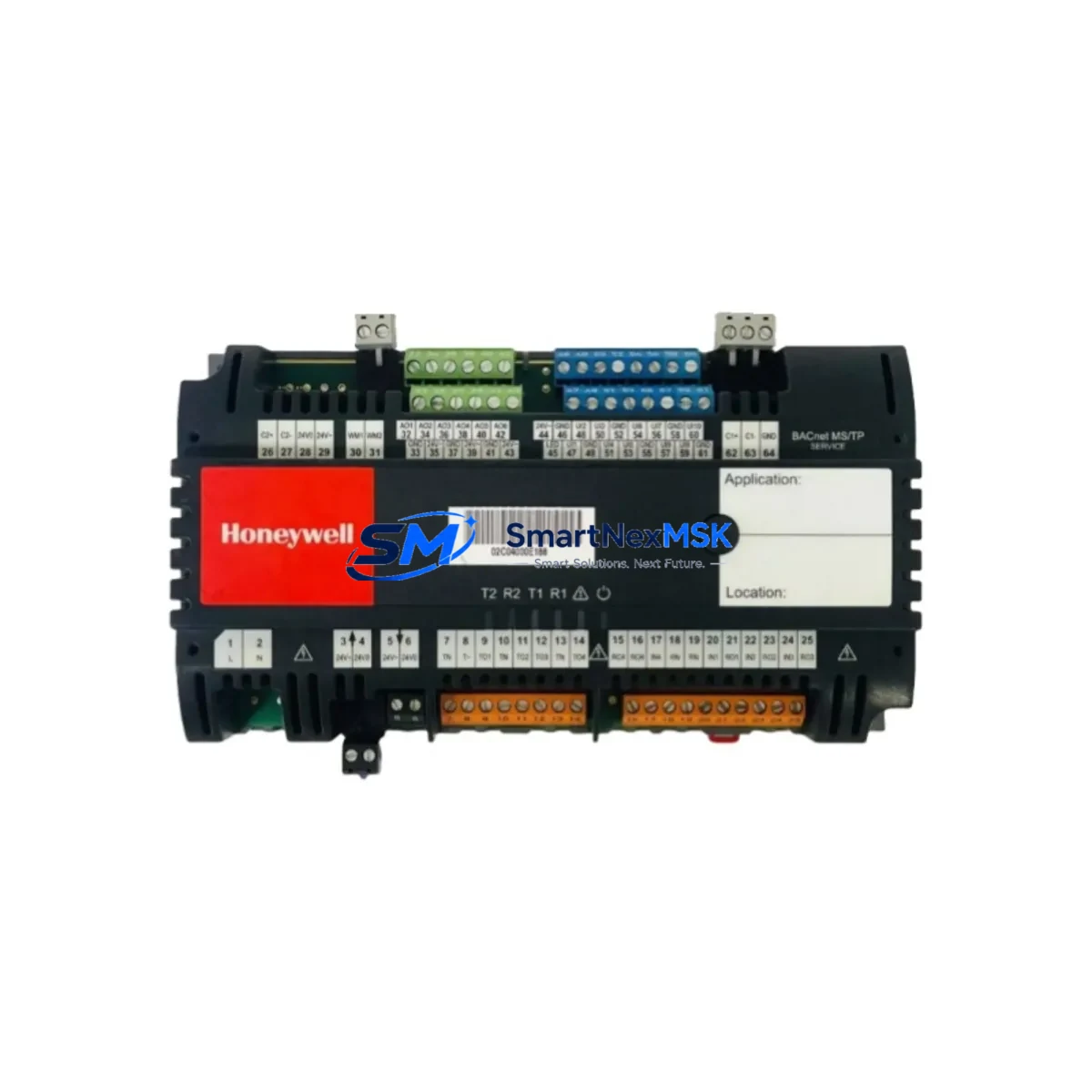
Honeywell CPO-RL4 Spare for TDC3000 Automation: Spare Replacement & Industrial Downtime Risk Control
The Honeywell CPO-RL4 is an original Remote I/O Link module designed for the TDC3000 Distributed Control System (DCS) platform — one of the most widely deployed process automation architectures in refining, petrochemical, power generation, and continuous manufacturing environments. As a critical communication bridge between the High-Level Manager (HLM) network and field-level I/O subsystems, the CPO-RL4 plays a central role in real-time data acquisition, process variable transmission, and control loop integrity. When this module fails or degrades, the consequences extend far beyond a single I/O channel — entire process units can lose visibility, triggering unplanned shutdowns and costly production losses.
Maintaining a verified, tested CPO-RL4 spare on-site is not optional for facilities running legacy TDC3000 infrastructure. With Honeywell having transitioned TDC3000 to end-of-active-support status, sourcing original replacement modules through authorized industrial spare parts channels is the only reliable path to maintaining system integrity without costly platform migration. This listing provides an original Honeywell CPO-RL4 module, function-tested prior to shipment, backed by a 12-month warranty, and available for rapid global dispatch to minimize your mean time to repair (MTTR).
Spare Maintenance Table
| Parameter | Specification / Detail |
|---|---|
| Part Number / SKU | CPO-RL4 |
| Brand | Honeywell |
| Series / Platform | TDC3000 DCS |
| Module Function | Remote I/O Link Module — connects HLM network to Remote I/O subsystems |
| Compatible Systems | Honeywell TDC3000, TDC3000X, LCN-based DCS architectures |
| Communication Interface | Local Control Network (LCN) / Remote I/O Link |
| Power Supply Requirement | Powered via TDC3000 card file backplane (5 VDC logic, 24 VDC field) |
| Installation | Card file slot insertion — compatible with standard TDC3000 card files |
| Operating Temperature | 0°C to 60°C (32°F to 140°F) |
| Humidity | 5% to 95% RH, non-condensing |
| Application Environment | Process control rooms, DCS cabinets, industrial automation panels |
| Condition | Original Honeywell — function-tested before shipment |
| Origin | USA |
| Weight | Approx. 900 g |
| Warranty | 12 Months — covers functional defects under normal operating conditions |
| Lead Time | In-stock units ship within 1–3 business days; DHL / FedEx international available |
Maintenance Planning for Continuous Operation
When a CPO-RL4 module is flagged for replacement during a scheduled turnaround or emergency fault isolation, experienced maintenance engineers know that the module itself is rarely the only component requiring attention. A thorough inspection of the surrounding TDC3000 subsystem is essential to prevent repeat failures and ensure a clean return to service.
Begin with the card file backplane that houses the CPO-RL4. Backplane connector pins can oxidize or sustain micro-fractures over years of thermal cycling, causing intermittent communication faults that are often misattributed to the module itself. Inspect and clean the backplane contacts before installing the replacement CPO-RL4.
Next, verify the LCN coaxial cable and termination resistors on the Local Control Network segment connected to this module. A degraded LCN cable or an improperly terminated segment will cause the new CPO-RL4 to exhibit the same communication errors as the failed unit. Check both ends of the LCN drop and confirm 75-ohm termination is correctly applied.
The Remote I/O Link (RIO) cable running from the CPO-RL4 to the Remote I/O Expander (RIE) or Remote I/O Gateway should also be inspected for insulation damage, connector corrosion, and proper shielding continuity. A compromised RIO cable is a common root cause of CPO-RL4 communication faults in field environments.
At the Remote I/O end, inspect the associated Honeywell IOP (Input/Output Processor) modules — such as the HPM IOP or PM IOP cards — for fault indicators. If the CPO-RL4 failure was preceded by I/O channel alarms, individual IOP modules may have sustained damage from voltage transients or ground faults. Replacing the CPO-RL4 without addressing a faulty IOP will result in continued process alarms.
Review the 24 VDC field power supply modules feeding the I/O subsystem. Honeywell TDC3000 systems typically use dedicated power supply cards within the card file; a failing power supply can cause erratic module behavior that mimics CPO-RL4 faults. Confirm output voltage stability under load before commissioning the replacement module.
For facilities using Honeywell UCN (Universal Control Network) gateways or NIM (Network Interface Module) cards in the same cabinet, verify their status indicators as well. A UCN communication fault upstream of the CPO-RL4 can mask the true source of process alarms and complicate fault isolation.
If the TDC3000 system interfaces with third-party equipment via Modbus RTU or HART signal isolators, inspect the signal conditioning modules in the same I/O loop. Signal isolators from the same vintage as the CPO-RL4 may be approaching end-of-life simultaneously, and proactive replacement during the same maintenance window reduces future downtime risk.
Finally, check the terminal blocks and field wiring terminations in the marshalling cabinet associated with the affected I/O subsystem. Loose or corroded terminations are a leading cause of intermittent I/O faults in aging DCS installations and should be re-torqued and inspected for insulation integrity as part of any CPO-RL4 replacement procedure.
Procurement engineers should note that the CPO-RL4 is frequently co-listed on spare parts BOMs alongside the Honeywell CPO-RL2 (2-port variant), Honeywell MC-TAIH02 analog input modules, and Honeywell MC-TDID12 digital I/O modules for TDC3000 and Experion migration projects. Stocking a balanced inventory of these complementary modules significantly reduces the risk of extended downtime during multi-point failures.
Site Replacement Workflow
Step 1 — Pre-Replacement Verification: Before removing the failed CPO-RL4, document the slot address, node number, and LCN/RIO link configuration from the TDC3000 Engineering Console. Capture a screenshot or printout of the module’s configuration parameters to ensure the replacement is configured identically.
Step 2 — Safe Removal: Place the affected I/O subsystem in a controlled state via the TDC3000 operator console. Where process conditions permit, transfer control of affected loops to manual mode. Remove the CPO-RL4 by releasing the card ejector levers — do not force extraction, as backplane connector damage is irreversible.
Step 3 — Replacement Installation: Insert the new CPO-RL4 into the same card file slot. Confirm the module seats fully against the backplane connector. Observe the module’s LED status indicators: a solid green RUN LED with no fault indicators confirms successful initialization and LCN communication establishment.
Step 4 — Configuration Restore: Using the TDC3000 Engineering Console, verify that the replacement module has automatically loaded its configuration from the system database. For systems without automatic configuration download, manually restore the node address and link parameters per the documented configuration.
Step 5 — Loop Verification: Return affected control loops to automatic mode one at a time, monitoring process variables for stability. Confirm that all I/O channels associated with the CPO-RL4’s RIO link are reporting correctly before declaring the replacement complete.
Step 6 — Documentation: Record the replacement in the plant maintenance management system (CMMS), including the failed module’s serial number, replacement date, and post-installation test results. Retain the failed CPO-RL4 for failure analysis if recurrent faults are suspected.
This workflow is applicable to both emergency replacements and planned turnaround maintenance. For facilities managing aging TDC3000 systems, establishing a documented CPO-RL4 replacement procedure in advance — and maintaining at least one verified spare on-site — is the most effective strategy for minimizing unplanned downtime.
Spare Parts Support FAQ
Q1: Is this CPO-RL4 an original Honeywell module or a third-party compatible replacement?
This is an original Honeywell CPO-RL4 module sourced through industrial spare parts channels. It is not a third-party clone or remanufactured substitute. Each unit undergoes functional testing prior to shipment to verify communication link establishment, LED status behavior, and backplane interface integrity. Original modules are the only recommended replacement for TDC3000 systems where configuration database compatibility and long-term reliability are priorities.
Q2: How do I verify compatibility with my specific TDC3000 system revision?
The CPO-RL4 is compatible with standard TDC3000 and TDC3000X card file configurations using the Local Control Network (LCN) and Remote I/O Link architecture. To confirm compatibility, provide your system’s card file model number, LCN revision, and current firmware version via email to [email protected]. Our technical team will cross-reference your system configuration and confirm fit before shipment.
Q3: What does the 12-month warranty cover, and what is the claims process?
The 12-month warranty covers functional defects arising under normal operating conditions — including communication link failures, backplane interface faults, and LED/status indicator malfunctions attributable to the module itself. Physical damage caused by incorrect installation, overvoltage events, or environmental contamination is excluded. To initiate a warranty claim, contact [email protected] with your order number, a description of the fault, and any available diagnostic data from the TDC3000 Engineering Console.
Q4: Can you support long-term or blanket purchase orders for CPO-RL4 and related TDC3000 spares?
Yes. We support long-term supply agreements, blanket POs, and scheduled delivery programs for facilities managing ongoing TDC3000 maintenance inventories. We maintain stock of CPO-RL4 and related modules including Remote I/O Link components and associated I/O processor cards. Contact [email protected] or call +86 18259474341 to discuss volume pricing, lead time commitments, and consignment stocking options tailored to your plant’s maintenance cycle.
© 2026 SMARTNEXMSK. All rights reserved.
Original Source: https://smartnexmsk.com
Contact: [email protected] | +86 18259474341



