
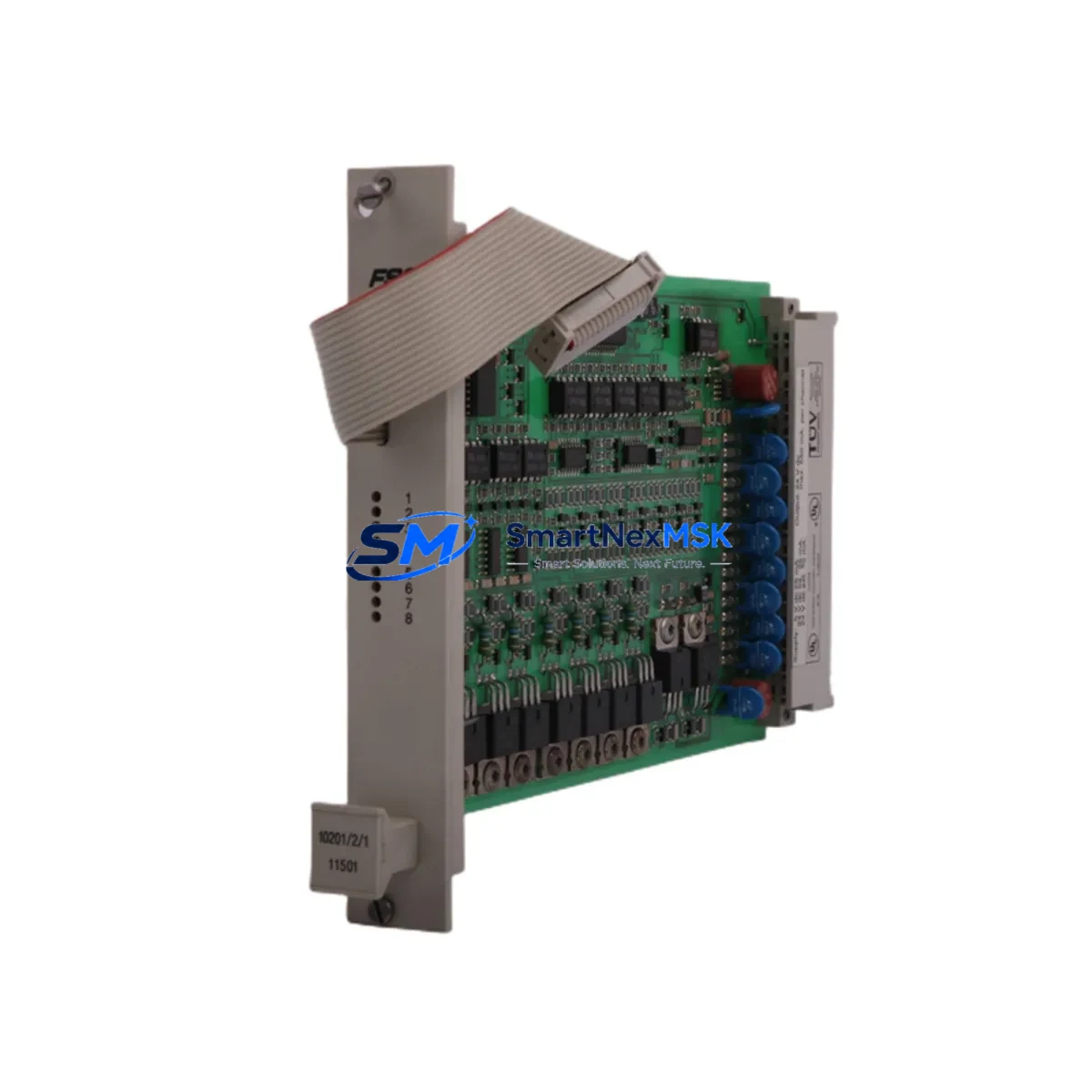
Honeywell FC-SDO-0824 Spare for FSC Safety Automation: Spare Replacement & Industrial Downtime Risk Control
The Honeywell FC-SDO-0824 (part number 10201/2/1) is a SIL 2-rated Safety Digital Output Module designed for the Honeywell FSC (Fail-Safe Controller) and Safety Manager platforms. In safety-critical process environments — including oil & gas, petrochemical, power generation, and chemical processing — this module serves as the final output interface between the safety logic solver and field actuators such as solenoid valves, shutdown relays, and motor starters. Maintaining a verified spare of the FC-SDO-0824 in your site inventory is a fundamental requirement for any plant maintenance strategy aimed at minimizing unplanned downtime and sustaining SIL-rated system integrity.
When an FC-SDO-0824 module fails or degrades, the consequences extend beyond a single output channel. The entire safety function associated with that output — emergency shutdown, fire and gas suppression, or process isolation — may be compromised. Rapid replacement with a tested, original spare is the only reliable path to restoring full SIL 2 coverage without requiring a full system recertification. Our FC-SDO-0824 units are sourced from verified supply chains, individually tested prior to shipment, and backed by a 12-month warranty covering both hardware integrity and functional performance.
Spare Maintenance Table
| Parameter | Specification |
|---|---|
| Part Number / SKU | FC-SDO-0824 / 10201/2/1 |
| Brand | Honeywell |
| Series / Platform | FSC (Fail-Safe Controller) / Safety Manager |
| Module Type | Safety Digital Output Module |
| Safety Integrity Level | SIL 2 (IEC 61508 compliant) |
| Output Channels | 8 digital output channels (24 VDC) |
| Output Voltage | 24 VDC nominal |
| Output Current | Up to 0.5 A per channel |
| Backplane Compatibility | FSC I/O Backplane (8-slot and 16-slot chassis) |
| Operating Temperature | 0°C to +60°C |
| Mounting | DIN rail / FSC chassis slot |
| Country of Origin | Germany |
| Diagnostics | Online self-test, channel-level fault detection |
| Application Environment | Process safety, ESD, F&G, BMS systems |
| Maintenance Recommendation | Inspect every 12 months; replace on first sign of output fault or SIL proof-test failure |
| Warranty | 12 Months — hardware and functional performance |
| Pre-shipment Testing | Yes — functional output test performed before dispatch |
Maintenance Planning for Continuous Operation
Replacing the FC-SDO-0824 in a live FSC or Safety Manager cabinet is rarely an isolated task. Maintenance engineers and procurement teams should treat this module replacement as an opportunity to inspect and verify the condition of all adjacent components within the same safety loop and control cabinet.
Begin with the FC-PSU-0824 power supply module, which provides regulated 24 VDC to the I/O backplane. A degraded power supply is a common root cause of intermittent output faults that are incorrectly attributed to the output module itself. Verify output voltage stability under load before installing the replacement FC-SDO-0824.
Inspect the FSC I/O backplane and chassis connector pins for corrosion, mechanical wear, or contamination. A damaged backplane slot can cause recurring failures in any module installed in that position. If the backplane shows signs of wear, replacement should be planned during the same maintenance window.
Check the FC-SDI-1624 safety digital input module in the same cabinet. Input and output modules in the same safety function share common diagnostic cycles; a fault in the input chain can mask or trigger false output states. Confirm that all input channels associated with the shutdown logic are reading correctly.
Review the FC-CPU-0714 or FC-CPU-0714/R processor module firmware version and diagnostic logs. The CPU module manages the safety logic execution and output command sequencing. Any logged communication errors between the CPU and the SDO module should be cleared and verified after the replacement.
Inspect field wiring at the terminal blocks and marshalling panels connected to the FC-SDO-0824 output channels. Loose terminations, corroded conductors, or undersized cable cross-sections are frequent contributors to output channel failures. Torque all terminals to specification and verify continuity to field devices.
For systems using Honeywell Safety Manager SC or Safety Manager MC as the higher-level safety controller, confirm that the FSC node communication link — typically via FC-COM-ETH1 Ethernet communication module or legacy serial interface — is operating without packet loss or timeout errors after the module swap.
If the plant uses signal isolators or safety barriers between the FC-SDO-0824 outputs and field solenoids, verify that the isolator output voltage and current ratings remain within the module’s drive capability. Zener barriers and galvanic isolators degrade over time and should be included in the same inspection cycle.
Finally, confirm that the FSC system configuration file and I/O assignment database reflect the correct slot address for the replacement module. An incorrect slot configuration will prevent the module from being recognized by the safety logic solver, even if the hardware is fully functional.
Site Replacement Workflow
Step 1 — Pre-replacement verification: Confirm the exact part number (FC-SDO-0824 / 10201/2/1) against the system’s bill of materials and the physical label on the installed module. Do not substitute with FC-SDO-0824H or other hardware revision variants without consulting the FSC system documentation, as hardware revisions may affect firmware compatibility.
Step 2 — Safety bypass and isolation: Follow your site’s Management of Change (MOC) and Safety Instrumented System (SIS) bypass procedures. Place the affected safety function in bypass mode via the Safety Manager operator station before removing the module. Document the bypass start time and notify the control room.
Step 3 — Module removal: Power down the affected backplane slot if hot-swap is not supported in your FSC configuration. Remove the FC-SDO-0824 by releasing the module locking lever and sliding it out of the chassis. Inspect the ejected module for visible damage — burnt components, discolored PCB areas, or damaged connector pins — to help identify the root cause of failure.
Step 4 — Replacement installation: Insert the new FC-SDO-0824 into the same chassis slot. Ensure the module is fully seated and the locking lever is engaged. Restore backplane power and observe the module’s LED status indicators: a solid green RUN LED confirms successful initialization and self-test passage.
Step 5 — Functional verification: From the Safety Manager engineering workstation, perform a channel-by-channel output test for all 8 channels on the replacement module. Verify that field devices (solenoid valves, shutdown relays) respond correctly to commanded output states. Confirm that no diagnostic alarms are active in the FSC system log.
Step 6 — Bypass removal and return to service: Remove the safety function bypass only after all output channels have been verified. Document the replacement in the site maintenance management system (CMMS), update the spare parts inventory, and order a replacement spare to restore your on-site buffer stock.
Spare Parts Support FAQ
Q1: Is this FC-SDO-0824 an original Honeywell module or a third-party replacement?
This is an original Honeywell FC-SDO-0824 module (part number 10201/2/1), sourced from verified industrial supply channels. Each unit undergoes functional output testing prior to shipment. We do not supply counterfeit, refurbished-without-disclosure, or third-party substitute modules for SIL-rated safety applications.
Q2: How do I verify compatibility with my existing FSC or Safety Manager system?
The FC-SDO-0824 is compatible with all standard FSC I/O chassis configurations using 8-slot or 16-slot backplanes. Confirm your system’s hardware revision level and FSC software version against Honeywell’s compatibility matrix. If your system uses a Safety Manager SC or MC controller, verify that the FSC node firmware supports the module’s diagnostic protocol. Contact our technical team with your system configuration details for pre-purchase compatibility confirmation.
Q3: What is your recommended spare parts stocking strategy for the FC-SDO-0824?
For continuous process plants with SIL 2 safety functions, we recommend maintaining a minimum of one FC-SDO-0824 spare per FSC node on-site, with an additional unit held at the regional warehouse level. Given the module’s role in emergency shutdown and process isolation functions, a zero-spare strategy is not acceptable for facilities with high-availability requirements. Lead times for original Honeywell FSC modules can extend to 8–16 weeks through standard distribution channels; maintaining on-site stock eliminates this risk entirely.
Q4: What does the 12-month warranty cover, and what is the return process?
Our 12-month warranty covers hardware defects and functional performance failures under normal operating conditions. If the FC-SDO-0824 fails to pass self-test on installation or develops a fault within the warranty period, we will provide a replacement unit at no additional cost. To initiate a warranty claim, contact our technical support team with the module serial number, installation date, and a description of the observed fault. Return shipping is coordinated by our logistics team upon claim approval.
© 2026 SMARTNEXMSK. All rights reserved.
Original Source: https://smartnexmsk.com
Contact: [email protected] | +86 18259474341



