
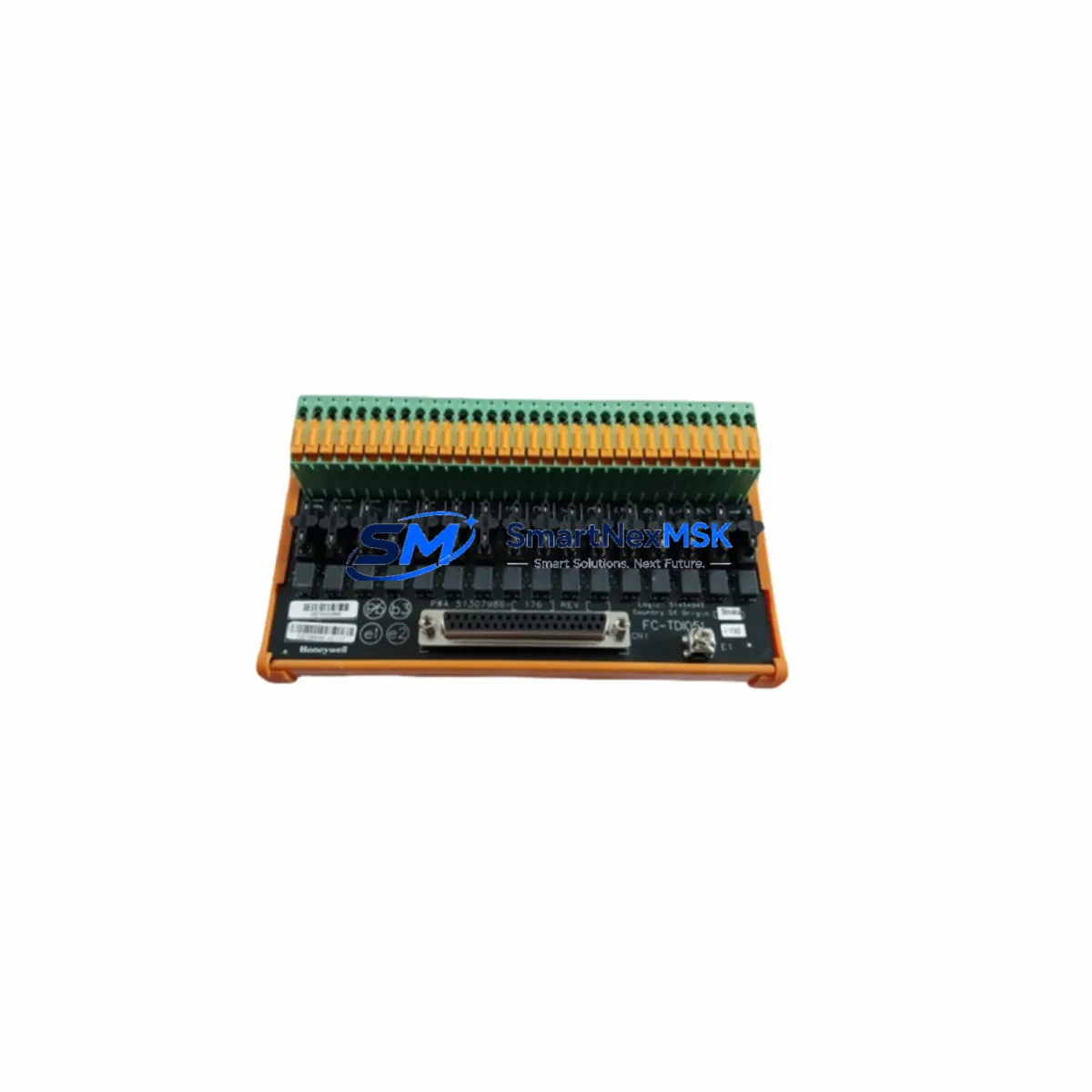
Honeywell FC-TDIO51 Retrofit-Ready DI/DO Module for Experion PKS Control Systems
The Honeywell FC-TDIO51 is a high-density digital input/output module engineered for the Experion PKS distributed control system platform. Designed to serve as a direct retrofit replacement for aging or discontinued I/O infrastructure, the FC-TDIO51 delivers seamless compatibility with C200 and C300 controller backplanes, enabling industrial facilities to modernize legacy control architectures without full system overhauls. Whether you are managing a planned upgrade cycle or responding to an unplanned failure of an end-of-life component, the FC-TDIO51 provides a verified drop-in solution backed by a 12-month warranty and pre-shipment functional testing.
Industrial plants running Honeywell Experion PKS systems frequently encounter the challenge of sourcing reliable replacements for modules that have reached end-of-life status. The FC-TDIO51 addresses this directly by maintaining full electrical and logical compatibility with the existing EUCN (Enhanced Universal Control Network) and FTE (Fault Tolerant Ethernet) communication infrastructure. This means your existing fiber optic trunk cabling, IOLIM (I/O Link Interface Module) connections, and controller addressing schemes remain intact during the swap, dramatically reducing the engineering effort and risk associated with the migration.
Before initiating a retrofit with the FC-TDIO51, engineers should verify several critical parameters. First, confirm the available power budget on the target IOTA (I/O Termination Assembly) — the FC-TDIO51 draws from the local 24 VDC field power rail, and the aggregate load across all installed modules must remain within the chassis power supply rating, typically provided by a PM-IOTA or equivalent power module. Second, review the terminal block wiring diagram against the existing field wiring schedule: the FC-TDIO51 uses a standard 40-pin IOTA connector, and any deviation in channel-to-terminal mapping between the old module and the replacement must be reconciled before energizing the loop. Third, validate the module slot address assignment in the Experion Control Builder configuration — the replacement module must inherit the same tag name, channel count, and I/O type definition as the original to avoid forcing a full download that could interrupt running processes.
Program compatibility is a key concern during any DCS I/O retrofit. Because the FC-TDIO51 is a like-for-like replacement within the Experion PKS I/O subsystem, the Control Builder application database does not require structural modification. However, engineers should perform a checkpoint save of the active controller image using the C200 or C300 controller’s built-in redundancy switchover capability before pulling the old module. If the system is running in simplex mode, coordinate a brief controlled shutdown window. After module insertion, a partial download targeting only the affected I/O card slot is sufficient to re-establish communication — a full controller download is not required and should be avoided to protect running logic.
HMI screen validation is another step that is frequently overlooked during retrofit planning. Confirm that all Experion Station displays referencing FC-TDIO51 channel tags are rendering correctly after the module comes online. Pay particular attention to alarm limits, engineering unit conversions, and interlock logic that references digital status points sourced from this module. If the plant uses a third-party SCADA system connected via OPC DA or OPC UA, verify that the data subscription paths remain valid after the module replacement.
Upgrade Compatibility Table
| Parameter | FC-TDIO51 Specification | Retrofit Notes |
|---|---|---|
| Compatible Controllers | C200, C200E, C300 | Verify controller firmware revision supports FC-TDIO51 module type |
| Backplane Interface | EUCN / FTE | No cabling changes required if existing IOLIM is retained |
| IOTA Connector | 40-pin standard | Confirm IOTA model matches; do not mix IOTA generations |
| Field Power Supply | 24 VDC (field side) | Verify PM-IOTA power budget before installation |
| Communication Protocol | FTE (Fault Tolerant Ethernet) | FTE switch port configuration unchanged; no IP reassignment needed |
| Installation Type | Drop-in module replacement | Partial download only; full controller download not required |
| Commissioning Requirement | Slot address verification + partial download | Perform loop check on all channels before returning to AUTO |
| Warranty | 12 Months | Covers manufacturing defects; pre-shipment functional test included |
Retrofit Planning for Existing Automation Systems
A successful FC-TDIO51 retrofit begins with a thorough audit of the existing control cabinet. In a typical Experion PKS installation, the I/O subsystem is organized around a series of IOTA assemblies mounted in a dedicated I/O enclosure, each connected to the controller via an IOLIM (I/O Link Interface Module) and the FTE network. The FC-TDIO51 slots into this architecture without requiring changes to the IOLIM, the FTE switch, or the fiber optic trunk that carries the EUCN traffic.
During the planning phase, engineers should pull the existing cabinet layout drawing and cross-reference it against the Experion Control Builder I/O assignment list. Identify all modules in the same chassis as the FC-TDIO51 — commonly these include FC-TAIX51 analog input modules, FC-TAOX51 analog output modules, FC-TDIX51 digital input modules, and FC-TDOX51 digital output modules. Confirm that none of these adjacent modules are also flagged for replacement, as simultaneous multi-module swaps increase the risk of configuration errors and extend the commissioning window.
Power distribution within the cabinet deserves careful attention. The PM-IOTA power module supplies both the module electronics and the field-side 24 VDC loop power. If the existing PM-IOTA is operating near its rated capacity — a common situation in densely populated cabinets — adding a replacement FC-TDIO51 with a slightly different inrush profile could trip the power supply’s overcurrent protection during startup. Measure the actual current draw before and after module insertion using a clamp meter on the 24 VDC bus.
For plants that are simultaneously upgrading their communication infrastructure, the FC-TDIO51 retrofit can be coordinated with a migration from legacy EUCN serial links to full FTE Ethernet topology. In this scenario, the FTE switch — typically a Honeywell FTE Switch or a qualified third-party managed switch — must be pre-configured with the correct VLAN and QoS settings before the new module is brought online. The C300 controller’s dual FTE ports provide redundant paths, and the FC-TDIO51 benefits from this redundancy automatically once the FTE network is correctly configured.
If the retrofit is part of a broader control system upgrade that includes replacing the operator interface, the transition from an older Experion Station running on Windows XP or Windows 7 to a current Experion PKS R500 or later station should be completed before the I/O module swap. This ensures that the new HMI software can correctly enumerate the FC-TDIO51 channel tags and that alarm management configurations are migrated cleanly. Programming cable access to the C200 or C300 controller via the front-panel RS-232 port or the Ethernet service port should be confirmed as part of the pre-work checklist.
Downtime Control During System Migration
Minimizing unplanned downtime is the primary operational constraint in any DCS I/O retrofit. The FC-TDIO51 is designed to support hot-swap replacement in redundant controller configurations — where a C200 or C300 redundant controller pair is active, the standby controller continues to execute the control strategy while the primary is briefly interrupted during the module swap. This architecture allows the physical replacement to be completed in under five minutes for an experienced technician, with the control strategy remaining in continuous execution throughout.
For simplex controller installations, the downtime window must be planned in advance. Coordinate with the operations team to identify a low-risk period — typically during a scheduled maintenance window or a planned production changeover. Before pulling the old module, place all affected control loops in manual mode at the Experion Station. Document the current setpoints and output values so that the loops can be returned to their pre-outage state immediately after the new FC-TDIO51 is commissioned. Use the Experion PKS Checkpoint and Restore function to save the current controller state to non-volatile memory before beginning work.
After the new module is seated and the partial download is complete, perform a systematic loop check: energize each digital input channel individually and confirm that the corresponding tag in the Experion database changes state correctly. For digital output channels, command each output from the Experion Station faceplate and verify the field device responds. This channel-by-channel verification, while time-consuming, is the most reliable method for confirming that the terminal block wiring is correct and that no channel mapping errors were introduced during the configuration migration.
Once all channels are verified, return the control loops to automatic mode in a controlled sequence — starting with the least critical loops and progressing to the most critical. Monitor the process variables for the first 30 minutes of automatic operation to confirm that the control performance matches the pre-outage baseline. Log the commissioning results, including the date, technician name, firmware revision of the new FC-TDIO51, and the results of each channel loop check, for inclusion in the plant’s maintenance management system.
Retrofit Support FAQ
Q: Is the FC-TDIO51 a direct drop-in replacement for the original module without any configuration changes?
A: In most cases, yes. The FC-TDIO51 is designed as a like-for-like replacement within the Experion PKS I/O subsystem. Provided the slot address, IOTA type, and channel count match the original configuration in Control Builder, only a partial download targeting the affected slot is required. No structural changes to the application database are needed. However, always verify the module firmware revision is compatible with the installed controller firmware before proceeding.
Q: What wiring checks should be performed before powering up the replacement module?
A: Confirm that the 40-pin IOTA connector is fully seated and that the field wiring terminal block is correctly torqued to the manufacturer’s specification (typically 0.5–0.6 Nm for M3 screws). Verify that the 24 VDC field power supply polarity is correct on all powered output channels. Check that any shield drain wires are terminated at the designated shield bus and not floating. Finally, confirm that the PM-IOTA power module is not in an overcurrent or fault state before energizing the new module.
Q: How is compatibility with the existing FTE network verified after installation?
A: After the partial download is complete, navigate to the Experion Station System Display and confirm that the FC-TDIO51 module icon shows a green (healthy) status. Check the FTE Network Display to verify that both FTE paths (A and B) are active and fault-free for the IOLIM associated with the replaced module. If either FTE path shows a fault, inspect the fiber optic connections at the IOLIM and the FTE switch port before proceeding.
Q: What does the 12-month warranty cover, and what pre-shipment testing is performed?
A: Every FC-TDIO51 unit is functionally tested prior to shipment, including power-on self-test, channel-by-channel I/O verification, and communication link validation. The 12-month warranty covers manufacturing defects and functional failures under normal operating conditions. It does not cover damage resulting from incorrect installation, overvoltage events, or physical mishandling. Warranty claims are supported with a return merchandise authorization (RMA) process; contact [email protected] to initiate a claim.
© 2026 SMARTNEXMSK. All rights reserved.
Original Source: https://smartnexmsk.com
Contact: [email protected] | +86 18259474341



