
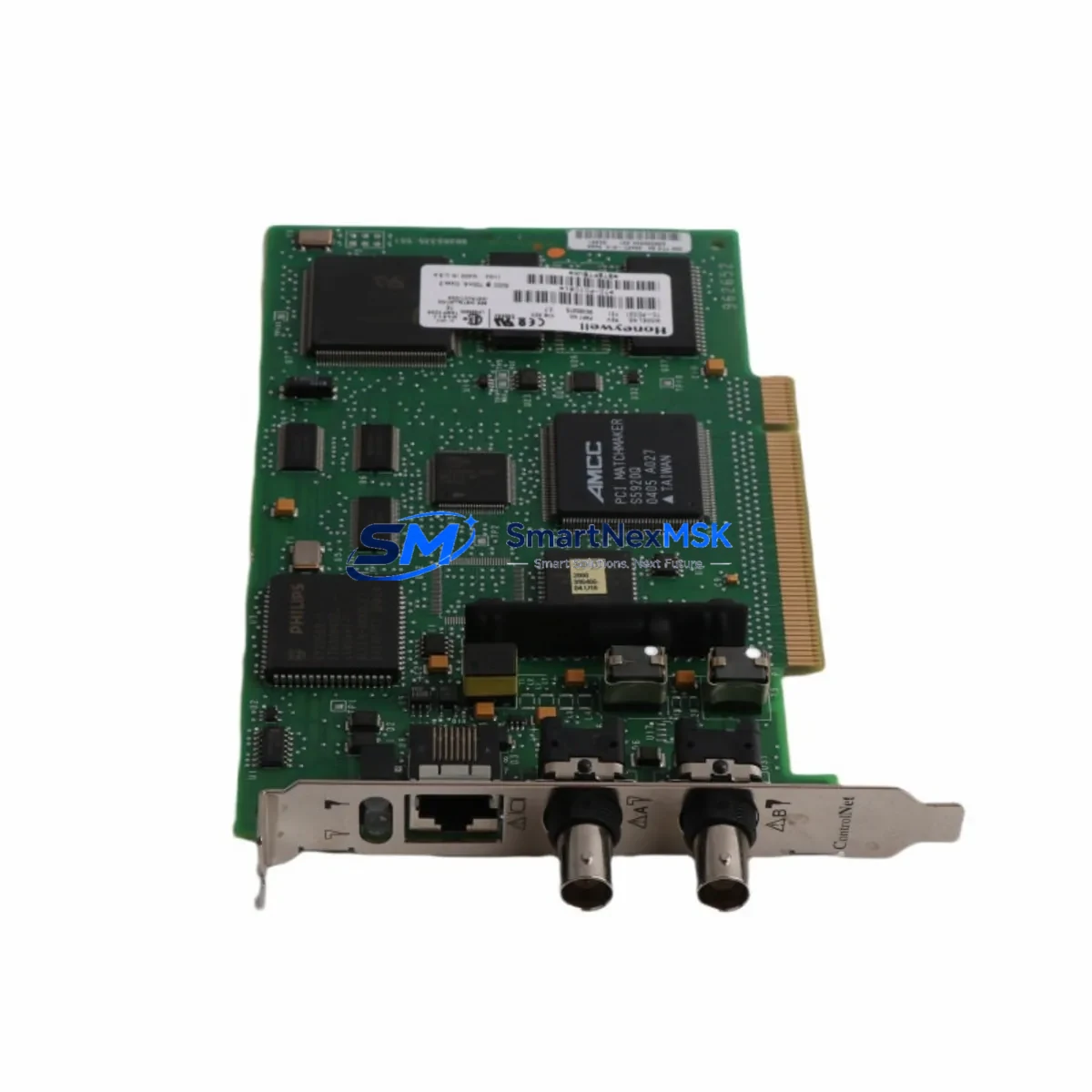
Honeywell TC-PCIC01 Retrofit-Ready ControlNet Interface Card: Seamless Compatibility for Legacy System Upgrades
The Honeywell TC-PCIC01 is a PCI-bus ControlNet Interface Card designed for use within the Experion PKS (Process Knowledge System) distributed control architecture. As legacy Experion PKS installations age and original spare inventories deplete, the TC-PCIC01 has become one of the most sought-after retrofit components for engineers tasked with sustaining continuous operations without a full platform migration. Our stock of TC-PCIC01 units is sourced, inspected, and function-tested to ensure drop-in compatibility with existing control cabinets and backplane configurations.
Whether you are replacing a failed card in a running system, pre-positioning spares ahead of a planned turnaround, or executing a phased upgrade of an aging DCS infrastructure, the TC-PCIC01 provides the ControlNet communication backbone that Experion PKS C300 controllers and associated I/O subsystems depend on. Each unit shipped by SMARTNEXMSK undergoes bench-level power-on verification and communication link testing before dispatch, and is covered by a 12-month warranty against manufacturing and functional defects.
Upgrade Compatibility Table
| Parameter | TC-PCIC01 Specification | Retrofit Notes |
|---|---|---|
| Interface Type | PCI Bus (32-bit, 33 MHz) | Verify host workstation or server has available PCI slot; not PCIe |
| Network Protocol | ControlNet (IEEE 802.4 / ODVA) | Compatible with existing ControlNet coaxial or fiber trunk cabling |
| Compatible Platform | Honeywell Experion PKS | Validated with C300 Controller and associated FIM/FTA assemblies |
| Installation Requirement | Standard PCI slot in Experion PKS engineering workstation or server | No backplane modification required; slot assignment must match node address configuration |
| Communication Compatibility | ControlNet NUT (Network Update Time) configurable | Match NUT to existing network schedule; reconfigure via Control Builder if replacing failed card |
| Replacement Recommendation | Direct replacement for failed or end-of-life TC-PCIC01 units | No firmware re-flash required if replacing like-for-like; verify revision level if upgrading |
| Commissioning Focus | Node address, NUT, redundancy path verification | Use Experion PKS Control Builder and RSNetWorx for ControlNet to validate network map post-installation |
| Warranty | 12 Months | Covers functional and communication defects; includes pre-shipment test report on request |
Retrofit Planning for Existing Automation Systems
Integrating a replacement TC-PCIC01 into a live or recently shut-down Experion PKS system requires careful pre-work to avoid extended downtime. Before pulling the failed card, engineers should document the existing ControlNet node address assigned to the interface, capture the current network schedule from RSNetWorx for ControlNet, and confirm the NUT value in use across the segment. The C300 Controller paired with this interface card communicates with field I/O through a series of Field Interface Modules (FIMs) and Field Termination Assemblies (FTAs); any disruption to the ControlNet link will cause the C300 to enter a faulted state, so a coordinated maintenance window is essential.
Power supply capacity in the control cabinet must be verified before installation. The TC-PCIC01 draws power from the host PCI bus, but the overall cabinet power budget — including the C300 Controller chassis, associated IOTA (I/O Termination Assembly) rails, and any redundant power modules — should be reviewed to confirm headroom. If the retrofit is part of a broader cabinet upgrade, this is also the right time to evaluate whether the existing Experion PKS Series C Power Supply modules are approaching end-of-life and should be replaced concurrently.
Terminal wiring on the ControlNet trunk side uses standard BNC connectors on the coaxial segment. Inspect tap connectors and termination resistors at both ends of the ControlNet segment before bringing the replacement card online. A common source of post-replacement communication faults is a degraded tap or an improperly terminated segment end, not the card itself. If the installation uses a fiber ControlNet media converter, verify that the fiber patch cables and SFP modules are within specification.
For sites running Experion PKS with redundant C300 Controllers, the TC-PCIC01 replacement procedure should be performed on the standby controller first, with a controlled switchover before replacing the primary side card. This approach keeps the process running on the primary path throughout the maintenance window. After the standby card is replaced and the ControlNet link is confirmed healthy, initiate a manual switchover via the Experion PKS Station HMI, verify that all C300 tags are scanning correctly on the new primary, and then proceed with the secondary card replacement.
HMI screen validation is a frequently overlooked step in ControlNet card replacements. After the TC-PCIC01 is seated and the ControlNet link is re-established, operators should walk through critical Experion PKS Station displays to confirm that all process values, alarm states, and control loop outputs are updating correctly. Any tags that remain in a stale or faulted state after the ControlNet link recovers may indicate a node address mismatch or a Control Builder download that did not complete successfully.
Sites that are simultaneously upgrading their communication infrastructure — for example, migrating from a legacy ControlNet backbone to a newer Ethernet-based architecture using Honeywell’s ENET cards — should plan the TC-PCIC01 replacement as a bridging step that keeps the existing ControlNet segment operational while the parallel Ethernet infrastructure is commissioned and validated. This phased approach avoids a hard cutover and allows engineering teams to verify I/O response times and alarm handling on the new network before decommissioning the ControlNet segment.
Downtime Control During System Migration
Minimizing unplanned downtime during a TC-PCIC01 replacement or broader Experion PKS retrofit begins with a thorough pre-outage checklist. Before the maintenance window opens, export the current Control Builder project to a backup archive, capture a snapshot of the RSNetWorx ControlNet network configuration, and confirm that the replacement TC-PCIC01 unit is on-site and has passed pre-installation inspection. Having a second technician monitor the Experion PKS Station HMI during the physical card swap reduces the risk of missing a process alarm that requires operator intervention.
The physical card swap itself — removing the failed TC-PCIC01, seating the replacement, and re-connecting the ControlNet tap — typically takes under 15 minutes for an experienced technician. The majority of the maintenance window is consumed by post-installation verification: confirming the ControlNet node map in RSNetWorx, downloading the Control Builder project to the C300 if required, and validating that all FIM and FTA assemblies are communicating correctly. Sites with a large number of I/O points distributed across multiple ControlNet drops should allocate additional time for a full I/O scan verification before returning the system to automatic control.
To protect original program logic during the replacement, never perform a full Control Builder download unless the project archive was captured immediately before the maintenance window. A partial download targeting only the affected C300 controller is preferable and reduces the risk of inadvertently overwriting tuning parameters or setpoint values that operators have adjusted since the last full project save. After the replacement is complete and the system is back in automatic, log the maintenance event in the site’s asset management system and update the spare parts inventory to reflect the consumed TC-PCIC01 unit.
Retrofit Support FAQ
Q: Is the TC-PCIC01 a direct drop-in replacement for a failed unit in my Experion PKS system?
A: Yes. The TC-PCIC01 is a like-for-like replacement. No firmware re-flashing is required for a same-revision swap. If you are replacing an older revision with a newer one, verify the revision compatibility note in the Experion PKS hardware compatibility matrix before installation.
Q: What commissioning steps are required after installing the replacement TC-PCIC01?
A: After seating the card, open RSNetWorx for ControlNet and verify that the TC-PCIC01 node appears on the network map with the correct node address. Confirm the NUT matches the existing network schedule. If the C300 Controller does not automatically re-establish communication, a targeted Control Builder download to the affected controller may be required. Validate all I/O tags on the Experion PKS Station HMI before returning to automatic control.
Q: How do I verify terminal wiring and ControlNet segment integrity before powering up the replacement card?
A: Inspect all BNC tap connectors on the ControlNet coaxial segment for corrosion or mechanical damage. Verify that termination resistors (75 Ω) are present and correctly installed at both ends of the segment. Use a ControlNet cable tester or a network analyzer to confirm segment impedance before powering the replacement card. For fiber segments, verify SFP module compatibility and fiber patch cable continuity.
Q: What does the 12-month warranty cover, and what is the return process?
A: The 12-month warranty covers all functional and communication defects attributable to the module itself. It does not cover damage resulting from incorrect installation, overvoltage, or physical mishandling. To initiate a warranty claim, contact SMARTNEXMSK with the order number and a description of the fault. A pre-shipment test report is available on request for all TC-PCIC01 units. Replacement or refund is processed within 5 business days of fault confirmation.
© 2026 SMARTNEXMSK. All rights reserved.
Original Source: https://smartnexmsk.com
Contact: [email protected] | +86 18259474341



