
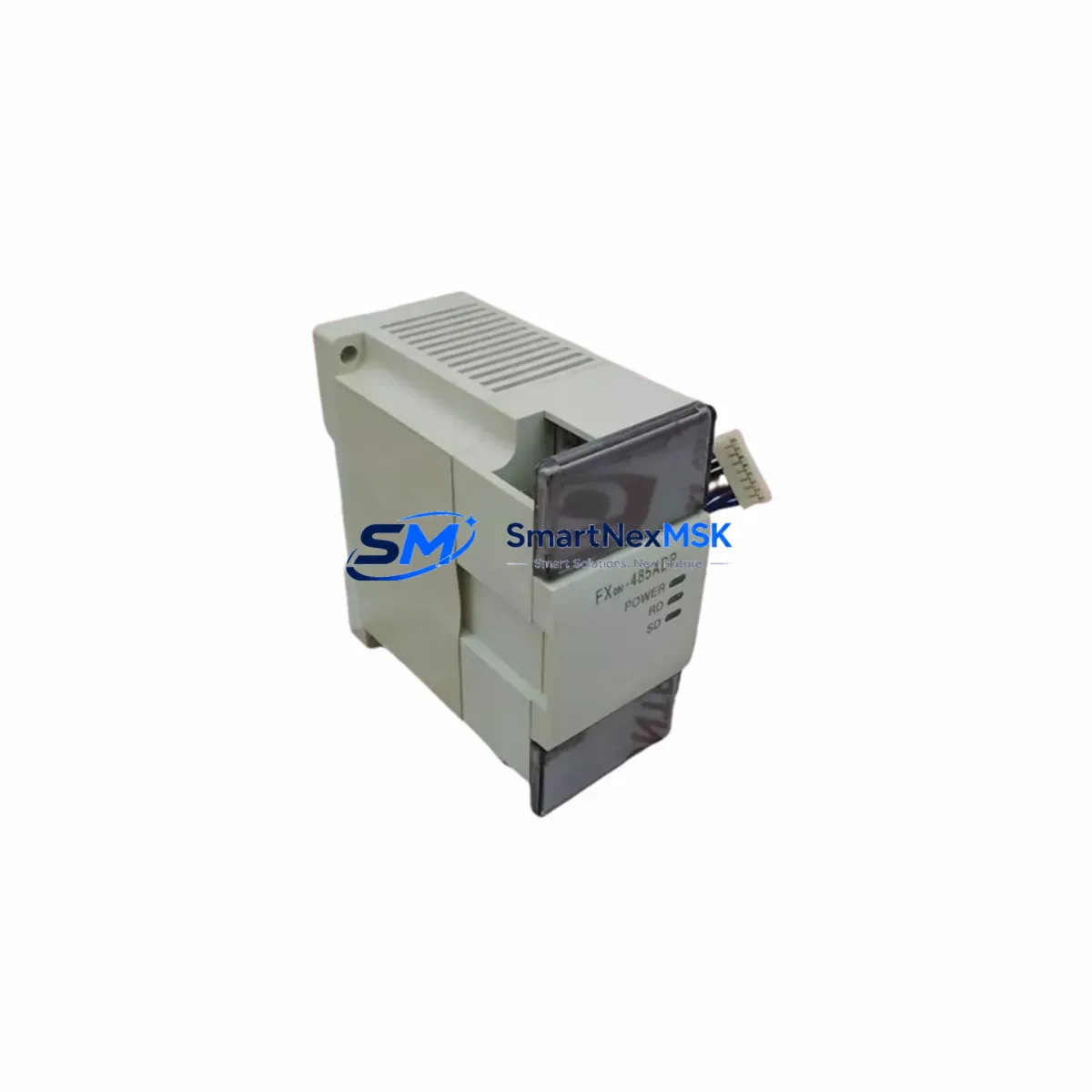
MITSUBISHI FX0N-485ADP Retrofit RS-485 Adaptor for MELSEC FX0N Control Systems
The MITSUBISHI FX0N-485ADP is a dedicated RS-485 communication adaptor engineered for the MELSEC FX0N series programmable logic controller platform. As legacy FX0N-based control systems approach end-of-service milestones, the FX0N-485ADP remains a critical retrofit component for engineers tasked with extending system life, migrating communication protocols, or upgrading aging control cabinets without full PLC replacement. SMARTNEXMSK maintains verified in-stock inventory of the FX0N-485ADP to support planned maintenance windows, emergency breakdowns, and phased modernization projects across manufacturing, utilities, and process automation sectors.
Whether you are replacing a failed communication adaptor on an existing FX0N CPU, migrating a MELSEC FX0N network from RS-232C to RS-485 multi-drop topology, or integrating legacy field devices into a newer supervisory architecture, the FX0N-485ADP provides the electrical interface and protocol compatibility required to maintain uninterrupted control continuity.
Upgrade Compatibility Table
| Parameter | Detail |
|---|---|
| SKU / Part Number | FX0N-485ADP |
| Compatible PLC Series | MELSEC FX0N (FX0N-14MR, FX0N-24MR, FX0N-40MR, FX0N-60MR) |
| Communication Standard | RS-485 (2-wire / 4-wire selectable) |
| Protocol Support | MELSEC Protocol, Modbus RTU (via GX Works2 / GX Developer) |
| Interface Connection | Dedicated expansion port on FX0N CPU left side |
| Max Network Nodes | Up to 16 stations on RS-485 multi-drop bus |
| Baud Rate | 300 bps – 19,200 bps |
| Power Supply | Supplied via FX0N CPU expansion bus (no external power required) |
| Replacement Compatibility | Direct drop-in for failed or discontinued FX0N-485ADP units |
| Installation Requirement | Snap-on left-side expansion port; no additional wiring harness required |
| Commissioning Note | Station number and baud rate configured via GX Developer or GX Works2 parameter settings |
| Warranty | 12 Months — covers manufacturing defects and functional failure under normal operating conditions |
Retrofit Planning for Existing Automation Systems
Successful integration of the FX0N-485ADP into an existing control system requires a structured pre-installation review. Engineers should begin by auditing the FX0N CPU variant in service — the FX0N-14MR, FX0N-24MR, FX0N-40MR, or FX0N-60MR — to confirm the left-side expansion port is unoccupied or that the existing adaptor is the unit being replaced. If the control cabinet also houses an FX0N-8EX or FX0N-8EYR I/O expansion module connected via the right-side expansion bus, these units are unaffected by the communication adaptor swap and can remain in service throughout the retrofit.
Terminal wiring for the RS-485 port uses a removable screw-terminal block. Before disconnecting the existing adaptor, photograph or document the current wiring layout, noting the SDA, SDB, RDA, RDB, and SG terminal assignments. In 2-wire RS-485 configurations common in MELSEC networks, SDA/RDA and SDB/RDB are typically jumpered at the terminal block. Verify that the field cable shield is grounded at one end only to prevent ground loop interference — a frequent source of communication errors in retrofitted panels.
If the FX0N system communicates upstream to a SCADA or HMI platform — such as a MITSUBISHI GOT1000 series or a third-party HMI using MELSEC protocol — confirm that the HMI communication driver is configured for RS-485 and that the station address assigned to the FX0N CPU matches the address stored in the HMI project. Mismatched station numbers are the most common cause of communication failure after a module swap and can be corrected in GX Developer under the PLC parameter network settings without modifying the ladder program.
For systems where the FX0N communicates with a MITSUBISHI FR-A700 or FR-E700 series inverter via RS-485 Modbus RTU, verify that the inverter’s Pr.117–Pr.124 communication parameters match the baud rate and parity settings configured in the FX0N program. The FX0N-485ADP supports Modbus RTU natively when the FX0N CPU firmware and GX Works2 project are configured accordingly. No hardware modification to the inverter or the FX0N program logic is required when replacing a like-for-like FX0N-485ADP unit.
In control cabinets where the FX0N is mounted on a DIN rail alongside an FX0N-3A analog I/O module or an FX2N-4AD analog input module connected via a dedicated expansion cable, ensure that the expansion bus ribbon cable is fully seated after the adaptor installation. Loose expansion connectors are a known source of intermittent I/O faults that can be misdiagnosed as CPU or program errors during post-retrofit commissioning.
Where the retrofit scope includes migrating from an older FX0N-232ADP RS-232C adaptor to the FX0N-485ADP for multi-drop network capability, the physical swap is straightforward — both adaptors use the same left-side expansion port. However, the communication program in the FX0N ladder must be updated to reflect the RS-485 protocol parameters, and any RS-232C-specific instructions (such as RS instruction with RS-232C settings) must be reviewed and adjusted in GX Developer before going live.
Downtime Control During System Migration
Minimizing production downtime during a communication adaptor replacement requires advance preparation and a disciplined commissioning sequence. Before any hardware is removed, use GX Developer or GX Works2 to perform a full program backup from the FX0N CPU to a PC. Save the backup file with a version-stamped filename and verify the file integrity by comparing the program checksum against the previous backup if available. This ensures that the original ladder logic, device comments, and parameter settings can be restored immediately if an unexpected issue arises during commissioning.
Schedule the physical swap during a planned maintenance window or shift changeover. The FX0N-485ADP installation itself takes under five minutes — power down the FX0N CPU, remove the old adaptor from the left-side expansion port, seat the replacement FX0N-485ADP, and restore power. The FX0N CPU will resume execution of the stored program automatically. No program download is required for a like-for-like adaptor replacement.
After power-up, verify communication status using the LED indicators on the FX0N-485ADP: the SD (Send Data) and RD (Receive Data) LEDs should flash during active communication. If the RD LED is static or absent, check the RS-485 cable continuity and terminal wiring before suspecting a configuration issue. Use GX Developer’s monitor mode to observe the communication instruction execution flags in the ladder program and confirm that the RS-485 link is active and error-free before releasing the system back to production.
For systems with HMI screens built on the GOT1000 or a third-party panel PC, perform a screen-by-screen functional check of all data displays and control buttons that communicate with the FX0N. Confirm that analog setpoints, alarm states, and output commands are updating correctly before signing off on the retrofit. Document the commissioning results, including the date, technician name, baud rate settings, and station address, and file the record alongside the program backup for future reference.
Retrofit Support FAQ
Q1: Is the FX0N-485ADP a direct replacement for a failed unit on my existing FX0N-24MR system?
Yes. The FX0N-485ADP is a direct drop-in replacement for any FX0N series CPU using the left-side expansion port for RS-485 communication. No program changes are required for a like-for-like swap. Confirm that the station number and baud rate in the PLC parameters match your network configuration before powering up.
Q2: Can the FX0N-485ADP support Modbus RTU communication with third-party field devices?
Yes, when the FX0N CPU program is configured with the appropriate RS instruction and Modbus RTU parameters in GX Works2 or GX Developer. The FX0N-485ADP provides the RS-485 physical layer; the protocol implementation is handled in the FX0N ladder program. Verify baud rate, parity, stop bits, and station address match the field device specifications.
Q3: What pre-shipment testing is performed on the FX0N-485ADP before dispatch?
Each FX0N-485ADP unit supplied by SMARTNEXMSK undergoes functional verification prior to shipment, including power-on self-test and communication port continuity checks. Units are dispatched with original or equivalent packaging to prevent transit damage. A 12-month warranty covers manufacturing defects and functional failure under normal operating conditions from the date of invoice.
Q4: What should I check if RS-485 communication fails immediately after installing the FX0N-485ADP?
Check the following in sequence: (1) Confirm terminal wiring — SDA, SDB, RDA, RDB, and SG — matches the original installation and the field cable pinout. (2) Verify that the PLC parameter station number and baud rate in GX Developer match the network master settings. (3) Confirm the RS-485 bus termination resistor (typically 110Ω) is installed at both ends of the cable run. (4) Check that the SD and RD LEDs on the adaptor are active during communication attempts. If the issue persists, contact SMARTNEXMSK technical support with your wiring diagram and GX Developer parameter screenshots.
© 2026 SMARTNEXMSK. All rights reserved.
Original Source: https://smartnexmsk.com
Contact: [email protected] | +86 18259474341



