
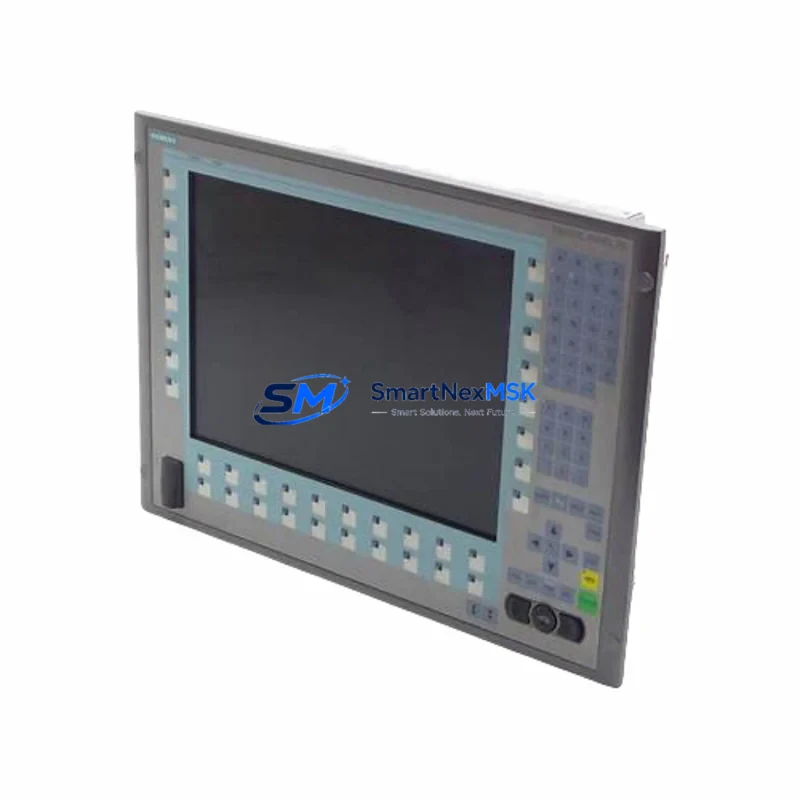
Siemens 6AV7875-0BC20-1AC0 PC677B Maintenance-Ready Spare: Spare Parts Replacement & Industrial Downtime Risk Control
The Siemens 6AV7875-0BC20-1AC0 is a SIMATIC PC677B 15-inch industrial Panel PC designed for demanding automation environments. As a maintenance-ready spare, this unit supports rapid replacement in SCADA, HMI, and process visualization applications across manufacturing, energy, chemical, and discrete automation sectors. Whether you are managing a planned shutdown, responding to an unplanned fault, or building a strategic spare parts inventory, the 6AV7875-0BC20-1AC0 delivers the compatibility, ruggedness, and long-term supply assurance that maintenance and procurement engineers require.
Sourced as an original Siemens component, each unit undergoes pre-shipment functional verification covering power-on, display output, I/O interface integrity, and communication port status. A 12-month warranty is included with every shipment, providing documented assurance for both site engineers and procurement departments.
Spare Maintenance Table
| Parameter | Specification |
|---|---|
| SKU / Part Number | 6AV7875-0BC20-1AC0 |
| Product Series | SIMATIC PC677B |
| Brand | Siemens |
| Display Size | 15″ TFT LCD, 1024×768 (XGA) |
| Supply Voltage | 24 V DC (18–30 V DC) |
| Protection Rating | IP65 (front panel) |
| Operating Temperature | 0 °C to +50 °C |
| Processor | Intel Core 2 Duo / compatible industrial CPU |
| Communication Interfaces | Ethernet (RJ45), USB, COM ports, optional PROFIBUS/MPI |
| Mounting | Panel cut-out, portrait/landscape |
| Compatibility | SIMATIC S7-300, S7-400, S7-1500, WinCC, TIA Portal |
| Origin | Germany (Original Siemens) |
| Pre-Shipment Test | Power-on, display, I/O, communication port verification |
| Warranty | 12 Months |
| Typical Application | SCADA visualization, HMI replacement, process control panels |
| Maintenance Recommendation | Inspect fan, thermal paste, and UPS backup annually; verify Ethernet and USB port integrity at each planned shutdown |
Maintenance Planning for Continuous Operation
When replacing the 6AV7875-0BC20-1AC0 in a control cabinet or panel enclosure, a thorough site inspection is essential to prevent repeat failures and ensure system stability. Maintenance engineers should treat this replacement as an opportunity to audit the surrounding electrical environment.
Begin with the 24 V DC power supply feeding the panel PC. Units such as the Siemens SITOP PSU100S or equivalent regulated DIN-rail power supplies should be checked for output ripple, load capacity, and terminal tightness. A degraded power supply is a common root cause of HMI instability and premature panel PC failure. Alongside the power supply, inspect the 24 V DC fuse or circuit breaker protecting the HMI branch circuit — replace any fuse showing signs of thermal stress or intermittent continuity.
The Ethernet communication cable and managed switch port connecting the PC677B to the SIMATIC S7-1500 or S7-300/400 PLC should be tested for link integrity and packet loss. In older installations, Cat5e cables routed near high-voltage conductors may exhibit signal degradation; upgrading to shielded Cat6 is recommended during any planned replacement. If the system uses PROFIBUS DP or MPI communication, inspect the bus connector (e.g., Siemens 6ES7972-0BB52-0XA0) and termination resistors at both ends of the segment.
For control cabinets housing the PC677B alongside a SIMATIC S7-300 or S7-400 CPU, this is an appropriate time to inspect the CPU backup battery (e.g., 6ES7971-0BA00) and the I/O expansion modules — particularly digital input modules (SM321), digital output modules (SM322), and analog input modules (SM331) — for loose terminal connections and indicator fault codes. Any signal isolators or loop-powered transmitters in the analog signal chain should be verified for correct 4–20 mA output.
The UPS module (if installed, e.g., Siemens SITOP UPS1600) should be tested for battery health and switchover time. An aging UPS that fails to hold voltage during a power dip is a frequent cause of unplanned PC677B shutdowns and file system corruption. Additionally, inspect terminal blocks and DIN-rail mounted relay modules in the same cabinet section for signs of overheating, loose wiring, or contact wear — these components are often overlooked during HMI-focused maintenance visits.
Finally, if the PC677B is running WinCC Runtime or TIA Portal HMI software, confirm that the OS image, driver versions, and communication configuration are backed up before powering down the old unit. A pre-configured CompactFlash or SSD image backup will significantly reduce commissioning time during emergency replacement.
Site Replacement Workflow
Step 1 — Pre-replacement preparation: Back up the existing HMI project, WinCC configuration, and OS image. Document all IP addresses, PROFIBUS node addresses, and communication parameters. Photograph all cable connections before disconnection.
Step 2 — Power isolation: Isolate the 24 V DC supply to the panel PC via the dedicated circuit breaker or fuse. Verify zero voltage at the PC power terminals using a calibrated multimeter before proceeding.
Step 3 — Physical removal: Release the panel cut-out clamps or mounting screws. Carefully disconnect all cables — power, Ethernet, USB peripherals, and any serial/COM connections — labeling each connector for reinstallation.
Step 4 — New unit installation: Mount the 6AV7875-0BC20-1AC0 into the panel cut-out. Reconnect all cables per the documented configuration. Verify that the 24 V DC supply polarity is correct before energizing.
Step 5 — Commissioning and verification: Power on the unit and confirm display output, OS boot, and communication link establishment. Restore the HMI project and WinCC configuration. Perform a full I/O check and confirm SCADA data integrity before returning the system to production.
Step 6 — Documentation: Update the maintenance log with the replacement date, new unit serial number, and any observations noted during the replacement. Schedule the next planned inspection interval.
This workflow is applicable to legacy SIMATIC PC670, PC677, and PC877 series replacements, ensuring backward compatibility and minimizing system downtime during the transition.
Spare Parts Support FAQ
Q1: What is the spare parts lifecycle for the Siemens 6AV7875-0BC20-1AC0, and how long can I expect supply availability?
The SIMATIC PC677B series has reached end-of-sale status with Siemens, making original spare stock increasingly scarce through standard distribution channels. SMARTNEXMSK maintains a dedicated inventory of tested original units to support long-term maintenance contracts and aging system extensions. We recommend procurement engineers secure a minimum of one cold-standby unit per critical HMI station to avoid extended lead times during emergency replacement scenarios.
Q2: How do I verify compatibility between the 6AV7875-0BC20-1AC0 and my existing WinCC or TIA Portal project?
Compatibility is determined by the OS version, WinCC Runtime version, and hardware interface configuration of your existing project. The PC677B platform supports WinCC V7.x and earlier TIA Portal HMI configurations. Before ordering, provide your current WinCC version and PLC communication protocol (Ethernet/IP, PROFIBUS, or MPI) to our technical team for a pre-sale compatibility confirmation. Each unit shipped by SMARTNEXMSK includes a pre-shipment test report documenting interface functionality.
Q3: What does the 12-month warranty cover, and what is the replacement process if a fault is identified after installation?
The 12-month warranty covers manufacturing defects and functional failures under normal operating conditions (24 V DC supply within specification, ambient temperature within rated range, IP65 protection maintained). If a fault is identified post-installation, contact [email protected] with the unit serial number, fault description, and installation date. Our team will initiate a replacement or repair process within 3 business days of fault confirmation. Warranty does not cover damage resulting from incorrect supply voltage, physical impact, or unauthorized modification.
Q4: Can the 6AV7875-0BC20-1AC0 be used as a direct drop-in replacement for earlier PC677 or PC670 variants?
In most cases, yes — the PC677B series maintains the same panel cut-out dimensions and 24 V DC power interface as earlier PC677 and PC670 variants, allowing physical drop-in replacement without cabinet modification. However, software and driver compatibility must be verified against your specific OS image and HMI project version. SMARTNEXMSK recommends a bench test of the replacement unit with a copy of your HMI project before site installation to confirm full operational compatibility and minimize on-site commissioning time.
© 2026 SMARTNEXMSK. All rights reserved.
Original Source: https://smartnexmsk.com
Contact: [email protected] | +86 18259474341



