
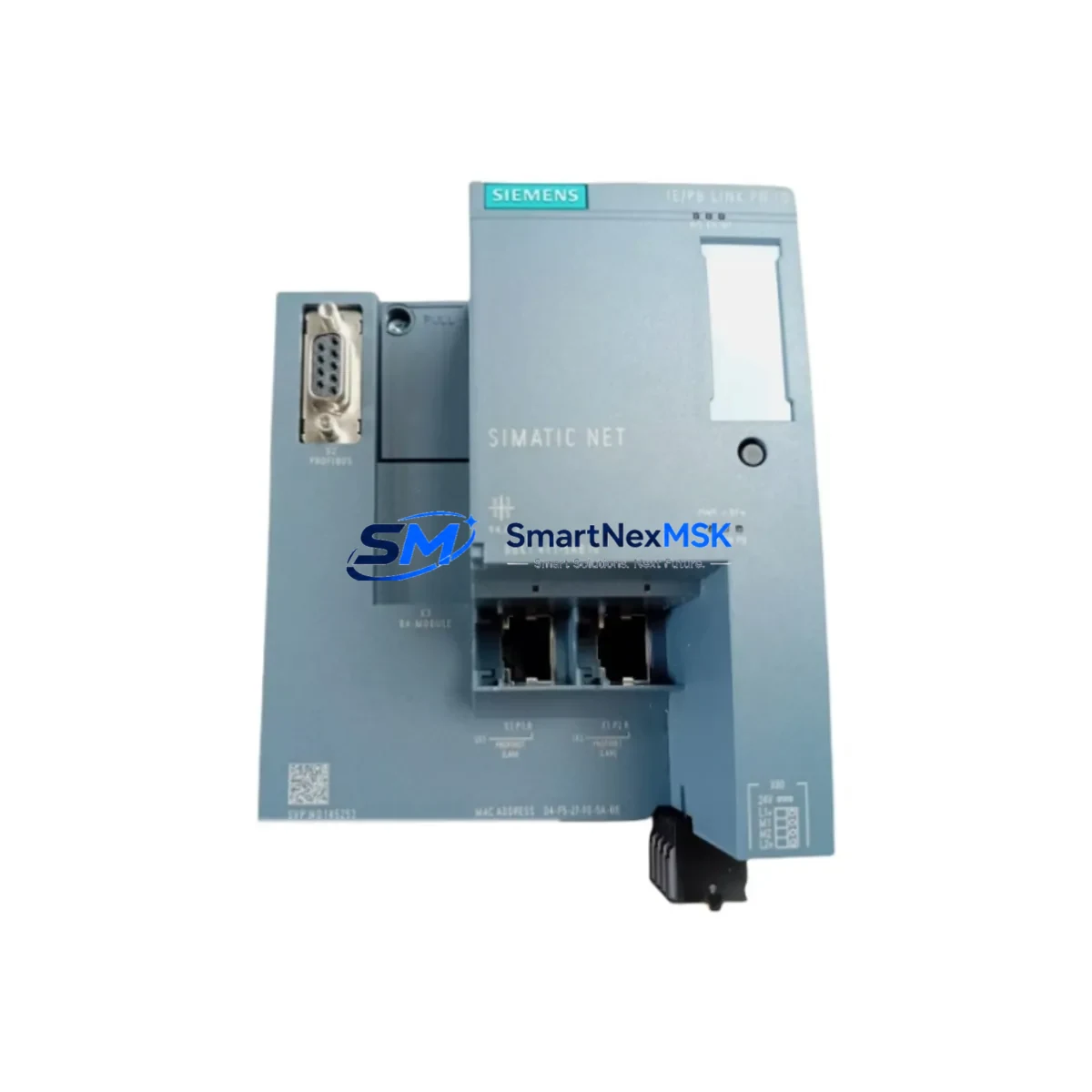
Siemens 6GK1411-5AB10 Retrofit-Ready PROFIBUS-PROFINET Gateway for Legacy Control Systems
The Siemens 6GK1411-5AB10 IE/PB Link PN IO is a proven PROFIBUS-to-PROFINET gateway module designed to bridge legacy PROFIBUS DP field devices with modern PROFINET IO controller networks. As industrial facilities accelerate the migration of aging S7-300 and S7-400 control platforms toward current-generation SIMATIC S7-1500 and ET 200SP architectures, the 6GK1411-5AB10 serves as a critical transition component — enabling existing PROFIBUS field instrumentation, drives, and remote I/O stations to remain fully operational within a PROFINET-based control environment without requiring immediate wholesale replacement of field wiring or devices.
This module is particularly valuable in brownfield retrofit projects where the installed base of PROFIBUS DP slaves — including Siemens ET 200M distributed I/O racks, SINAMICS G120 and S120 drive systems, and third-party PROFIBUS field devices — must be preserved while the upper-level controller and network backbone are upgraded. The 6GK1411-5AB10 acts as a PROFINET IO device on the controller side and a PROFIBUS DP master (Class 1) on the field side, transparently mapping I/O data between both domains.
Upgrade Compatibility Table
| Parameter | Specification / Retrofit Guidance |
|---|---|
| Part Number | 6GK1411-5AB10 |
| Product Family | IE/PB Link PN IO (SIMATIC NET) |
| PROFINET Interface | 2× RJ45 (10/100 Mbit/s), integrated switch, IRT/RT support |
| PROFIBUS Interface | 1× RS-485 (9-pin Sub-D), DP Master Class 1, up to 12 Mbit/s |
| Max. PROFIBUS Slaves | Up to 64 DP slaves per segment |
| Power Supply | 24 V DC (18–30 V), via 4-pin terminal connector — verify panel PSU capacity before installation |
| Compatible Controllers | SIMATIC S7-300, S7-400, S7-1200, S7-1500, WinCC-based SCADA via PROFINET IO |
| Replaces / Upgrades From | 6GK1411-5AA00 (IE/PB Link V1), CP 342-5 (when used as DP master), direct PROFIBUS CP cards in legacy racks |
| Installation | DIN rail mount; no backplane slot required — standalone module, suitable for control cabinet retrofit |
| Configuration Tool | STEP 7 (V5.5+) or TIA Portal (V13 SP1+); GSD/GSDML file required for PROFINET IO device integration |
| Communication Compatibility | PROFIBUS DP V0/V1; PROFINET IO RT/IRT; S7 communication via PROFINET |
| Retrofit Commissioning | Assign PROFINET device name via TIA Portal or PRONETA; configure DP slave address map; verify I/O consistency bytes |
| Warranty | 12 months from shipment date — covers hardware defects under normal operating conditions |
Retrofit Planning for Existing Automation Systems
Successful integration of the 6GK1411-5AB10 into an existing control system begins with a thorough audit of the current PROFIBUS segment. Engineers should document all connected DP slave addresses, GSD file versions, and baud rate settings before any hardware change. In a typical S7-300 retrofit scenario where a CP 342-5 communications processor previously served as the PROFIBUS DP master, the 6GK1411-5AB10 assumes that master role on the field side while presenting itself as a standard PROFINET IO device to the upgraded S7-1500 controller. This eliminates the need to rewire field devices or reassign slave addresses.
Power supply planning is essential. The 6GK1411-5AB10 draws up to 4 W from a 24 V DC rail. In control cabinets where a SITOP PSU100S or SITOP PSU200M power supply is already installed, verify that sufficient headroom exists after accounting for all other 24 V consumers — including solenoid valves, signal conditioners, and any ET 200S or ET 200M I/O stations on the same rail. If the existing PSU is at capacity, a dedicated 24 V / 2.5 A supply for the gateway is recommended.
Terminal wiring for the PROFIBUS side uses a standard 9-pin Sub-D connector. Confirm that the existing PROFIBUS cable (typically Siemens 6XV1830-0EH10 or equivalent) is terminated correctly at both ends with 150 Ω bus termination resistors, and that only the first and last physical nodes on the segment have termination active. Incorrect termination is a leading cause of intermittent communication faults during commissioning.
On the PROFINET side, connect the module to the plant network switch — or directly to the S7-1500 CPU’s PROFINET port — using standard Cat5e or Cat6 Ethernet cable. Assign the PROFINET device name using TIA Portal’s “Assign device name” function or the standalone PRONETA diagnostic tool. The GSDML file for the 6GK1411-5AB10 must be imported into the TIA Portal project before the device can be configured in the hardware catalog.
For projects involving SINAMICS G120 drives or SINAMICS S120 drive systems currently on PROFIBUS, the 6GK1411-5AB10 allows these drives to remain on their existing PROFIBUS wiring while the PLC migrates to PROFINET. Drive parameter sets, telegram types (e.g., Standard Telegram 1 or 352), and PZD word counts must be verified to match the new controller’s I/O configuration. Similarly, any Siemens IM 153-2 interface modules in ET 200M stations will continue to operate as PROFIBUS DP slaves behind the gateway without modification.
HMI integration should also be reviewed. If a SIMATIC HMI TP700 Comfort or MP377 panel communicates with the S7-300 CPU via MPI or PROFIBUS, migrating the CPU to S7-1500 with PROFINET requires updating the HMI connection in WinCC Flexible or TIA Portal WinCC to use an S7 connection over PROFINET/TCP. Screen layouts, tag addresses, and alarm configurations typically remain valid, but connection parameters must be updated to reflect the new CPU IP address and rack/slot assignment.
Programming cable compatibility is another consideration. Legacy STEP 7 projects programmed via a PC Adapter USB (6ES7972-0CB20-0XA0) or MPI/DP adapter will need to be migrated to TIA Portal if the target controller is S7-1500. The 6GK1411-5AB10 itself is configured entirely within TIA Portal’s network view and does not require a separate programming connection.
Downtime Control During System Migration
Minimizing production downtime is the primary concern in any brownfield retrofit. A phased migration strategy using the 6GK1411-5AB10 allows the PROFIBUS field layer to remain live while the controller-level changes are made. The recommended approach is to pre-configure the new S7-1500 CPU and the 6GK1411-5AB10 offline in TIA Portal, simulate I/O mapping against the existing PROFIBUS slave GSD configurations, and perform a full factory acceptance test (FAT) on the replacement hardware before the scheduled maintenance window.
During the cutover, the original S7-300 CPU and CP 342-5 (or equivalent PROFIBUS master) should be powered down only after the new hardware is physically installed and network connections are verified. The 6GK1411-5AB10 will begin scanning the PROFIBUS segment immediately upon power-up, and the S7-1500 CPU will establish PROFINET IO communication with the gateway within seconds of entering RUN mode. Total controller switchover time — from power-down of the old CPU to first scan of the new CPU — can typically be achieved within 15–30 minutes for a well-prepared retrofit.
To protect existing program logic, export the S7-300 STEP 7 project blocks (OBs, FBs, FCs, DBs) and convert them using the TIA Portal migration tool before the cutover. Verify that all I/O addresses, symbolic names, and data block structures are preserved. After the new system is live, retain the original STEP 7 project and hardware configuration as a documented backup for at least 12 months.
All units supplied by SMARTNEXMSK undergo pre-shipment functional testing, including power-on verification, port integrity checks, and firmware version confirmation. Each 6GK1411-5AB10 is covered by a 12-month warranty from the date of shipment, providing assurance for both planned retrofit projects and emergency replacement scenarios.
Retrofit Support FAQ
Q1: Can the 6GK1411-5AB10 directly replace a CP 342-5 in an existing S7-300 rack?
The 6GK1411-5AB10 is not a rack-mounted CP card — it is a standalone DIN rail module. It cannot occupy a slot in the S7-300 backplane. However, it functionally replaces the CP 342-5’s role as a PROFIBUS DP master by taking over that function on the field side while connecting to the new PROFINET controller. The S7-300 CPU slot previously used by the CP 342-5 can be freed or repurposed.
Q2: What commissioning steps are required after physical installation?
After mounting and wiring, import the GSDML file into TIA Portal, add the 6GK1411-5AB10 as a PROFINET IO device in the network view, assign a unique device name and IP address, configure the PROFIBUS DP slave address table to match the existing field devices, and download the configuration to the S7-1500 CPU. Use PRONETA or TIA Portal’s online diagnostics to verify PROFINET connectivity before enabling the PROFIBUS segment.
Q3: Is the 6GK1411-5AB10 compatible with third-party PROFIBUS devices from other manufacturers?
Yes. The module operates as a standard PROFIBUS DP Master Class 1 and is compatible with any DP slave device that provides a valid GSD file and conforms to the IEC 61158 / EN 50170 PROFIBUS standard. This includes drives, valve terminals, encoders, and remote I/O from ABB, Beckhoff, Phoenix Contact, Wago, and other vendors commonly found in mixed-brand control systems.
Q4: What does the 12-month warranty cover, and how is a claim processed?
The 12-month warranty covers hardware defects in materials and workmanship under normal operating conditions (24 V DC supply within specification, ambient temperature within rated range, no physical damage). To initiate a warranty claim, contact SMARTNEXMSK with the order number, shipment date, and a description of the fault. Replacement or repair will be arranged promptly to minimize impact on your production schedule.
© 2026 SMARTNEXMSK. All rights reserved.
Original Source: https://smartnexmsk.com
Contact: [email protected] | +86 18259474341



