
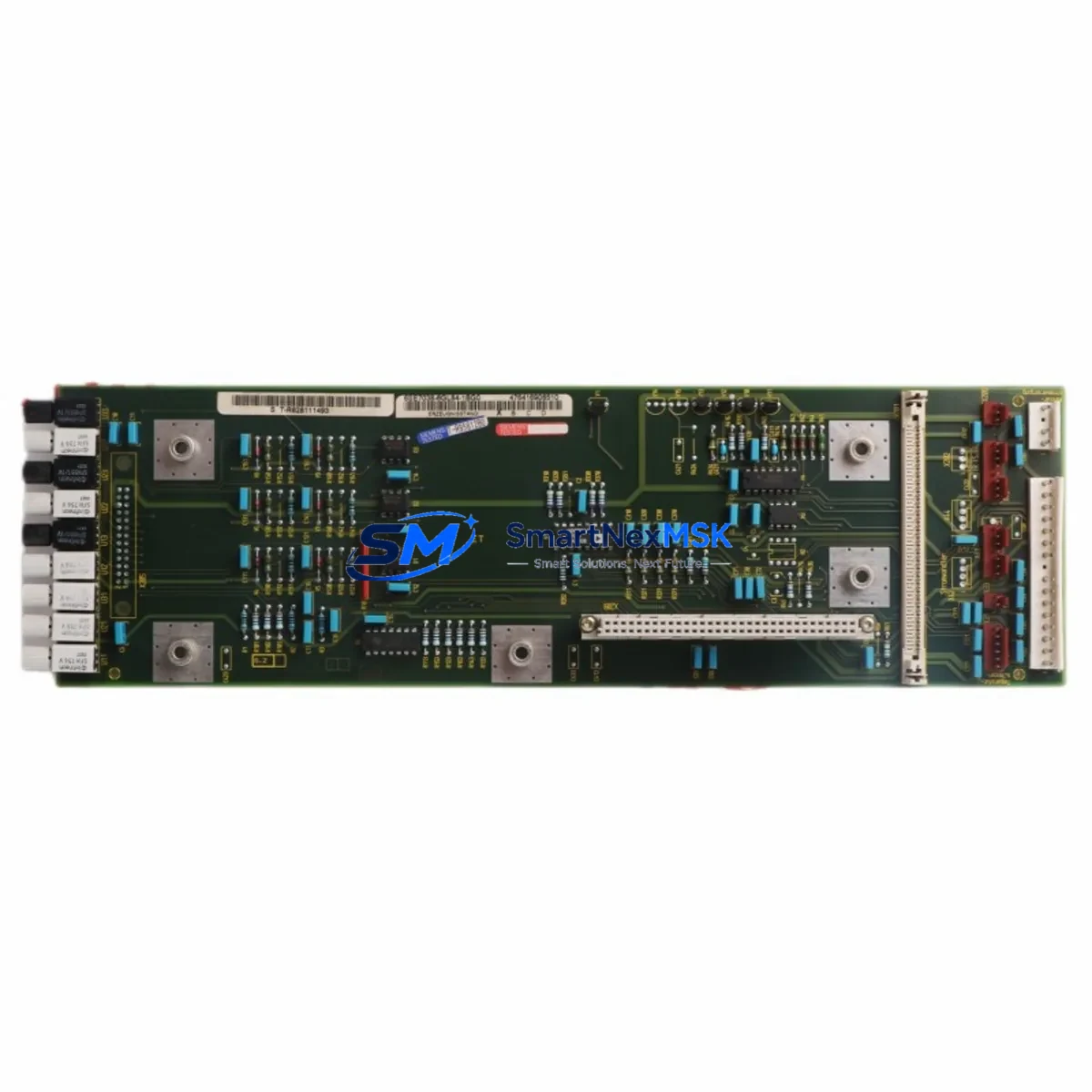
Siemens 6SE7038-6GL84-1BG0 Maintenance-Ready Spare for MASTERDRIVES Automation
The Siemens 6SE7038-6GL84-1BG0 is an IVI (Intelligent Vector Interface) interface module engineered for MASTERDRIVES GL-Frame variable-speed drive systems. In industrial environments where unplanned downtime translates directly into production loss, having a verified, tested spare of this module on the shelf is a fundamental element of any proactive maintenance strategy. This unit is sourced as an original Siemens component, fully inspected prior to dispatch, and backed by a 12-month warranty — giving maintenance engineers and procurement teams the confidence to act fast when a fault is detected.
The 6SE7038-6GL84-1BG0 sits at the heart of the MASTERDRIVES GL-Frame drive’s control architecture, managing the interface between the drive’s power section and the higher-level automation or motion control system. When this module fails or degrades, the entire drive becomes inoperable, halting connected machinery. Rapid spare replacement is the most effective path to restoring operation without waiting for lengthy repair cycles or OEM lead times that can stretch weeks.
Spare Maintenance Table
| Parameter | Specification / Detail |
|---|---|
| Part Number / SKU | 6SE7038-6GL84-1BG0 |
| Brand | Siemens |
| Series | SIMOVERT MASTERDRIVES (GL-Frame) |
| Module Type | IVI Interface Module (Drive Interface) |
| Compatible Drive Frame | GL-Frame MASTERDRIVES Variable Speed Drives |
| Application | Industrial automation, motor control, variable-speed drive systems |
| Origin | Germany (DE) |
| Installation | Slot-in module, GL-Frame drive cabinet |
| Operating Environment | Industrial control cabinet, IP20 internal environment |
| Maintenance Role | Emergency replacement, planned overhaul spare, lifecycle extension |
| Pre-shipment Testing | Functional verification performed before dispatch |
| Warranty | 12 Months |
| Condition | Original Siemens spare, inspected stock |
| Shipping | Secure anti-static packaging, global express available |
Maintenance Planning for Continuous Operation
When a maintenance or reliability engineer identifies a fault in the 6SE7038-6GL84-1BG0, the replacement of this interface module alone is rarely sufficient to guarantee a full system recovery. A disciplined site inspection should accompany every drive module swap to prevent repeat failures and confirm system integrity before restart.
Begin with the drive’s DC bus and power supply section. The 6SE7023-0TA87-1FB0 or equivalent MASTERDRIVES power supply module should be checked for correct DC link voltage and any signs of capacitor aging or thermal stress. A degraded power supply can stress interface modules and cause premature failure of replacement units. Similarly, inspect the 6SE7090-0XX84-0AB0 CUVC control board if fitted, as communication faults between the control board and the IVI interface are a common root cause of module errors.
Review the drive’s fiber-optic communication links and the CBP2 (6SE7090-0XX84-0FF5) PROFIBUS communication board if the drive is integrated into a PROFIBUS DP network. A corrupted or intermittent PROFIBUS connection can generate fault codes that mimic interface module failures. Confirm bus termination resistors are correctly set and cable shielding is intact throughout the cabinet.
Inspect the 6SE7031-8EF84-1JA1 or similar pulse encoder interface board if the drive operates in closed-loop speed or torque control. Encoder signal integrity is critical for IVI module operation, and a faulty encoder cable or connector can cause the replacement module to fault immediately after installation. Check the encoder cable for continuity, shielding, and correct connector seating.
Terminal blocks and wiring within the GL-Frame cabinet deserve close attention. Loose or corroded terminals on the 24 VDC auxiliary supply rail, the enable signal wiring, and the analog reference inputs can all contribute to drive instability. Use a calibrated torque screwdriver to re-torque all control wiring terminals to the manufacturer’s specification during the maintenance window.
If the site uses a Siemens OP1S operator panel or an external HMI connected via the drive’s serial interface, verify that the HMI communication parameters match the replacement module’s factory defaults. Parameter sets stored in the OP1S can be re-downloaded to the new module to restore the drive’s application configuration without manual re-entry, significantly reducing commissioning time after the swap.
For sites running multiple MASTERDRIVES units in a common DC bus configuration, also inspect the 6SE7038-6GL84-1BD0 or adjacent GL-Frame units sharing the same DC link. A fault in one drive can propagate transient overvoltages to neighboring units, potentially damaging their interface modules simultaneously. Checking the DC bus fuses and the pre-charge circuit of each drive in the group is a prudent step before energizing the restored system.
Finally, review the drive’s fault history log using the STARTER commissioning tool or the OP1S panel before clearing faults and restarting. Recurring fault codes pointing to the interface module — particularly F023, F025, or communication timeout faults — may indicate an underlying issue with the backplane connector, the module slot, or the drive’s internal power rail rather than the module itself.
Site Replacement Workflow
Step 1 — Isolation and Safety: Follow site LOTO (Lockout/Tagout) procedures. Isolate the drive from the AC supply and allow the DC bus capacitors to discharge fully (minimum 5 minutes, verify with a calibrated voltmeter before touching internal components).
Step 2 — Document Current Configuration: Before removing the 6SE7038-6GL84-1BG0, record or upload the drive’s parameter set using the OP1S operator panel or STARTER software. This ensures the replacement module can be configured identically to the original, preserving motor data, ramp times, and control mode settings.
Step 3 — Module Removal: Release the module retention clips, disconnect the ribbon or fiber-optic connectors carefully, and slide the module out of its slot. Handle with anti-static precautions throughout.
Step 4 — Inspect the Slot and Connectors: Before inserting the replacement 6SE7038-6GL84-1BG0, inspect the backplane connector pins for damage, corrosion, or debris. Clean with dry compressed air if necessary. A damaged backplane connector will cause the new module to fail immediately.
Step 5 — Install Replacement Module: Seat the new module firmly until the retention clips engage. Reconnect all cables and fiber-optic links. Verify correct seating visually before applying power.
Step 6 — Parameter Restore and Commissioning: Power up the drive and download the saved parameter set. Perform a no-load test run to verify correct speed reference tracking and fault-free operation before reconnecting the mechanical load.
Step 7 — System Handover: Document the replacement in the site maintenance log, record the new module’s serial number, and update the spare parts inventory. Schedule the next planned inspection interval according to the site’s preventive maintenance program.
This workflow minimizes total downtime to typically under two hours for a prepared maintenance team with the spare module on hand, compared to days or weeks waiting for repair or OEM supply.
Spare Parts Support FAQ
Q1: Is the 6SE7038-6GL84-1BG0 a direct drop-in replacement for the original module in my GL-Frame MASTERDRIVES drive?
Yes. This module is an original Siemens spare sourced for the MASTERDRIVES GL-Frame series. It is a direct slot-compatible replacement. After installation, restore the drive’s parameter set using the OP1S or STARTER tool to match your application configuration. No hardware modification is required.
Q2: How is the module tested before shipment?
Each unit undergoes functional verification prior to dispatch, including power-on checks and interface signal testing. The module is packed in anti-static protective packaging to prevent ESD damage during transit. A 12-month warranty covers the unit against defects from the date of delivery.
Q3: What is the recommended spare parts strategy for MASTERDRIVES GL-Frame installations?
For critical production lines, we recommend holding at minimum one 6SE7038-6GL84-1BG0 interface module per drive type on site. For multi-drive installations sharing a common DC bus, consider holding spares for the CUVC control board, the CBP2 PROFIBUS module, and the pulse encoder interface board as well. This covers the most common failure modes and allows same-shift recovery from most drive faults.
Q4: Can you support long-term or repeat supply of this module for fleet maintenance programs?
Yes. We support ongoing supply agreements for maintenance teams managing large fleets of MASTERDRIVES or legacy Siemens drive systems. Contact our team to discuss volume pricing, reserved stock arrangements, and scheduled delivery programs tailored to your planned maintenance calendar.
© 2026 SMARTNEXMSK. All rights reserved.
Original Source: https://smartnexmsk.com
Contact: [email protected] | +86 18259474341



