
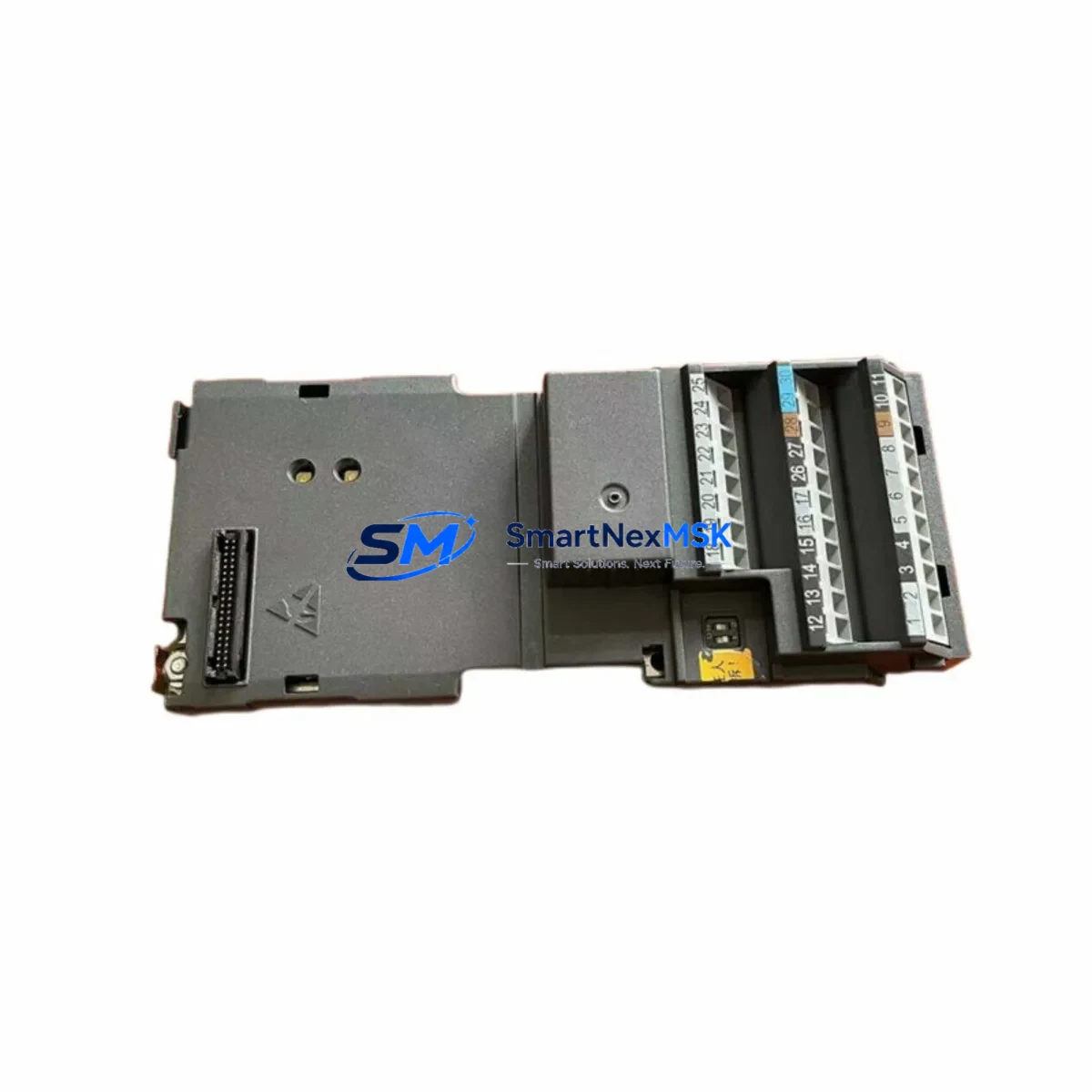
Siemens A5E00684817 Retrofit-Ready I/O Board for SINAMICS Control Systems
The Siemens A5E00684817 is a SINAMICS Converter I/O Board engineered for seamless integration into legacy and active drive control architectures. As industrial facilities face increasing pressure to extend the service life of existing automation infrastructure, this module delivers a verified, drop-in retrofit solution for SINAMICS S120 and G120 drive platforms without requiring full system replacement. Whether you are recovering from an unplanned drive failure, executing a planned control cabinet upgrade, or migrating from an obsolete predecessor board, the A5E00684817 provides the electrical compatibility, signal integrity, and firmware alignment required for reliable recommissioning.
This I/O board interfaces directly with the SINAMICS S120 Control Unit family — including the CU320-2 DP and CU320-2 PN — and is designed to restore full I/O functionality across digital inputs, digital outputs, and analog channels without modification to existing terminal wiring. Engineers replacing a failed or end-of-life board will find that the A5E00684817 preserves the original terminal assignment, eliminating the need to re-document field wiring or reroute cabinet cabling. The board mounts to the standard SINAMICS booksize or chassis format backplane, and its connector footprint is backward-compatible with earlier SINAMICS converter generations.
For sites running multi-axis drive lines built around the SINAMICS S120 booksize power unit and motor modules, the A5E00684817 supports coordinated I/O expansion alongside components such as the Terminal Module TM31, TM41, and TM54F — all of which share the DRIVE-CLiQ communication backbone. Facilities that have already deployed the SMC30 Sensor Module Cabinet-Mounted or the VSM10 Voltage Sensing Module will find that the A5E00684817 integrates without protocol conflict, maintaining the existing DRIVE-CLiQ topology and preserving encoder feedback routing.
When retrofitting into a control cabinet that also houses a SIMATIC S7-300 or S7-1500 PLC communicating via PROFIBUS DP or PROFINET IO, the A5E00684817 does not require changes to the PLC program’s drive parameter block or telegram configuration. The board’s I/O mapping remains consistent with the original hardware, meaning HMI screens built on SIMATIC WinCC or WinCC Flexible will continue to display correct process values without screen revision. This is a critical advantage in facilities where HMI re-engineering carries significant validation and downtime cost.
Procurement teams sourcing this board as a spare or emergency replacement should note that the A5E00684817 is fully tested prior to shipment, with functional verification of all I/O channels, power rail integrity, and DRIVE-CLiQ port handshake. Each unit ships with a 12-month warranty covering manufacturing defects and functional failure under normal operating conditions. Stock is maintained to support both single-unit emergency orders and multi-unit planned maintenance programs.
Upgrade Compatibility Table
| Parameter | Details |
|---|---|
| Compatible Drive Platform | SINAMICS S120 (Booksize & Chassis), SINAMICS G120 |
| Compatible Control Units | CU320-2 DP, CU320-2 PN, CU310-2 |
| Communication Interface | DRIVE-CLiQ; PROFIBUS DP / PROFINET IO (via CU) |
| Terminal Compatibility | Drop-in replacement; original terminal assignment preserved |
| Backplane / Rack Interface | Standard SINAMICS booksize backplane; no adapter required |
| Installation Requirement | Power-off installation; firmware parameter restore via STARTER or TIA Portal |
| Commissioning Tool | SINAMICS STARTER v5.x / TIA Portal V16+ |
| Predecessor Compatibility | Replaces earlier A5E-series I/O boards in same form factor |
| Warranty | 12 months from shipment date |
| Pre-shipment Test | Full I/O channel verification, power rail check, DRIVE-CLiQ handshake |
Retrofit Planning for Existing Automation Systems
A successful retrofit begins with a thorough audit of the existing drive cabinet. Before removing the failed or obsolete board, engineers should document the current parameter set using SINAMICS STARTER or TIA Portal — saving the full drive parameter file (p-file) to a commissioning laptop or USB memory card. This backup is essential for restoring motor data, ramp times, speed limits, and I/O function assignments after the new A5E00684817 is installed.
Terminal wiring should be photographed and cross-referenced against the original cabinet wiring diagram before disconnection. The A5E00684817 preserves the standard SINAMICS I/O terminal layout, so in most cases the existing wire labels and ferrule markings will align directly with the replacement board’s terminal block. However, engineers should verify the 24 VDC supply rail capacity at the cabinet power supply — particularly in cabinets where a SITOP PSU8200 or SITOP modular power supply feeds multiple modules including the CU320-2 and associated Terminal Module TM31 or TM41 units. Insufficient supply headroom is a common cause of intermittent faults after board replacement.
For multi-axis systems, the DRIVE-CLiQ ring topology should be re-verified after installation. The A5E00684817 must be assigned the correct module address within the DRIVE-CLiQ network, and the CU320-2 must recognize the new board during the topology scan. If the system includes an SMC30 Sensor Module or a VSM10 Voltage Sensing Module downstream in the DRIVE-CLiQ chain, their addresses must remain unchanged to avoid axis assignment errors. After topology confirmation, restore the saved parameter file and perform a function test of all digital inputs and outputs before re-enabling the drive.
In cabinets where the SINAMICS drive communicates with a SIMATIC S7-1500 via PROFINET IO, verify that the GSD file version in the PLC project matches the firmware version of the replacement board. A mismatch can cause the PLC to report a configuration fault even if the drive hardware is correctly installed. This check takes less than five minutes in TIA Portal and prevents unnecessary troubleshooting cycles during recommissioning.
Downtime Control During System Migration
Minimizing production downtime during an I/O board replacement requires preparation before the maintenance window opens. The recommended approach is to pre-configure the A5E00684817 offline using SINAMICS STARTER in offline mode, loading the saved parameter file and verifying all function block assignments before the board is physically installed. This reduces the live commissioning time to topology scan, parameter download, and I/O function test — typically achievable within 60 to 90 minutes for a single-axis drive.
For multi-axis lines where the SINAMICS S120 booksize power unit feeds multiple motor modules, a phased replacement strategy limits the impact to a single axis at a time. The remaining axes can continue operating while the affected axis is isolated, provided the control program includes axis-level enable logic that allows individual axis shutdown without triggering a line-wide fault. PLC programs built on SIMATIC S7-1500 with standard SINAMICS telegram 111 or telegram 352 typically support this architecture without modification.
Field teams should also prepare a rollback plan: retain the original board in a labeled anti-static bag until the replacement has completed a full production cycle without fault. If an unexpected compatibility issue arises — such as a firmware version mismatch or an undocumented hardware revision difference — the original board can be reinstalled while the issue is resolved, maintaining production continuity. The 12-month warranty on the A5E00684817 covers the unit from the shipment date, providing a clear support window throughout the commissioning and initial production period.
Retrofit Support FAQ
Q: Is the A5E00684817 a direct drop-in replacement for the original board in my SINAMICS S120 drive?
A: Yes. The A5E00684817 is designed as a form-fit-function replacement for the original SINAMICS Converter I/O Board. The terminal layout, backplane connector, and DRIVE-CLiQ interface are preserved, so no wiring modification or mechanical adaptation is required. After installation, restore the saved parameter file and perform a topology scan to complete commissioning.
Q: Do I need to update my TIA Portal or STARTER project after installing the replacement board?
A: In most cases, no project update is required if the firmware version of the replacement board matches the original. If the firmware version differs, a GSD file update may be needed in the PROFINET IO configuration. We recommend verifying the firmware version on the board label before installation and comparing it against the version recorded in your existing project.
Q: What pre-shipment testing is performed on the A5E00684817?
A: Each unit undergoes full I/O channel functional verification, 24 VDC power rail integrity check, and DRIVE-CLiQ port handshake test before shipment. Units that do not pass all test criteria are not shipped. A test record is available upon request for quality documentation purposes.
Q: What does the 12-month warranty cover?
A: The warranty covers manufacturing defects and functional failure under normal operating conditions for 12 months from the shipment date. It does not cover damage resulting from incorrect installation, overvoltage events, or operation outside the specified environmental ratings. Warranty claims are processed through our sales team at [email protected].
© 2026 SMARTNEXMSK. All rights reserved.
Original Source: https://smartnexmsk.com
Contact: [email protected] | +86 18259474341



