
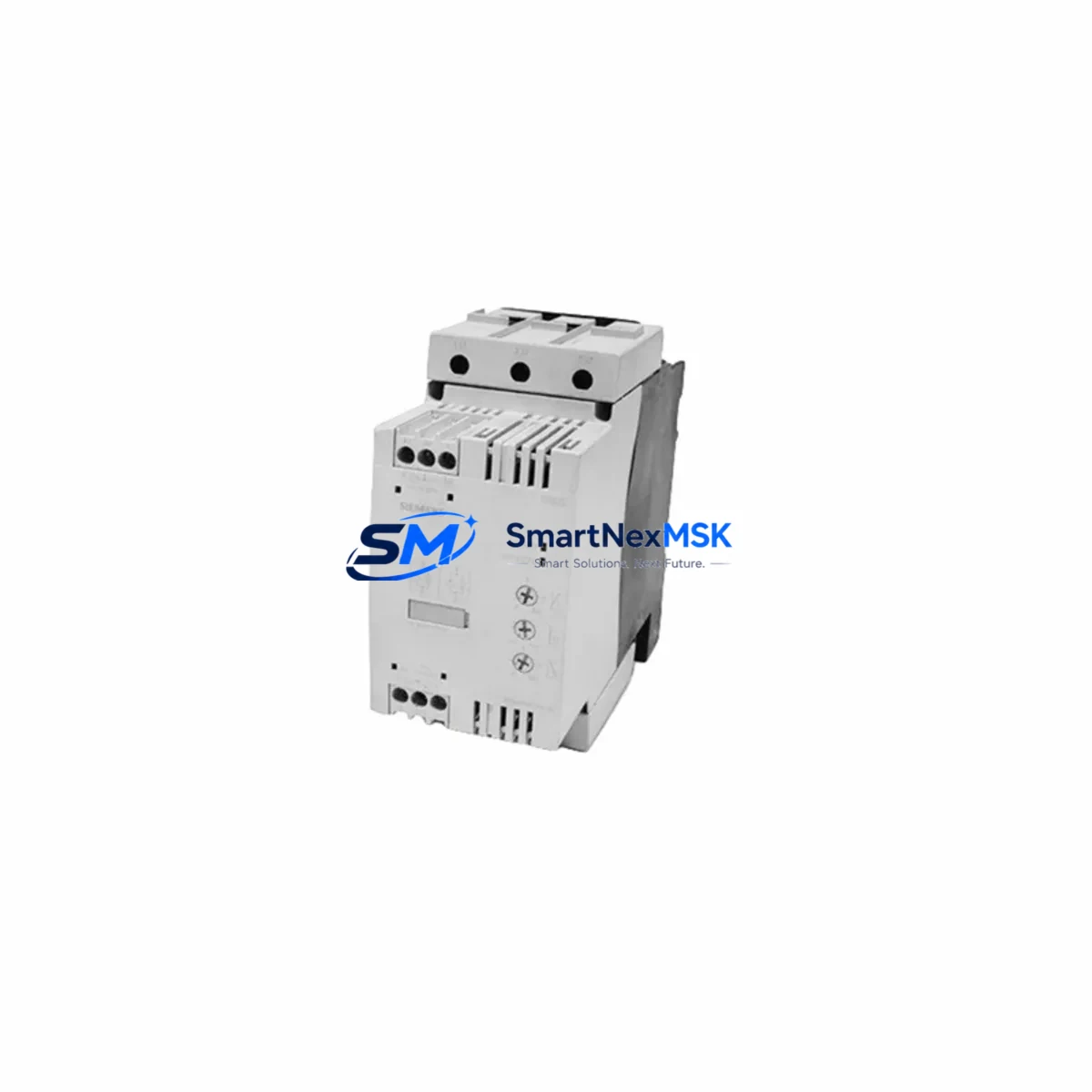
Siemens RW3045-1AB14 Maintenance-Ready Spare SIRIUS Automation
The Siemens RW3045-1AB14 is an original SIRIUS series soft starter and motor protection unit engineered for three-phase induction motor control in demanding industrial environments. As a maintenance-ready spare, this component is critical for facilities operating continuous production lines, compressor stations, pump systems, conveyor drives, and HVAC plant rooms where unplanned motor trips translate directly into costly downtime. Sourced as an original Siemens spare, the RW3045-1AB14 is fully compatible with the SIRIUS control system architecture and can be installed as a direct replacement without firmware reconfiguration in most standard panel layouts.
For maintenance engineers managing aging automation infrastructure, having the RW3045-1AB14 pre-positioned in the spare parts cabinet is a proven strategy for reducing mean time to repair (MTTR). The unit integrates motor overload protection, phase failure detection, and thermistor input in a single compact housing, eliminating the need for separate protective relays in retrofit scenarios. Its DIN rail mounting and standard terminal pitch ensure compatibility with existing SIRIUS 3RW and 3RM series panel wiring without modification.
Procurement engineers sourcing this unit for MRO (Maintenance, Repair, and Operations) inventories will find the RW3045-1AB14 suitable for both planned replacement cycles and emergency breakdown response. Each unit is tested prior to shipment and covered by a 12-month warranty, providing confidence for both immediate installation and long-term stock holding.
Spare Maintenance Table
| SKU / Part Number | RW3045-1AB14 |
| Brand / Manufacturer | Siemens |
| Series | SIRIUS |
| Product Type | Soft Starter / Motor Protection Unit |
| Rated Voltage | 200–480 V AC, 3-phase |
| Control Supply Voltage | 24 V DC / 110–230 V AC (model-dependent) |
| Motor Power Range | Up to 45 kW (at 400 V) |
| Protection Class | IP20 (panel-mounted) |
| Mounting | DIN Rail / Screw mounting |
| Compatibility | SIRIUS 3RW30, 3RW40, 3RM series; direct replacement in standard SIRIUS MCC panels |
| Communication Interface | AS-Interface / PROFIBUS DP (series-dependent) |
| Ambient Temperature | -25°C to +60°C (storage); 0°C to +40°C (operation) |
| Origin | Germany |
| Condition | Original New Spare |
| Pre-shipment Testing | Yes — functional and insulation tested |
| Warranty | 12 Months |
| Weight | 1,210 g |
| Maintenance Recommendation | Inspect every 12 months or after motor fault event; replace if thermal memory shows repeated trip history |
| Application Environment | Motor control centers, pump stations, compressor drives, conveyor systems, HVAC plant rooms |
| Installation Standard | IEC 60947-4-2 compliant |
Maintenance Planning for Continuous Operation
When replacing the RW3045-1AB14 in a SIRIUS motor control center (MCC) or standalone control cabinet, a thorough inspection of the surrounding electrical circuit is essential to prevent repeat failures and ensure system stability. Maintenance engineers should treat this replacement as an opportunity for a full cabinet health check.
Begin by verifying the upstream 3RV2 motor circuit breaker and 3RT2 contactor — both core SIRIUS series components — for contact wear, arc erosion, and correct trip setting. A degraded contactor upstream of the soft starter is a frequent root cause of premature soft starter failure due to voltage transients at switching. Check the 3RU2 overload relay if installed in parallel protection schemes, and confirm its current setting matches the motor nameplate FLA.
Inspect all terminal blocks and busbar connections (such as Siemens 8WH series or Phoenix Contact PTFIX terminal blocks) for signs of thermal discoloration, loose torque, or oxidation — particularly on the motor output terminals where resistive heating is most pronounced. Verify that control wiring to the 24 V DC SITOP PSU100S power supply module is within voltage tolerance, as undervoltage on the control circuit is a common cause of nuisance trips and soft starter lockout.
For panels with AS-Interface or PROFIBUS DP communication, confirm that the network termination resistors are intact and that the CP343-1 or CP1616 communication module in the associated S7-300 or S7-400 PLC rack is not reporting bus errors. A soft starter replacement that coincides with a communication fault can mask the true root cause and delay restoration. Where the system uses a SIMATIC S7-1200 or S7-1500 PLC with PROFINET, verify the device name assignment matches the replacement unit’s configuration.
Check the thermistor input wiring from the motor winding to the RW3045-1AB14 — broken or high-resistance thermistor circuits will trigger false thermal protection trips immediately after installation. If the motor is equipped with a PTC sensor or Klixon bimetal protector, verify continuity before energizing the replacement unit. Also inspect the signal isolator (such as a Phoenix Contact MCR-SL-CPS or Weidmüller WAS series module) on the thermistor circuit, as these are frequently overlooked during emergency replacements.
Finally, inspect the 24 V DC auxiliary relay outputs connected to the soft starter’s fault output and confirm that the KTP700 Basic or TP1200 Comfort HMI panel correctly reflects the new device status after parameter upload. Persistent alarms on the HMI after hardware replacement are often caused by unacknowledged fault buffers in the PLC program rather than a hardware defect in the new unit. Confirm that any fuse holders or NH fuse bases protecting the motor circuit are intact and that fuse ratings match the motor’s short-circuit protection requirements.
Site Replacement Workflow
Step 1 — Isolation and Lockout: Isolate the motor circuit at the upstream MCCB or isolator. Apply LOTO (Lockout/Tagout) per site safety procedure. Verify absence of voltage on all three phases at the soft starter input terminals using a calibrated voltage tester.
Step 2 — Documentation: Photograph existing wiring, terminal labeling, and DIP switch or parameter settings on the outgoing unit before removal. Record the motor FLA, trip class, ramp-up time, ramp-down time, and current limit settings programmed into the old device. This data is essential for restoring identical behavior in the replacement unit and avoiding nuisance trips during commissioning.
Step 3 — Removal: Disconnect control wiring (24 V supply, thermistor, fault relay, communication bus) before power terminals. Remove the unit from DIN rail or unscrew panel mounting. Retain all terminal ferrules and cable markers for reuse on the replacement unit.
Step 4 — Installation of RW3045-1AB14: Mount the replacement unit. Reconnect power terminals first (L1/L2/L3 input, T1/T2/T3 motor output), then control wiring. Torque all terminals to manufacturer specification — under-torqued power terminals are a leading cause of early failure in soft starter replacements. Confirm the unit’s rated current matches or exceeds the motor FLA before energizing.
Step 5 — Parameter Restore: Set ramp-up time, ramp-down time, current limit, and trip class to match the documented values from the removed unit. For PROFIBUS-connected units, upload the GSD file and verify the device address matches the network configuration. For AS-Interface variants, confirm the slave address assignment via the AS-i master or handheld programmer.
Step 6 — Commissioning Test: Perform a no-load test run before connecting the motor load. Verify start ramp, run current, and fault relay status via the HMI or PLC diagnostic screen. Confirm the 12-month warranty seal is intact and log the installation date and unit serial number in the site maintenance register for future scheduling.
Spare Parts Support FAQ
Q1: Is the RW3045-1AB14 a direct drop-in replacement for older SIRIUS soft starter models?
In most standard SIRIUS panel configurations, the RW3045-1AB14 is a compatible replacement for earlier 3RW30 and 3RW40 series soft starters with equivalent power ratings. Terminal pitch and DIN rail footprint are consistent across the SIRIUS generation. However, if the original unit was configured for a specific communication protocol (AS-Interface vs. PROFIBUS DP), confirm the variant suffix before ordering. Parameter settings must be re-entered manually or restored from a backup file — they are not transferred automatically.
Q2: What does the 12-month warranty cover, and how is it validated?
The 12-month warranty covers manufacturing defects and functional failures under normal operating conditions. Each unit undergoes pre-shipment functional and insulation testing, and ships with a test certificate. Warranty is validated from the date of invoice. Units showing signs of incorrect installation, overvoltage damage, water ingress, or unauthorized modification are excluded from warranty coverage. Retain original packaging, test report, and invoice to support any warranty claim.
Q3: How should the RW3045-1AB14 be stored as a long-term spare?
Store in original anti-static packaging in a dry, temperature-controlled environment (10°C–35°C, <75% RH non-condensing). Avoid storage near strong magnetic fields or corrosive atmospheres. Inspect annually for signs of moisture ingress or connector oxidation. For long-term stock exceeding 24 months, perform a bench power-up test before installation to verify capacitor health and control circuit integrity.
Q4: Can compatibility be verified before shipment for a specific machine or panel?
Yes. Provide your machine model, existing soft starter part number, motor kW rating, and control voltage when placing your order. Our technical team will confirm compatibility and, where required, advise on any parameter differences between the outgoing and replacement units. All units are tested before dispatch and shipped with a test certificate confirming functional and insulation test results.
© 2026 SMARTNEXMSK. All rights reserved.
Original Source: https://smartnexmsk.com
Contact: [email protected] | +86 18259474341



