
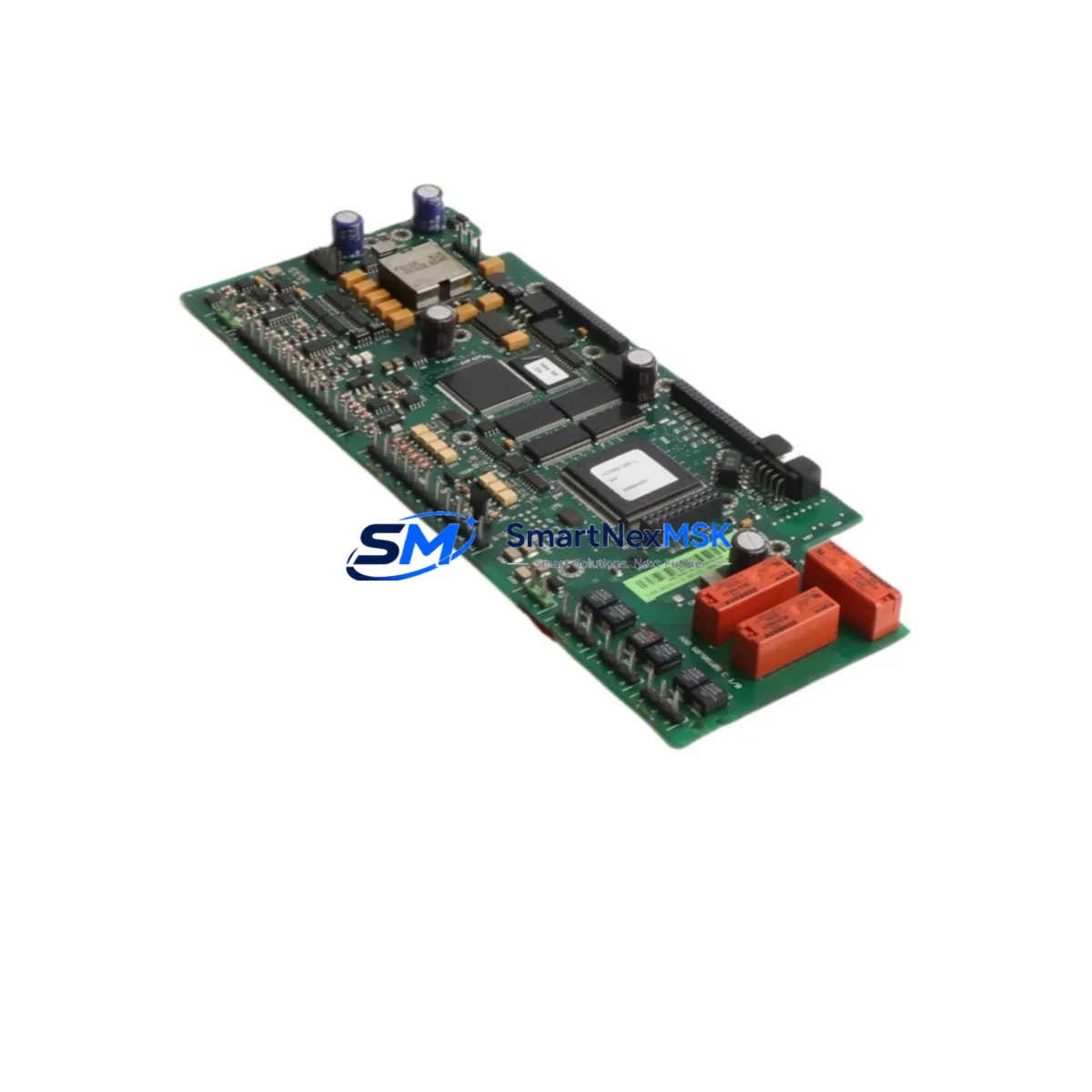
ABB RMIO-11C 3AUA0000035408 Retrofit-Ready I/O Board for ACS800 Control Systems
The ABB RMIO-11C (part number 3AUA0000035408) is the standard control I/O board used across the ACS800 series of AC drives. As aging ACS800 installations approach end-of-service milestones, this board has become one of the most requested retrofit and replacement components in industrial automation. Whether you are recovering a tripped drive, upgrading a legacy control cabinet, or migrating an entire production line to a modernized control architecture, the RMIO-11C provides a verified, drop-in compatible solution that preserves your existing wiring, parameter sets, and fieldbus configuration with minimal downtime.
The RMIO-11C serves as the central I/O and control interface for the ACS800 drive platform. It manages analog and digital I/O signals, communicates with the drive’s main control unit, and interfaces with optional fieldbus adapter modules such as the RPBA-01 PROFIBUS adapter, RCAN-01 CANopen adapter, and RDNA-01 DeviceNet adapter. When replacing a failed RMIO-11C, engineers must verify that the firmware revision on the replacement board is compatible with the existing drive software version to avoid parameter migration errors during commissioning.
In retrofit projects involving older ACS800 single drives or ACS800 multidrive cabinets, the RMIO-11C is typically replaced alongside the AINT-02 or AINT-11 inverter control boards when full drive modernization is required. For partial upgrades focused on restoring I/O functionality without replacing the entire power section, the RMIO-11C alone is often sufficient. Engineers should confirm the RMIO-11C slot position on the control section backplane and verify that the RDIO-01 digital I/O extension module, if installed, remains compatible with the replacement board revision.
During panel-level upgrades, it is common to simultaneously service the APOW-01 auxiliary power supply board and inspect the IOEC-04 I/O extension module for signs of capacitor aging or connector corrosion. Replacing these components together during a planned maintenance window significantly reduces the risk of secondary failures after the drive is returned to service. The RMIO-11C replacement procedure also provides an opportunity to audit the DDCS fiber-optic communication links between the drive and any connected NDBU-95 branching units in multidrive configurations.
For sites running legacy HMI panels connected via the CDP312R control panel interface, the RMIO-11C swap requires no HMI screen reconfiguration provided the drive parameters are backed up and restored using DriveWindow or DriveStudio software prior to board removal. Parameter backup should capture all application macro settings, PID tuning values, and fieldbus node addresses before the board is physically removed from the drive chassis.
Upgrade Compatibility Table
| Attribute | Details |
|---|---|
| Compatible Drive Series | ABB ACS800 Single Drive, ACS800 Multidrive, ACS800-04, ACS800-07, ACS800-11, ACS800-17 |
| Part Number | 3AUA0000035408 / RMIO-11C |
| Board Function | Main Control I/O Interface Board |
| Analog Inputs | 3 × AI (0–10 V / 0–20 mA / 4–20 mA selectable) |
| Digital Inputs | 6 × DI (24 VDC) |
| Relay Outputs | 3 × RO (250 VAC / 30 VDC) |
| Fieldbus Interface | DDCS fiber-optic; optional RPBA-01, RCAN-01, RDNA-01 via slot |
| Installation | Direct plug-in replacement on ACS800 control section backplane |
| Firmware Compatibility | Verify drive software version before installation; parameter backup required |
| Commissioning Note | Restore parameters via DriveWindow / DriveStudio after board swap |
| Replacement Recommendation | Drop-in replacement for failed or end-of-life RMIO-11C boards |
| Warranty | 12-Month Warranty — covers manufacturing defects and functional failure |
Retrofit Planning for Existing Automation Systems
A successful RMIO-11C retrofit begins with a thorough audit of the existing ACS800 control section. Before ordering the replacement board, document the current firmware version displayed on the CDP312R control panel, record all parameter groups using DriveStudio, and photograph the existing terminal wiring on the RMIO-11C X1 and X2 connector blocks. This documentation becomes the reference baseline for post-swap verification.
In multidrive installations, the RMIO-11C communicates with the NDBU-95 branching unit via DDCS fiber-optic cables. These fiber links must be carefully disconnected and labeled before board removal to ensure correct reconnection sequence. Fiber connectors on aging drives are prone to contamination — clean all fiber ends with an appropriate optical cleaning tool before reinstalling.
When the retrofit scope extends beyond the RMIO-11C, engineers frequently replace the AINT-02 inverter control board, the APOW-01 auxiliary power supply, and the RDIO-01 digital I/O extension module as a coordinated package. This approach eliminates the risk of a secondary board failure shortly after the primary repair, which is a common cause of unplanned downtime in aging ACS800 installations. If the control cabinet also houses an IOEC-04 I/O extension module connected to a DCS or SCADA system, verify that the module’s analog signal scaling remains consistent with the replacement RMIO-11C configuration.
For sites migrating from legacy PROFIBUS DP communication to PROFINET or EtherNet/IP, the RMIO-11C retrofit is often the trigger point for installing an updated RPBA-01 PROFIBUS adapter or transitioning to an FENA-21 Ethernet adapter module. This protocol migration should be planned in coordination with the PLC or DCS engineering team to update the GSD file, network node address, and cyclic data mapping before the drive is returned to automatic control.
Terminal wiring on the RMIO-11C follows the standard ACS800 control wiring diagram. Analog input channels AI1 through AI3 accept speed reference, torque reference, and process feedback signals. Digital inputs DI1 through DI6 handle start/stop, direction, fault reset, and external interlock signals. All wiring should be verified against the original as-built drawings before energizing the drive after board replacement.
Downtime Control During System Migration
Minimizing production downtime during an RMIO-11C replacement requires advance preparation and a structured commissioning sequence. The recommended approach is to pre-configure the replacement board off-line using DriveStudio with the parameter backup file captured from the original board. This allows the engineering team to verify parameter integrity and identify any firmware version conflicts before the drive is taken offline.
On the day of the swap, schedule the replacement during a planned maintenance window or shift changeover to limit impact on production. Isolate the ACS800 drive from the power supply, discharge the DC bus capacitors according to the ABB safety procedure, and confirm zero voltage on the DC bus terminals before opening the control section. The RMIO-11C can typically be removed and replaced within 30 to 45 minutes by a qualified drive engineer familiar with the ACS800 platform.
After installing the replacement RMIO-11C, restore the parameter backup via DriveStudio and perform a full I/O verification test before enabling automatic control. Check each digital input and output against the control system’s I/O list, verify analog signal scaling on AI1 through AI3, and confirm relay output RO1 through RO3 operation using the drive’s diagnostic output test function. Re-establish the DDCS fiber-optic link to the NDBU-95 branching unit and verify communication status on the CDP312R panel before releasing the drive to production.
For sites where continuous process operation is critical, a hot-standby spare RMIO-11C board pre-loaded with the current parameter set can reduce unplanned downtime to under one hour. SMARTNEXMSK maintains in-stock inventory of the RMIO-11C (3AUA0000035408) to support emergency replacement requirements with same-day dispatch capability.
Retrofit Support FAQ
Q1: Is the RMIO-11C (3AUA0000035408) a direct drop-in replacement for all ACS800 variants?
The RMIO-11C is compatible with the ACS800 single drive and multidrive series including the ACS800-04, ACS800-07, ACS800-11, and ACS800-17 variants. It installs directly onto the ACS800 control section backplane without mechanical modification. Firmware version compatibility should be verified against the drive’s existing software revision before installation.
Q2: Do I need to reconfigure my fieldbus settings after replacing the RMIO-11C?
If the drive’s parameters are backed up before board removal and restored after installation, fieldbus node addresses, cyclic data mapping, and communication timeout settings are preserved. For PROFIBUS configurations using the RPBA-01 adapter, verify that the GSD file in the PLC or DCS project matches the restored parameter set. For DDCS-based multidrive configurations, re-establish fiber-optic links to the NDBU-95 branching unit and confirm communication status before enabling automatic control.
Q3: What pre-shipment testing is performed on the RMIO-11C before dispatch?
Each RMIO-11C unit supplied by SMARTNEXMSK undergoes functional verification testing prior to dispatch. Testing covers power supply rail integrity, I/O channel continuity, and communication interface functionality. Units are shipped with a 12-month warranty covering manufacturing defects and functional failure under normal operating conditions. A test report is available upon request for critical replacement applications.
Q4: Can the RMIO-11C be used to upgrade an ACS800 drive that previously ran a different control macro?
Yes. The RMIO-11C supports all standard ACS800 application macros including the Factory Macro, Hand/Auto Macro, PID Control Macro, and Torque Control Macro. After installing the replacement board, load the appropriate macro via DriveStudio or the CDP312R panel and restore the site-specific parameter adjustments from the backup file. If the original macro configuration is unknown, the drive’s parameter group 99 (Start-Up Data) provides the macro selection reference.
© 2026 SMARTNEXMSK. All rights reserved.
Original Source: https://smartnexmsk.com
Contact: [email protected] | +86 18259474341



