
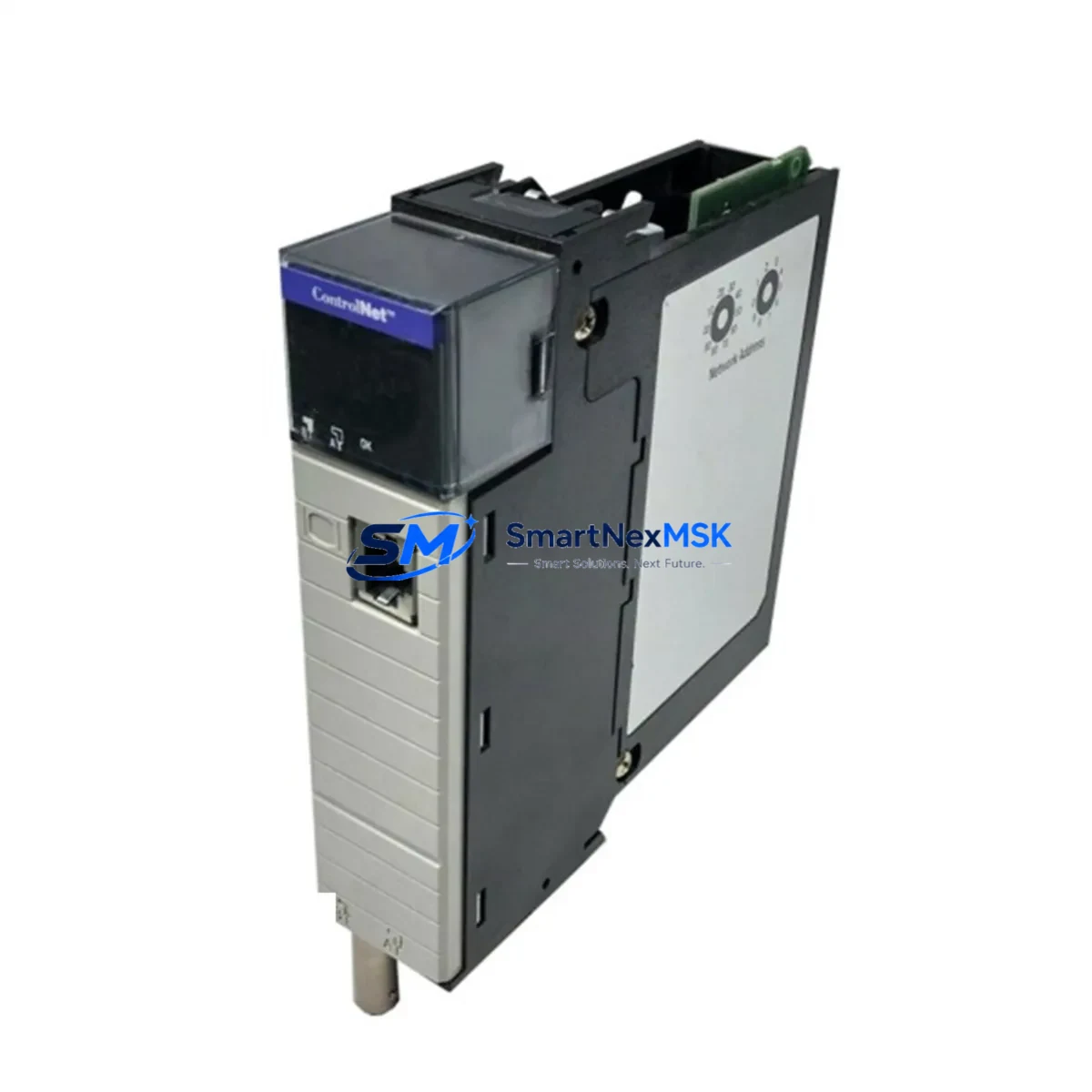
Allen-Bradley 1756-CNBR/D Maintenance-Ready Spare for ControlLogix Automation
The Allen-Bradley 1756-CNBR/D is a ControlNet Bridge Module designed for the Rockwell Automation ControlLogix 1756 chassis platform. As a critical network interface component, it bridges the ControlLogix backplane to a ControlNet network, enabling deterministic, high-speed communication between PLCs, I/O adapters, and HMI devices across the plant floor. For maintenance engineers managing aging ControlNet infrastructure, keeping a verified spare of the 1756-CNBR/D on the shelf is a fundamental risk-reduction strategy — one that directly shortens mean time to repair (MTTR) and protects production continuity.
In industrial facilities where ControlNet remains the backbone of motion control, process I/O, and inter-controller messaging, an unplanned failure of the bridge module can cascade into a full line stoppage. The 1756-CNBR/D supports both redundant and non-redundant ControlNet topologies, making it a versatile replacement candidate across a wide range of legacy and active ControlLogix installations. Each unit supplied by SMARTNEXMSK is sourced from verified channels, functionally tested prior to shipment, and backed by a 12-month warranty — giving procurement and maintenance teams the confidence to stock and deploy without hesitation.
Whether you are executing a planned shutdown replacement, responding to an emergency fault, or building out a critical spare parts inventory for a ControlLogix-based control cabinet, the 1756-CNBR/D represents a high-priority line item. Its role in the communication architecture means that adjacent components — including the 1756-L71 or 1756-L74 ControlLogix CPU, the 1756-PA72 or 1756-PB72 power supply module, and the 1756-A7 or 1756-A13 chassis backplane — should all be inspected and verified during any bridge module replacement event.
Spare Maintenance Table
| Parameter | Specification |
|---|---|
| Part Number / SKU | 1756-CNBR/D |
| Brand | Allen-Bradley (Rockwell Automation) |
| Series | ControlLogix 1756 |
| Module Type | ControlNet Bridge Module |
| Network Protocol | ControlNet (IEC 61158) |
| Backplane Compatibility | 1756 ControlLogix Chassis (all slot counts) |
| ControlNet Ports | 2 × BNC (coaxial), redundant media capable |
| Communication Rate | 5 Mbps (ControlNet standard) |
| Power Consumption | Supplied via 1756 backplane |
| Operating Temperature | 0 °C to 60 °C (32 °F to 140 °F) |
| Relative Humidity | 5% to 95% non-condensing |
| Mounting | 1756 chassis slot (single-slot) |
| Firmware Revision | /D series — confirm with RSNetWorx for ControlNet |
| Origin | USA |
| Condition | Original, tested before shipment |
| Warranty | 12 Months |
| Application | PLC-to-ControlNet bridging, I/O adapter communication, inter-controller messaging, HMI integration |
| Maintenance Recommendation | Inspect BNC connectors and coaxial cable terminations at each planned shutdown; verify node address and NUT (Network Update Time) settings post-replacement using RSNetWorx |
Maintenance Planning for Continuous Operation
A disciplined maintenance strategy for any ControlLogix system running ControlNet must account for the full communication chain — not just the bridge module itself. When scheduling a replacement of the 1756-CNBR/D, maintenance engineers should treat the event as an opportunity to audit the surrounding electrical and network environment.
Begin with the power supply: the 1756-PA72 (120/240 VAC) or 1756-PB72 (24 VDC) modules should be checked for output voltage stability and capacitor aging, as a marginal power supply can cause intermittent bridge faults that mimic module failure. Next, inspect the 1756 chassis backplane — particularly the 1756-A7 or 1756-A13 — for signs of connector wear or contamination that could cause communication errors after module reseating.
On the ControlNet media side, verify the integrity of the coaxial cable segments, BNC T-connectors, and 75-ohm termination resistors at both ends of each trunk. Degraded coaxial media is a leading cause of ControlNet network instability and is frequently misdiagnosed as a bridge module fault. If the installation uses fiber optic repeaters such as the 1786-RPFM, inspect those as well.
For I/O integrity, review the 1756-IB16 digital input modules and 1756-OB16E digital output modules connected via the ControlNet network. Check for blown fuses on output modules and verify that 1756-IF8 analog input modules are reading within calibrated ranges. If the system includes any 1756-DNB DeviceNet Bridge modules sharing the same chassis, confirm that DeviceNet node health is unaffected by the ControlNet maintenance window.
Communication modules such as the 1756-EN2T EtherNet/IP bridge should also be verified — many ControlLogix systems run parallel EtherNet/IP and ControlNet paths, and a maintenance window is the right time to confirm that both paths are healthy. For systems with HMI integration, verify that PanelView Plus terminals connected via ControlNet are re-establishing communication correctly after the bridge module swap. Finally, check any 1756-RM or 1756-RM2 redundancy modules if the system operates in a redundant controller configuration, as ControlNet bridge replacement in redundant systems requires careful sequencing to avoid a switchover event.
Site Replacement Workflow
Step 1 — Pre-replacement preparation: Download the current ControlNet network configuration from RSNetWorx for ControlNet and save the .xc file. Record the module’s node address, NUT setting, and scheduled connection parameters. Notify operations of the planned maintenance window.
Step 2 — Safe removal: Place the ControlLogix controller in Program mode via RSLogix 5000 / Studio 5000 to inhibit I/O updates. Remove the 1756-CNBR/D by pressing the top and bottom locking tabs and sliding the module out of the chassis slot. Inspect the backplane connector on the removed module for bent pins or contamination.
Step 3 — Install the replacement 1756-CNBR/D: Set the node address rotary switches on the new module to match the original configuration before insertion. Slide the module firmly into the chassis slot until both locking tabs engage. Reconnect the BNC coaxial cables, ensuring the termination resistors are in place at the network endpoints.
Step 4 — Network re-commissioning: Open RSNetWorx for ControlNet and perform a network browse to confirm the replacement module is visible at the correct node address. Re-schedule the network if required. Verify that all scheduled connections are re-established and that the NUT is restored to the original value.
Step 5 — Return to Run mode: Switch the controller back to Run mode and monitor the I/O tree in Studio 5000 for any faulted connections. Confirm that all ControlNet devices — I/O adapters, drives, and HMI nodes — are communicating normally. Document the replacement in the maintenance log with the new module’s serial number and firmware revision.
This workflow minimizes downtime, preserves system compatibility, and ensures that the replacement 1756-CNBR/D is fully integrated into the existing ControlNet architecture without requiring a full system restart.
Spare Parts Support FAQ
Q1: Is the 1756-CNBR/D still available as a new original spare, and what is its lifecycle status?
The 1756-CNBR/D is a mature product within the Rockwell Automation ControlLogix portfolio. While Rockwell has transitioned newer installations toward EtherNet/IP-based architectures, ControlNet infrastructure remains active in a large installed base of process and manufacturing facilities. SMARTNEXMSK maintains stock of original 1756-CNBR/D units to support long-term maintenance and life extension programs for these systems. Each unit is tested before shipment and covered by a 12-month warranty.
Q2: How do I verify compatibility between the replacement 1756-CNBR/D and my existing ControlLogix chassis and firmware?
The 1756-CNBR/D is compatible with all standard 1756 ControlLogix chassis variants (1756-A4, 1756-A7, 1756-A10, 1756-A13, 1756-A17). Firmware compatibility should be verified using the Rockwell Automation Product Compatibility and Download Center (PCDC). The /D series revision is a later hardware revision and is generally backward compatible with earlier /A, /B, and /C revisions in the same chassis. Confirm the RSNetWorx for ControlNet version supports the module firmware before deployment.
Q3: What pre-shipment testing does SMARTNEXMSK perform on the 1756-CNBR/D?
Every 1756-CNBR/D unit undergoes functional verification prior to shipment, including backplane communication checks and ControlNet port integrity testing. Units are inspected for physical condition, connector integrity, and correct firmware revision labeling. A 12-month warranty is provided from the date of shipment, covering manufacturing defects and functional failures under normal operating conditions.
Q4: What is the recommended spare parts stocking strategy for ControlNet bridge modules in a multi-chassis ControlLogix system?
For facilities operating three or more ControlLogix chassis on a shared ControlNet network, the recommended minimum stock is one 1756-CNBR/D per four chassis, with at least one unit always on-site. For critical production lines or systems without redundant ControlNet media, a 1:1 hot-spare ratio per chassis is advisable. Pair the bridge module spare with a spare 1756-PA72 or 1756-PB72 power supply and a set of BNC termination resistors to ensure a complete rapid-recovery kit is available for any ControlNet fault scenario.
© 2026 SMARTNEXMSK. All rights reserved.
Original Source: https://smartnexmsk.com
Contact: [email protected] | +86 18259474341



