
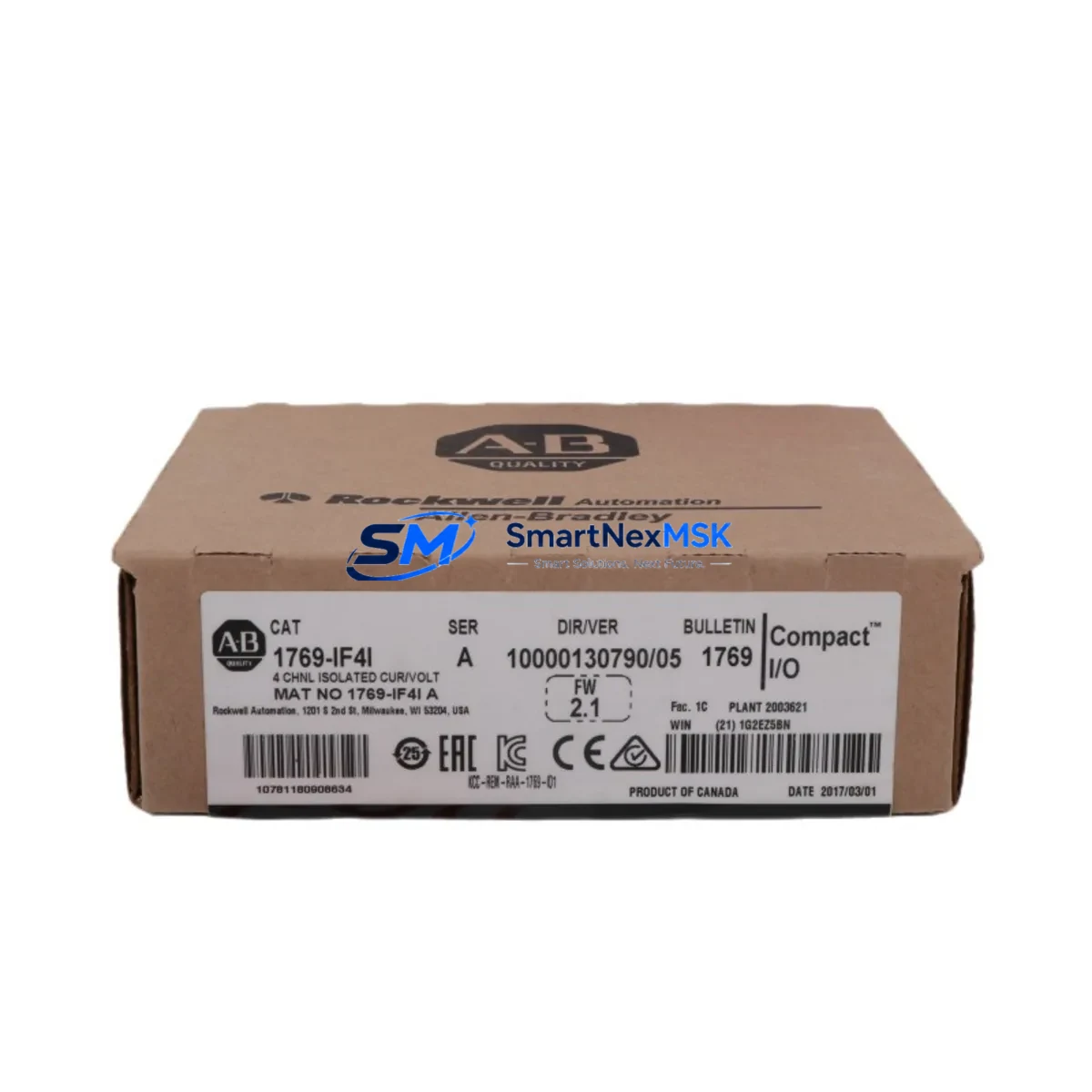
Allen-Bradley 1769-IF4I Maintenance Spare for 1769 Automation
The Allen-Bradley 1769-IF4I is a 4-channel isolated analog input module designed for the CompactLogix 1769 series control platform. As a critical spare part for continuous industrial operations, the 1769-IF4I supports 4–20 mA and 0–10 V DC signal inputs with full channel-to-channel isolation, making it indispensable in process control environments where signal integrity and electrical noise immunity are non-negotiable. Whether you are managing a planned maintenance cycle, responding to an unplanned fault, or building a strategic spare parts inventory for aging automation systems, the 1769-IF4I is a direct, tested replacement that restores full analog input functionality with minimal downtime.
Maintenance engineers working on CompactLogix-based control systems frequently encounter degraded analog signal quality, erratic PID loop behavior, or complete channel failure — all of which point to a failing or failed analog input module. The 1769-IF4I addresses these failure modes directly. Its isolated architecture prevents ground loop interference from propagating across channels, which is especially important in installations where field transmitters share common grounding with variable frequency drives or other high-noise equipment. When replacing a suspect module, technicians should also inspect the 1769-PA2 or 1769-PB4 power supply module to confirm that the 24 VDC bus voltage is within specification, as undervoltage conditions are a common secondary cause of analog module faults.
Spare Maintenance Table
| Parameter | Specification / Detail |
|---|---|
| SKU / Part Number | 1769-IF4I |
| Brand | Allen-Bradley (Rockwell Automation) |
| Series | CompactLogix 1769 |
| Module Type | Isolated Analog Input Module |
| Input Channels | 4 (channel-to-channel isolated) |
| Input Signal Types | 4–20 mA, 0–10 V DC, ±10 V DC |
| Resolution | 16-bit |
| Backplane Compatibility | 1769 CompactLogix backplane (left-side expansion) |
| Power Consumption | 120 mA @ 5 VDC (backplane); 0 mA @ 24 VDC |
| Operating Temperature | 0–60 °C (32–140 °F) |
| Mounting | DIN rail or panel mount via 1769 bus connector |
| Communication | Via CompactLogix backplane (no separate comms module required) |
| Replacement Compatibility | Direct replacement for existing 1769-IF4I installations |
| Condition | New / Tested surplus |
| Warranty | 12-Month Warranty — tested before shipment |
Maintenance Planning for Continuous Operation
Effective maintenance planning for CompactLogix-based systems requires a holistic view of the control cabinet, not just the failed module. When scheduling a replacement of the 1769-IF4I, maintenance and procurement engineers should simultaneously audit the surrounding components to prevent repeat failures and reduce the risk of a second unplanned shutdown.
Begin with the power distribution chain. The 1769-PA2 power supply module provides the 5 VDC and 24 VDC rails that feed the 1769 backplane. A marginal power supply can cause intermittent analog faults that are misdiagnosed as module failures. Verify output voltage under load before installing the replacement 1769-IF4I. Similarly, inspect the 1769-ECR end cap resistor and the 1769-CRL or 1769-CRR bus connector links, as a cracked or corroded bus connector can interrupt backplane communication and cause the new module to fault immediately after installation.
On the field wiring side, check the terminal block connections at the 1769-IF4I’s removable wiring connector. Loose or corroded terminals are a leading cause of signal drift in 4–20 mA loops. If the installation uses signal isolators or loop-powered transmitters, verify that the isolator output range matches the module’s configured input range. In systems where the 1769-IF4I feeds analog data to a PID loop running on a 1769-L30ER or 1769-L33ER CompactLogix processor, confirm that the Studio 5000 Logix Designer tag scaling parameters are correctly mapped to the new module’s channel configuration — a mismatch will cause the PID output to behave erratically even after a successful hardware replacement.
For facilities running mixed analog and digital I/O, it is good practice to inspect adjacent modules such as the 1769-IQ16 digital input module and the 1769-OB16 digital output module for signs of thermal stress or connector wear during the same maintenance window. If the control system includes a 1769-ASCII or 1769-SM2 serial communications module for legacy device integration, verify that the module’s communication parameters have not been altered during any recent firmware updates to the CompactLogix processor. Finally, check the 1769-SDN DeviceNet scanner module if the system uses DeviceNet field devices, as a DeviceNet fault can mask analog input errors and complicate fault isolation.
Procurement engineers should maintain a minimum of one 1769-IF4I in the on-site spare parts inventory for every four installed units. Given the module’s role in process control loops, a stockout during a critical failure can result in extended production downtime that far exceeds the cost of carrying a spare. SMARTNEXMSK maintains ready stock of the 1769-IF4I with same-day dispatch capability and a 12-month warranty on every unit shipped.
Site Replacement Workflow
Replacing the 1769-IF4I on a live CompactLogix system requires a structured approach to minimize downtime and protect the integrity of the control program. Follow this sequence to ensure a safe, efficient swap:
Step 1 — Pre-replacement preparation: Place the CompactLogix processor (e.g., 1769-L30ER) in Program mode via Studio 5000 Logix Designer or the RSLogix 5000 programming terminal. This suspends scan execution and prevents the PID loops from driving outputs based on stale or invalid analog data. Document the current module configuration, including input range, filter frequency, and channel enable settings, by exporting the module properties from the I/O tree.
Step 2 — Field isolation: De-energize the field transmitters connected to the 1769-IF4I by opening the loop supply fuses or circuit breakers in the marshalling cabinet. Do not rely solely on the module’s internal isolation — physically disconnecting field power prevents accidental signal injection during the swap. Label each field wire before removing the removable wiring connector from the module face.
Step 3 — Module removal and installation: Slide the 1769-IF4I out of the backplane slot. Inspect the backplane bus connector pins for damage or contamination. Insert the replacement 1769-IF4I and confirm the bus connector is fully seated. Reconnect the removable wiring connector, verifying terminal assignments against the original wiring diagram.
Step 4 — Configuration verification: Power up the system and allow the CompactLogix processor to recognize the new module. In Studio 5000, verify that the module properties match the exported configuration from Step 1. If the module was added to the I/O tree with inhibit enabled, remove the inhibit before returning to Run mode.
Step 5 — Functional test: Apply a known 4–20 mA or 0–10 V signal to each channel using a loop calibrator and verify that the raw counts and engineering unit values in the controller tags match expected values. Confirm PID loop response before returning the system to automatic control.
This workflow typically allows a trained technician to complete a 1769-IF4I replacement in under 45 minutes, including functional testing, keeping unplanned downtime within acceptable limits for most process industries.
Spare Parts Support FAQ
Q1: Is the 1769-IF4I a direct replacement for all existing 1769-IF4I installations, regardless of firmware revision?
A: Yes. The 1769-IF4I is a form-fit-function replacement across all hardware revisions. The CompactLogix processor automatically detects the module revision during backplane enumeration. In most cases, no program changes are required. If your Studio 5000 project was created with a specific module revision locked, you may need to update the module definition in the I/O tree to accept the new revision — this is a configuration change only and does not affect the control logic.
Q2: How do I verify compatibility with my existing CompactLogix backplane before ordering?
A: The 1769-IF4I is compatible with all 1769 CompactLogix backplane configurations, including systems using the 1769-L23E, 1769-L30ER, 1769-L33ER, and 1769-L36ERM processors. Confirm that your backplane has an available slot and that the total backplane current draw, including the 1769-IF4I’s 120 mA at 5 VDC, does not exceed the power supply rating. Use the Rockwell Automation Power Estimator tool or manually sum the current draw of all installed modules.
Q3: What testing is performed before shipment, and what does the 12-month warranty cover?
A: Every 1769-IF4I unit shipped by SMARTNEXMSK undergoes functional testing that includes backplane communication verification, channel-by-channel analog input accuracy testing across the full 4–20 mA and 0–10 V ranges, and isolation integrity checks. The 12-month warranty covers hardware defects and functional failures under normal operating conditions. Units that fail within the warranty period are replaced or refunded at no additional cost. Contact [email protected] for warranty claims.
Q4: Can SMARTNEXMSK supply the 1769-IF4I for long-term maintenance contracts or blanket purchase orders?
A: Yes. SMARTNEXMSK supports long-term supply agreements for the 1769-IF4I and related CompactLogix 1769 series components. We maintain buffer stock to support scheduled maintenance programs, annual turnaround shutdowns, and emergency replacement requirements. Contact our sales team to discuss volume pricing, lead time commitments, and consignment stock arrangements tailored to your facility’s maintenance schedule.
© 2026 SMARTNEXMSK. All rights reserved.
Original Source: https://smartnexmsk.com
Contact: [email protected] | +86 18259474341



