
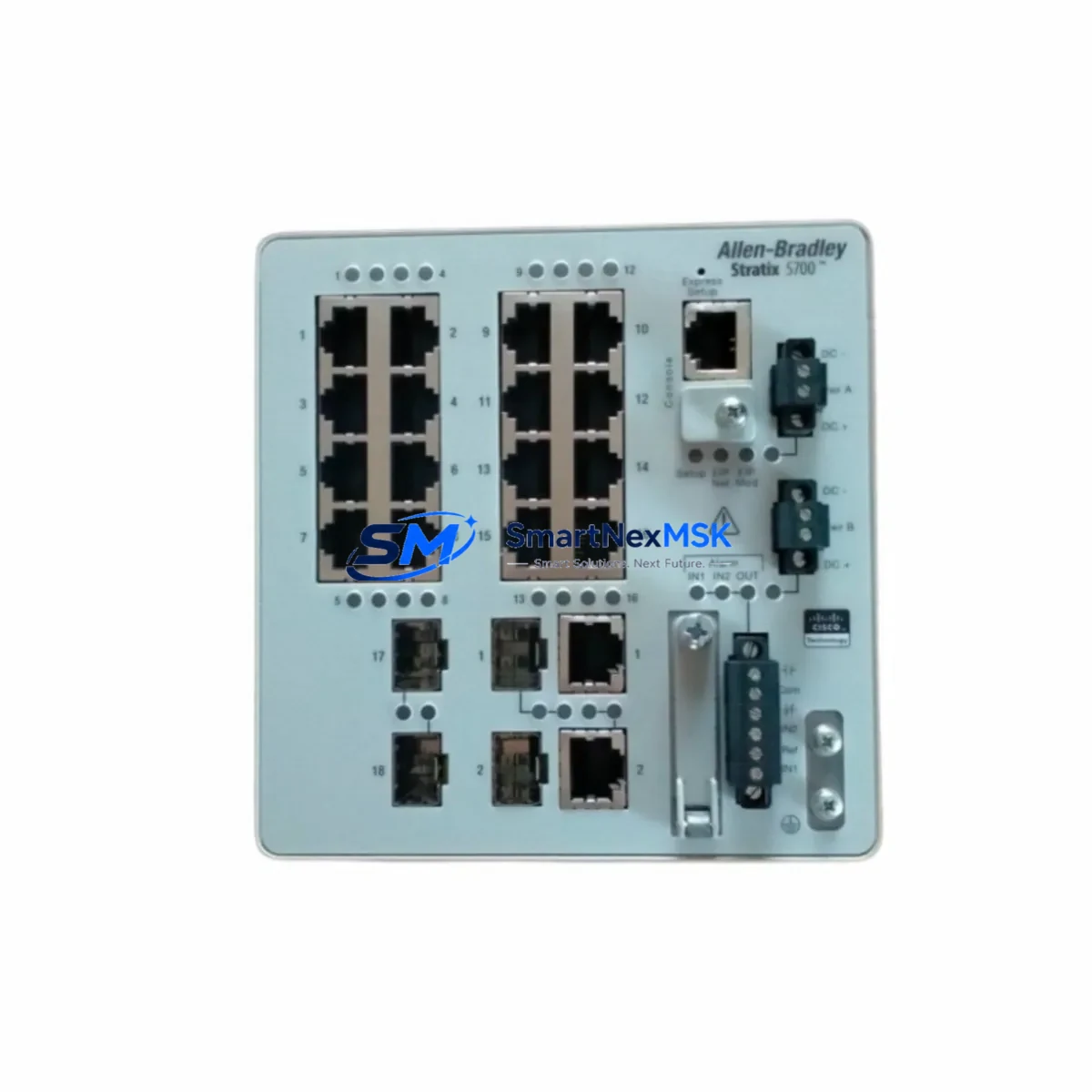
Allen-Bradley 1783-BMS20CGN Maintenance-Ready Spare for Stratix 5700 Automation
The Allen-Bradley 1783-BMS20CGN is an 18-port managed Ethernet switch from the Stratix 5700 series, engineered for demanding industrial automation environments. As a critical network infrastructure component in Rockwell Automation control architectures, this switch supports EtherNet/IP communications between PLCs, I/O modules, HMI panels, and distributed control nodes. When this unit fails or reaches end-of-service life, the impact on production continuity is immediate — network segmentation collapses, device communication drops, and the entire control loop is at risk of unplanned shutdown.
Sourced as an original spare, the 1783-BMS20CGN is fully tested prior to shipment and backed by a 12-month warranty. It is stocked to support rapid deployment in emergency replacement scenarios, planned maintenance windows, and long-term spare parts inventory programs for aging Stratix 5700 infrastructure.
Spare Maintenance Table
| Parameter | Specification |
|---|---|
| Part Number | 1783-BMS20CGN |
| Brand / Manufacturer | Allen-Bradley (Rockwell Automation) |
| Series | Stratix 5700 |
| Product Type | Industrial Managed Ethernet Switch |
| Total Ports | 20 (18 × 10/100BASE-TX copper + 2 × SFP combo uplink) |
| Network Protocol | EtherNet/IP, IEEE 802.3, IGMP Snooping, RSTP/STP |
| Power Supply Input | 24V DC (18–32V DC operating range) |
| Operating Temperature | 0°C to +60°C |
| Mounting | DIN Rail |
| Enclosure Rating | IP20 |
| Certifications | UL, CE, cUL, ATEX Zone 2 (Class I Div 2) |
| Compatibility | Stratix 5700 series; ControlLogix, CompactLogix, GuardLogix PLC platforms |
| Management Interface | Cisco IOS-based web GUI, CLI, Studio 5000 integration |
| Origin | USA |
| Condition | Original Spare — Pre-shipment Tested |
| Warranty | 12 Months |
| Lead Time | In Stock — Ships within 1–3 business days |
Maintenance Planning for Continuous Operation
For maintenance engineers managing Stratix 5700 network infrastructure, replacing the 1783-BMS20CGN is rarely an isolated task. A thorough site inspection and spare parts review should accompany any switch replacement to prevent cascading failures and ensure the restored network performs reliably.
Begin by verifying the 24V DC power supply rail feeding the switch — a degraded or undersized power supply such as the 1606-XLP series can cause intermittent switch resets that mimic hardware failure. Check terminal blocks and DIN rail power distribution for loose connections or corrosion before commissioning the replacement unit.
Inspect all Ethernet patch cables and RJ45 connectors in the cabinet. Industrial environments subject cabling to vibration, heat cycling, and chemical exposure; damaged cables are a common root cause of port errors incorrectly attributed to switch failure. Replace any cables showing jacket cracking or connector deformation.
Review the SFP fiber uplink modules installed in the combo ports. Confirm compatibility with the 1783-BMS20CGN’s Cisco IOS firmware to avoid link negotiation failures after the swap. Allen-Bradley 1783-SFP1GSX or 1783-SFP1GLX modules are the recommended spares for these slots.
Audit the ControlLogix or CompactLogix backplane connected downstream. Verify that 1756-EN2T or 1756-EN3TR EtherNet/IP communication modules are operating within normal diagnostic parameters — a failing communication module can generate false network alarms that complicate post-replacement validation. Similarly, check any 1734-AENT or 1734-AENTR POINT I/O adapter nodes on the network segment for firmware currency and connection health.
If the control cabinet includes PanelView Plus HMI terminals such as the 2711P series, confirm that the HMI’s Ethernet port and IP configuration are intact before restoring network power. HMI communication loss during a switch replacement is a common source of operator alarm and unnecessary escalation.
For systems using DeviceNet or PROFIBUS legacy segments bridged through EtherNet/IP gateways, inspect the gateway module such as the 1788-EN2DN for active faults. A switch replacement is an ideal opportunity to clear accumulated diagnostic logs and verify gateway firmware versions.
Finally, check surge protection devices and panel-level fusing on the 24V DC bus. A failed switch is sometimes the downstream symptom of a transient overvoltage event; replacing the switch without addressing the root cause will result in repeat failures. Ensure that any DIN rail-mounted surge arrestors are within their rated service life.
Site Replacement Workflow
Step 1 — Pre-replacement documentation: Export the existing switch configuration via Studio 5000 or the Cisco IOS CLI (show running-config) and save to a secure location. This configuration backup is essential for restoring VLAN assignments, IGMP settings, port security policies, and QoS parameters on the replacement unit.
Step 2 — Safe isolation: Coordinate with the control room to place the affected PLC zone in a safe hold state. Notify operators of the planned network interruption window. Remove power from the switch by disconnecting the 24V DC supply at the terminal block.
Step 3 — Physical swap: Label all Ethernet cables before disconnection. Remove the failed 1783-BMS20CGN from the DIN rail. Mount the replacement unit and reconnect all cables in the documented port sequence. Verify SFP modules are fully seated.
Step 4 — Configuration restore: Apply the saved configuration to the replacement switch. Confirm IP address, subnet mask, default gateway, and SNMP community strings match the original. Verify IGMP snooping is enabled if the network carries EtherNet/IP multicast traffic.
Step 5 — Validation: Restore 24V DC power. Confirm all port link LEDs are active. Ping each downstream device (PLCs, I/O adapters, HMIs) from the engineering workstation. Check Studio 5000 for any unresolved communication faults before releasing the zone to production.
This workflow minimizes mean time to repair (MTTR) and ensures the replacement 1783-BMS20CGN is fully validated before production restart — a critical discipline for facilities operating under continuous process or safety-rated control requirements.
Spare Parts Support FAQ
Q1: Is the 1783-BMS20CGN still available as a new original spare, or only as a refurbished unit?
The 1783-BMS20CGN is available as an original spare. All units supplied by SMARTNEXMSK are pre-shipment tested and covered by a 12-month warranty. Condition and traceability documentation are available upon request for quality-critical procurement.
Q2: What is the recommended spare parts inventory strategy for Stratix 5700 switches in a multi-line facility?
For facilities with 10 or more Stratix 5700 switches deployed, a minimum of one cold-standby 1783-BMS20CGN per production zone is recommended. High-criticality lines should maintain a hot-standby unit pre-configured with the current running configuration to achieve sub-30-minute MTTR targets.
Q3: How do I verify compatibility between the replacement 1783-BMS20CGN and my existing Rockwell Automation system firmware?
Confirm the firmware version of the replacement unit against the Rockwell Automation Product Compatibility and Download Center (PCDC). The 1783-BMS20CGN supports field firmware upgrades via the Cisco IOS CLI or Studio 5000 integration. SMARTNEXMSK can provide firmware version details for each unit prior to shipment upon request.
Q4: What pre-shipment testing is performed on each 1783-BMS20CGN unit?
Each unit undergoes power-on functional testing, port-level link verification, and basic EtherNet/IP communication validation before dispatch. Units are shipped in anti-static packaging with inspection documentation. The 12-month warranty covers manufacturing defects and functional failures under normal operating conditions from the date of receipt.
© 2026 SMARTNEXMSK. All rights reserved.
Original Source: https://smartnexmsk.com
Contact: [email protected] | +86 18259474341



