
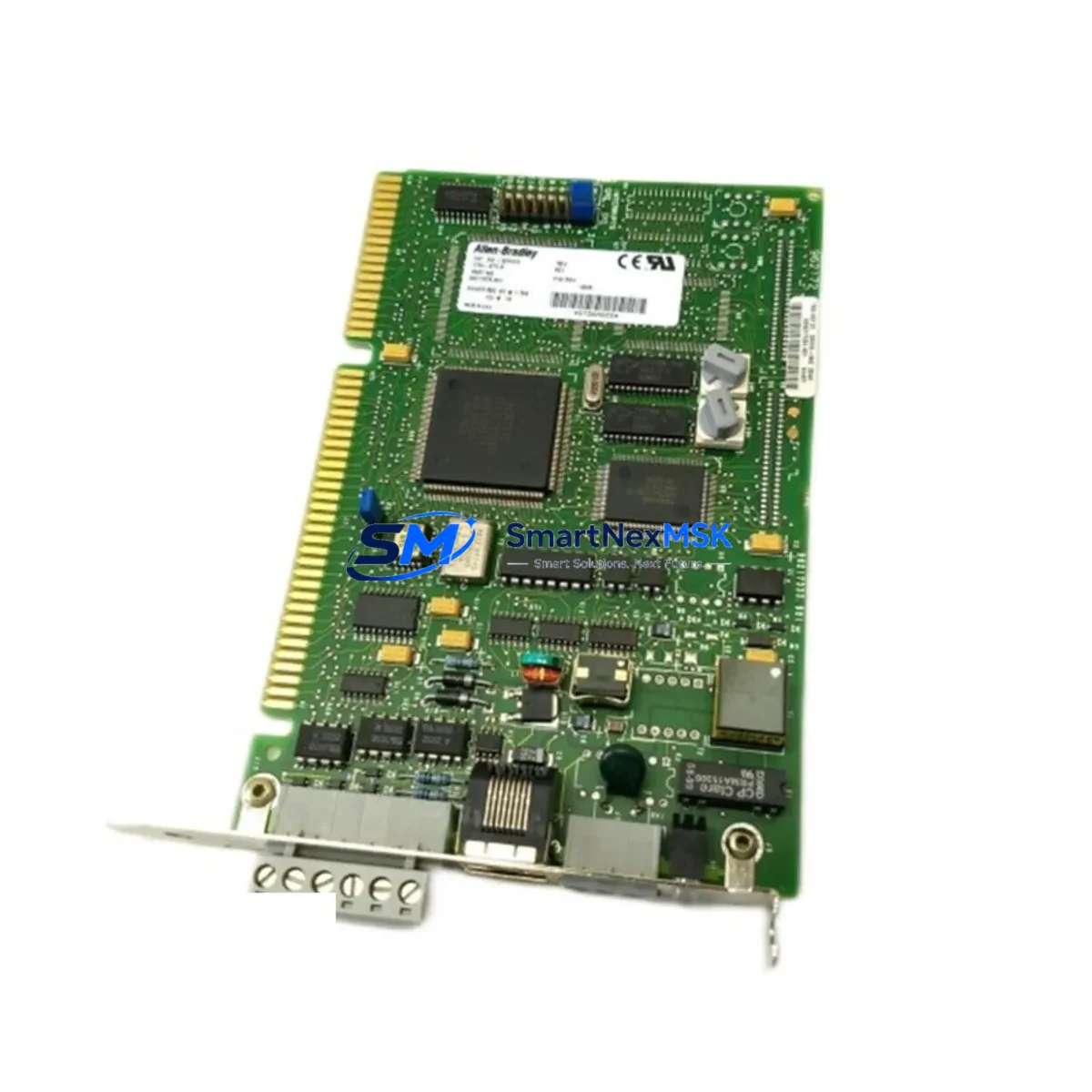
Allen-Bradley 1784-KTX Retrofit-Ready DH+ Card for PLC-5 Control Systems
The Allen-Bradley 1784-KTX is an ISA-bus Data Highway Plus (DH+) and Remote I/O (RIO) communication card designed for PC-based programming and supervisory control of legacy Allen-Bradley PLC-5 and SLC 500 control systems. As the 1784-KTX has reached end-of-life status, sourcing a verified replacement or retrofit-ready unit has become a critical priority for plant engineers managing aging automation infrastructure. SMARTNEXMSK maintains in-stock inventory of tested 1784-KTX units and compatible migration alternatives, backed by a 12-month warranty and pre-shipment functional verification.
Whether you are replacing a failed card in an active production line, upgrading a legacy programming workstation, or planning a phased migration from a PLC-5 platform to a ControlLogix or CompactLogix architecture, the 1784-KTX remains the most direct drop-in solution for maintaining DH+ network connectivity without rewriting ladder logic or reconfiguring HMI screens. Our units are sourced from verified channels, inspected for ISA slot integrity, and tested for DH+ token-passing and RIO scanner functionality before dispatch.
Upgrade Compatibility Table
| Parameter | 1784-KTX Specification | Retrofit / Migration Notes |
|---|---|---|
| Bus Interface | ISA 16-bit slot | Requires ISA-capable PC or industrial workstation; PCI/PCIe systems require 1784-PKTX or 1784-U2DHP adapter |
| Communication Protocol | DH+ (Data Highway Plus), RIO | Compatible with PLC-5, SLC 500, MicroLogix 1500 DH+ nodes; not native EtherNet/IP |
| Network Speed | 57.6 kbps / 115.2 kbps / 230.4 kbps | Match baud rate to existing DH+ network configuration; verify via RSLinx Classic node scan |
| Installation Requirement | ISA slot, IRQ assignment, I/O base address | Configure IRQ and base address via jumpers; document settings before removal of original card |
| Software Compatibility | RSLinx Classic, RSLogix 5, RSLogix 500 | Driver: 1784-KTX/A; configure in RSLinx Classic under DH+/RIO driver setup |
| Replacement Path (ISA → PCI) | 1784-KTX → 1784-PKTX | 1784-PKTX provides identical DH+/RIO functionality on PCI bus; no ladder logic changes required |
| Replacement Path (ISA → USB) | 1784-KTX → 1784-U2DHP | USB-to-DH+ adapter; suitable for laptop-based programming and maintenance access |
| ControlLogix Migration Path | 1784-KTX + PLC-5 → 1756-DHRIO + ControlLogix | 1756-DHRIO module bridges DH+ network to ControlLogix backplane; preserves existing DH+ field devices |
| Warranty | 12-Month Warranty — all units pre-tested for DH+ communication and RIO scanner function prior to shipment | |
Retrofit Planning for Existing Automation Systems
A successful 1784-KTX retrofit begins well before the card is physically installed. Engineers should start by auditing the existing DH+ network topology: document all node addresses, confirm the baud rate setting on the existing 1784-KTX (typically found on the card’s DIP switches or jumper block), and record the IRQ and I/O base address assignments in the host PC’s BIOS and Device Manager. This information is essential for configuring the replacement card identically and avoiding node address conflicts on the DH+ ring.
In systems where the 1784-KTX serves as the primary programming interface to a PLC-5/40, PLC-5/60, or PLC-5/80 processor, the replacement card must be installed in the same ISA slot or an equivalent slot with matching resource assignments. The PLC-5 processor’s channel 0 DH+ port and channel 1 RIO scanner port should be verified for correct termination — a 1784-TRS terminating resistor assembly is commonly required at each end of the DH+ trunk. If the system also includes SLC 500 racks communicating over DH+, confirm that each SLC 5/04 or SLC 5/05 processor’s DH+ channel address does not conflict with the new card’s node assignment.
For control cabinets that house both the programming workstation and the PLC rack, the 1784-KTX card interfaces directly with the 1771 I/O chassis backplane through the PLC-5 processor’s RIO port. During the retrofit, verify that the 1771-ASB remote I/O adapter modules in any remote 1771 racks are correctly addressed and that the RIO cable (Belden 9463 or equivalent) is properly terminated. If the system includes a PanelView 550 or PanelView 900 HMI communicating over DH+, the HMI’s node address and baud rate must be confirmed before the new card goes online — a mismatch will cause the HMI to lose communication with the PLC-5 and display a fault screen.
In modernization projects where the long-term goal is migration to a ControlLogix platform, the 1784-KTX can remain in service during the transition period while a 1756-DHRIO module is added to the ControlLogix chassis. This dual-network approach allows the new ControlLogix controller to communicate with legacy DH+ devices — including existing PanelView terminals, SLC 500 processors, and third-party DH+ nodes — without requiring immediate replacement of all field devices. The 1756-L71 or 1756-L74 ControlLogix processor can run converted ladder logic while the 1784-KTX continues to support the legacy programming workstation, enabling a phased cutover that minimizes production risk.
For sites using RSLinx Classic as the OPC server for SCADA or historian systems, the 1784-KTX driver configuration must be replicated exactly on the replacement workstation. Export the RSLinx Classic configuration before decommissioning the old card, and verify that the DH+ driver topic names match those referenced by the SCADA system’s tag database. If the site is also running FactoryTalk View SE or FactoryTalk Historian, confirm that the communication path definitions in those applications reference the correct RSLinx Classic driver and node address.
Downtime Control During System Migration
Minimizing unplanned downtime during a 1784-KTX replacement requires a structured pre-outage preparation process. Before removing the existing card, use RSLogix 5 or RSLogix 500 to perform a full online upload of all PLC-5 and SLC 500 programs, saving both the .RSS/.RSP source files and a printed hardcopy of the I/O configuration, rung comments, and force table. Store these backups on a network drive independent of the programming workstation to protect against simultaneous PC and card failure.
During the physical swap, keep the PLC-5 processor in RUN mode if the process allows — the DH+ network will lose the programming workstation node, but the PLC will continue executing its ladder program and controlling field I/O through the 1771 chassis. This approach preserves production continuity while the card is replaced. Once the new 1784-KTX is installed and the RSLinx Classic DH+ driver is re-established, perform a node scan to confirm all DH+ devices are visible before attempting an online connection to the PLC-5 processor.
For systems where a brief controlled shutdown is unavoidable, coordinate the outage window with operations to align with a scheduled maintenance period. Use the downtime to also inspect the 1784-KTX’s DH+ cable connections at the card’s DB-9 port, check the Belden 9463 cable for continuity and shield integrity, and verify that the terminating resistors at both ends of the DH+ trunk are correctly installed. A clean physical layer is the most common factor in rapid post-replacement commissioning. After the card is online, verify communication to all DH+ nodes, confirm HMI screen updates are live, and document the new card’s serial number and configuration settings for the site’s maintenance records.
Retrofit Support FAQ
Q1: Is the 1784-KTX a direct drop-in replacement for a failed card of the same model?
Yes. The 1784-KTX is a direct replacement for any existing 1784-KTX installation. Configure the replacement card’s jumpers to match the IRQ, I/O base address, and DH+ baud rate of the original unit. No changes to the PLC-5 or SLC 500 program are required. Reinstall the RSLinx Classic 1784-KTX/A driver and perform a node scan to verify connectivity.
Q2: What is the recommended alternative if my workstation no longer has an ISA slot?
If the programming workstation uses a PCI bus, the 1784-PKTX is the direct functional equivalent of the 1784-KTX and provides identical DH+ and RIO communication capability. For laptop-based or USB-only workstations, the 1784-U2DHP USB-to-DH+ adapter is the recommended solution. Both alternatives are supported by RSLinx Classic and require no changes to the PLC-5 or SLC 500 application program.
Q3: How do I verify wiring and termination before commissioning the replacement card?
Confirm that the DH+ cable (Belden 9463 or equivalent shielded twisted-pair) is connected to the 1784-KTX’s DB-9 port with the correct pin assignments (shield to pin 1, data+ to pin 3, data− to pin 8). Verify that 1784-TRS terminating resistor assemblies are installed at both physical ends of the DH+ trunk. Use a multimeter to check cable continuity and shield isolation before powering the workstation. After installation, use RSLinx Classic’s DH+ node scan to confirm all expected nodes appear on the network.
Q4: What does the 12-month warranty cover, and what pre-shipment testing is performed?
All 1784-KTX units supplied by SMARTNEXMSK are functionally tested for DH+ token-passing communication and RIO scanner operation prior to shipment. The 12-month warranty covers hardware defects and communication failures under normal operating conditions. Units are inspected for ISA connector integrity, DIP switch and jumper condition, and firmware version compatibility. In the event of a warranty claim, SMARTNEXMSK provides advance replacement to minimize production downtime.
© 2026 SMARTNEXMSK. All rights reserved.
Original Source: https://smartnexmsk.com
Contact: [email protected] | +86 18259474341



