
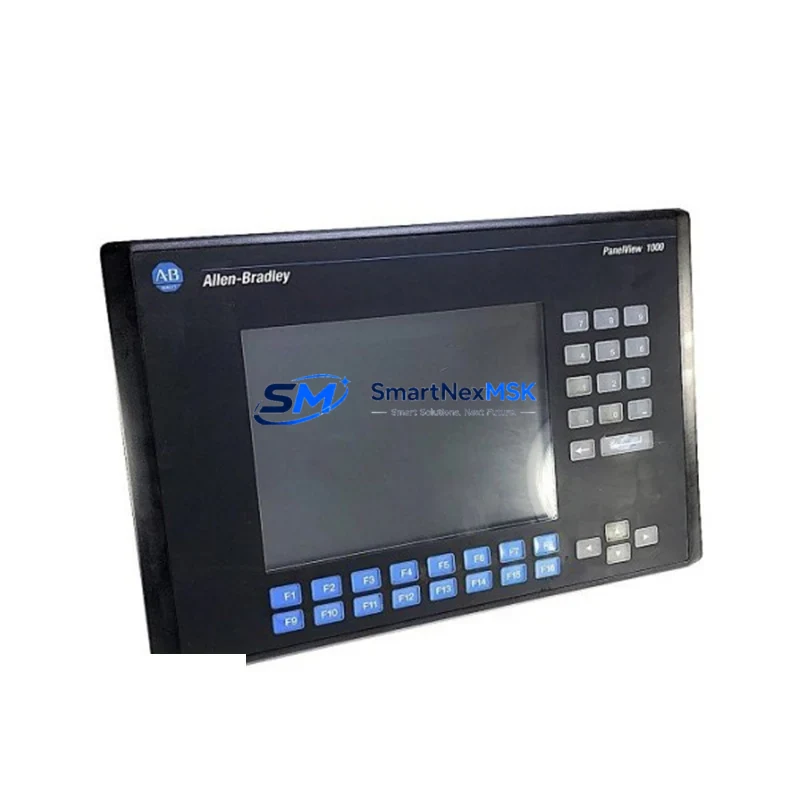
Allen-Bradley 2711-K10C15L1 Retrofit-Ready HMI for PanelView 1000 Control Systems
The Allen-Bradley 2711-K10C15L1 is a Color Keypad HMI terminal from the PanelView 1000 series, designed for seamless integration into legacy and modernized industrial control architectures. As production lines age and OEM support for discontinued Rockwell Automation terminals becomes increasingly limited, the 2711-K10C15L1 remains a critical retrofit component for facilities operating SLC 500, PLC-5, and early ControlLogix platforms. Whether you are replacing a failed unit, upgrading a control cabinet, or migrating from an older monochrome terminal, this module provides a validated, drop-in compatible solution backed by a 12-month warranty and pre-shipment functional testing.
Procurement engineers and maintenance teams sourcing this unit should verify the following before installation: the existing power supply capacity (typically 24 VDC, confirm amperage headroom in the control cabinet), terminal block wiring compatibility with the existing I/O harness, backplane interface type (standalone or rack-mounted configuration), and the communication port assignment used in the original PanelView application file. The 2711-K10C15L1 supports Data Highway Plus (DH+) communication, which must be confirmed against the host controller — typically a 1747-L553 SLC 5/05 or a 1785-L80E PLC-5/80E — before commissioning.
For facilities running RSView32 or FactoryTalk View ME application files, screen migration from the legacy terminal to the 2711-K10C15L1 is generally straightforward, but engineers should audit all alarm setpoints, tag bindings, and communication node addresses within the .mer or .rsp project file prior to download. Any mismatch in node addressing between the replacement HMI and the host PLC will result in communication faults that must be resolved at the DH+ network level before the system can resume normal operation.
Upgrade Compatibility Table
| Parameter | Details |
|---|---|
| SKU / Part Number | 2711-K10C15L1 |
| Series | PanelView 1000 |
| Brand | Allen-Bradley / Rockwell Automation |
| Display Type | 10″ Color Keypad |
| Communication Interface | Data Highway Plus (DH+), RS-232 |
| Power Supply Requirement | 24 VDC (verify cabinet supply capacity before installation) |
| Mounting / Installation | Panel cutout mount; verify existing cutout dimensions match 2711-K10C15 footprint |
| Compatible Host Controllers | SLC 5/03, SLC 5/04, SLC 5/05, PLC-5 series, early ControlLogix via DH+ bridge |
| Software Compatibility | RSView32, FactoryTalk View ME, PanelBuilder 1400e |
| Replacement Recommendation | Direct replacement for 2711-K10C15, 2711-K10C15L2; verify firmware revision |
| Commissioning Notes | Confirm DH+ node address, tag bindings, and .mer file version before download |
| Warranty | 12-Month Warranty — all units tested prior to shipment |
Retrofit Planning for Existing Automation Systems
Integrating the 2711-K10C15L1 into an existing control system requires a structured approach that accounts for both hardware and software dependencies. In a typical retrofit scenario, the control cabinet will house a combination of legacy components: a 1746-A13 SLC 500 chassis with a 1747-L553 processor, one or more 1746-IB16 digital input modules, 1746-OB16 digital output modules, and a 1746-NI4 analog input module for process variable monitoring. The existing DH+ network may also include a 1784-KTX communication card in the programming workstation, which must remain accessible during the migration to allow live program edits without interrupting production.
Before removing the failed or obsolete HMI, document the existing terminal’s node address on the DH+ network — typically set via rotary switches on the rear of the unit. The 2711-K10C15L1 replacement must be configured to the same node address to avoid network conflicts. If the control system also includes a 1785-KA5 DH+ to DH-485 link coupler or a 1761-NET-AIC Advanced Interface Converter, verify that the new terminal’s baud rate settings match the network configuration (typically 57.6 Kbps for DH+).
For facilities that have already partially migrated to a ControlLogix platform using a 1756-L63 or 1756-L71 controller, the 2711-K10C15L1 can be bridged via a 1756-DHRIO module, allowing the legacy HMI to communicate with the new controller while the full HMI migration to a PanelView Plus 7 or PanelView 5510 is planned and budgeted. This phased approach is common in food processing, water treatment, and discrete manufacturing facilities where full system shutdowns are operationally prohibitive.
Power supply integrity is a frequently overlooked factor in HMI retrofits. The 2711-K10C15L1 draws up to 1.5A at 24 VDC; if the existing 1606-XLP power supply is already loaded near capacity by the SLC chassis and field devices, a supplemental 1606-XLP60E or equivalent 60W DIN-rail power supply should be added to the cabinet before commissioning the replacement terminal. Failure to address power budget shortfalls is a leading cause of intermittent HMI faults and communication dropouts in retrofit projects.
Downtime Control During System Migration
Minimizing unplanned downtime during an HMI replacement is a primary concern for maintenance and engineering teams. The recommended approach for replacing a 2711-K10C15L1 in a live production environment is to pre-stage the replacement unit off-line: load the existing .mer application file, configure the DH+ node address, and verify screen navigation and tag communication against a bench-top SLC 500 or PLC-5 simulator before the scheduled maintenance window.
During the physical swap, the host PLC program should be placed in RUN mode with outputs disabled (if the process permits) to preserve the current program logic and data table values. This prevents the controller from reverting to default output states during the HMI changeover. Once the 2711-K10C15L1 is physically installed and powered, the DH+ communication link should be verified using RSLinx Classic before the application file is downloaded to the terminal. Confirm that all alarm pages, trend displays, and operator control screens are functioning correctly before returning the system to automatic mode.
For critical processes where even a brief interruption is unacceptable, a parallel commissioning strategy is recommended: install the replacement 2711-K10C15L1 alongside the existing terminal using a DH+ T-connector, verify full communication and screen functionality, then remove the old unit during a planned micro-shutdown. This approach is particularly effective in continuous process industries where the cost of an unplanned stoppage far exceeds the cost of the additional commissioning time.
Retrofit Support FAQ
Q: Is the 2711-K10C15L1 a direct drop-in replacement for the 2711-K10C15 and 2711-K10C15L2?
A: In most cases, yes. The 2711-K10C15L1 shares the same panel cutout dimensions, DH+ communication interface, and 24 VDC power requirement as the 2711-K10C15 and 2711-K10C15L2. However, you should verify the firmware revision of the replacement unit against the PanelBuilder or FactoryTalk View ME application file to ensure full compatibility. Minor firmware differences can affect screen rendering and tag update rates.
Q: Can I reuse my existing RSView32 or FactoryTalk View ME application file on the replacement terminal?
A: Yes, provided the application file was created for the PanelView 1000 platform and the 2711-K10C15 terminal type. Open the project in PanelBuilder 1400e or FactoryTalk View ME Studio, confirm the target terminal type is set to 2711-K10C15L1, and re-download the .mer file to the replacement unit. Audit all communication tag addresses and DH+ node assignments before going live.
Q: What pre-shipment testing is performed on the 2711-K10C15L1?
A: Every unit undergoes functional power-on testing, display verification, keypad response testing, and communication port continuity checks before shipment. Units are shipped with a 12-month warranty covering manufacturing defects and functional failures under normal operating conditions. Expedited replacement is available for critical production environments.
Q: What should I verify regarding wiring and terminal connections before installing the replacement HMI?
A: Confirm the 24 VDC supply polarity and cable gauge at the HMI power terminals. Inspect the DH+ network cable (Belden 9463 or equivalent) for continuity and correct termination resistors at both ends of the network segment. Verify that the RS-232 port pinout matches your programming cable (typically a 1747-CP3 or 2711-NC13) if you plan to use the serial port for application download. Document all wiring before disconnecting the old unit.
© 2026 SMARTNEXMSK. All rights reserved.
Original Source: https://smartnexmsk.com
Contact: [email protected] | +86 18259474341



