
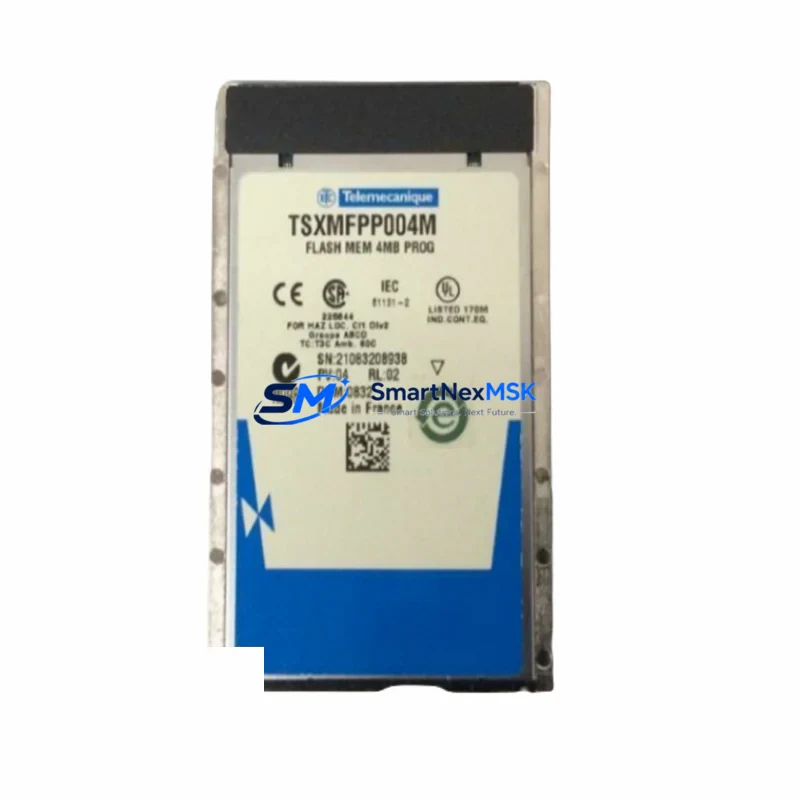
Schneider TSXMFPP004M Retrofit Flash Memory for Magelis XBT Control Systems
The Schneider Electric TSXMFPP004M is a 4 MB flash memory card engineered for the Magelis XBT series of operator panels and HMI terminals. As legacy Magelis XBT units approach end-of-life or require storage media replacement, the TSXMFPP004M remains the authoritative drop-in solution for system integrators and maintenance engineers managing aging control infrastructure. Whether you are restoring a failed panel, upgrading storage capacity on an existing XBT terminal, or migrating HMI application data to a refreshed control cabinet, this module delivers the compatibility and reliability your retrofit project demands.
SMARTNEXMSK maintains verified stock of the TSXMFPP004M sourced from authorized supply chains, with each unit subject to pre-shipment functional testing and covered by a 12-month warranty. Our inventory supports urgent breakdown recovery as well as planned system modernization programs across manufacturing, utilities, water treatment, and process automation sectors.
Upgrade Compatibility Table
| Parameter | TSXMFPP004M Specification | Retrofit Notes |
|---|---|---|
| Memory Type | Flash PCMCIA Card, 4 MB | Compatible with all Magelis XBT-F, XBT-N, and XBT-GT panel families |
| Interface | PCMCIA Type II slot | Direct insertion — no adapter required for XBT terminals with standard PCMCIA bay |
| Communication Compatibility | Stores XBT Designer / Vijeo Designer application files | Supports Modbus RTU, Modbus TCP, Uni-Telway, and Ethernet-based HMI projects |
| Replacement Scope | Replaces failed or corrupted OEM flash cards | Suitable for TSXMFPP001M (1 MB) and TSXMFPP002M (2 MB) upgrade paths |
| Installation Requirement | Power-off insertion recommended | Verify XBT firmware version supports 4 MB capacity before installation |
| Commissioning Focus | Re-download HMI application via XBT Designer or Vijeo Designer | Confirm COM port settings and PLC driver selection match original project |
| Warranty | 12-Month Warranty | Covered from date of shipment; includes functional verification report on request |
Retrofit Planning for Existing Automation Systems
A successful TSXMFPP004M retrofit begins well before the card arrives on-site. Engineers should first retrieve the original HMI project file from the engineering workstation or a backup TSXMFPP001M / TSXMFPP002M card, as the application logic, screen layouts, alarm configurations, and PLC variable mappings must be preserved intact. If the original project file is unavailable, the XBT Designer or Vijeo Designer software can attempt an upload from the existing panel before the card is replaced — this step is critical for minimizing re-engineering time.
Within the control cabinet, verify that the Magelis XBT terminal’s power supply — typically a 24 VDC rail sourced from a Schneider ABL8 or Phaseo power supply module — is stable and within specification. Voltage fluctuations during flash write operations can corrupt the new card. Inspect the terminal block wiring between the XBT panel and the host PLC, whether that is a Modicon M340, a Modicon Premium with a TSXP57 processor, or a Modicon Quantum rack. Confirm that the RS-232 or RS-485 serial cable connecting the HMI to the PLC communication port is undamaged and that the Uni-Telway or Modbus RTU driver settings in the project file match the physical wiring.
For systems using Ethernet-based communication, check the IP address configuration stored in the XBT terminal and ensure it aligns with the plant network segment. Panels communicating with a Modicon M340 via Modbus TCP or with a Quantum Ethernet module will require the correct gateway and subnet mask settings to be re-entered after the flash card is replaced and the application is reloaded. If the control system includes a Twido or Zelio Logic controller connected via a serial link, verify the baud rate and parity settings before commissioning.
Where the retrofit involves expanding I/O capacity alongside the HMI upgrade, engineers often simultaneously install additional Modicon STB distributed I/O modules or Advantys island bus components. In these cases, the HMI screen pages referencing I/O status bits must be updated in the Vijeo Designer project before downloading to the new TSXMFPP004M card. Similarly, if the upgrade path includes replacing an older TSXP57 processor with a Modicon M580 ePAC, the HMI driver must be updated from Uni-Telway to Modbus TCP or EtherNet/IP to maintain communication continuity.
SMARTNEXMSK can supply the TSXMFPP004M alongside related components commonly required in the same retrofit window, including Magelis XBT-GT replacement terminals, Modicon M340 BMX processor modules, TSXCUSB485 programming cables, Schneider TSXPCX3030 serial cables, and Phaseo ABL8 power supply units — all from verified stock with the same 12-month warranty coverage.
Downtime Control During System Migration
Minimizing production downtime during an HMI flash card replacement requires a structured approach. Begin by scheduling the swap during a planned maintenance window and preparing a complete backup of the existing HMI project on a laptop running XBT Designer or Vijeo Designer. If the panel is still partially functional, perform a full project upload before powering down the terminal — this preserves all screen objects, PLC variable bindings, alarm thresholds, and recipe data that would otherwise need to be reconstructed manually.
With the TSXMFPP004M installed and the panel powered on, the XBT terminal will typically display a blank screen or a memory card prompt, indicating it is ready to receive the application download. Connect the programming cable — a TSXCUSB485 or TSXPCX3030 depending on the panel model — and initiate the download from the engineering workstation. The download process for a 4 MB project typically completes within three to eight minutes. Once complete, cycle power to the panel and verify that all PLC communication links are active, all HMI screens display correctly, and all alarm and event logs are functioning as expected.
For critical processes where even a brief HMI outage is unacceptable, consider pre-programming a spare TSXMFPP004M card with the validated project file before the maintenance window begins. This hot-swap approach reduces the on-site replacement time to under two minutes and eliminates the risk of download errors during a live changeover. SMARTNEXMSK can ship pre-tested units with lead times confirmed at order placement, supporting both emergency breakdown recovery and scheduled upgrade programs.
Retrofit Support FAQ
Q1: Is the TSXMFPP004M a direct replacement for the TSXMFPP001M and TSXMFPP002M cards?
Yes. The TSXMFPP004M uses the same PCMCIA Type II form factor and is electrically compatible with all Magelis XBT terminals that accept the 1 MB and 2 MB variants. The only prerequisite is confirming that the panel firmware supports 4 MB capacity — most XBT-F and XBT-GT models do, but older XBT-N units may require a firmware update first.
Q2: What commissioning steps are required after installing the TSXMFPP004M?
After physical installation, connect the engineering workstation via a TSXCUSB485 or TSXPCX3030 cable, open the original project in XBT Designer or Vijeo Designer, and perform a full application download to the card. Verify PLC driver settings, communication port parameters, and IP address configuration (for Ethernet-linked panels) before returning the system to service. A functional test of all HMI screens and PLC data exchange points is recommended before sign-off.
Q3: Can the TSXMFPP004M be used in a system being migrated from a Modicon Premium to a Modicon M340 or M580?
Yes, provided the HMI project is updated in Vijeo Designer to reflect the new PLC driver and communication protocol. The flash card itself is protocol-agnostic — it stores the compiled HMI application regardless of the target PLC platform. Update the driver from Uni-Telway to Modbus TCP or EtherNet/IP as appropriate, recompile the project, and download to the TSXMFPP004M.
Q4: What does the 12-month warranty cover, and how is it claimed?
The 12-month warranty covers manufacturing defects and functional failures under normal operating conditions from the date of shipment. Each unit undergoes pre-shipment functional testing. In the event of a warranty claim, contact SMARTNEXMSK at [email protected] with the order reference and a description of the fault. Replacement units are dispatched from verified stock, and a functional verification report is available on request.
© 2026 SMARTNEXMSK. All rights reserved.
Original Source: https://smartnexmsk.com
Contact: [email protected] | +86 18259474341



