
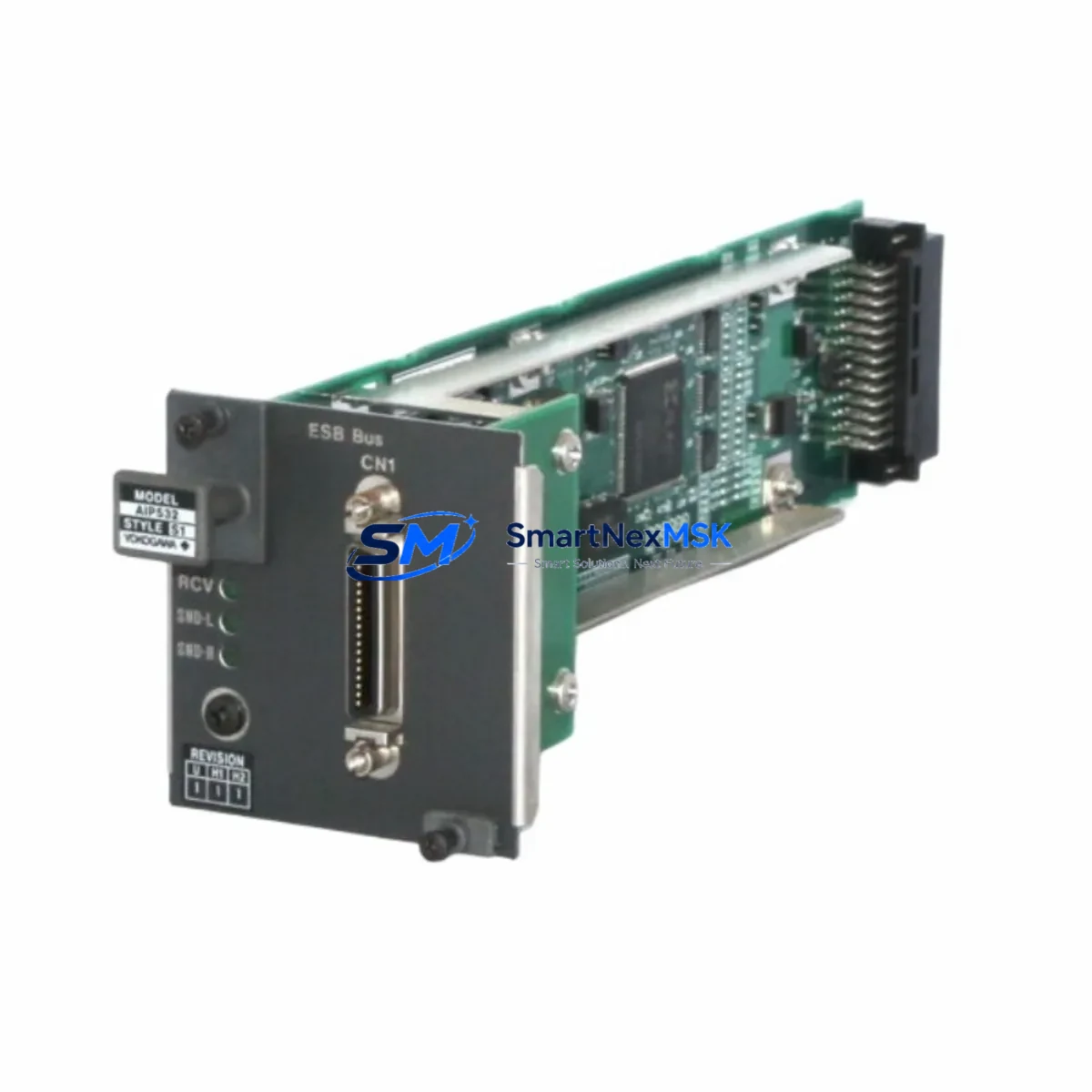
Yokogawa AIP532-S1 Maintenance-Ready Spare for CENTUM VP Automation
The Yokogawa AIP532-S1 is an original PROFIBUS DP Bus Coupler Module designed for the CENTUM VP Distributed Control System platform. In process industries — including oil & gas, petrochemical, power generation, and pharmaceutical manufacturing — the AIP532-S1 serves as a critical communication bridge between the CENTUM VP field control station and PROFIBUS DP field devices. An unplanned failure of this module can immediately disrupt field device communication, trigger process alarms, and force unscheduled shutdowns. Maintaining a verified, tested spare on the shelf is the most effective strategy to minimize mean time to repair (MTTR) and protect continuous operation.
This listing provides a maintenance-ready, original Yokogawa AIP532-S1 spare unit — sourced, inspected, and tested before shipment. Each unit is backed by a 12-month warranty and is available for fast global dispatch to support both planned turnaround maintenance and emergency breakdown recovery.
Spare Maintenance Table
| Parameter | Specification / Detail |
|---|---|
| Part Number / SKU | AIP532-S1 |
| Brand | Yokogawa Electric Corporation |
| Series / Platform | CENTUM VP (also compatible with CENTUM CS 3000 architecture review recommended) |
| Module Type | PROFIBUS DP Bus Coupler Module |
| Communication Protocol | PROFIBUS DP (EN 50170 / IEC 61158) |
| Baud Rate Support | Up to 12 Mbps (auto-negotiated) |
| Power Supply | Supplied via CENTUM VP field control station backplane |
| Installation | Slot-mount into CENTUM VP FCS node cabinet; hot-swap capability subject to system configuration |
| Operating Temperature | 0°C to 55°C (standard industrial cabinet environment) |
| Origin | Japan (Original Yokogawa manufacture) |
| Compatibility | CENTUM VP R4.xx / R5.xx / R6.xx field control stations; verify FCS firmware revision before installation |
| Application Environment | Process automation, DCS field network, PROFIBUS DP segment master/slave topology |
| Maintenance Recommendation | Inspect bus coupler connectors and termination resistor status during every scheduled cabinet inspection; replace if communication error counters are rising |
| Pre-Shipment Testing | Functional communication test performed before dispatch |
| Warranty | 12 months from date of delivery |
| Lead Time | In-stock units: 3–7 business days international; emergency dispatch available |
Maintenance Planning for Continuous Operation
When a maintenance or reliability engineer schedules inspection or replacement of the AIP532-S1 PROFIBUS DP Bus Coupler, the scope should never be limited to the coupler alone. The PROFIBUS DP segment is an interconnected chain of hardware, and a fault in any adjacent component can produce symptoms identical to a failed bus coupler — wasting time and delaying recovery.
During the same maintenance window, engineers should inspect and, where appropriate, carry spares for the following associated components:
- Yokogawa AIP531 PROFIBUS DP Slave Module — the slave-side counterpart to the AIP532-S1; if the bus coupler is being replaced due to communication loss, the slave module should be diagnostically verified in parallel.
- Yokogawa AFV10D / AFV30D Field Control Station Power Supply Modules — bus coupler communication errors are frequently caused by marginal or fluctuating backplane power; verify output voltage and ripple under load.
- PROFIBUS DP Trunk Cable and Connectors (9-pin D-Sub, IEC 61158) — inspect for mechanical damage, correct termination resistor activation at segment endpoints, and shield continuity. A degraded cable is the most common root cause of intermittent PROFIBUS faults.
- PROFIBUS DP Repeaters / Segment Couplers — if the segment spans multiple cabinets or exceeds 200 m, repeater health should be confirmed; a failing repeater produces bus errors that mimic a coupler fault.
- Yokogawa ESB Bus Interface Module (e.g., ESB10D) — the ESB bus connecting the FCS node to I/O nest modules should be inspected for connector seating and error logs when performing any FCS-level maintenance.
- Yokogawa AAI143 / AAI841 Analog I/O Modules — PROFIBUS-connected analog I/O modules on the same segment should be checked for channel error flags after any bus coupler replacement and re-initialization.
- Yokogawa ADV151 / ADV161 Digital I/O Modules — digital output modules on the PROFIBUS segment should be verified for correct status after bus re-establishment to confirm no latched fault states remain.
- Signal Isolators and Zener Barriers (IS-rated installations) — in hazardous area installations, intrinsic safety barriers associated with PROFIBUS field devices should be inspected for continuity and correct entity parameters.
- Yokogawa STARDOM / Exaquantum Historian Connection — after bus coupler replacement, confirm that data historian tags associated with PROFIBUS devices are resuming normal scan and logging without gap errors.
- Cabinet Ventilation Filters and Thermal Management — elevated cabinet temperature accelerates bus coupler aging; clean or replace ventilation filters as part of the same maintenance visit.
Procurement engineers should note that the AIP532-S1 is a long-lifecycle Yokogawa component, but availability from the OEM channel may be subject to lead time variability as the CENTUM VP platform matures. Establishing a minimum stock level of one verified spare per PROFIBUS DP segment — particularly in high-criticality process units — is a recognized best practice in DCS lifecycle management.
Site Replacement Workflow
Step 1 — Pre-Replacement Verification: Before removing the AIP532-S1, use the CENTUM VP HIS (Human Interface Station) to capture a snapshot of the PROFIBUS segment status, including all slave device addresses, GSD file assignments, and current diagnostic flags. This baseline is essential for post-replacement validation.
Step 2 — Isolate and De-energize: Follow the site-specific LOTO (Lockout/Tagout) procedure for the FCS node cabinet. Confirm that the PROFIBUS segment can be safely taken offline without triggering process interlocks, or coordinate with the control room for a managed process hold.
Step 3 — Module Removal: Release the AIP532-S1 from its slot using the module extraction handle. Inspect the backplane connector pins for corrosion or mechanical damage before inserting the replacement unit.
Step 4 — Replacement Installation: Insert the new AIP532-S1 into the same slot. The CENTUM VP FCS will automatically detect the module and begin initialization. No manual address configuration is required on the module itself — all PROFIBUS DP parameters are managed through the FCS engineering database.
Step 5 — Post-Replacement Validation: Monitor the PROFIBUS segment status on the HIS for a minimum of 15 minutes after re-energization. Confirm that all slave devices return to normal communication status, that no diagnostic alarms remain active, and that process variable readings are within expected ranges. Document the replacement in the site maintenance management system (CMMS) with the new module serial number and warranty start date.
This workflow is applicable to both planned maintenance replacements and emergency breakdown recovery scenarios. The AIP532-S1’s slot-compatible design ensures that no re-engineering of the FCS database is required when replacing a like-for-like unit, significantly reducing the skill level required for field execution and shortening total downtime.
Spare Parts Support FAQ
Q1: Is this AIP532-S1 an original Yokogawa unit, and how is it tested before shipment?
Yes. Every AIP532-S1 unit we supply is an original Yokogawa-manufactured component. Prior to dispatch, each unit undergoes a functional communication test to verify PROFIBUS DP initialization and basic data exchange capability. A test report is available upon request. Units are packed in anti-static protective packaging to prevent ESD damage during transit.
Q2: What is the warranty coverage, and what does it include?
All AIP532-S1 units are covered by a 12-month warranty from the date of delivery. The warranty covers manufacturing defects and functional failures under normal operating conditions. It does not cover damage resulting from incorrect installation, overvoltage events, or physical mishandling. In the event of a warranty claim, we provide a replacement unit or full refund after fault verification.
Q3: How do I confirm compatibility with my specific CENTUM VP system revision?
The AIP532-S1 is designed for the CENTUM VP platform. Compatibility depends on your FCS hardware generation and firmware revision. Before ordering, please provide your FCS model number (e.g., AFV10S, AFV30S) and the CENTUM VP software revision (R4, R5, or R6). Our technical team will confirm compatibility and advise on any firmware considerations. We recommend always verifying against the Yokogawa CENTUM VP hardware compatibility matrix for your specific project.
Q4: Can you support long-term or blanket spare parts orders for ongoing DCS lifecycle management?
Yes. We support both single-unit emergency orders and long-term supply agreements for DCS lifecycle programs. For facilities managing multiple CENTUM VP systems or planning multi-year maintenance contracts, we can provide reserved stock allocation, priority dispatch agreements, and consolidated invoicing. Contact our team to discuss your site’s specific spare parts strategy and annual consumption forecast.
© 2026 SMARTNEXMSK. All rights reserved.
Original Source: https://smartnexmsk.com
Contact: [email protected] | +86 18259474341



