
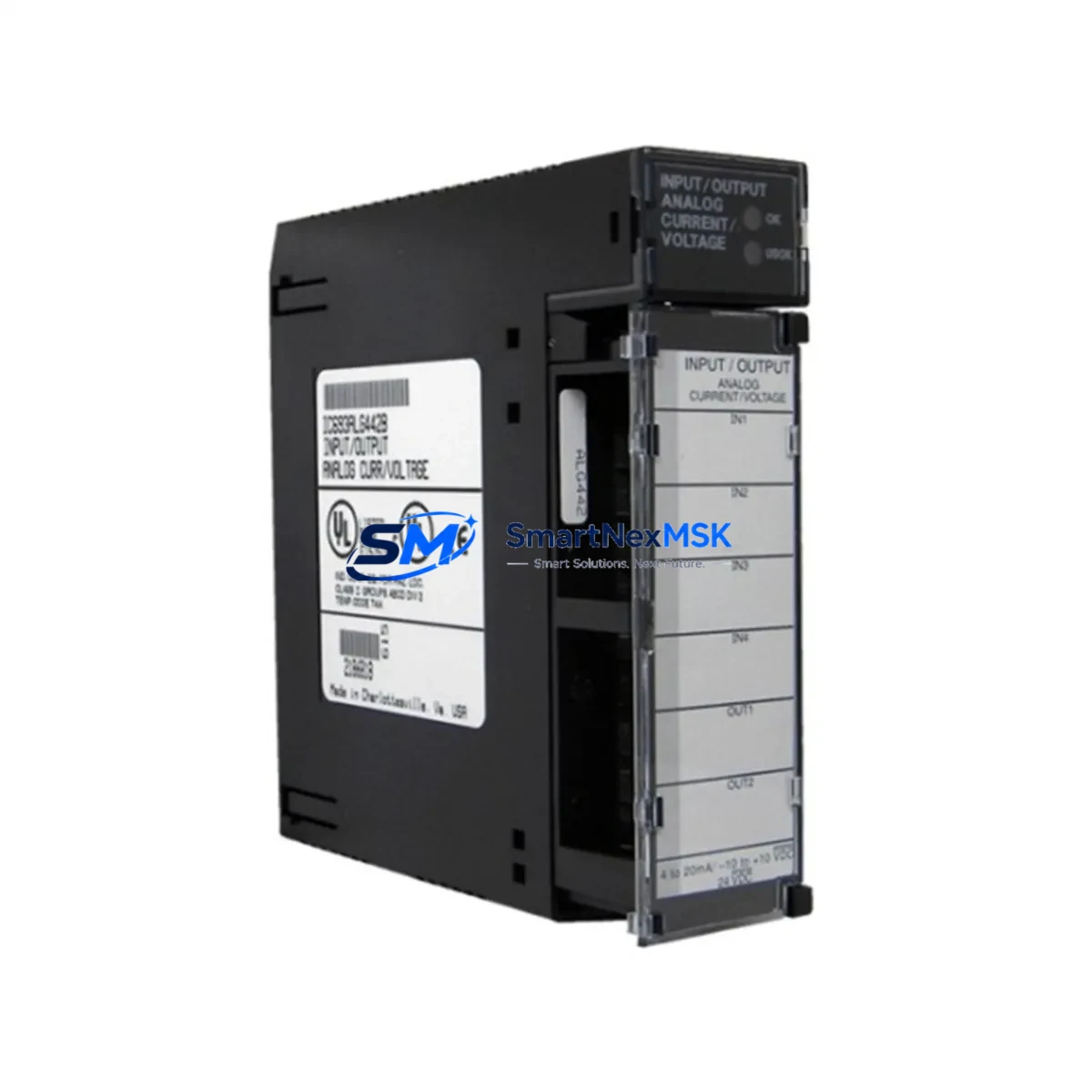
GE IC693ALG442 Retrofit-Ready Analog I/O for Series 90-30 Control Systems
The GE IC693ALG442 is a 4-channel analog input / 2-channel analog output module designed for the GE Series 90-30 programmable logic controller platform. As legacy 90-30 installations continue to operate across manufacturing, utilities, and process industries, the IC693ALG442 remains one of the most frequently requested replacement components for aging control cabinets. Whether you are restoring a failed module, upgrading a deteriorating rack, or migrating an entire control system to a more maintainable configuration, this module provides a verified drop-in fit for existing Series 90-30 backplanes without requiring program restructuring or I/O address remapping.
The IC693ALG442 accepts 4 analog input channels configurable for voltage (0–10 VDC, ±10 VDC) or current (4–20 mA) signals, and provides 2 analog output channels for actuator or drive control. Resolution is 12-bit, consistent with the original GE Fanuc specification. The module installs into any standard Series 90-30 5-slot or 10-slot rack — including the IC693CHS391, IC693CHS392, and IC693CHS397 — and is addressed through the CPU’s I/O configuration table without hardware jumper changes when replacing a like-for-like unit.
All units are inspected, function-tested, and shipped with a 12-month warranty covering manufacturing defects and operational failure under normal industrial use conditions.
Upgrade Compatibility Table
| Parameter | IC693ALG442 Specification | Retrofit Notes |
|---|---|---|
| Analog Inputs | 4 channels (voltage / current selectable) | Verify field wiring: voltage inputs use terminals 1–8; current inputs require jumper at terminal block |
| Analog Outputs | 2 channels (0–10 VDC or 4–20 mA) | Confirm output type matches downstream actuator or VFD signal requirement |
| Resolution | 12-bit (4096 counts) | Identical to original spec; no scaling changes required in ladder logic |
| Backplane Interface | Series 90-30 parallel backplane | Compatible with IC693CHS391, IC693CHS392, IC693CHS397 racks |
| Power Consumption | 5 VDC from backplane (verify PSU headroom) | Check IC693PWR321 or IC693PWR330 power supply capacity before adding modules |
| CPU Compatibility | IC693CPU311, IC693CPU313, IC693CPU323, IC693CPU341, IC693CPU364, IC693CPU374 | I/O configuration must be updated in Proficy Machine Edition if slot assignment changes |
| Communication Protocol | Local backplane I/O (no fieldbus required) | If migrating from remote I/O via IC693BEM331 or IC693CMM321, verify rack addressing |
| Installation | DIN-rail or panel-mount rack | No mechanical modification required for direct slot replacement |
| Warranty | 12 Months | Covers manufacturing defects and operational failure under normal industrial conditions |
Retrofit Planning for Existing Automation Systems
Replacing the IC693ALG442 in an active production environment requires a structured approach to avoid unplanned downtime and configuration errors. Begin by documenting the existing I/O address assignments in the CPU’s hardware configuration — this is typically managed through Proficy Machine Edition (formerly Logicmaster 90) and defines how the analog channels map to %AI and %AQ reference addresses in the ladder program. If the replacement module occupies the same rack slot as the failed unit, the address mapping remains intact and no program modification is necessary.
Before powering down the rack, verify the power supply budget. The IC693PWR321 (120/240 VAC, 30W) and IC693PWR330 (24 VDC, 30W) are the most common power supplies in 90-30 systems. Adding or replacing analog modules can shift the 5 VDC load on the backplane, particularly in fully populated 10-slot racks. If the existing power supply is already near capacity, consider upgrading to the IC693PWR331 (65W) to provide headroom for future expansion.
Terminal block wiring should be photographed and labeled before removal. The IC693ALG442 uses a removable terminal block, which simplifies field replacement — the wiring assembly can be transferred directly to the new module without re-terminating individual conductors. Confirm that shielded cable is used for all analog signal runs and that shields are grounded at one end only to prevent ground loops, which are a common source of signal noise in retrofit projects.
For systems that include a GE IC693CMM321 communications coprocessor or an IC693BEM331 Bus Expansion Module for remote I/O, verify that the rack slot numbering and module addressing remain consistent after the swap. In distributed architectures where the 90-30 CPU communicates with remote racks over the Genius Bus or via an IC693BEM340 Ethernet interface, the analog module’s slot position must match the hardware configuration stored in the CPU — any mismatch will generate a configuration fault on power-up.
HMI screens connected via IC693CMM311 or through a SCADA system reading %AI/%AQ tags should be reviewed to confirm that engineering unit scaling (e.g., 4–20 mA mapped to 0–100% process variable) is preserved after the module swap. If the original module had been configured with non-default input ranges, those settings must be re-entered in the hardware configuration and downloaded to the CPU before returning the system to automatic mode.
Downtime Control During System Migration
Minimizing control system downtime during an IC693ALG442 replacement begins with pre-staging. Before the maintenance window opens, bench-test the replacement module using a spare IC693CHS391 rack and IC693PWR321 power supply if available. Confirm that the module powers up without fault LEDs and that analog channels respond correctly to a calibrated signal source. This eliminates the risk of installing a second defective unit and extends the downtime window unnecessarily.
Back up the CPU program and hardware configuration to a PC running Proficy Machine Edition before any physical work begins. Store the backup on a local drive and a secondary location. If the CPU is an IC693CPU374 or IC693CPU364 with a built-in Ethernet port, the backup can be performed over the network without opening the control cabinet. For older CPUs such as the IC693CPU311 or IC693CPU313, a serial programming cable (IC693CBL316 or IC693CBL301) connected to the SNP port is required.
During the swap, keep the CPU in Stop mode rather than removing power from the entire rack where process conditions allow. This preserves the program in CPU RAM and reduces restart time. After installing the IC693ALG442, power the rack and observe the module’s OK LED — a steady green indicates normal operation. Perform a forced I/O test on each analog channel before returning the CPU to Run mode, confirming that field signals are received and output commands reach the connected actuators or drives.
For critical processes where even a brief interruption is unacceptable, consider a hot-standby configuration using a redundant CPU module such as the IC693CPU374 paired with a Hot Standby module. While this requires a more significant system redesign, it eliminates single-point-of-failure risk for the analog I/O subsystem and is increasingly adopted in water treatment, power generation, and chemical processing retrofits.
Retrofit Support FAQ
Q: Is the IC693ALG442 a direct replacement for the IC693ALG440 or IC693ALG441?
A: The IC693ALG442 is not pin-for-pin identical to the IC693ALG440 (4-input only) or IC693ALG441 (2-output only). The ALG442 combines both functions in a single module. If you are replacing an ALG440 or ALG441, verify that your rack has an available slot and that the hardware configuration in the CPU is updated to reflect the combined module. The %AI and %AQ address assignments will differ from a single-function module installation.
Q: What commissioning steps are required after installing the replacement module?
A: After physical installation, download the hardware configuration to the CPU using Proficy Machine Edition. Perform a channel-by-channel analog calibration check using a calibrated signal source (e.g., a 4–20 mA loop calibrator for current inputs). Verify that the CPU reads the expected %AI values and that %AQ outputs drive the connected field devices to the correct positions. Document the as-found and as-left readings for maintenance records.
Q: Can the IC693ALG442 be used in a Series 90-70 rack?
A: No. The IC693ALG442 is designed exclusively for the Series 90-30 backplane architecture. Series 90-70 systems use a different backplane connector and module form factor. For 90-70 analog I/O replacement, the IC697ALG230 or IC697ALG320 are the appropriate modules depending on channel configuration.
Q: What does the 12-month warranty cover?
A: The 12-month warranty covers manufacturing defects and operational failure under normal industrial operating conditions, including temperature, vibration, and electrical environment within GE’s published specifications. It does not cover damage resulting from incorrect installation, overvoltage, reverse polarity, or physical impact. Warranty claims are processed through our sales team with a return authorization number issued within 2 business days of the claim submission.
© 2026 SMARTNEXMSK. All rights reserved.
Original Source: https://smartnexmsk.com
Contact: [email protected] | +86 18259474341



