
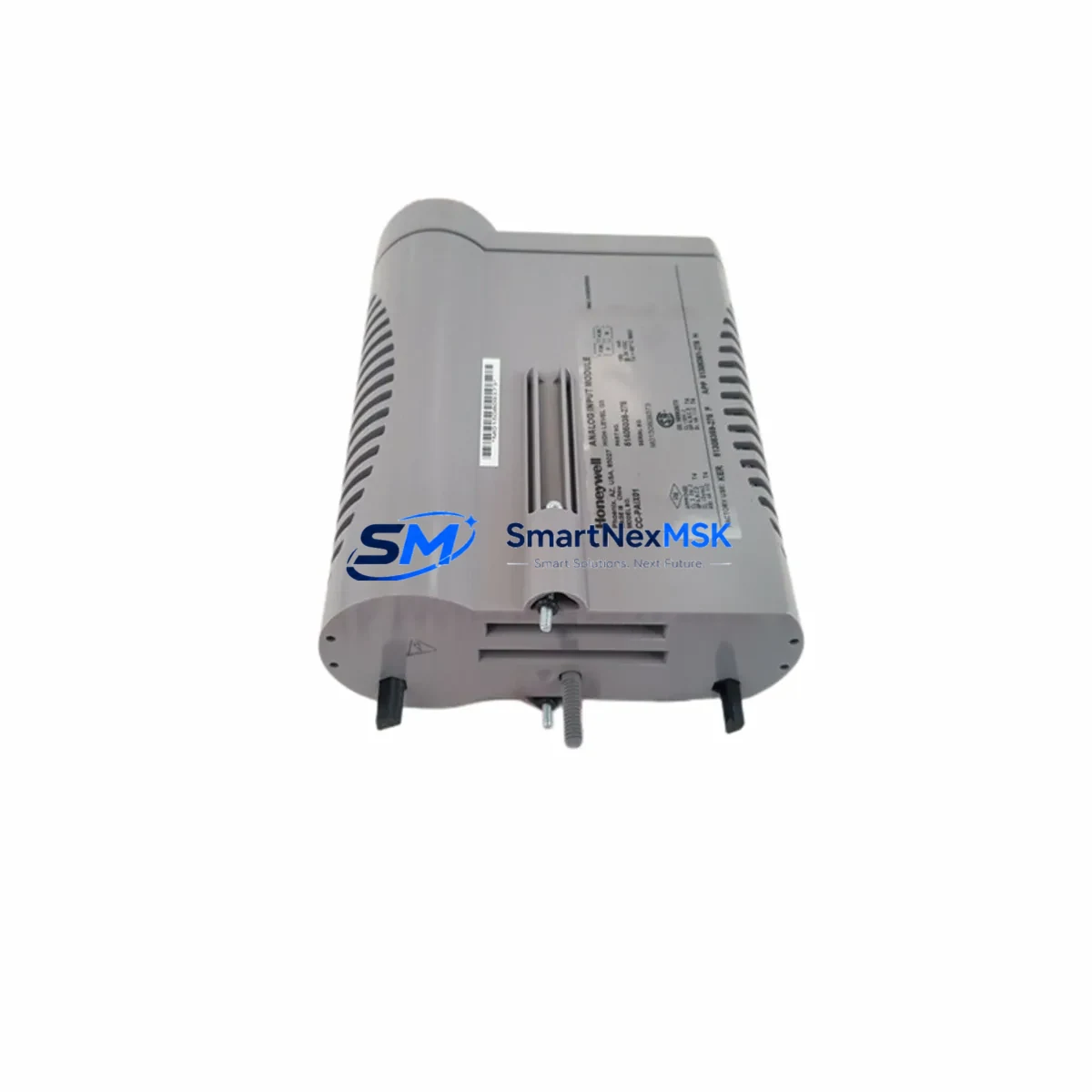
Honeywell CC-PAIX02 51405038-475: Retrofit-Ready Analog Input for Experion PKS C300 Control Systems
The Honeywell CC-PAIX02 (Part No. 51405038-475) is a high-density analog input module engineered for the Experion PKS C300 Controller platform. As legacy DCS installations age and original equipment reaches end-of-life, the CC-PAIX02 has become one of the most sought-after retrofit components for plants seeking to extend the operational life of their existing Honeywell control infrastructure without committing to a full platform migration. Whether you are replacing a failed module, replenishing critical spare inventory, or executing a phased control system upgrade, the CC-PAIX02 delivers the signal fidelity, backplane compatibility, and firmware alignment required for seamless integration into your existing C300 architecture.
This module supports 16-channel analog input acquisition with configurable signal ranges, making it directly compatible with field transmitters wired to HART-enabled marshalling cabinets. It mounts into the standard Honeywell Series C I/O Link backplane and communicates natively over the FTE (Fault Tolerant Ethernet) network, preserving your existing network topology and eliminating the need for protocol conversion gateways. For sites running Experion PKS R400 through R510, the CC-PAIX02 is a validated drop-in replacement that requires no changes to the control strategy or HMI faceplates.
Upgrade Compatibility Table
| Parameter | Details |
|---|---|
| SKU / Part Number | CC-PAIX02 / 51405038-475 |
| Compatible Controller | Honeywell C300 (Experion PKS) |
| Backplane Interface | Series C I/O Link (CIOM-A / CIOM-B) |
| Communication Protocol | FTE (Fault Tolerant Ethernet) / IOLINK |
| Signal Type | Analog Input (AI), 16-channel, 4–20 mA / 1–5 V |
| HART Support | Yes — per-channel HART pass-through |
| Firmware Compatibility | Experion PKS R400 / R410 / R430 / R500 / R510 |
| Replaces / Supersedes | CC-PAIX01, legacy CIOM-based AI modules |
| Installation Requirement | No hardware modification; slot-compatible with existing CIOM chassis |
| Commissioning Note | Module address auto-assigned via I/O Link; verify in Control Builder |
| Warranty | 12 Months — covers hardware defects and functional failure |
Retrofit Planning for Existing Automation Systems
A successful CC-PAIX02 retrofit begins well before the module arrives on-site. Engineers responsible for the upgrade should first audit the existing CIOM-A or CIOM-B chassis to confirm available slot positions and verify that the backplane power budget can support the additional module load. The CC-PWRR01 or CC-PWRR02 redundant power supply units installed in the cabinet should be checked against the total I/O draw — adding a 16-channel AI module increases the 24 VDC rail demand, and undersized power supplies are a common cause of intermittent faults after retrofit.
Terminal wiring is the next critical checkpoint. Field cables currently landed on the marshalling cabinet should be mapped against the CC-PAIX02 terminal assignment drawing. If the existing installation uses CC-TAIX11 or CC-TAIX01 terminal assemblies, these are directly compatible and no re-termination is required — a significant advantage that reduces both labor cost and the risk of wiring errors during the cutover window. For sites where the original terminal assembly has been replaced or is non-standard, a full point-to-point continuity check is recommended before energizing the new module.
Module addressing in the Experion PKS environment is handled automatically through the C300 Controller’s I/O Link scan. Once the CC-PAIX02 is seated in the chassis and power is applied, the controller will detect the module and assign a slot address consistent with its physical position. Engineers should open Honeywell Control Builder and navigate to the I/O assignment view to confirm that the module appears with the correct channel count and signal type. Any mismatch between the configured I/O block and the physical module type will generate a hardware mismatch alarm that must be resolved before the module can be placed in service.
For sites that also need to expand communications infrastructure during the same outage window, it is worth considering whether the CC-SCMB01 Series C Media Converter or a CC-TCF901 FTE network switch should be replaced concurrently. Aging network hardware is frequently the hidden cause of intermittent I/O communication faults that are misdiagnosed as module failures. Similarly, if the C300 controller itself is running firmware older than R430, a coordinated firmware upgrade using the Experion PKS Software Manager will ensure that the new CC-PAIX02 module benefits from the latest HART diagnostic and channel isolation improvements.
HMI impact should also be assessed before cutover. In most Experion PKS installations, analog input channels are displayed on Honeywell Station or HMIWeb Display Builder faceplates that reference the I/O tag name rather than the physical slot address. Provided the tag names are preserved in the Control Builder database, HMI screens will continue to function without modification after the module swap. However, if the retrofit involves renumbering slots or reassigning channels, a full HMI faceplate review is mandatory to prevent operators from monitoring stale or misrouted signals. Sites running the CC-PDOB01 digital output module or CC-PAOX01 analog output module in adjacent slots should also verify that their terminal assemblies remain undisturbed during the physical swap to avoid inadvertent output activation.
Downtime Control During System Migration
Minimizing production downtime is the primary operational constraint in any DCS module replacement. For the CC-PAIX02, the recommended approach is a hot-standby swap procedure where the replacement module is pre-configured and verified offline before the maintenance window opens. Using Honeywell Control Builder’s offline simulation mode, engineers can load the existing controller configuration, insert the new module into the simulated chassis, and confirm that all I/O blocks resolve correctly — all without touching the live system.
During the actual cutover, the sequence should follow the plant’s Management of Change (MOC) procedure: place affected loops in manual mode at the C300 Controller level, inhibit alarms for the affected I/O group, remove the failed or legacy module, seat the CC-PAIX02, and restore power. The I/O Link re-scan typically completes within 30 to 90 seconds, after which channels can be individually verified against field transmitter readings before returning loops to automatic control. This structured approach consistently achieves cutover times under 15 minutes per module, even in complex multi-loop installations.
For plants where even brief interruptions are unacceptable, the C300’s redundant I/O capability — when paired with a redundant CC-PAIX02 in a mirrored slot — allows the primary module to be replaced while the redundant module maintains control continuity. This architecture is particularly valuable in critical process applications such as reactor temperature monitoring, boiler drum level control, and compressor surge protection, where a momentary loss of analog input could trigger a safety system trip. Engineers should also confirm that the CC-LINK01 I/O Link Interface module firmware is current, as older LINK01 firmware versions may delay module recognition after a hot-swap event.
All replacement modules supplied by SMARTNEXMSK are subject to a pre-shipment functional test that verifies channel accuracy, HART communication, and backplane interface integrity. Each unit ships with a test report and is covered by a 12-month warranty against hardware defects and functional failure, giving maintenance teams confidence that the replacement module will perform reliably from the first power-on.
Retrofit Support FAQ
Q1: Is the CC-PAIX02 a direct drop-in replacement for the CC-PAIX01?
Yes. The CC-PAIX02 is the designated successor to the CC-PAIX01 and is slot-compatible with all CIOM-A and CIOM-B chassis. No hardware modification or backplane adapter is required. The I/O block type in Control Builder remains identical, so existing control strategies and HMI configurations do not need to be modified.
Q2: What commissioning steps are required after installing the CC-PAIX02?
After seating the module and restoring power, open Control Builder and verify that the module appears in the I/O assignment view with the correct slot address and channel count. Perform a channel-by-channel signal verification against known field transmitter values. If HART diagnostics are required, enable per-channel HART pass-through in the I/O block configuration and confirm communication with each HART device using the Experion Field Device Manager.
Q3: Can the CC-PAIX02 be used in an Experion PKS R500 or R510 environment?
Yes. The CC-PAIX02 is fully validated for Experion PKS R400 through R510. No firmware patch or special configuration is required. Plants running R500 or R510 will also benefit from enhanced HART diagnostic reporting that was introduced in those releases and is fully supported by the CC-PAIX02 hardware.
Q4: What does the 12-month warranty cover, and what is the return process?
The 12-month warranty covers all hardware defects and functional failures under normal operating conditions. If a module fails within the warranty period, contact SMARTNEXMSK with the original order reference and a description of the fault. A replacement unit will be dispatched after the failed module is returned and inspected. Pre-shipment test reports are available for all warranty claims to support root cause analysis.
© 2026 SMARTNEXMSK. All rights reserved.
Original Source: https://smartnexmsk.com
Contact: [email protected] | +86 18259474341



