
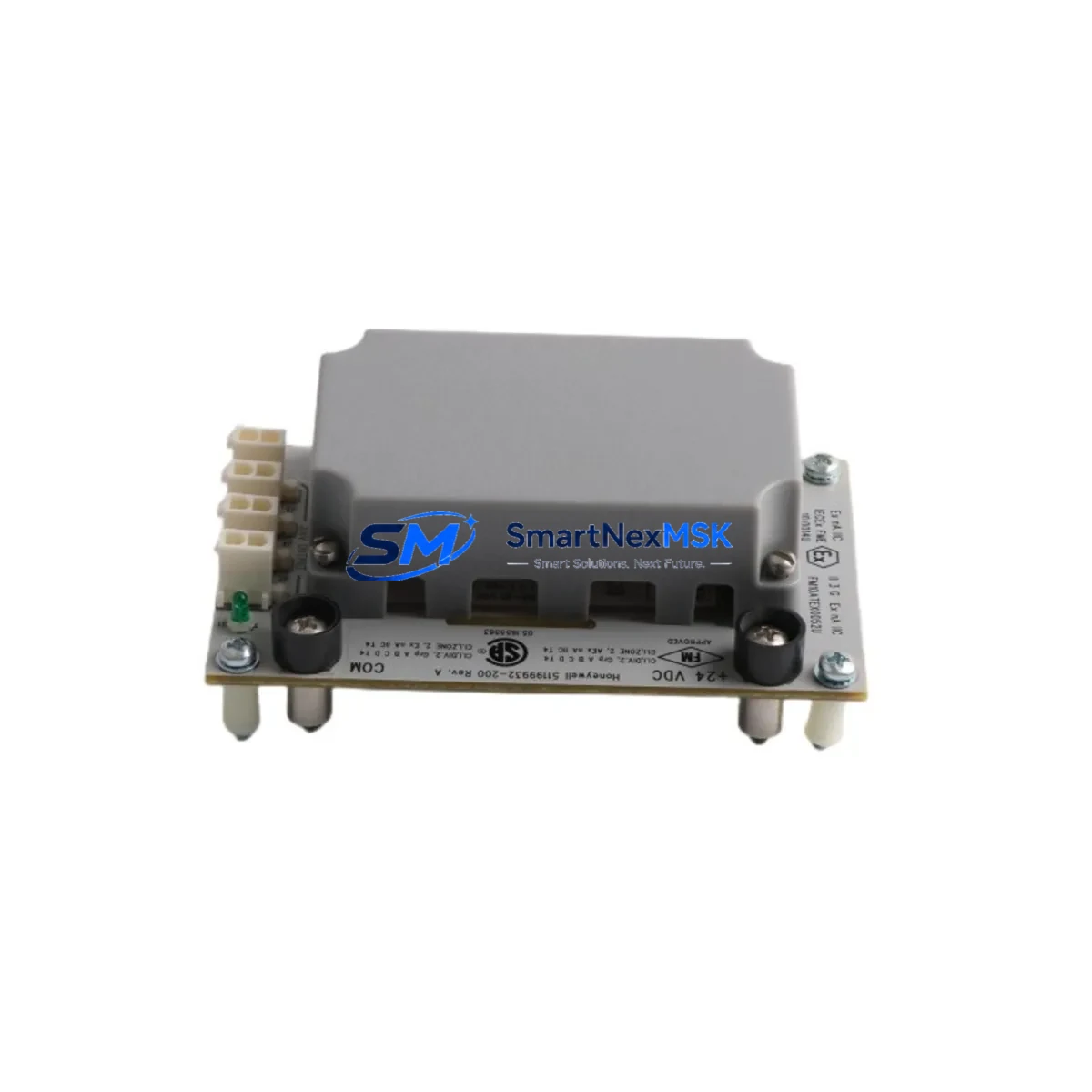
Honeywell CC-SCMB02 51199932-200 Retrofit-Ready SCM for C300 Control Systems
The Honeywell CC-SCMB02 (P/N 51199932-200) is a System Communication Module (SCM) designed for the Experion PKS C300 Controller platform. As legacy DCS installations age and OEM support windows close, this module has become one of the most sought-after retrofit and replacement components for facilities operating Honeywell’s distributed control architecture. Whether you are replacing a failed unit, upgrading a degraded backplane assembly, or migrating from an older Honeywell TDC 3000 or PlantScape system to the Experion PKS environment, the CC-SCMB02 provides a verified drop-in solution that preserves your existing control logic, I/O wiring, and HMI configuration with minimal engineering rework.
This module interfaces directly with the C300 Controller Chassis and communicates over the FTE (Fault Tolerant Ethernet) network backbone. It supports redundant controller configurations and is fully compatible with the standard CC-PCNT01 and CC-PCNT02 process controller nodes. When installed alongside a CC-SCMB01 primary SCM, the 51199932-200 variant serves as the secondary communication bridge, enabling seamless failover without interrupting live process control loops.
All units are sourced from verified industrial supply channels, inspected against Honeywell’s published hardware revision specifications, and dispatched with a 12-month warranty covering manufacturing defects and functional failures under normal operating conditions.
Upgrade Compatibility Table
| Parameter | CC-SCMB02 (51199932-200) | Notes / Retrofit Guidance |
|---|---|---|
| Compatible Controller | Honeywell C300 (Experion PKS) | Verify chassis revision ≥ R400 |
| Backplane Interface | C300 Controller Chassis Slot 2 | Must match CC-SCMB01 slot pairing |
| Communication Protocol | FTE (Fault Tolerant Ethernet), FOUNDATION Fieldbus | Confirm FTE switch port assignment before swap |
| Power Requirement | 24 VDC via backplane (chassis-supplied) | Verify CC-PWR001 or CC-PWR002 capacity ≥ 30W margin |
| Installation Method | Hot-swap capable (with redundant SCM active) | Confirm redundancy is active before removal |
| Firmware Compatibility | Experion PKS R400–R520 | Download firmware via Honeywell Support Portal |
| Replacing Legacy Model | Replaces CC-SCMB01 (51199931-100) in secondary role | Check module address assignment in Control Builder |
| HMI Compatibility | Experion Station, HMIWeb Display Builder | No HMI screen rebuild required for drop-in swap |
| Commissioning Tool | Honeywell Control Builder R400+ | Re-download module configuration post-installation |
| Warranty | 12-Month Warranty — covers functional failure and manufacturing defects under normal operating conditions | |
Retrofit Planning for Existing Automation Systems
Successful retrofit of the CC-SCMB02 into an operating plant environment requires systematic pre-work across hardware, software, and field instrumentation layers. Before scheduling a maintenance window, engineers should audit the existing C300 Controller Chassis to confirm the backplane revision and available slot positions. The chassis typically accommodates the primary CC-SCMB01 in Slot 1 and the secondary CC-SCMB02 in Slot 2; misidentifying these positions is a common source of commissioning delays.
Power budget verification is a critical early step. The CC-PWR001 or CC-PWR002 power supply modules feeding the chassis must have sufficient headroom — typically a minimum 30W margin above the current draw of all installed modules — to support the replacement SCM without triggering under-voltage faults on adjacent I/O modules. If the power budget is marginal, consider upgrading to a higher-capacity supply before the SCM swap.
On the I/O side, review all CC-TDIL01 digital input modules and CC-TAOX11 analog output modules connected to the affected controller node. Their channel assignments and module addresses are stored in the Control Builder project database; export a full backup before any hardware change. Similarly, any CC-LINK01 or CC-LINK02 communication interface modules in the same rack should be documented, as their FTE port bindings may need to be re-confirmed after the SCM replacement.
For sites migrating from older Honeywell TDC 3000 or PlantScape architectures, the CC-SCMB02 is frequently part of a broader platform migration that also involves replacing HPM (High-Performance Process Manager) nodes with C300 controllers. In these projects, the SCM module is installed as part of a new C300 chassis assembly, and the migration team must map legacy CL (Control Language) logic blocks to Function Block Diagrams in Control Builder. The Honeywell UCN (Universal Control Network) cabling from the old system is typically decommissioned in parallel, and new FTE infrastructure — including managed switches and fiber runs — is commissioned before the C300 nodes go live.
HMI continuity is another key concern. Experion Station displays built on HMIWeb Display Builder reference tag names and controller node addresses. If the replacement SCM is installed into the same chassis slot with the same node address, existing HMI screens, trend displays, and alarm configurations will continue to function without modification. Only if the node address changes — which can occur during a full platform migration — will HMI engineering rework be required.
Finally, confirm that the site’s Honeywell Experion PKS server is running a firmware release compatible with the 51199932-200 hardware revision. Releases R400 through R520 are confirmed compatible. Sites on older server releases should plan a server upgrade in parallel with the SCM replacement to avoid firmware mismatch faults at startup.
Downtime Control During System Migration
Minimizing unplanned downtime is the primary operational constraint in any live-plant SCM replacement. The CC-SCMB02 supports hot-swap replacement when the system is configured in redundant SCM mode — meaning the CC-SCMB01 primary module remains active and continues to handle all FTE communication traffic while the secondary CC-SCMB02 is removed and replaced. This architecture allows the physical swap to be completed in under 15 minutes without interrupting the control loops managed by the C300 node.
Before initiating the swap, operators should confirm in the Experion Station system status display that the primary SCM is reporting healthy and that no active alarms are present on the controller node. The Control Builder should be used to place the secondary SCM in a maintenance state, suppressing any redundancy-loss alarms that would otherwise trigger during the physical removal. Once the new CC-SCMB02 is seated and powered, Control Builder will automatically re-synchronize the module configuration from the primary, and the redundancy status will return to normal within 2–5 minutes.
For non-redundant installations — where only a single SCM is present — the replacement requires a planned controller shutdown. In this scenario, the recommended approach is to export the full Control Builder project, document all active setpoints and mode states from the Experion historian, and coordinate with the operations team to place all affected control loops in manual mode at the field level before the shutdown. After the new CC-SCMB02 is installed and the controller restarts, each loop should be verified in manual before returning to automatic, and all FTE communication links should be confirmed healthy in the network status display before handing control back to the operations team.
All units supplied by SMARTNEXMSK are pre-tested against functional benchmarks prior to dispatch, reducing the risk of a second outage caused by a defective replacement module. The 12-month warranty provides additional assurance that any latent defects identified during commissioning or early operation will be covered without additional cost.
Retrofit Support FAQ
Q1: Is the CC-SCMB02 (51199932-200) a direct drop-in replacement for the CC-SCMB01 (51199931-100)?
No — these are not interchangeable in the same slot. The CC-SCMB01 occupies the primary SCM slot (Slot 1) and the CC-SCMB02 occupies the secondary slot (Slot 2). If you are replacing a failed primary SCM, you need the CC-SCMB01. The CC-SCMB02 is the correct replacement for the secondary communication module. Confirm your failed module’s part number before ordering.
Q2: What commissioning steps are required after installing the CC-SCMB02?
After physical installation, open Honeywell Control Builder and navigate to the C300 node configuration. The system will detect the new secondary SCM and prompt a configuration download. Confirm the module address matches the original assignment, verify FTE port bindings on the managed switch, and check that the redundancy status returns to “Synchronized” in the Experion Station system display. No changes to I/O wiring or HMI screens are required for a same-slot replacement.
Q3: How do I verify wiring and backplane compatibility before installation?
The CC-SCMB02 connects exclusively via the C300 chassis backplane — there is no field wiring to the module itself. Compatibility verification focuses on chassis revision (must be C300-series), slot position (Slot 2 for secondary SCM), and power supply capacity. Use the chassis label and Control Builder hardware inventory report to confirm these parameters before ordering.
Q4: What does the 12-month warranty cover, and how is it claimed?
The 12-month warranty covers functional failure and manufacturing defects under normal operating conditions, including failures identified during initial commissioning. It does not cover damage caused by incorrect installation, overvoltage, or physical impact. To initiate a warranty claim, contact SMARTNEXMSK at [email protected] with your order reference, a description of the fault, and commissioning test results. Replacement units are dispatched within 3–5 business days of claim approval.
© 2026 SMARTNEXMSK. All rights reserved.
Original Source: https://smartnexmsk.com
Contact: [email protected] | +86 18259474341



