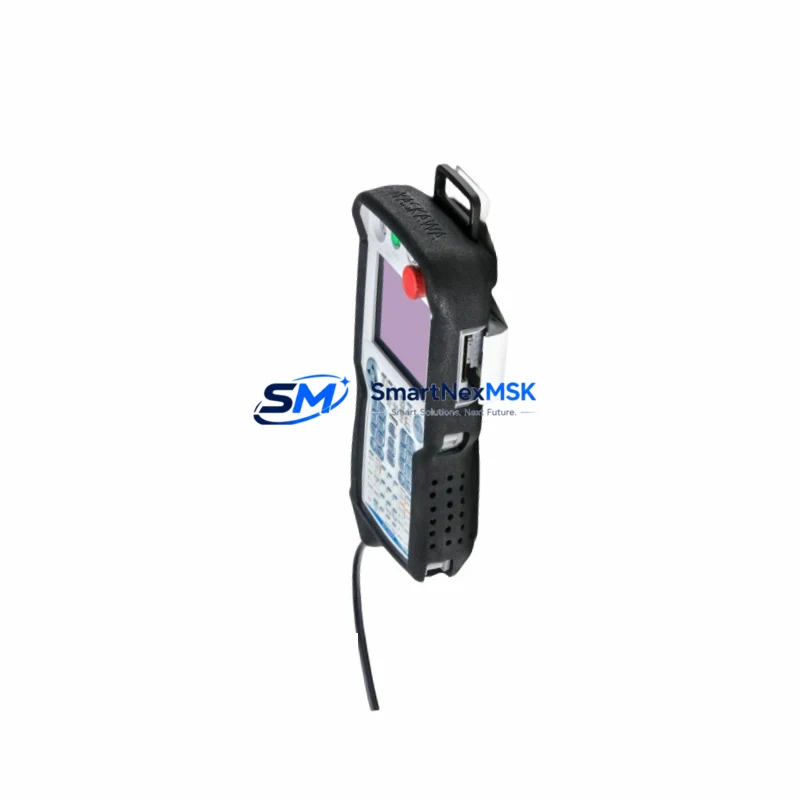
Yaskawa JZRCR-APP01-1 Retrofit-Ready Teach Pendant for YRC1000 Control Systems
The Yaskawa JZRCR-APP01-1 is a retrofit-ready programming and operator interface device engineered for seamless integration into YRC1000 robot controller platforms. As legacy teach pendants reach end-of-life or sustain physical damage on the production floor, the JZRCR-APP01-1 provides a verified drop-in replacement path that preserves existing program logic, axis configurations, and HMI screen layouts without requiring controller firmware re-flashing or full system recommissioning. Whether you are recovering from an unplanned failure, executing a planned control cabinet upgrade, or migrating from an older DX100 or DX200 controller generation, this unit delivers the compatibility and reliability that industrial maintenance teams depend on.
Upgrade Compatibility Table
| Parameter | Detail |
|---|---|
| Compatible Controller | Yaskawa YRC1000, YRC1000micro |
| Replaces / Supersedes | JZRCR-APP01, DX200 pendant (with adapter harness), DX100 pendant (firmware check required) |
| Communication Interface | Proprietary Yaskawa high-speed serial link via 15-pin D-sub connector on YRC1000 CPU unit |
| Display | 7-inch color LCD touchscreen with backlit keypad |
| Installation Requirement | Direct cable swap; verify cable assembly JZRCR-APP01-CABLE or equivalent OEM harness |
| Program Compatibility | Full INFORM III job file compatibility; no re-teaching required for existing motion programs |
| HMI Screen Retention | Custom alarm pages, I/O monitor screens, and user-defined menus preserved |
| Retrofit Recommendation | Confirm YRC1000 system software version ≥ YAS-3-10 before swap; update if below threshold |
| Commissioning Focus | Safety circuit continuity check, E-stop chain verification, axis limit re-confirmation |
| Warranty | 12 months from shipment date — covers manufacturing defects and functional failure |
Retrofit Planning for Existing Automation Systems
Successful integration of the JZRCR-APP01-1 into an active production line begins well before the physical swap. Maintenance engineers should first audit the YRC1000 controller cabinet to confirm the power supply unit — typically the JZNC-YPS01-E or equivalent — is delivering stable 24 VDC to the pendant interface board. Voltage fluctuations above ±5% have been known to cause intermittent communication faults that mimic pendant hardware failure, so resolving upstream power quality issues before replacement eliminates false diagnostics.
Next, document the existing I/O assignment map from the YRC1000 machine I/O board (JANCD-YIO21-E or JANCD-YIO22-E). The JZRCR-APP01-1 does not alter I/O addressing, but confirming the current map prevents confusion during post-swap functional testing, particularly for conveyor trigger signals, gripper solenoid outputs, and safety gate interlock inputs. If the system uses a PROFIBUS or EtherNet/IP communication module — such as the JANCD-YCP21-E or a third-party gateway card — verify that the fieldbus node address and baud rate settings stored in the controller are intact after the pendant replacement, as some older YRC1000 firmware versions reload communication parameters from the pendant memory on first boot.
For facilities running coordinated multi-robot cells, the JZRCR-APP01-1 supports the full YRC1000 coordinated motion and interference zone configuration interface. Engineers migrating from a DX200-based cell should note that while the physical pendant connector is compatible with an adapter harness, the INFORM III job syntax differences between DX200 and YRC1000 require a job file conversion step using Yaskawa’s MotoSim EG-VRC simulation software or the MotoPlus SDK before live execution. The JZRCR-APP01-1 itself does not perform this conversion — it is a hardware interface device, not a software migration tool.
Control cabinet wiring teams should also inspect the teach pendant cable assembly for jacket integrity, particularly at the strain relief point near the cabinet entry gland. A damaged cable — even with a functional pendant — will produce E-stop faults or axis enable errors. Replacement cable assemblies are available as a separate line item and should be staged alongside the JZRCR-APP01-1 for any retrofit project where the original cable has been in service for more than five years or shows visible wear. The YRC1000 base unit’s JANCD-YCP01-2E CPU board and the JZNC-YRK01-1E robot control board should also be visually inspected for capacitor bulge or corrosion on the backplane connector rows before closing the cabinet after pendant installation.
Downtime Control During System Migration
Minimizing production downtime during a teach pendant replacement on a live YRC1000 system requires a structured pre-outage preparation protocol. Before taking the robot offline, use the existing pendant to perform a full job file backup to a USB memory stick via the YRC1000 file manager. Save the system configuration file, the I/O comment file, the alarm history log, and the user coordinate frame data. These four data sets represent the complete operational state of the robot and allow full restoration within 15 minutes if the new pendant or any associated hardware produces an unexpected fault during commissioning.
The physical swap itself — disconnecting the 15-pin pendant cable, installing the JZRCR-APP01-1, and powering the controller back on — typically takes under 10 minutes for a trained technician. The YRC1000 will perform an automatic pendant recognition sequence on power-up. If the system software version is compatible, the controller will display the standard home screen within 60 seconds. If a version mismatch is detected, the controller will prompt for a system software update, which adds approximately 20–30 minutes to the outage window. Staging a laptop with the YRC1000 system software installer pre-loaded eliminates the delay caused by downloading the update file during the maintenance window.
For cells where continuous production cannot be interrupted, a cold-standby strategy is recommended: keep a pre-configured JZRCR-APP01-1 unit on the shelf with the correct system software version confirmed, so that a fault-driven swap can be completed within a single shift break. SMARTNEXMSK maintains in-stock inventory of the JZRCR-APP01-1 with same-day dispatch capability from Xiamen, supporting emergency replenishment for facilities that cannot sustain multi-day lead times from OEM distribution channels.
Retrofit Support FAQ
Q1: Is the JZRCR-APP01-1 a direct replacement for the original JZRCR-APP01 pendant on my YRC1000?
Yes. The JZRCR-APP01-1 is the current production revision of the JZRCR-APP01 and is fully backward compatible with all YRC1000 and YRC1000micro controllers. No parameter changes or firmware updates are required for a like-for-like swap on systems already running a compatible software version.
Q2: Will my existing INFORM III robot programs and HMI screens be retained after the swap?
Yes. Job files, user coordinate frames, I/O comments, and custom HMI screen configurations are stored in the YRC1000 controller memory, not in the teach pendant itself. Replacing the pendant does not affect any stored program data. As a best practice, always perform a full backup before any hardware change.
Q3: What pre-shipment testing is performed on the JZRCR-APP01-1?
Each unit undergoes power-on functional verification, display and keypad actuation testing, and communication link validation before dispatch. Units are shipped in anti-static packaging with a test record. The 12-month warranty covers all manufacturing defects and functional failures from the shipment date.
Q4: Can this pendant be used during a migration from a DX200 controller to a YRC1000?
The JZRCR-APP01-1 is designed for YRC1000 and YRC1000micro platforms only. It is not natively compatible with DX200 controllers without an adapter harness and firmware alignment. For DX200-to-YRC1000 migration projects, the pendant is installed on the new YRC1000 controller after the controller swap is complete. Job file conversion from DX200 INFORM syntax to YRC1000 INFORM III syntax must be handled separately using Yaskawa’s migration toolset.
© 2026 SMARTNEXMSK. All rights reserved.
Original Source: https://smartnexmsk.com
Contact: [email protected] | +86 18259474341